






Showing all 2 results

Filter by price
Filter by brands

- National Instruments
- PXI Systems
- PXI Chassis
- PXI Controller
- PXI Modules
- PXI Semiconductor Test
- PXI FPGA and RIO Modules
- PXI MXI Interfaces
- PXI Programmable Power Supplies & SMU
- PXI Sensor Measurements
- PXI Signal Generators
- PXI Vision
- PXI Data Acquisition
- PXI Oscilloscopes/Digitizers
- PXI Counter/Timers
- PXI RF and Wireless Test
- PXI GPIB, Ethernet and VXI
- PXI Switches
- PXI Digital Multimeters
- PXI Digital Input/Output
- PXI Industrial Communication
- PXI Dynamic Signal Analysis
- PXI Data Streaming
- CompactDAQ Systems
- CompactRIO Systems
- PCI Modules
- USB Devices
- USRP Software Defined Radio Device
- PXI Systems
- keysight
- Tektronix
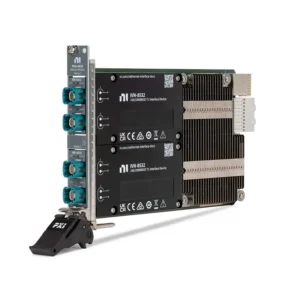

NI PXI Industrial Communication Interfaces
NI PXI Industrial Communication interfaces connect automated test systems to CAN, CAN FD, LIN, FlexRay and Automotive Ethernet networks. These modules are used for ECU validation, hardware-in-the-loop testing, restbus simulation, gateway development, network monitoring, fault insertion and synchronized vehicle measurement.
Selecting the correct interface requires more than matching a protocol name. Engineers must verify the physical layer, transceiver type, port count, baud rate, connector, termination, timestamping, synchronization, database format, driver architecture and PXI chassis compatibility. CAN, LIN, FlexRay and Automotive Ethernet interfaces are designed for different network architectures and are not interchangeable.
What Is a PXI Industrial Communication Interface?
A PXI industrial communication interface allows a PXI or PXI Express system to transmit, receive, monitor and analyze messages on an external communication network. Unlike a general-purpose digital I/O module, a dedicated communication interface implements the protocol controller, physical-layer transceiver, message timing, buffering and driver functions required by the network.
Within this category, the primary NI interface families are designed for vehicle and embedded control networks. They can operate alongside measurement, switching, waveform generation and fault-insertion hardware in a synchronized automated test system.
The communication interface does not replace the network under test. Correct cabling, termination, grounding, transceiver compatibility, bus power and network configuration remain essential parts of the system.
Supported PXI Communication Families
| Communication Family | Physical Network | Typical Use | Important Selection Factors |
|---|---|---|---|
| CAN and CAN FD | Differential two-wire control network | ECU communication, powertrain, chassis, battery and industrial controller testing | CAN or CAN FD support, nominal and data-phase rates, transceiver type and termination |
| LIN | Single-wire, master-slave network | Body electronics, doors, seats, lighting, climate controls and actuator testing | Master or slave operation, schedule tables, bus power, baud rate and LIN version |
| FlexRay | Deterministic single- or dual-channel network | Legacy safety-related and high-performance vehicle control networks | Channel configuration, cluster timing, cold-start operation and database parameters |
| 100BASE-T1 | 100 Mbps single-pair Automotive Ethernet | ECU, camera, gateway and vehicle network validation | Link role, connector, PHY compatibility, endpoint operation and packet capture |
| 1000BASE-T1 | 1 Gbps single-pair Automotive Ethernet | ADAS, domain controllers, high-data-rate gateways and synchronized network analysis | Endpoint or TAP mode, hardware timestamping, time synchronization and sustained traffic rate |
PROFIBUS, PROFINET, EtherCAT, DeviceNet, RS-232, RS-422 and RS-485 may require different NI interface families, third-party PXI modules or external gateways. Do not select an interface solely because the application is described as “industrial communication.” Identify the exact protocol and electrical layer first.
CAN, LIN, FlexRay and Automotive Ethernet Compared
| Protocol | Primary Strength | Typical Limitation | Common Test Role |
|---|---|---|---|
| CAN | Reliable priority-based control communication | Limited payload and bandwidth compared with Ethernet | Frame transmission, bus monitoring and ECU simulation |
| CAN FD | Larger payloads and a faster data phase than classical CAN | Requires CAN FD-compatible controllers, transceivers and network configuration | Modern ECU, battery and embedded controller validation |
| LIN | Low-cost communication for simple nodes | Lower bandwidth and master-controlled timing | Body-control and actuator restbus simulation |
| FlexRay | Deterministic timing and redundant-channel capability | Complex cluster configuration and declining use in new designs | Maintenance and validation of established vehicle platforms |
| Automotive Ethernet | High bandwidth and compatibility with Ethernet-based architectures | Requires compatible single-pair PHYs, link configuration and network analysis | ADAS, gateway, infotainment and domain-controller testing |
Representative NI PXI Industrial Communication Interfaces
| Model | Unique Category | Core Architecture | Best Fit |
|---|---|---|---|
| PXI-8512 | High-Speed CAN/CAN FD Interface | One- or two-port NI-XNET interface for high-speed CAN and CAN FD networks | ECU validation, CAN FD development and synchronized CAN measurement |
| PXI-8513 | Software-Selectable CAN Interface | One- or two-port NI-XNET interface supporting selectable high-speed, fault-tolerant, single-wire and external-transceiver configurations | Laboratories that must test multiple CAN physical layers with one platform |
| PXI-8516/2 | Dual-Port LIN Interface | Two-port NI-XNET interface supporting LIN 2.0, 2.1 and 2.2 communication at rates up to 20 kbit/s | LIN master, slave, schedule and body-electronics testing |
| PXI-8517/2 | Dual-Port FlexRay Interface | Two fully functional NI-XNET FlexRay interfaces supporting rates up to 10 Mbit/s | FlexRay cluster simulation, ECU testing and established vehicle-platform support |
| PXIe-8521 | 100BASE-T1 Automotive Ethernet Interface | PXI Express interface for 100 Mbps single-pair Automotive Ethernet networks | 100BASE-T1 ECU, gateway and embedded Ethernet testing |
| PXIe-8522 | Synchronized Gigabit Automotive Ethernet Interface | Four 1000BASE-T1 ports configurable as independent endpoints or two network TAPs, with onboard timestamping and 802.1AS synchronization | Time-correlated packet capture, ADAS and Gigabit vehicle-network analysis |
| PXIe-8520 | Multi-Speed Automotive Ethernet Interface | Four independent 100M/1GBASE-T1 ports with NI-XNET, MACsec and OPEN Alliance TC10 support | Modern ECU, secure gateway and mixed-speed Automotive Ethernet validation |
This table represents the main communication architectures rather than every discontinued or specialized NI interface. Verify the exact model, port configuration, part number, connector accessory, operating system and driver version before ordering.
How to Select a PXI Industrial Communication Interface
1. Identify the Exact Protocol
Begin with the network specification rather than the measured device. Record whether the application uses classical CAN, CAN FD, LIN, FlexRay, 100BASE-T1 or 1000BASE-T1. Protocol families with similar application names may use completely different controllers and physical layers.
For CAN FD, confirm whether the network uses bit-rate switching and determine both the nominal arbitration rate and the faster data-phase rate. A classical CAN interface cannot perform full CAN FD communication.
2. Confirm the Physical Layer and Transceiver
The protocol controller and electrical transceiver are separate considerations. CAN installations may use high-speed, low-speed fault-tolerant or single-wire physical layers. Selecting the wrong transceiver can prevent communication even when the frame format and baud rate are correct.
Automotive Ethernet requires compatible PHY standards at both ends of the link. 100BASE-T1 and 1000BASE-T1 are not simply conventional office Ethernet connections with different cables.
3. Determine Port Count and Independence
Count the number of networks that must be accessed simultaneously. A gateway ECU may require multiple CAN channels, LIN channels and Automotive Ethernet ports at the same time. Confirm whether each port is a fully independent interface or part of a shared monitoring configuration.
Allow additional ports when the tester must simulate multiple network segments, monitor both sides of a gateway or preserve a dedicated diagnostic connection.
4. Define Required Communication Roles
Identify whether the PXI system will transmit frames, monitor an existing network, simulate missing nodes, operate as a LIN master, join a FlexRay cluster, function as an Ethernet endpoint or passively capture traffic through a TAP.
Endpoint and monitoring applications have different requirements. An endpoint actively participates in the network, while a TAP is intended to observe traffic between other devices with minimal disruption.
5. Review Timing and Timestamp Requirements
Basic frame transmission may only require protocol-level timing. ECU response-time measurement, gateway latency testing and correlation with analog sensors require more accurate timestamps and a defined relationship between the communication interface and the rest of the PXI system.
Check whether the selected model supports external timing and triggering. Capabilities differ by model; installation in the same chassis does not automatically guarantee that every interface shares identical timing features.
6. Evaluate Automotive Ethernet Synchronization
Automotive Ethernet applications may require hardware timestamping and IEEE 802.1AS time synchronization. These functions are important when comparing packets with camera triggers, power measurements, ECU events or traffic captured on another network segment.
The PXIe-8522 supports hardware timestamping and can be configured for synchronized Gigabit Automotive Ethernet applications. Confirm the required grandmaster, slave and PXI-system synchronization architecture before selecting the interface.
7. Select Frame-Based or Signal-Based Operation
A frame-based application reads and writes raw identifiers, payload bytes and timestamps. A signal-based application uses a network database to translate payload bits into named engineering values such as speed, temperature, torque or switch state.
Signal-based workflows simplify test development but depend on accurate database definitions. Incorrect byte order, scaling, offsets, multiplexing or frame timing can produce plausible but incorrect engineering values.
8. Verify Database Compatibility
Obtain the applicable network database before implementation. Depending on the protocol and development process, this may include CAN database, LIN description, FlexRay database or Automotive Ethernet communication definitions.
Check message identifiers, cycle times, signal encoding, network nodes and version control. A compatible interface cannot compensate for an incomplete or outdated database.
9. Confirm Cabling, Termination and Bus Power
Communication faults are often caused by the physical network rather than the PXI module. Confirm cable impedance, termination, shield strategy, connector pinout, stub length, polarity, common ground and external power requirements.
LIN networks may require appropriate bus power and pull-up arrangements. CAN networks require correct termination at the ends of the main bus. Automotive Ethernet requires compatible twisted-pair cable, connectors and PHY configuration.
10. Check Chassis and Slot Compatibility
PXI-8512, PXI-8513, PXI-8516 and PXI-8517 are PXI hybrid-compatible modules. PXIe-8520, PXIe-8521 and PXIe-8522 require PXI Express-compatible peripheral slots.
Review the exact slot map of the selected PXI chassis. A module should not be ordered solely because the chassis has an unused physical slot.
11. Verify Driver and Application Compatibility
Modern NI vehicle communication interfaces primarily use NI-XNET. Older NI CAN hardware may use the legacy NI-CAN driver and a different programming API. Confirm the operating system, driver version and development environment before replacing or expanding an existing system.
Also verify whether the application uses LabVIEW, LabWindows/CVI, C/C++, .NET, VeriStand or another environment. Required database-management, restbus and test-sequencing functions may depend on additional software.
NI-XNET and Legacy NI-CAN
NI-XNET provides a common programming architecture for supported CAN, LIN and FlexRay interfaces and is also used with current NI Automotive Ethernet hardware. It supports frame and signal sessions, queued and single-point communication, hardware-assisted timing and network database integration.
Legacy NI-CAN interfaces use a different driver and API. Replacing an NI-CAN device with an NI-XNET interface can require changes to hardware configuration, database handling and application code. Similar connector shapes or channel counts do not make the replacement software-compatible.
For a legacy upgrade, document the existing module number, driver calls, database files, termination arrangement, connector pinout and required timing behavior before selecting new hardware.
Frame-Based and Signal-Based Communication
| Method | Application Handles | Best Fit | Main Risk |
|---|---|---|---|
| Raw Frame Communication | Frame identifier, payload, flags and timestamp | Protocol development, diagnostics, custom decoding and network analysis | Application must implement payload packing and interpretation correctly |
| Signal-Based Communication | Named engineering values defined by a database | Automated validation, HIL systems and parameter-oriented test sequences | Results depend on database accuracy and revision control |
| Single-Point Sessions | Most recent value for each configured signal or frame | Control loops and deterministic HIL applications | Intermediate values may be overwritten when not read in time |
| Queued Sessions | Ordered sequence of frames, signals or timestamps | Logging, network analysis and event reconstruction | Insufficient queue handling can cause overflow during heavy traffic |
Restbus Simulation and HIL Testing
Restbus simulation reproduces the network behavior of controllers that are not physically present in the test system. The PXI interface transmits scheduled messages, receives ECU responses and updates signal values according to the test scenario.
A complete restbus configuration may include cyclic frames, event-driven messages, rolling counters, checksums, diagnostic traffic, error states and timeout behavior. The interface must provide adequate port count and deterministic performance for the required simulated nodes.
In a hardware-in-the-loop system, communication interfaces operate alongside real-time models, analog and digital I/O, loads, power supplies and fault-insertion switching. The timing relationship between these components should be defined at the system level.
Synchronizing Network Traffic with Measurements
Vehicle-network events often need to be correlated with voltage, current, temperature, strain, vibration or digital-state measurements. Hardware timestamping and shared PXI timing resources help determine whether a physical event occurred before or after a transmitted or received message.
Use PXI data acquisition modules for synchronized electrical and sensor measurements. Use PXI switches when the test requires signal routing, load switching or controlled fault insertion.
Define the required time resolution before selecting the hardware. Software timestamps produced after data reaches the application do not provide the same determinism as timestamps generated by the interface hardware.
Network Cabling and Physical-Layer Considerations
| Network | Connectivity to Confirm | Common Integration Problem |
|---|---|---|
| CAN/CAN FD | CAN_H, CAN_L, common reference, termination and selected transceiver type | Incorrect termination or a transceiver that does not match the network |
| LIN | LIN signal, ground, bus supply and master pull-up configuration | Missing bus power or more than one incorrectly configured master |
| FlexRay | Channel A, channel B, connector pinout and cluster termination | Incorrect cluster timing or channel configuration |
| Automotive Ethernet | 100BASE-T1 or 1000BASE-T1 PHY, twisted pair, connector and link role | Connecting a T1 port as though it were conventional RJ45 Ethernet |
Use manufacturer-approved or electrically equivalent cables and breakout accessories. Connector pinouts should be verified from the exact module documentation because similarly sized connectors may have different assignments.
Typical Applications
- Electronic control unit functional and diagnostic testing
- Hardware-in-the-loop and model-in-the-loop validation
- CAN and CAN FD bus monitoring and message generation
- LIN master, slave and body-electronics simulation
- FlexRay cluster and cold-start node simulation
- Automotive Ethernet endpoint and TAP-based analysis
- Vehicle gateway and domain-controller validation
- Battery-management and electric powertrain testing
- ADAS sensor and network synchronization
- Restbus simulation for incomplete vehicle networks
- Protocol fault, timeout and error-response testing
- Synchronized communication and physical-signal measurement
Legacy Interface Replacement
Replacing an older PXI communication interface requires more than matching the protocol and port count. The replacement may use a different driver, API, transceiver, connector, database workflow or timing architecture.
Compare the following before approving a replacement:
- Classical CAN, CAN FD, LIN, FlexRay or Automotive Ethernet support
- Physical-layer transceiver and voltage levels
- Number of independent ports
- Connector type and cable pinout
- Termination and external power requirements
- External timing and trigger support
- Hardware timestamp resolution
- NI-XNET or legacy NI-CAN driver dependency
- Database format and signal definitions
- Operating-system and development-environment support
- Classic PXI, hybrid or PXI Express slot compatibility
A newer interface may provide higher performance while still requiring changes to cabling, configuration files and application code. Production systems should be requalified using representative network load, error conditions and full-duration testing.
PXI Industrial Communication Procurement and RFQ Guide
Provide the following information for accurate interface selection and quotation:
- Required communication protocol and physical layer
- Classical CAN or CAN FD requirement
- Nominal and data-phase baud rates
- LIN, FlexRay or Automotive Ethernet standard
- Required number of independent ports
- Transmit, monitor, endpoint, TAP or restbus role
- Hardware timestamping and synchronization requirements
- Existing network database format
- Connector, cable, breakout and termination requirements
- Existing PXI chassis and controller models
- Operating system, NI driver and application-software versions
- Existing module model for legacy replacement
- Required quantity and preferred product condition
- Delivery destination and required delivery date
When comparing quotations, confirm whether cables, connector blocks, termination accessories and required software licenses are included. For pre-owned interfaces, request device-recognition results, port communication testing and inspection of the front and backplane connectors.
FAQ
Can one PXI interface support CAN, LIN and FlexRay?
Not generally. NI-XNET provides a common software architecture, but each module contains protocol-specific controllers and physical-layer hardware. Select separate interfaces for CAN, LIN and FlexRay unless the exact product documentation states otherwise.
What is the difference between PXI-8512 and PXI-8513?
The PXI-8512 is intended for high-speed CAN and CAN FD networks. The PXI-8513 provides software-selectable support for multiple CAN physical layers, including high-speed, low-speed fault-tolerant, single-wire and external-transceiver configurations.
Can a classical CAN interface communicate with CAN FD devices?
It may participate only under limited classical-CAN conditions. Full CAN FD communication requires compatible controllers and transceivers, especially when using longer payloads or a faster data phase.
What is the difference between an Automotive Ethernet endpoint and a TAP?
An endpoint actively participates in the Ethernet link as a network device. A TAP observes traffic passing between other devices and is used for monitoring, packet capture and timing analysis. Confirm which operating mode the application requires.
Can PXIe-8520 and PXIe-8522 be treated as identical four-port interfaces?
No. The PXIe-8520 supports four 100M/1GBASE-T1 endpoints and includes features such as MACsec and TC10. The PXIe-8522 focuses on synchronized 1000BASE-T1 operation, hardware timestamping and endpoint or TAP configurations.
Does installing modules in the same PXI chassis synchronize them automatically?
No. The chassis provides timing and trigger resources, but the interface, driver and application must support and configure the required synchronization method. External timing capabilities also differ between models.
Why can the interface detect the bus but not communicate correctly?
Common causes include the wrong baud rate, incompatible transceiver, incorrect termination, reversed wiring, missing ground reference, absent LIN bus power, database errors or mismatched network timing parameters.
Can NI-CAN application code directly control an NI-XNET interface?
Not as a guaranteed drop-in replacement. NI-CAN and NI-XNET use different APIs and configuration models. Migration may require application-code changes and validation of database, timing and queue behavior.
Related NI PXI Solutions
Browse additional PXI modules for synchronized automated test systems. Combine communication interfaces with PXI data acquisition modules for physical-signal measurement, PXI switches for routing and fault insertion, and a compatible PXI chassis for system integration.
NI PXI Industrial Communication Interfaces from PXISOURCE
PXISOURCE supports engineers, system integrators and procurement teams with protocol identification, NI-XNET interface selection, chassis compatibility review, accessory matching and legacy NI-CAN replacement. Send the network standard, physical layer, required port count, chassis model and software environment for a technically matched quotation.
Need help selecting an NI PXI industrial communication interface? Email sales@pxisource.com or contact PXISOURCE through WhatsApp.