






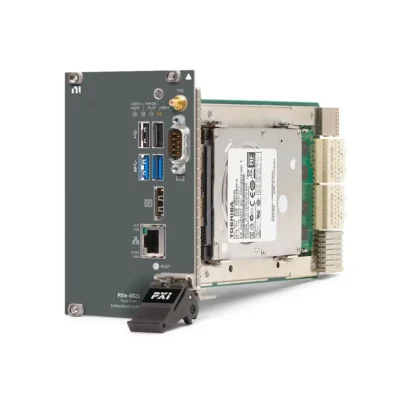
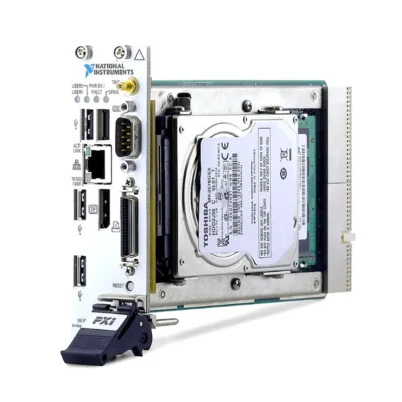

PXIe-8880 2.3 GHz Eight-Core Xeon PXI Express Controller
The NI PXIe-8880 is a high-performance PXI Express embedded controller designed for processor-intensive RF, data acquisition, modular instrumentation and automated test applications. It combines an eight-core Intel Xeon E5-2618L v3 processor, triple-channel DDR4 memory, solid-state storage and up to 24 GB/s of controller-to-backplane bandwidth.
Installing the PXIe-8880 in a compatible PXI Express chassis creates a complete industrial computer inside the modular instrumentation system. The embedded architecture eliminates the need for a separate desktop host or remote-control interface while providing direct access to PXI Express instruments through the chassis backplane.
The controller includes two Gigabit Ethernet ports, one DisplayPort 1.2 video output, two USB 3.0 ports, four USB 2.0 ports, an integrated GPIB controller and an SMB connector for routing PXI trigger signals. Different configurations were supplied with Windows and LabVIEW Real-Time operating systems.
Key Features of the PXIe-8880
- 2.3 GHz Intel Xeon E5-2618L v3 processor
- Eight physical processor cores
- Up to 3.4 GHz single-core Turbo frequency
- 20 MB Intel Smart Cache
- 8 GB standard triple-channel DDR4-1866 memory
- 24 GB maximum supported memory
- 240 GB or larger integrated Serial ATA solid-state drive
- 480 GB SSD supplied with many later ordering configurations
- 24 GB/s maximum PXI Express controller bandwidth
- Four-link x4, x4, x4 and x4 backplane configuration
- Two-link x8 and x16 backplane configuration
- Two 10/100/1000BASE-T Ethernet ports
- IEEE 1588-capable Intel I210 Ethernet interface
- One DisplayPort 1.2 video output
- Two USB 3.0 Type-A ports
- Four USB 2.0 Type-A ports
- Integrated PCI-based GPIB controller
- SMB connector for PXI trigger-bus routing
- Hardware watchdog timer
- Windows and LabVIEW Real-Time configurations
- Four-wide 3U PXI Express form factor
Eight-Core Intel Xeon Processing
The PXIe-8880 uses an Intel Xeon E5-2618L v3 processor with eight physical cores. Its 2.3 GHz base frequency supports sustained multi-core workloads, while Intel Turbo Boost can increase a single active core to as much as 3.4 GHz when power and thermal conditions permit.
Multiple processor cores allow automated test software to divide instrument control, waveform acquisition, mathematical analysis, data logging and user-interface operations across separate execution threads. This is particularly valuable in systems containing several high-speed PXI Express instruments.
The processor includes 20 MB of Intel Smart Cache, helping reduce memory-access delays during repeated calculations and data-processing operations. Applications involving RF waveform analysis, high-channel-count acquisition and parallel test execution can benefit from the controller’s Xeon-class processing resources.
Turbo Boost and Deterministic Performance
Turbo Boost improves short-duration performance by increasing processor frequency when workload and thermal conditions allow. It can accelerate single-threaded operations such as portions of a test sequence that cannot be distributed across multiple cores.
Processor frequency can vary according to temperature, workload and BIOS configuration. Applications requiring deterministic real-time execution should evaluate Turbo Boost and processor power-management settings because variable processor frequency may affect timing consistency.
If processor throttling occurs at elevated ambient temperature, NI recommends setting compatible chassis fans to high. Proper cooling is essential when the controller executes sustained processor-intensive workloads.
Triple-Channel DDR4 Memory
The standard PXIe-8880 configuration includes 8 GB of DDR4-1866 memory. The controller provides three SODIMM sockets and supports up to 24 GB using three compatible 8 GB modules.
Triple-channel memory architecture provides additional memory bandwidth for waveform processing and data-intensive applications. Increasing memory capacity can also provide larger acquisition buffers and improve performance when several software environments or instrument drivers operate simultaneously.
Use compatible DDR4 modules and follow NI installation procedures when upgrading memory. Unsupported module capacities, speeds or arrangements can cause boot failures, reduce performance or prevent triple-channel operation.
Solid-State Data Storage
The original PXIe-8880 architecture includes a 240 GB or larger Serial ATA solid-state drive. Later ordering configurations are commonly associated with 480 GB SSD capacity.
The SATA interface supports transfer rates up to 600 MB/s, while the solid-state drive supports Native Command Queuing. SSD storage provides faster access and greater resistance to shock and vibration than a conventional mechanical hard drive.
The drive stores the operating system, NI drivers, test applications and locally recorded measurement data. Continuous acquisition systems should calculate the required storage data rate separately from the controller’s 24 GB/s backplane bandwidth because the internal SATA drive cannot record data at the full backplane transfer rate.
24 GB/s PXI Express Bandwidth
The PXIe-8880 provides up to 24 GB/s maximum controller-to-backplane bandwidth. This capability is intended for high-performance systems containing RF instruments, high-speed digitizers, FPGA modules and other data-intensive PXI Express hardware.
The controller supports a four-link configuration of x4, x4, x4 and x4. It can also operate in a two-link configuration of x8 and x16, depending on the backplane architecture of the selected PXI Express chassis.
The chassis must provide an appropriate link topology to use the available controller bandwidth. Actual throughput also depends on peripheral modules, driver implementation, DMA transfers, memory activity, record size and application architecture.
High-Throughput Modular Instrumentation
High backplane bandwidth allows compatible instruments to transfer large datasets into controller memory for processing. Multiple acquisitions can be performed while earlier records are being analyzed, displayed or transferred to another storage location.
The PXIe-8880 is especially useful when the system must coordinate several simultaneous instruments. However, the complete data path must be considered because processor utilization, storage speed and network transfer rates can become limiting factors before the PXI Express backplane reaches its maximum bandwidth.
Dual Gigabit Ethernet Interfaces
Two 10/100/1000BASE-T Ethernet ports provide network connectivity through RJ45 connectors. One port uses an Intel I217 Ethernet controller and supports Wake-on-LAN. The second uses an Intel I210 controller and supports IEEE 1588 functionality.
The Ethernet controllers support automatic crossover, eliminating the need for a special crossover cable when compatible equipment is connected directly.
Dual Ethernet connections can separate instrument or DUT communication from enterprise and production networks. For example, one interface can control networked equipment while the second transfers results to a database or remote workstation.
IEEE 1588 Network Timing
The Intel I210 interface provides IEEE 1588 support for compatible network synchronization applications. This capability can help coordinate timestamped measurements and distributed equipment over an Ethernet network.
Final timing accuracy depends on the complete network architecture, including switches, operating-system support, software configuration and other connected devices. IEEE 1588 support on one interface does not automatically synchronize every instrument in the test system.
DisplayPort 1.2 Video Output
The controller provides one DisplayPort 1.2 connector driven by an AMD Radeon E6460 embedded graphics processor. A local display can be used for controller setup, BIOS configuration, software development, diagnostics and operation of the test interface.
Monitor resolution and adapter compatibility depend on the connected display and operating-system driver. A direct digital DisplayPort connection is preferable when supported by the monitor.
Six Front-Panel USB Ports
The PXIe-8880 provides two USB 3.0 Type-A ports and four USB 2.0 Type-A ports. USB 3.0 ports support compatible SuperSpeed devices and are backward compatible with USB 2.0 peripherals.
High-throughput external storage should normally use the USB 3.0 ports, while keyboards, mice and license devices can use the USB 2.0 connections. This arrangement preserves faster interfaces for peripherals that benefit from additional bandwidth.
Bus-powered USB devices consume chassis power. Their electrical requirements must be included when calculating the total system power budget.
Integrated GPIB Controller
An integrated PCI-based GPIB controller allows the PXIe-8880 to communicate with IEEE 488.2 instruments. This is valuable in laboratories that combine PXI Express modules with existing oscilloscopes, signal generators, power supplies and other standalone equipment.
The front panel uses a 25-pin Micro-D GPIB connector. A compatible Micro-GPIB-to-standard-GPIB cable or adapter is required for conventional instruments.
NI-488.2 software must be installed and configured. Each device on the GPIB bus must use a unique address, and the complete cable arrangement must remain within applicable GPIB limitations.
PXI Trigger Bus Connectivity
An SMB connector provides a software-controlled route between the controller front panel and the PXI Express backplane trigger bus. An external signal can trigger installed modules, or a PXI trigger can be routed to external equipment.
The trigger direction and backplane trigger line are configured through software. Signal levels and timing must be compatible with the connected equipment.
Hardware Watchdog Timer
The PXIe-8880 includes a watchdog timer that can reset the controller or generate a trigger if the application stops responding. This function can improve recovery in unattended or long-duration automated systems.
The watchdog interval and response should be configured according to the application. Automatic reset must be coordinated with DUT power control, fixtures and safety interlocks so that unexpected recovery does not create a hazardous system state.
Operating System Generations
PXIe-8880 configurations were offered with Windows 7 Professional, Windows 10 and LabVIEW Real-Time operating systems. Real-time configurations include both the earlier Phar Lap ETS platform and later NI Linux Real-Time versions.
Windows 7 Professional
Earlier controller versions were delivered with 64-bit Windows 7 Professional. This operating system is now a legacy platform, so cybersecurity, driver availability and application compatibility should be reviewed before placing such a controller on a network.
Windows 10
Later Windows configurations were supplied with 64-bit Windows 10. These versions are suitable for compatible LabVIEW, TestStand, InstrumentStudio and third-party Windows applications.
LabVIEW Real-Time with Phar Lap ETS
Earlier real-time configurations used the NI Phar Lap ETS operating system. Existing systems may depend on this environment because of software or driver compatibility, but it should not be assumed to be interchangeable with NI Linux Real-Time.
NI Linux Real-Time
Later real-time configurations use NI Linux Real-Time. Before replacing a Phar Lap controller with an NI Linux Real-Time version, verify application code, driver support, file paths, networking and deployment procedures.
PXIe-8880 Technical Specifications
| Product Model | PXIe-8880 |
|---|---|
| Product Type | High-performance PXI Express embedded controller |
| Processor | Intel Xeon E5-2618L v3 |
| Processor Cores | 8 |
| Base Processor Frequency | 2.3 GHz |
| Maximum Single-Core Turbo Frequency | 3.4 GHz |
| Processor Cache | 20 MB Intel Smart Cache |
| Standard Memory | 8 GB |
| Maximum Memory | 24 GB |
| Memory Type | Triple-channel DDR4-1866, PC4-1866 |
| Memory Sockets | 3 SODIMM sockets |
| Original Storage Specification | 240 GB or larger Serial ATA solid-state drive |
| Later Common Storage Configuration | 480 GB SSD, part-number dependent |
| Storage Interface | Serial ATA, up to 600 MB/s |
| Maximum Controller Bandwidth | 24 GB/s |
| Four-Link Configuration | x4, x4, x4, x4 |
| Two-Link Configuration | x8 and x16 |
| Ethernet | 2 × 10/100/1000BASE-T RJ45 ports |
| Ethernet Controllers | Intel I217 and Intel I210 |
| Network Timing | IEEE 1588 support through the Intel I210 interface |
| Video Output | 1 × DisplayPort 1.2 |
| Graphics Processor | AMD Radeon E6460 Embedded GPU |
| USB 3.0 | 2 × Type-A ports |
| USB 2.0 | 4 × Type-A ports |
| GPIB | Integrated PCI-based IEEE 488 controller |
| GPIB Connector | 25-pin Micro-D |
| Trigger Interface | 1 × SMB PXI Express trigger-bus input/output |
| Watchdog Timer | Controller reset or trigger-generation capability |
| Operating System Options | Windows 7, Windows 10, Phar Lap ETS or NI Linux Real-Time, part-number dependent |
| Module Format | Four-wide 3U PXI Express module |
| Slot Requirement | One system slot plus three controller expansion slots |
| PXI Compatibility | PXI Express Specification 1.0 |
| Typical Weight | 1.5 kg |
| Standard Operating Temperature | 0°C to 50°C |
| Selected Chassis Operating Temperature | 0°C to 45°C with PXIe-1071, PXIe-1078 using the specified kit, or PXIe-1086 |
| Operating Humidity | 10% to 90%, noncondensing |
| Storage Temperature | -40°C to 71°C |
| Storage Humidity | 5% to 95%, noncondensing |
| Maximum Altitude | 2,000 m at 25°C with chassis fans set to high |
| Operating Shock | 30 g in Y/Z axes and 20 g in X axis, half-sine, 11 ms |
| Operating Random Vibration | 5 Hz to 500 Hz, 0.3 grms |
| Nonoperating Random Vibration | 5 Hz to 500 Hz, 2.4 grms |
| Operating Environment | Indoor use, Pollution Degree 2 |
PXIe-8880 Electrical Requirements
| Power Rail | Typical Current | Maximum Current |
|---|---|---|
| +3.3 V | 2.24 A | 2.96 A |
| +5 V | 2.44 A | 3.11 A |
| +12 V | 6.5 A | 8.7 A |
| +5 V auxiliary | 0.19 A | 0.23 A |
Power delivered to external USB devices is not included in these controller values. The requirements of the controller, PXI modules and external peripherals must all be included in the complete chassis power calculation.
PXIe-8880 Part Number and Accessories
| Part Number | Operating System | Typical Storage | Configuration Notes |
|---|---|---|---|
| 783513-04 | Windows 7 Professional, 64-bit | 480 GB SSD | Earlier Windows configuration |
| 783513-05 | Windows 10, 64-bit | 480 GB SSD | Windows configuration with TPM 1.2 |
| 783513-33 | LabVIEW Real-Time, Phar Lap ETS | 480 GB SSD | Earlier real-time configuration |
| 787892-33 | LabVIEW Real-Time, NI Linux Real-Time | 480 GB SSD | Later real-time configuration |
PXIe-8880 configurations were produced across multiple operating-system generations. The operating system, SSD capacity, TPM version and installed memory should be verified from the complete part number and the actual controller configuration.
Because the PXIe-8880 is an established earlier-generation controller, current availability may depend on remaining new inventory, surplus stock, refurbished equipment or tested pre-owned units.
Recommended Accessories
- Compatible PXI Express chassis with one system slot and three expansion slots
- DisplayPort monitor or compatible video adapter
- Micro-GPIB-to-standard-GPIB cable
- Cat 5e or better Ethernet cables
- USB keyboard and mouse
- External or network storage for high-volume test data
- Compatible DDR4 SODIMM memory upgrade kit
- Validated replacement SATA solid-state drive
- PXIe-1078 controller cooling kit, part number 158034A-01, when applicable
Recommended Software
- LabVIEW for test and measurement development
- TestStand for automated test sequencing and reporting
- NI-DAQmx for supported data-acquisition modules
- NI-RFSA and NI-RFSG for compatible RF instruments
- NI-VISA for instrument communication
- NI-488.2 for GPIB communication
- Drivers required by every installed PXI module
Selecting the Correct PXIe-8880 Version
Choose a configuration that matches the existing test software and driver environment. Windows 7, Windows 10, Phar Lap ETS and NI Linux Real-Time are different platforms and should not be treated as interchangeable.
When replacing an existing controller, record the original part number, BIOS configuration, memory, storage image, operating-system version and driver set. This information is especially important when the test system contains older PXI modules or custom software.
PXIe-8880 Applications
Processor-Intensive RF Testing
The PXIe-8880 can coordinate compatible vector signal analyzers, vector signal generators, transceivers and RF switches. Its eight-core processor supports parallel instrument control and waveform analysis.
The 24 GB/s PXI Express connection helps transfer large RF datasets into system memory. This makes the controller suitable for applications involving wideband signal capture, modulation analysis, spectrum monitoring and automated wireless-device testing.
High-Speed Digitizer Systems
High-speed digitizers can transfer waveform records through the PXI Express backplane for processing by the controller. Multiple acquisition modules can operate within one test sequence when chassis bandwidth and slot topology are configured correctly.
Continuous recording applications should not assume that the internal SATA SSD can sustain the full 24 GB/s backplane rate. Data reduction, segmented acquisition, additional storage hardware or network transfer may be required.
High-Channel-Count Data Acquisition
The controller can manage systems containing multiple DAQ and signal-conditioning modules. Its multicore processing resources can perform scaling, filtering, limit checking and result logging across many measurement channels.
Memory expansion can provide larger buffers for long acquisitions. Required RAM and storage should be calculated from sample rate, channel count, sample width and recording duration.
Automated Production Testing
The PXIe-8880 can operate as the central computer in a production test station. Test software can identify the DUT, configure instruments, execute measurements, analyze results and communicate with manufacturing systems.
Dual Ethernet ports allow DUT communication to be separated from factory or database traffic. Integrated GPIB also allows existing standalone instruments to remain part of the automated sequence.
Semiconductor Characterization
Semiconductor systems can combine the controller with source measure units, digital pattern instruments, waveform generators, digitizers and switch matrices. Parallel processing helps manage multi-instrument sequences and large result sets.
The PXI platform also supports expansion when additional instrumentation channels are required for characterization or production screening.
Hardware-in-the-Loop Testing
Compatible LabVIEW Real-Time versions can execute deterministic test and control applications. The controller may be combined with FPGA, vehicle communication, DAQ and fault-insertion modules for controller validation.
Before deployment, verify the loop-rate requirement, operating-system generation, driver compatibility, CPU utilization and expected execution jitter. Phar Lap ETS applications may require migration work before they can run under NI Linux Real-Time.
Aerospace and Defense Systems
The PXIe-8880 can support RF, avionics communication and electronic subsystem testing. Its PXI trigger connection allows synchronization with external equipment, while GPIB and Ethernet support mixed-generation laboratory instruments.
The complete system must still satisfy application-specific security, safety, environmental and export-control requirements.
Research and Development
Research laboratories can use the PXIe-8880 for experiments requiring substantial local processing and high PXI Express throughput. The embedded design provides a compact platform that can be moved or integrated into a test rack as one system.
PXIe-8880 Installation Workflow
Step 1: Identify the Exact Controller Configuration
Record the complete PXIe-8880 part number, operating system, memory capacity, SSD capacity and TPM version. Confirm compatibility with the existing test application and instrument drivers.
Step 2: Verify Chassis Compatibility
Use a compatible PXI Express chassis with a system-controller slot and three adjacent controller expansion slots. Check the chassis backplane link configuration to determine how the controller’s PCI Express lanes are routed.
Step 3: Check Temperature Restrictions
The standard operating range is 0°C to 50°C. When used with a PXIe-1071, PXIe-1078 with the specified cooling kit or PXIe-1086 chassis, the operating range is limited to 0°C to 45°C.
Step 4: Calculate Chassis Power
Add the maximum controller current on each power rail to the requirements of all installed modules and USB peripherals. Confirm that the chassis power supply and cooling system provide adequate capacity.
Step 5: Apply ESD Protection
Keep the controller in an antistatic package until installation. Ground yourself before touching the module and avoid contact with exposed connector pins or electronic components.
Step 6: Power Off the Chassis
Connect the chassis to protective ground according to its manual but keep chassis power off during installation. Remove the filler panels covering the controller positions.
Step 7: Install the PXIe-8880
Place the injector/ejector handle in the downward position. Align the controller with the chassis guides, slide it into the system slot and use the handle to seat the backplane connectors.
Secure the front-panel retaining screws evenly. Do not force the module if it does not align smoothly.
Step 8: Connect Peripherals
Connect the DisplayPort monitor, USB keyboard and mouse. Attach Ethernet, GPIB and trigger cables only after confirming their compatibility and required pinout.
Step 9: Start and Configure the BIOS
Power on the chassis and monitor the startup process. Review boot order, processor settings, power-restoration behavior, TPM settings and real-time options only when the application requires changes from the factory defaults.
Step 10: Install the Operating System and Drivers
Install or restore the appropriate Windows or LabVIEW Real-Time environment. Install the chipset, video, Ethernet, GPIB and PXI module drivers required by the system.
Step 11: Verify Installed Modules
Confirm that the chassis and all peripheral modules are detected correctly. Test trigger routing, Ethernet communication, GPIB instruments and data transfers before executing the final application.
Step 12: Measure System Performance
Test the actual acquisition and analysis workload. Monitor CPU frequency, core utilization, memory usage, storage throughput and chassis temperature under worst-case operating conditions.
Step 13: Create Recovery Backups
Preserve the original recovery image and create a validated application backup. Document BIOS settings, driver versions, network addresses, software licenses and module configuration.
PXIe-8880 Troubleshooting
The PXIe-8880 Does Not Power On
Recommended Checks
Verify chassis input power, fuse condition, power-switch position and inhibit settings. Confirm that the controller is fully seated in the system slot and that the front-panel screws are secured.
The Controller Does Not Boot
Recommended Checks
Disconnect unnecessary USB storage devices and review the BIOS boot order. Use the built-in BIOS diagnostics to test the SSD and memory. NI specifies that the controller will not continue booting if the drive diagnostic reports a failure.
No Video Appears
Recommended Checks
Check the DisplayPort cable, monitor input and adapter. Restart the system with a single known-compatible monitor. If the controller boots remotely but no local video appears, reinstall or verify the graphics driver.
PXI Modules Are Missing
Recommended Checks
Power down the chassis and reseat the affected modules. Verify slot compatibility and install the correct device drivers. Confirm that the chassis link configuration provides the expected PCI Express connection to each slot.
Throughput Is Lower Than Expected
Recommended Checks
Review the chassis topology, DMA configuration, waveform record size, memory usage and CPU load. Check whether data is being limited by the internal SATA SSD, network transfer or analysis software rather than the PXI Express backplane.
The Processor Frequency Drops
Recommended Checks
Check ambient temperature, chassis airflow and fan mode. NI recommends setting chassis fans to high if CPU frequency varies during heavy workloads at elevated temperatures.
The Controller Overheats
Recommended Checks
Clean chassis filters, clear air vents and verify that neighboring modules do not exceed cooling limits. Observe the reduced 45°C maximum when the controller is installed in specified PXIe-1071, PXIe-1078 or PXIe-1086 configurations.
Ethernet Communication Is Unstable
Recommended Checks
Inspect the RJ45 cable and network switch. Confirm link speed, IP address and adapter settings. Test each Ethernet port separately and verify that the application is using the intended interface.
A GPIB Instrument Does Not Respond
Recommended Checks
Install NI-488.2 and check the Micro-GPIB adapter and cable. Confirm the instrument address and ensure that no two devices use the same address. Test communication with one instrument before reconnecting the complete bus.
Real-Time Software Cannot Be Deployed
Recommended Checks
Determine whether the controller uses Phar Lap ETS or NI Linux Real-Time. Match the host software, runtime version and instrument drivers to that operating-system generation.
The BIOS Configuration Is Corrupted
Recommended Checks
Enter the BIOS and press F9 to restore default settings, then save and restart. If required, the internal Clear CMOS switch can be used after powering down and removing the controller according to the service instructions.
The SSD Is Nearly Full
Recommended Checks
Archive large waveform files, historical reports and application logs. Maintain adequate free storage for operating-system operation and temporary acquisition data. Create a verified backup before replacing or reformatting the drive.
PXIe-8880 Comparison
| Model | Processor | Maximum Controller Bandwidth | Best Suited For |
|---|---|---|---|
| PXIe-8840 | Intel Core i5 | 2 GB/s on common configurations | General automated test and legacy PXI systems |
| PXIe-8842 | Newer six-core Intel Core i5 | 8 GB/s | Modern multifunction DAQ and moderate streaming |
| PXIe-8861 | 2.8 GHz quad-core Intel Xeon | 16 GB/s | Processor-intensive RF and DAQ systems |
| PXIe-8880 | 2.3 GHz eight-core Intel Xeon | 24 GB/s | High-bandwidth RF, digitizer and analysis systems |
| PXIe-8881 | Newer Intel Xeon configurations | Up to 24 GB/s | Modern processor-intensive PXI applications |
| PXIe-8862 | Newer eight-core Intel Core i7 | Configuration dependent | Current-generation automated test and analysis |
PXIe-8880 vs PXIe-8861
The PXIe-8880 provides eight Xeon processor cores and up to 24 GB/s controller bandwidth. The PXIe-8861 uses a higher-frequency quad-core Xeon processor and provides up to 16 GB/s bandwidth.
The PXIe-8880 is better suited to heavily parallel workloads and systems requiring greater aggregate backplane throughput. The PXIe-8861 may perform well in applications that depend more heavily on higher per-core frequency or require its newer peripheral interfaces.
PXIe-8880 vs PXIe-8881
The PXIe-8881 is a newer high-performance controller family with several Xeon processor options, including higher-core-count configurations. It also provides updated interfaces, memory and storage architecture.
The PXIe-8880 remains useful for maintaining qualified systems whose software, chassis topology or validation records depend on this controller generation. Migration should include performance and driver testing rather than only a physical controller replacement.
PXIe-8880 vs PXIe-8842
The PXIe-8842 uses a newer six-core Intel Core i5 processor, dual 2.5GbE networking, Thunderbolt 4 and current Windows configurations. The PXIe-8880 provides eight Xeon cores and a higher 24 GB/s maximum backplane bandwidth.
Select the PXIe-8842 for modern connectivity and moderate-streaming systems. Choose or retain the PXIe-8880 when its higher aggregate PXI Express bandwidth and established application compatibility are more important.
PXIe-8880 vs PXIe-8862
The PXIe-8862 uses a newer eight-core Intel Core i7 processor with modern memory, storage and peripheral interfaces. The PXIe-8880 uses an older Xeon platform but provides an established 24 GB/s backplane architecture.
Consider processor benchmark requirements, operating-system compatibility, chassis topology and required external interfaces when selecting between the two generations.
Embedded Controller vs Remote PXI Control
The PXIe-8880 is installed directly in the chassis and creates a self-contained computer. A remote-control architecture connects the chassis to an external workstation through an MXI-Express or compatible interface.
Embedded control reduces external cabling and is convenient for integrated rack systems. Remote control can provide more flexibility when the application needs specialized computing hardware or independently upgradeable storage and graphics.
Recommended Related Products
- PXIe-8881 High-Performance PXI Express Controller
- PXIe-8861 Quad-Core Xeon PXI Controller
- PXIe-8862 Eight-Core PXI Express Controller
- PXIe-8842 Six-Core PXI Express Controller
- PXIe-1095 High-Bandwidth PXI Express Chassis
- PXIe-1085 PXI Express Chassis
- PXIe-1075 PXI Express Chassis
- View More NI PXI Controllers
Why Choose the PXIe-8880?
- Provides eight-core Intel Xeon processing
- Supports up to 24 GB/s controller bandwidth
- Includes 20 MB of Intel Smart Cache
- Supports up to 24 GB of triple-channel DDR4 memory
- Uses solid-state storage for system reliability
- Provides dual Gigabit Ethernet connections
- Includes integrated GPIB instrument control
- Provides six USB peripheral ports
- Supports external PXI trigger routing
- Includes a configurable watchdog timer
- Supports Windows and LabVIEW Real-Time configurations
- Suitable for processor-intensive RF and high-speed DAQ systems
Frequently Asked Questions
What is the PXIe-8880?
The PXIe-8880 is a four-wide high-performance embedded controller that provides the processing, memory, storage and peripheral interfaces required to operate a compatible PXI Express chassis.
Which processor does the PXIe-8880 use?
It uses an Intel Xeon E5-2618L v3 processor with eight cores, a 2.3 GHz base frequency and up to 3.4 GHz single-core Turbo operation.
What is the maximum controller bandwidth?
The PXIe-8880 provides up to 24 GB/s between the controller and a compatible PXI Express backplane.
How much memory is installed?
The standard configuration includes 8 GB of DDR4-1866 memory.
What is the maximum supported memory?
The controller supports as much as 24 GB using three compatible 8 GB SODIMMs.
What type of storage does it use?
The original specification identifies a 240 GB or larger Serial ATA SSD. Many later ordering configurations were supplied with a 480 GB SSD.
Can the internal SSD record at 24 GB/s?
No. The 24 GB/s value describes maximum controller-to-backplane bandwidth. The integrated SATA SSD has a much lower maximum transfer rate.
How many Ethernet ports are provided?
The controller provides two 10/100/1000BASE-T Ethernet ports.
Does it support IEEE 1588?
Yes. The Intel I210 Ethernet interface supports IEEE 1588 for compatible network-timing applications.
Does the PXIe-8880 have Thunderbolt?
No Thunderbolt interface is listed for the PXIe-8880. It provides DisplayPort, USB, Ethernet, GPIB and trigger connections.
How many USB ports are included?
The controller includes two USB 3.0 ports and four USB 2.0 ports, for a total of six front-panel USB connections.
Does it include GPIB?
Yes. It includes a PCI-based IEEE 488 controller using a 25-pin Micro-D GPIB connector.
Does the PXIe-8880 have an RS-232 port?
The official PXIe-8880 front-panel interface list does not specify a DB-9 RS-232 port. Serial instruments can instead be connected through a compatible USB or PXI serial interface.
Which operating systems were offered?
Configurations were supplied with Windows 7 Professional, Windows 10, LabVIEW Real-Time Phar Lap ETS and NI Linux Real-Time.
Can a Phar Lap application run directly on NI Linux Real-Time?
Not necessarily. Application code, drivers, file handling and supporting components must be checked and may require migration before deployment on NI Linux Real-Time.
How many chassis slots does it occupy?
The controller requires one system-controller slot and three adjacent controller expansion slots.
What is its normal operating-temperature range?
The standard range is 0°C to 50°C. Certain chassis combinations reduce the maximum temperature to 45°C.
Why should the chassis fans be set to high?
High fan speed improves cooling under heavy workloads and is required for the stated maximum-altitude condition. It can also help prevent processor-frequency throttling.
Is the PXIe-8880 suitable for RF testing?
Yes. Its eight-core Xeon processor and 24 GB/s backplane bandwidth make it suitable for processor-intensive RF and wireless measurement systems.
Is it suitable for continuous data streaming?
It can support high-throughput acquisition, but continuous recording must account for memory, storage and processing limitations. Additional storage or real-time data reduction may be required.
Does it require an external computer?
No. The PXIe-8880 is an embedded controller and functions as the computer for the PXI Express chassis.
What should be checked when buying a used PXIe-8880?
Verify the exact part number, operating system, memory, SSD health, TPM version, Ethernet ports, USB ports, GPIB communication, trigger operation and controller temperature under load. Request a functional test report when available.
Which controller can replace the PXIe-8880?
The PXIe-8881, PXIe-8862 and other newer controllers may be considered, but compatibility depends on chassis topology, operating system, software, drivers, bandwidth and external-interface requirements.
Request a Quote for the PXIe-8880
Contact us for current availability, condition, lead time and project pricing for the NI PXIe-8880 2.3 GHz Eight-Core Xeon PXI Express Embedded Controller. Please provide the required part number, operating system, memory and storage configuration with your inquiry.
We can also help identify compatible PXI Express chassis, memory, SSD storage, GPIB cables and replacement controllers for RF, high-speed data acquisition, semiconductor and automated production test systems.















