







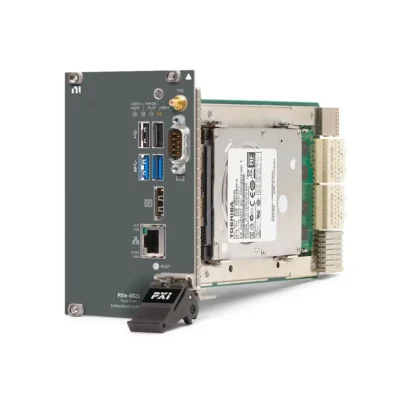
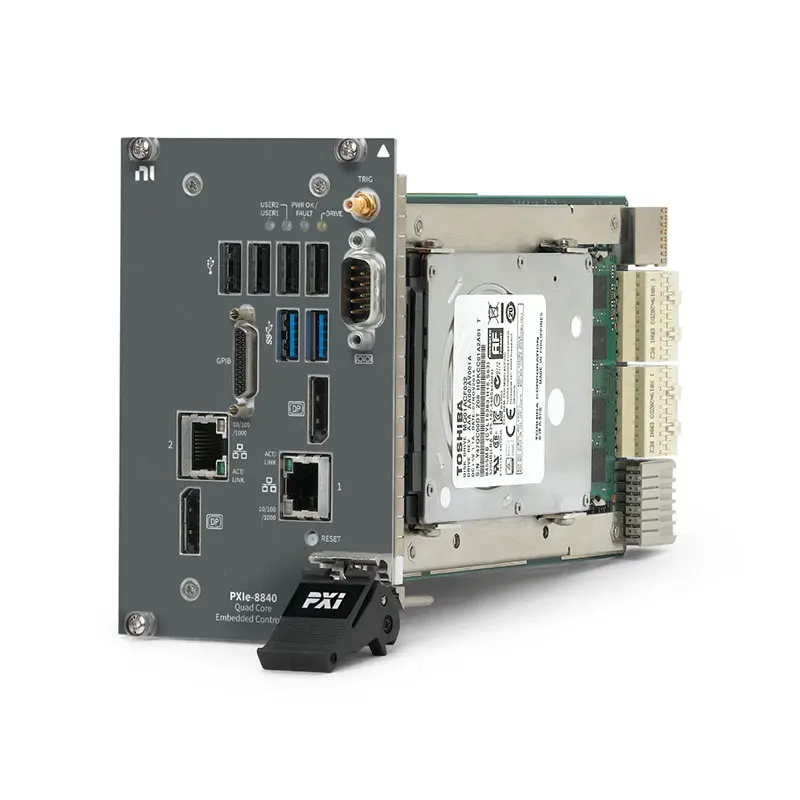
PXIe-8840 Dual-Core and Quad-Core PXI Express Embedded Controller
The NI PXIe-8840 is an embedded controller designed for PXI Express modular instrumentation, automated test and data-acquisition systems. The product family includes a 2.7 GHz dual-core Intel Core i5-4400E version and a higher-performance 2.6 GHz quad-core Intel Core i7-5700EQ version.
Depending on the processor configuration, the PXIe-8840 provides up to 2 GB/s or 8 GB/s of maximum controller-to-backplane bandwidth. This allows users to select a controller for general automated testing or for more demanding multi-instrument and data-streaming applications.
Front-panel connectivity includes two Gigabit Ethernet ports, two DisplayPort outputs, USB 3.0, USB 2.0, RS-232 serial, GPIB and an SMB connector for PXI trigger-bus routing. A special quad-core version also provides an ExpressCard/34 expansion slot.
The PXIe-8840 was supplied under multiple Windows, Phar Lap Real-Time, NI Linux Real-Time and no-operating-system part numbers. NI now identifies these configurations as no longer available for normal purchase, with support status varying between Standard Support, Limited Support and Discontinued.
Key Features of the PXIe-8840
- Dual-core and quad-core processor configurations
- 2.7 GHz Intel Core i5-4400E dual-core processor
- 2.6 GHz Intel Core i7-5700EQ quad-core processor
- Up to 3.3 GHz Turbo frequency on the dual-core version
- Up to 3.4 GHz Turbo frequency on the quad-core version
- 3 MB cache on the dual-core processor
- 6 MB cache on the quad-core processor
- Up to 8 GB DDR3L memory
- 250 GB or 320 GB integrated Serial ATA storage
- 2 GB/s maximum bandwidth on dual-core configurations
- 8 GB/s maximum bandwidth on quad-core configurations
- Two 10/100/1000BASE-T Ethernet ports
- Two DisplayPort video outputs
- Two USB 3.0 Type-A ports
- Four USB 2.0 Type-A ports
- One DB-9 RS-232 serial port
- Integrated GPIB controller
- One SMB PXI trigger-bus input/output
- Hardware watchdog timer
- Optional ExpressCard/34 slot on a specific quad-core variant
- Windows 7 and Windows 10 configurations
- Phar Lap and NI Linux Real-Time configurations
- Four-wide 3U PXI Express form factor
Dual-Core and Quad-Core Configurations
The PXIe-8840 name covers two significantly different processor and backplane-performance configurations. The exact part number must therefore be checked before ordering a replacement controller.
PXIe-8840 Dual-Core
The dual-core version uses an Intel Core i5-4400E processor operating at a 2.7 GHz base frequency. The processor includes 3 MB of cache and can operate at up to approximately 3.3 GHz through Intel Turbo Boost.
Dual-core versions provide up to 2 GB/s maximum controller bandwidth. These configurations are suitable for instrument control, general automated testing, moderate data acquisition and applications that do not require the greater parallel processing or backplane bandwidth of the quad-core version.
PXIe-8840 Quad-Core
The quad-core version uses an Intel Core i7-5700EQ processor operating at a 2.6 GHz base frequency. It provides 6 MB of cache and supports Intel Turbo Boost for higher short-duration processor frequency.
Quad-core configurations provide up to 8 GB/s maximum controller bandwidth. They are better suited to processor-intensive modular instrumentation, multi-module acquisition and test applications that must run several operations simultaneously.
Selecting Dual-Core or Quad-Core Performance
Select the dual-core PXIe-8840 when maintaining a qualified test system whose workload and chassis topology were designed around the 2 GB/s controller. A dual-core version may also be adequate for switching, DMM, serial communication and moderate DAQ applications.
Select the quad-core version when the application needs additional processing threads or higher aggregate PXI Express throughput. The 8 GB/s configuration provides more margin for digitizers, RF instruments and simultaneous data transfers.
The two configurations should not be treated as identical replacements. Processor type, memory, storage and backplane bandwidth can differ even though both products use the PXIe-8840 model name.
DDR3L System Memory
The PXIe-8840 uses 1600 MHz DDR3L PC3-12800 memory. The controller supports up to 8 GB in one SODIMM socket.
The quad-core hardware manual specifies 4 GB standard memory and 8 GB maximum. Some earlier product configurations and commercial listings may show different factory-installed capacities, including 2 GB on selected dual-core versions.
The installed memory should be verified directly when purchasing a used controller. The amount of RAM affects waveform buffering, operating-system performance and the number of software processes that can run simultaneously.
NI identified the following qualified memory options for the quad-core controller:
- 4 GB DDR3L-1600 SODIMM, part number 782341-4096
- 8 GB DDR3L-1600 SODIMM, part number 783001-8192
Integrated Serial ATA Storage
PXIe-8840 configurations include an internal Serial ATA drive. Storage capacity depends on the processor and ordering configuration.
Dual-core versions commonly include a 250 GB drive, while quad-core versions commonly include a 320 GB drive. Several no-OS configurations are also listed with 320 GB of storage.
The drive stores the operating system, drivers, test software and locally recorded data. High-volume acquisition systems should monitor storage capacity and transfer important test results to network or external storage.
The PXIe-8840 does not provide a front-removable drive. Replacing the internal storage requires the controller to be powered down and serviced according to the applicable hardware procedure.
PXIe-8840 Backplane Bandwidth
The maximum controller bandwidth depends on the processor configuration. Dual-core versions provide up to 2 GB/s, while quad-core configurations provide up to 8 GB/s.
The quad-core controller supports a four-link configuration of x4, x4, x4 and x4 or a two-link configuration of x8 and x8. The active link topology depends on the PXI Express chassis.
Actual application throughput depends on the chassis, installed modules, slot arrangement, DMA architecture, acquisition record size, memory and storage. The controller-bandwidth specification does not guarantee that the internal drive can record at the same rate.
Dual Gigabit Ethernet
The PXIe-8840 provides two 10/100/1000BASE-T Ethernet connections through RJ45 ports. The quad-core architecture uses an Intel I217-LM interface and an Intel I210-IT interface.
Dual Ethernet ports allow test-system traffic to be separated. One interface can communicate with instruments or devices under test while the second connects to a production network, database or remote engineering workstation.
The Ethernet interfaces support automatic crossover, allowing compatible devices to be connected without a dedicated crossover cable.
Dual DisplayPort Outputs
The PXIe-8840 provides two DisplayPort video outputs. They can be used for operating-system configuration, BIOS setup, software development, diagnostics and local operation of the test station.
A dual-monitor arrangement can display the operator interface on one screen and measurement data, system status or development tools on another.
Monitor resolution and adapter compatibility depend on the controller graphics driver, operating system and connected display. A direct digital DisplayPort connection is preferable when available.
USB Peripheral Connections
The front panel provides two USB 3.0 Type-A ports and four USB 2.0 Type-A ports. USB 3.0 connections are appropriate for compatible high-throughput peripherals, while USB 2.0 ports can support keyboards, mice and license devices.
USB 3.0 ports are backward compatible with USB 2.0 equipment. High-speed external storage should normally use the USB 3.0 ports.
Power consumed by bus-powered USB devices must be included in the complete chassis power budget.
RS-232 Serial Communication
A DB-9 COM1 port provides RS-232 communication with legacy instruments, environmental chambers, industrial controllers and custom test fixtures.
Serial parameters such as baud rate, parity, data bits, stop bits and flow control must match the connected device. Verify whether the application requires a straight-through or null-modem cable.
Integrated GPIB Controller
The PXIe-8840 includes a GPIB controller for communication with IEEE 488.2 instruments. This allows existing oscilloscopes, programmable power supplies, signal generators and other standalone equipment to be incorporated into a PXI test system.
A compatible cable or adapter is required for the controller’s compact GPIB connector. NI-488.2 must be installed, and each instrument must use a unique GPIB address.
PXI Trigger Bus Interface
An SMB connector provides a routable connection between the controller front panel and the PXI backplane trigger bus. External events can initiate PXI measurements, or PXI trigger signals can be exported to compatible equipment.
Trigger direction, selected backplane line and electrical compatibility must be configured correctly through software.
Hardware Watchdog Timer
The controller includes a watchdog timer that can reset the PXIe-8840 or generate a trigger when an application stops responding. This function is useful in unattended and long-duration automated systems.
Watchdog recovery must be coordinated with DUT power, switching hardware and safety interlocks. An automatic controller reset should not leave the test fixture in an unsafe state.
ExpressCard/34 Expansion Option
A specific quad-core version, part number 784340-00, includes an ExpressCard/34 expansion slot. The slot can accept compatible ExpressCard devices and supports automatic device detection.
Most PXIe-8840 versions do not include this slot. Verify the front panel and complete part number if ExpressCard compatibility is required.
Before removing an ExpressCard, stop communication and use the operating system’s safe-removal procedure to avoid data loss.
Windows and Real-Time Operating Systems
The PXIe-8840 was supplied with multiple operating-system generations. Correctly identifying the installed platform is essential when replacing or restoring a controller.
Windows 7
Part number 784007-04 is a quad-core Windows 7 64-bit configuration. Windows 7 is now a legacy operating system, so driver availability and cybersecurity requirements should be reviewed carefully.
Windows 10
Windows 10 versions are available for both dual-core and quad-core controllers. Part number 785782-0118 is specifically identified as a Simplified Chinese Windows 10 configuration.
LabVIEW Real-Time Phar Lap
Earlier real-time configurations use the Phar Lap ETS operating system. These versions may be required for maintaining existing applications and drivers that were validated on Phar Lap.
NI Linux Real-Time
Later real-time configurations use NI Linux Real-Time. Phar Lap applications should not be assumed to run without modification under NI Linux Real-Time.
No-OS Configurations
Several part numbers were supplied without an operating system. These versions are intended for qualified integrators who can install, license and maintain a compatible software image.
Product Lifecycle and Replacement Planning
NI identifies PXIe-8840 configurations as no longer available for normal purchase. Individual part numbers have Standard Support, Limited Support or Discontinued lifecycle status.
NI lists part number 788816-01, a PXIe-8842 Windows 11 controller, as the recommended replacement for several PXIe-8840 configurations. Replacement suitability still depends on the chassis, operating system, drivers and test application.
Existing systems can also be maintained using verified surplus or tested pre-owned PXIe-8840 controllers when application migration is not practical.
PXIe-8840 Technical Specifications
| Product Model | PXIe-8840 |
|---|---|
| Product Type | PXI Express embedded controller |
| Processor Options | Intel Core i5-4400E or Intel Core i7-5700EQ |
| Processor Cores | 2 or 4, configuration dependent |
| Dual-Core Base Frequency | 2.7 GHz |
| Dual-Core Cache | 3 MB |
| Quad-Core Base Frequency | 2.6 GHz |
| Quad-Core Cache | 6 MB |
| Memory Type | DDR3L-1600, PC3-12800 SODIMM |
| Factory-Installed Memory | 2 GB or 4 GB on earlier configurations; configuration dependent |
| Maximum Memory | 8 GB |
| Storage | 250 GB or 320 GB integrated Serial ATA drive |
| Removable Storage | No |
| Dual-Core Maximum Bandwidth | 2 GB/s |
| Quad-Core Maximum Bandwidth | 8 GB/s |
| Quad-Core Four-Link Configuration | x4, x4, x4, x4 |
| Quad-Core Two-Link Configuration | x8 and x8 |
| Ethernet | 2 × 10/100/1000BASE-T RJ45 ports |
| Display Outputs | 2 × DisplayPort |
| USB 3.0 | 2 × Type-A ports |
| USB 2.0 | 4 × Type-A ports |
| Serial Interface | 1 × DB-9 RS-232 port |
| GPIB | Integrated IEEE 488 controller |
| Trigger Interface | 1 × SMB PXI trigger-bus input/output |
| Expansion Interface | ExpressCard/34 on part number 784340-00 only |
| Watchdog Timer | Controller reset or trigger-generation capability |
| Operating System Options | Windows 7, Windows 10, Phar Lap, NI Linux Real-Time or no OS |
| Module Format | Four-wide 3U PXI Express module |
| Slot Requirement | One system slot plus three controller expansion slots |
| PXI Compatibility | PXI Express Specification 1.0 |
| Typical Quad-Core Weight | 1.32 kg |
| Standard Operating Temperature | 5°C to 50°C |
| Extended-Temperature Option | 0°C to 55°C |
| Operating Humidity | 10% to 90%, noncondensing |
| Standard Storage Temperature | -40°C to 65°C |
| Extended Storage Temperature | -40°C to 71°C |
| Storage Humidity | 5% to 95%, noncondensing |
| Maximum Altitude | 2,000 m at 25°C ambient |
| Operating Shock | 30 g peak, half-sine, 11 ms pulse |
| Operating Random Vibration | 5 Hz to 500 Hz, 0.3 grms with solid-state drive |
| Nonoperating Random Vibration | 5 Hz to 500 Hz, 2.4 grms |
Quad-Core Electrical Requirements
| Power Rail | Typical Current | Maximum Current |
|---|---|---|
| +3.3 V | 1.68 A | 2.82 A |
| +5 V | 1.99 A | 3.63 A |
| +12 V | 5.19 A | 8.79 A |
| -12 V | 0 A | 0 A |
| +5 V auxiliary | 0.20 A | 0.35 A |
These values apply to the documented quad-core controller and do not include USB devices or an ExpressCard. Verify the applicable specification for the exact dual-core or extended-temperature version.
PXIe-8840 Part Number and Accessories
| Part Number | Processor | Operating System | Bandwidth | Storage |
|---|---|---|---|---|
| 784007-00 | Quad-Core Intel Core i7 | No OS | 8 GB/s | 320 GB |
| 784007-04 | Quad-Core Intel Core i7 | Windows 7, 64-bit | 8 GB/s | 320 GB |
| 785546-01 | Quad-Core Intel Core i7 | Windows 10, 64-bit | 8 GB/s | 320 GB |
| 784007-33 | Quad-Core Intel Core i7 | LabVIEW Real-Time, Phar Lap | 8 GB/s | 320 GB |
| 787894-33 | Quad-Core Intel Core i7 | NI Linux Real-Time | 8 GB/s | 320 GB |
| 784340-00 | Quad-Core Intel Core i7 | No OS | 8 GB/s | 320 GB; ExpressCard version |
| 785782-01 | Dual-Core Intel Core i5 | Windows 10, 64-bit | 2 GB/s | 250 GB |
| 785782-0118 | Dual-Core Intel Core i5 | Windows 10, 64-bit, Simplified Chinese | 2 GB/s | 250 GB |
| 785782-33 | Dual-Core Intel Core i5 | LabVIEW Real-Time, Phar Lap | 2 GB/s | 250 GB |
| 787893-33 | Dual-Core Intel Core i5 | NI Linux Real-Time | 2 GB/s | 250 GB |
| 785781-00 | Dual-Core Intel Core i5 | No OS | 2 GB/s | 320 GB |
| 783001-00 | Dual-Core Intel Core i5 | No OS | 2 GB/s | 320 GB |
PXIe-8840 part numbers differ substantially in processor, bandwidth, operating system, storage and ExpressCard support. Always quote and purchase using the complete NI part number.
Recommended Accessories
- Compatible PXI Express chassis with four available controller positions
- DisplayPort monitor or compatible video adapter
- Compact-GPIB-to-standard-GPIB cable
- Cat 5e or better Ethernet cables
- USB keyboard and mouse
- External USB or network storage for test results
- 4 GB DDR3L SODIMM, part number 782341-4096
- 8 GB DDR3L SODIMM, part number 783001-8192
- Compatible ExpressCard/34 hardware for part number 784340-00
Recommended Software
- LabVIEW for test and measurement development
- TestStand for automated sequence execution
- NI-DAQmx for supported data-acquisition modules
- NI-RFSA and NI-RFSG for compatible RF instruments
- NI-VISA for serial and instrument communication
- NI-488.2 for GPIB communication
- Device drivers matching the installed Windows or real-time system
Buying a Used PXIe-8840
For a pre-owned controller, verify the processor model, installed RAM, drive capacity, operating system, GPIB port, DisplayPort outputs, USB ports, Ethernet interfaces and PXI backplane communication.
Request an SSD or hard-drive health report and confirm that the controller passes BIOS memory and storage diagnostics. A functional test report is particularly important because different PXIe-8840 part numbers are not equivalent.
PXIe-8840 Applications
Automated Test Equipment
The PXIe-8840 can operate as the central computer in automated test equipment containing DMMs, digitizers, waveform generators, switch modules, programmable power supplies and DAQ hardware.
Windows configurations support conventional test software, while real-time versions support compatible deterministic applications.
Multifunction Data Acquisition
The controller can coordinate compatible analog input, analog output, digital I/O and counter/timer modules. The quad-core version provides additional processing and bandwidth for multi-module acquisition.
Required throughput should be calculated from channel count, sample rate, resolution and acquisition duration.
Production Functional Testing
Production systems can use the controller to execute test sequences, configure instruments, process measurements and save results. Dual Ethernet ports can separate DUT communication from factory-network traffic.
Design Validation
The PXIe-8840 can coordinate multiple instruments used for electronic design verification. Software-controlled switching allows the same instruments to measure many DUT points without manual cable changes.
Hardware-in-the-Loop Testing
Phar Lap and NI Linux Real-Time versions can support compatible HIL and deterministic control applications. Driver and operating-system generation must match the existing real-time project.
Laboratory Instrument Integration
Integrated GPIB and RS-232 ports allow legacy standalone instruments to operate alongside PXI modules. This can extend the useful life of existing laboratory equipment.
RF and Modular Instrumentation
The quad-core PXIe-8840 can control compatible RF signal generators, analyzers and switching hardware. Systems with heavier RF processing may require a higher-performance PXIe-8861 or PXIe-8881 controller.
Maintenance of Qualified PXI Systems
The PXIe-8840 remains important for test systems that have already been validated around its hardware, operating system and driver versions. A matching replacement can avoid extensive software migration and requalification.
PXIe-8840 Installation Workflow
Step 1: Identify the Exact Part Number
Confirm whether the controller is dual-core or quad-core and record its operating system, storage, memory and ExpressCard configuration.
Step 2: Verify Chassis Compatibility
Use a compatible PXI Express chassis with a system-controller slot and three adjacent expansion slots. Check that the chassis provides the required link topology.
Step 3: Calculate Power and Cooling
Include the controller, installed modules, USB devices and optional ExpressCard in the system power calculation. Confirm that chassis airflow is unobstructed.
Step 4: Apply ESD Protection
Keep the controller in antistatic packaging until installation. Ground yourself and avoid touching exposed connector pins.
Step 5: Power Off the Chassis
Connect the chassis to protective ground but keep the power off while installing the controller.
Step 6: Install the PXIe-8840
Lower the injector/ejector handle, align the controller with the card guides and slide it into the system slot. Use the handle to seat the connectors and secure the front-panel screws.
Step 7: Connect Peripherals
Connect a DisplayPort monitor, USB keyboard and mouse. Attach Ethernet, serial, GPIB and trigger cables according to the test-system design.
Step 8: Start and Configure the BIOS
Power on the chassis and press Delete when prompted to enter the BIOS. Avoid changing advanced settings unless required because incorrect values can make the controller unstable or unbootable.
Step 9: Install the Correct Operating System
Restore or install the operating system associated with the selected part number. Do not assume that a Phar Lap image can be replaced directly with NI Linux Real-Time.
Step 10: Install Drivers and Applications
Install chipset, graphics, Ethernet, GPIB and PXI device drivers. Add LabVIEW, TestStand or the required runtime environment.
Step 11: Verify the PXI System
Confirm that the chassis and all installed modules are detected. Test network, serial, GPIB and trigger communication before deploying the final application.
Step 12: Create a Recovery Backup
Preserve the factory recovery image and create an application backup. The Windows recovery tool can be accessed with F4 during startup, but recovery erases existing drive contents.
PXIe-8840 Troubleshooting
The Controller Does Not Power On
Recommended Checks
Verify chassis power, fuse condition and inhibit settings. Confirm that the PXIe-8840 is fully seated in the system slot and disconnect unnecessary USB or ExpressCard devices.
The Controller Does Not Boot
Recommended Checks
Check the BIOS boot order and disconnect unnecessary bootable USB devices. Press F2 during startup to access the storage and memory diagnostic utilities.
The Drive Diagnostic Fails
Recommended Checks
Back up recoverable data and replace the drive using a compatible storage device. NI specifies that the controller will not boot after a failed drive diagnostic.
The Memory Diagnostic Fails
Recommended Checks
Power off the chassis, remove the controller and inspect the SODIMM. Replace it with compatible DDR3L memory and rerun the diagnostic.
PXI Modules Are Missing
Recommended Checks
Reseat the affected modules, verify chassis slot compatibility and install the correct drivers. Confirm that the chassis link topology matches the controller configuration.
Throughput Is Lower Than Expected
Recommended Checks
Confirm whether the controller is the 2 GB/s dual-core or 8 GB/s quad-core version. Review DMA settings, record sizes, chassis topology, storage performance and CPU utilization.
A GPIB Instrument Does Not Respond
Recommended Checks
Install NI-488.2 and verify the cable, instrument address and bus configuration. Test one instrument before reconnecting the complete GPIB system.
RS-232 Communication Fails
Recommended Checks
Confirm baud rate, parity, data bits, stop bits and flow control. Verify the cable pinout and whether a null-modem connection is required.
The Ethernet Connection Is Slow
Recommended Checks
Confirm Gigabit link negotiation and inspect the Ethernet cable and network switch. Test the two ports separately.
The ExpressCard Is Not Detected
Recommended Checks
Confirm that the controller is part number 784340-00 and that the card is correctly inserted. Install any required third-party driver.
The BIOS Configuration Is Corrupted
Recommended Checks
Press F9 in the BIOS to restore factory defaults. If the controller remains unbootable, power down, remove it and use the internal Clear CMOS switch according to the manual.
Windows Recovery Does Not Start
Recommended Checks
Press and hold F4 when video first appears. If the recovery partition is unavailable, use the appropriate recovery media with a compatible external USB drive.
The Real-Time Application Will Not Deploy
Recommended Checks
Determine whether the controller uses Phar Lap or NI Linux Real-Time. Match the host software, runtime version and device drivers to that operating system.
The Controller Overheats
Recommended Checks
Check chassis airflow, fan speed, filters and ambient temperature. Verify whether the controller is a standard or extended-temperature version.
PXIe-8840 Comparison
| Model | Processor | Maximum Bandwidth | Best Suited For |
|---|---|---|---|
| PXIe-8821 | Intel Core i3 | 2 GB/s | Basic instrument control and automated testing |
| PXIe-8840 | Dual-core Core i5 or quad-core Core i7 | 2 GB/s or 8 GB/s | Legacy automated test, DAQ and modular instrumentation |
| PXIe-8842 | Six-core Intel Core i5 | 8 GB/s | Modern multifunction DAQ and moderate streaming |
| PXIe-8861 | Quad-core Intel Xeon | 16 GB/s | Processor-intensive RF and DAQ applications |
| PXIe-8881 | Four-, eight- or eighteen-core Intel Xeon | 24 GB/s | High-performance RF and parallel analysis |
PXIe-8840 Dual-Core vs Quad-Core
The dual-core version uses an Intel Core i5 processor and provides 2 GB/s bandwidth. The quad-core version uses an Intel Core i7 processor and provides up to 8 GB/s.
Selecting the wrong version can substantially change test-system performance. Always verify the part number rather than relying only on the front-panel model name.
PXIe-8840 vs PXIe-8842
The PXIe-8842 is the newer six-core controller and is NI’s recommended replacement for several PXIe-8840 configurations. It provides DDR4 memory, NVMe storage, dual 2.5GbE and Thunderbolt 4.
Migration requires checking the operating system, software, drivers, chassis compatibility and external interfaces. The PXIe-8842 does not automatically reproduce every legacy PXIe-8840 configuration.
PXIe-8840 vs PXIe-8861
The PXIe-8861 provides a quad-core Intel Xeon processor and 16 GB/s bandwidth. It is better suited to more demanding RF and acquisition systems.
The PXIe-8840 remains appropriate for maintaining systems validated around its Core i5 or Core i7 hardware and legacy operating systems.
PXIe-8840 vs PXIe-8881
The PXIe-8881 provides significantly more processor, memory and bandwidth capability, including options with as many as 18 Xeon cores and 64 GB memory.
It is intended for substantially more demanding workloads and has higher chassis cooling requirements than the PXIe-8840.
Recommended Related Products
- PXIe-8842 Six-Core PXI Express Controller
- PXIe-8821 PXI Express Embedded Controller
- PXIe-8861 Quad-Core Xeon PXI Controller
- PXIe-8862 Eight-Core PXI Express Controller
- PXIe-8881 High-Performance PXI Controller
- PXIe-1085 PXI Express Chassis
- PXIe-1095 PXI Express Chassis
- View More NI PXI Controllers
Why Choose the PXIe-8840?
- Maintains compatibility with established PXI Express systems
- Offers dual-core and quad-core processor options
- Provides up to 8 GB/s controller bandwidth
- Supports up to 8 GB DDR3L memory
- Includes dual Gigabit Ethernet
- Provides two DisplayPort outputs
- Includes six front-panel USB ports
- Integrates RS-232 and GPIB instrument control
- Supports external PXI trigger routing
- Offers Windows and real-time operating-system options
- Provides an ExpressCard option on a specialized configuration
Frequently Asked Questions
What is the PXIe-8840?
The PXIe-8840 is a four-wide embedded controller used to operate compatible PXI Express chassis and instruments.
Is the PXIe-8840 dual-core or quad-core?
Both versions exist. The exact processor configuration is determined by the NI part number.
Which processor is used in the dual-core version?
The dual-core version uses a 2.7 GHz Intel Core i5-4400E processor.
Which processor is used in the quad-core version?
The quad-core version uses a 2.6 GHz Intel Core i7-5700EQ processor.
What is the maximum controller bandwidth?
Dual-core versions provide up to 2 GB/s, while quad-core versions provide up to 8 GB/s.
How much memory does the PXIe-8840 support?
The controller supports up to 8 GB of DDR3L-1600 memory. Factory-installed capacity varies by configuration.
What storage capacity is included?
Configurations are listed with either 250 GB or 320 GB of internal Serial ATA storage.
Does the PXIe-8840 support Windows 10?
Yes. Both dual-core and quad-core Windows 10 configurations were produced.
Does it support NI Linux Real-Time?
Yes. Separate NI Linux Real-Time part numbers are available for the dual-core and quad-core versions.
Does it support Phar Lap Real-Time?
Yes. Earlier real-time configurations use Phar Lap ETS.
Can Phar Lap software run directly on NI Linux Real-Time?
Not necessarily. Application code, drivers and system configuration may require migration and validation.
Does the PXIe-8840 include GPIB?
Yes. Listed configurations include an integrated IEEE 488 GPIB controller.
Does it provide an RS-232 port?
Yes. One DB-9 RS-232 serial interface is provided.
How many Ethernet ports are included?
The controller provides two 10/100/1000BASE-T Gigabit Ethernet ports.
How many USB ports are provided?
It includes two USB 3.0 and four USB 2.0 ports.
Does every PXIe-8840 have an ExpressCard slot?
No. ExpressCard/34 is available only on the specialized quad-core ExpressCard version, part number 784340-00.
How many chassis slots does it occupy?
The controller occupies the system-controller slot and three adjacent expansion slots.
What is the normal operating-temperature range?
The standard operating range is 5°C to 50°C. Selected extended-temperature hardware supports 0°C to 55°C.
Is the PXIe-8840 still available from NI?
NI lists its configurations as no longer available for normal purchase. Support status varies by part number.
What is the recommended replacement?
NI lists PXIe-8842 part number 788816-01 as the recommended replacement for several PXIe-8840 configurations.
Can a PXIe-8842 directly replace every PXIe-8840?
No. Chassis, software, operating system, drivers, GPIB requirements and application performance must be checked before migration.
What should be checked when purchasing a used PXIe-8840?
Verify the full part number, processor, RAM, drive health, operating system, ports, PXI backplane communication and BIOS diagnostic results.
Request a Quote for the PXIe-8840
Contact us for current availability, condition, lead time and project pricing for the NI PXIe-8840 Dual-Core or Quad-Core PXI Express Embedded Controller. Please include the complete part number and required operating system with your inquiry.
We can also help identify compatible PXI Express chassis, memory, storage, cables and replacement controllers for automated test, data acquisition, RF and real-time control systems.















