







PXIe-8135 2.3 GHz Quad-Core PXI Express Embedded Controller
The NI PXIe-8135 is a high-performance PXI Express embedded controller designed for automated test, high-speed data acquisition, RF measurement, hardware-in-the-loop validation and computationally demanding laboratory applications. It combines a third-generation Intel Core i7-3610QE quad-core processor with high-bandwidth PXI Express connectivity and a comprehensive set of computer and instrument-control interfaces.
The processor operates at a base frequency of 2.3 GHz and can reach as much as 3.3 GHz in single-core Turbo mode. Standard versions provide 4 GB of dual-channel DDR3-1600 memory and support as much as 16 GB. A removable-drive version is also available, although this configuration uses single-channel memory and supports a maximum of 8 GB.
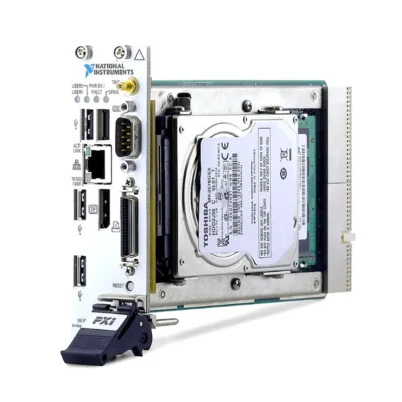
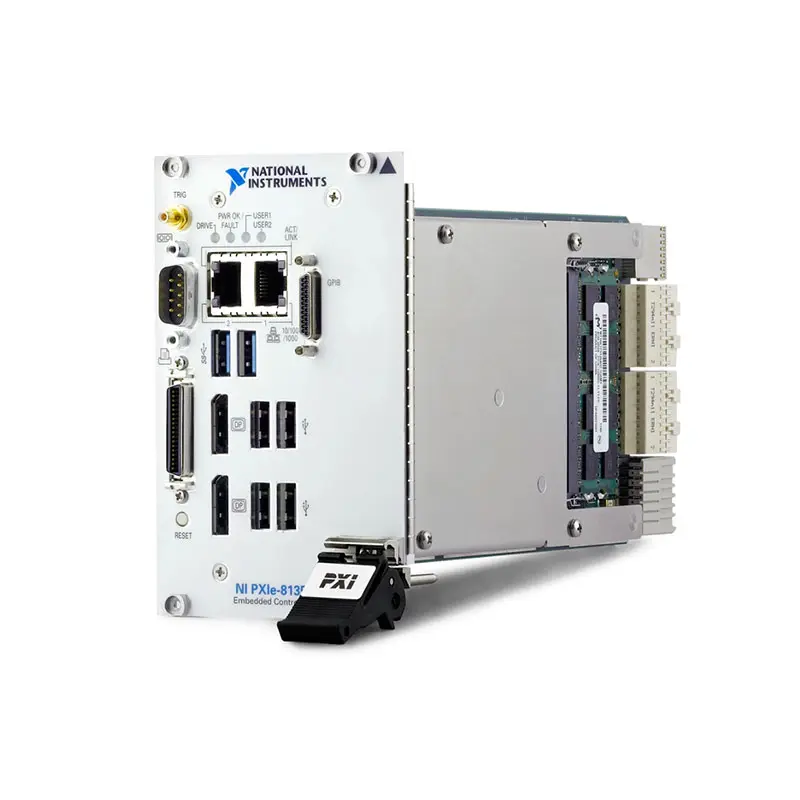
With two Gigabit Ethernet ports, two USB 3.0 ports, four USB 2.0 ports, two DisplayPort outputs, integrated GPIB, RS-232, a parallel interface and an SMB trigger connector, the PXIe-8135 can serve as the central controller for complex PXI Express systems without requiring an external host computer.
Key Features of the PXIe-8135
- Intel Core i7-3610QE quad-core processor
- 2.3 GHz base processor frequency
- Up to 3.3 GHz single-core Turbo frequency
- Four physical processor cores
- 4 GB standard dual-channel DDR3-1600 memory
- Up to 16 GB RAM on standard configurations
- Up to 8 GB RAM on removable-drive configurations
- 250 GB or larger internal SATA hard drive on standard configurations
- Optional removable hard-drive configuration
- Up to 8 GB/s theoretical aggregate PXI Express bandwidth
- Two 10/100/1000BASE-T Gigabit Ethernet ports
- Two SuperSpeed USB 3.0 ports
- Four Hi-Speed USB 2.0 ports
- Two DisplayPort video outputs
- Integrated IEEE 488.2 GPIB controller
- One RS-232 serial interface
- One IEEE 1284 parallel port
- ExpressCard/34 or removable-drive front-panel variant
- PXI Express trigger-bus input and output
- Four-slot 3U PXI Express form factor
- Windows and LabVIEW Real-Time configurations
PXIe-8135 Technical Specifications
| Product Model | PXIe-8135 |
|---|---|
| Product Type | High-performance PXI Express embedded controller |
| Processor | Intel Core i7-3610QE |
| Processor Generation | Third-generation Intel Core architecture |
| Processor Cores | 4 |
| Base Processor Frequency | 2.3 GHz |
| Maximum Turbo Frequency | 3.3 GHz in single-core Turbo mode |
| L2 Cache | 256 KB per core, 1 MB total |
| Standard Memory | 4 GB |
| Memory Type | PC3-12800 DDR3-1600 |
| Standard Memory Architecture | Dual-channel |
| Maximum Standard-Version Memory | 16 GB |
| Removable-Drive Memory Architecture | Single-channel |
| Maximum Removable-Drive Memory | 8 GB |
| Standard Storage | 250 GB or larger internal SATA drive |
| Extended-Temperature Storage | 80 GB minimum on documented 24/7 extended-temperature configurations |
| LabVIEW Real-Time Storage | 80 GB minimum SATA drive on documented RT configurations |
| Removable Storage Option | One removable hard-drive assembly |
| PXI Express Four-Link Configuration | x4, x4, x4, x4 |
| PXI Express Two-Link Configuration | x8, x8 |
| Theoretical Aggregate System Bandwidth | Up to 8 GB/s, dependent on chassis topology |
| Measured Peer-to-Peer Performance | Application and module dependent; NI documented approximately 3.4 GB/s in a representative peer-to-peer test |
| Ethernet | 2 × 10/100/1000BASE-T RJ45 ports |
| USB 3.0 | 2 × SuperSpeed USB ports |
| USB 2.0 | 4 × Hi-Speed USB ports |
| Video Output | 2 × DisplayPort connectors |
| Graphics Controller | ATI Radeon E4690 embedded GPU |
| GPIB | Integrated IEEE 488.2 controller with 25-pin Micro-D connector |
| Serial Interface | 1 × 16550-compatible RS-232 DB9 port |
| Parallel Interface | 1 × IEEE 1284 Type C port |
| Expansion Option | ExpressCard/34 slot on applicable configuration |
| Front-Panel Trigger | SMB connector for routing triggers to or from the PXI Express backplane |
| PXI Trigger Support | PXI Express trigger-bus input and output |
| Form Factor | Four-wide 3U PXI Express module |
| Slot Requirement | One system slot plus three adjacent controller-expansion slots |
| PXI Express Compatibility | PXI Express Specification 1.0 |
| Typical Weight | 1.30 kg (2.87 lb) |
| Standard Operating Temperature | 5°C to 50°C |
| Extended Operating Temperature | 0°C to 55°C on applicable extended-temperature configuration |
| Operating Humidity | 10% to 90%, noncondensing |
| Standard Storage Temperature | -40°C to 65°C |
| Extended Storage Temperature | -40°C to 71°C on applicable configuration |
| Maximum Altitude | 2,000 m at 25°C ambient temperature |
| Operating Shock | 30 g peak, half-sine, 11 ms pulse |
| Operating Random Vibration | 5 Hz to 500 Hz, 0.3 grms with a solid-state drive |
PXIe-8135 specifications differ between the standard, removable-drive, extended-temperature and LabVIEW Real-Time configurations. Verify the complete part number and hardware label before ordering a replacement controller or memory upgrade.
Intel Core i7 Quad-Core Processing
The PXIe-8135 uses an Intel Core i7-3610QE processor with four physical cores. Its 2.3 GHz base frequency provides consistent performance for automated testing, while Intel Turbo technology allows a single active core to operate at up to 3.3 GHz when thermal and workload conditions permit.
The quad-core architecture is useful when the test application performs several tasks simultaneously. Instrument communication, measurement processing, operator-interface updates, database access and report generation can be distributed across different processor cores.
Compared with an entry-level dual-core controller, the PXIe-8135 is better suited to multithreaded LabVIEW programs, parallel TestStand sequences, RF data processing and measurement systems containing multiple high-speed instruments.
Dual-Channel DDR3 Memory
Standard PXIe-8135 configurations contain 4 GB of PC3-12800 DDR3-1600 RAM and provide two SO-DIMM sockets. Installing matched memory modules enables dual-channel operation and supports a maximum capacity of 16 GB.
Matched modules are recommended because they provide the best memory bandwidth. The controller can operate with different-capacity modules, but memory performance may be lower than with a matched pair.
The removable-hard-drive variant uses a different internal arrangement and provides one memory socket. It supports as much as 8 GB of single-channel DDR3 memory. Buyers should identify the controller variant before ordering RAM.
High-Bandwidth PXI Express Connectivity
The PXIe-8135 can connect to a compatible chassis through four x4 links or two x8 links. Using PCI Express Gen 2 signaling, these links provide as much as 8 GB/s of theoretical aggregate bandwidth between the controller and PXI Express backplane.
Actual throughput depends on the chassis backplane, number of installed modules, transfer direction, DMA architecture, driver efficiency and system workload. The maximum theoretical figure should not be interpreted as the sustained bandwidth available to every module simultaneously.
This connectivity makes the controller suitable for digitizers, RF analyzers, waveform generators, FPGA modules and high-speed data-acquisition devices that transfer large amounts of information through the chassis.
Internal and Removable Storage
Standard configurations provide a 250 GB or larger internal SATA drive. Documented extended-temperature and LabVIEW Real-Time configurations may use an 80 GB or larger SATA drive.
The removable-drive version allows the storage assembly to be removed from the front of the controller. This is valuable when a laboratory needs to physically secure data, exchange operating-system images or separate classified and nonclassified projects.
The removable-drive option changes the internal memory architecture, limiting the controller to one SO-DIMM and a maximum of 8 GB RAM. Storage security benefits should therefore be balanced against memory-capacity requirements.
Dual Gigabit Ethernet
The PXIe-8135 provides two independent Gigabit Ethernet interfaces. Ethernet Port 1 uses an Intel 82579 controller and supports Wake-on-LAN, while Port 2 uses an Intel 82574 controller and does not provide Wake-on-LAN.
Dual ports allow the controller to separate test-network traffic from corporate-network communication. One interface can communicate with networked instruments or a DUT while the other transfers results to a server or provides remote system access.
USB 3.0 and USB 2.0 Connectivity
Two SuperSpeed USB 3.0 ports support higher-performance external storage and compatible peripherals. Four additional USB 2.0 ports can connect keyboards, mice, license dongles, low-speed instruments and other standard USB devices.
USB bandwidth and power are shared resources. High-power or high-throughput peripherals should be evaluated carefully, especially when several devices operate at the same time.
Dual DisplayPort Outputs
Two DisplayPort connectors are driven by an ATI Radeon E4690 embedded graphics controller. Dual-display support can improve productivity in development and debugging environments by providing separate screens for test interfaces, block diagrams, monitoring software and documentation.
Adapters may be required when connecting VGA, DVI or HDMI monitors. Confirm that the adapter type and display resolution are compatible with the controller and operating system.
Integrated GPIB Instrument Control
The PXIe-8135 includes an IEEE 488.2 GPIB controller. This interface allows test software to communicate directly with compatible oscilloscopes, spectrum analyzers, power supplies, digital multimeters and other traditional laboratory instruments.
Integrated GPIB can eliminate the need for a separate PXI GPIB module or USB-to-GPIB adapter. The correct NI-488.2 driver must be installed for the operating system and application environment.
Serial and Parallel Interfaces
A DB9 RS-232 port supports legacy instruments, industrial controllers and fixture devices. The IEEE 1284 parallel interface can connect to older printers, production fixtures and specialized equipment that still depends on parallel communication.
The parallel port uses a compact Type C connector rather than a conventional 25-pin Type A connector. A compatible adapter cable is required for standard DB25 equipment.
PXIe-8135 Part Number and Accessories
| Item | Part Number or Configuration | Description |
|---|---|---|
| PXIe-8135 Controller Family | 782340 series | Standard PXIe-8135 configurations with differences in operating system and software |
| PXIe-8135 Removable-Drive Family | 782450 series | PXIe-8135 configurations equipped with front-accessible removable storage |
| Common PXIe-8135 Ordering Numbers | 782340-00, 782340-04, 782340-33 | Commonly documented standard controller configurations; verify the operating system |
| Common Removable-Drive Ordering Numbers | 782450-00, 782450-01, 782450-04 | Commonly documented removable-drive configurations; exact storage and OS vary |
| Additional PXIe-8135 Configuration | 782452-04 | Configuration-specific assembly; verify features using the full NI label |
| 4 GB DDR3-1600 SO-DIMM | 782341-4096 | NI-qualified PC3-12800 memory module |
| 8 GB DDR3-1600 SO-DIMM | 782341-8192 | NI-qualified PC3-12800 memory module |
| Parallel-Port Adapter Cable | 777169-01 | Type C to Type A adapter for conventional DB25 parallel equipment |
| USB Keyboard and Mouse Splitter | 778713-01 | Adapter for compatible keyboard and mouse installations |
| External USB CD/DVD-ROM Drive | 778492-01 | External optical drive for software installation and system recovery |
The PXIe-8135 was manufactured in multiple operating-system, storage, temperature and front-panel configurations. The model name alone does not identify every installed option. Always verify the full part number, serial label, removable-drive configuration, RAM and operating system before purchasing.
Standard vs Removable-Drive Configuration
| Feature | Standard PXIe-8135 | Removable-Drive PXIe-8135 |
|---|---|---|
| Storage | Internal SATA drive | Front-accessible removable drive |
| Memory Channels | Dual-channel | Single-channel |
| Memory Sockets | Two | One |
| Maximum RAM | 16 GB | 8 GB |
| Front-Panel Expansion | ExpressCard/34 on applicable variant | Removable storage occupies the applicable front-panel area |
| Primary Advantage | Higher memory capacity and dual-channel performance | Physical control and convenient exchange of storage media |
Selecting the Correct Replacement
When replacing a PXIe-8135, record the complete ordering number, installed operating system, storage configuration and RAM capacity. A standard controller and removable-drive controller are not identical even though both carry the PXIe-8135 model designation.
For a validated production system, also document BIOS settings, NI driver versions, software licenses, database connections and application startup procedures. These details can be as important as the hardware specification when restoring the station.
Memory Upgrade Considerations
The standard controller supports two SO-DIMM modules. For maximum performance and capacity, use two matched 8 GB modules for a total of 16 GB. Install the lower memory socket first when using only one module.
The removable-drive variant supports only one SO-DIMM and therefore cannot exceed 8 GB. Disconnect power and remove the controller from the chassis before servicing its memory.
PXIe-8135 Applications
- High-performance automated test equipment
- RF and wireless device testing
- High-speed data acquisition
- Hardware-in-the-loop simulation
- Automotive ECU validation
- Aerospace and defense testing
- Semiconductor characterization
- Production functional testing
- Electronic device validation
- Machine condition monitoring
- Research and laboratory automation
- Parallel TestStand sequence execution
- LabVIEW Real-Time control
- Legacy GPIB instrument integration
High-Speed Data Acquisition
The PXIe-8135 can control digitizers and multifunction data-acquisition modules that transfer large measurement records through the PXI Express backplane. Its quad-core processor can handle instrument configuration, data transfer, visualization and analysis concurrently.
For sustained acquisition, evaluate the complete data path from the module through the chassis and controller to system memory or storage. Actual recording performance depends on channel count, sample rate, data format, drive speed and processing workload.
RF and Wireless Testing
RF test systems frequently require substantial data movement and signal processing. The PXIe-8135 can coordinate vector signal analyzers, signal generators, RF switches and timing modules inside a common PXI Express chassis.
Its multiple processor cores allow test software to perform waveform management, measurement analysis, switching control and result reporting in parallel. For more recent wideband RF instruments, verify that the controller and chassis deliver the required sustained bandwidth.
Hardware-in-the-Loop Validation
When configured with LabVIEW Real-Time, the PXIe-8135 can execute deterministic control and simulation tasks for hardware-in-the-loop testing. It can coordinate analog I/O, digital I/O, CAN, FlexRay, fault-insertion and FPGA modules through the PXI platform.
Processor-intensive simulation models may benefit from assigning separate loops or model components to different CPU cores. Timing performance should be tested with the complete model and I/O configuration before deployment.
Automotive ECU Testing
The controller can manage an automated ECU validation system containing vehicle communication interfaces, DAQ modules, programmable power supplies and fault-insertion switches. TestStand or VeriStand can coordinate stimuli, measurements and diagnostic checks.
Dual Ethernet interfaces are useful when the system needs a dedicated test network and a separate company or database connection.
Production Test Systems
In production environments, the PXIe-8135 can run parallel test sequences, control several instruments and transfer results to a manufacturing database. Its embedded format produces a self-contained test station without an external desktop computer or MXI cable.
The removable-drive variant may be valuable when production programs or customer data must be physically secured. The standard version is preferable when maximum memory capacity is more important.
Legacy Instrument Integration
The integrated GPIB, RS-232 and parallel interfaces help connect the PXIe-8135 to established laboratory instruments and fixtures. This can reduce migration costs when modern PXI Express instruments must operate alongside older equipment.
Driver compatibility remains important. Confirm support for the required NI-488.2, NI-VISA and instrument-driver versions before moving an established application to another operating system.
Recommended System Integration
The PXIe-8135 can be installed in a compatible chassis such as the PXIe-1085 high-bandwidth chassis or PXIe-1082 chassis. The chassis must provide one system-controller slot and three adjacent expansion slots.
A complete automated test system can combine the controller with a PXIe-6365 multifunction DAQ module, a PXIe-4080 digital multimeter and application-specific RF, switching or FPGA instruments.
PXIe-8135 Installation Workflow
Step 1: Verify Chassis Compatibility
Confirm that the chassis supports a four-wide 3U PXI Express embedded controller. The system-controller slot and three adjacent controller-expansion slots must be available.
Step 2: Identify the Controller Configuration
Check whether the controller has an ExpressCard/34 slot or removable drive. Record its complete part number, installed memory, operating system and storage capacity.
Step 3: Back Up the Existing System
Back up application code, configuration files, calibration data, database settings and license information. Create a recoverable disk image when replacing a controller in a validated system.
Step 4: Ground and Power Down the Chassis
Connect the chassis power cord to establish protective grounding, but keep the chassis switched off. Touch the metal chassis enclosure or use suitable ESD protection before handling the controller.
Step 5: Insert the PXIe-8135
Keep the injector/ejector handle in its downward position. Align the module with the upper and lower guides and slide it into the system-controller location until the handle engages the injector rail.
Step 6: Seat and Secure the Controller
Raise the injector/ejector handle to seat the backplane connectors. Tighten the front-panel retaining screws evenly to provide secure mechanical engagement and grounding.
Step 7: Connect Peripherals
Connect the required DisplayPort monitor, USB keyboard and mouse, Ethernet cables, GPIB cable and any RS-232, parallel or trigger connections required by the application.
Step 8: Power On and Check Indicators
Power on the monitor and chassis. Confirm that the power indicator remains green and that the drive indicator shows storage activity during startup.
Step 9: Verify BIOS Configuration
Open BIOS Setup if necessary and confirm that the memory, SATA drive, processor and boot devices are detected. Restore documented custom settings used by the original test station.
Step 10: Verify PXI Hardware
Use NI Measurement & Automation Explorer or the applicable system-management software to confirm that the chassis and installed modules are recognized correctly.
Step 11: Install Drivers and Applications
Install versions of NI-488.2, NI-VISA, instrument drivers, LabVIEW, TestStand or VeriStand that are compatible with the controller operating system and installed PXI hardware.
Step 12: Validate System Performance
Run representative acquisition, trigger, data-transfer and test-sequence operations. Confirm that the system meets throughput, timing and thermal requirements before returning it to production use.
Operating-System Considerations
PXIe-8135 configurations were documented with Windows 7 Professional, Windows XP Professional SP3 for Embedded Systems and LabVIEW Real-Time. These are legacy software environments, and compatibility with modern applications should not be assumed.
When maintaining an existing system, preserving its validated operating-system and driver image may be more practical than upgrading individual components. If modernization is required, evaluate a newer controller and qualify the complete application stack.
Cooling Requirements
The controller must receive adequate forced-air cooling from the chassis. Install filler panels in unused slots and keep chassis air inlets, filters and exhaust openings clear.
The standard controller is rated for operation from 5°C to 50°C. Only a verified extended-temperature configuration should be operated from 0°C to 55°C.
PXIe-8135 Troubleshooting
The PXIe-8135 Does Not Boot
Verify chassis power, fuses and circuit protection. Confirm that the controller is fully seated and observe the front-panel power and drive LEDs during startup.
Disconnect nonessential USB devices and external cables, then remove other PXI modules if necessary. Test the controller in another compatible chassis or install a known-good controller in the original chassis to isolate the problem.
No Video Appears
Check the DisplayPort cable, adapter, monitor input and display power. Try the second DisplayPort output or a known-good monitor. If the operating system uses an unsupported resolution, start in Safe Mode and select conservative display settings.
The Internal Drive Is Not Detected
Enter BIOS Setup and confirm that the SATA controller and drive are recognized. For a removable-drive controller, power down and verify that the drive assembly is completely seated and mechanically secured.
The Controller Reports a Memory Error
Run the BIOS memory diagnostic. Power down the chassis and reseat the SO-DIMM modules. Standard controllers should use compatible matched modules for the best dual-channel performance.
PXI Express Modules Are Missing
Power off and reseat the controller and affected modules. Confirm that the installed chassis supports the required PXI Express link topology and that the correct instrument drivers are installed.
Ethernet Port 1 Remains Active After Shutdown
This can be normal because Ethernet Port 1 supports Wake-on-LAN and may remain powered after operating-system shutdown. Disconnect chassis power before removing the controller.
GPIB Instruments Are Not Detected
Verify the GPIB cable, instrument address and termination. Confirm that the NI-488.2 driver is installed and that the controller’s integrated GPIB interface appears correctly in NI MAX.
USB 3.0 Performance Is Lower Than Expected
Confirm that the device and cable support USB 3.0 and are connected to one of the two SuperSpeed ports. External storage performance may also be limited by the drive, file system or simultaneous bus activity.
The Application Runs Slowly
Check CPU utilization, available memory, storage health and background software. Upgrade standard configurations with matched RAM modules when the application exceeds the original 4 GB capacity.
The Controller Overheats
Inspect chassis fans, filters and airflow. Install filler panels in empty locations and verify that cables do not obstruct the vents. Confirm that the controller configuration is operating within its specified temperature range.
The Real-Time Application Has Excessive Jitter
Review BIOS power-management settings, processor core assignments, loop priorities and background services. Measure performance using the complete real-time model and I/O configuration rather than relying only on processor specifications.
A Recovered System Cannot Run the Original Test
An operating-system recovery image may not contain all application software, drivers, licenses and custom configuration files. Restore the validated system backup or reinstall the required components in the documented sequence.
PXIe-8135 Comparison
| Model | General Configuration | Best Suited For |
|---|---|---|
| PXIe-8135 | 2.3 GHz quad-core Core i7, up to 16 GB DDR3 | High-performance legacy PXI Express test and data-acquisition systems |
| PXIe-8820 | 2.2 GHz dual-core Celeron, up to 8 GB DDR3 | Cost-sensitive applications with moderate processing requirements |
| PXIe-8840 | Later-generation quad-core embedded controller | Modernized systems requiring higher CPU performance and newer platform support |
| PXIe-8880 | Eight-core Xeon-class high-performance controller | Compute-intensive RF, semiconductor and high-channel-count validation systems |
| PXIe-8881 | Modern high-core-count PXI Express controller | New high-performance applications requiring current processing and interfaces |
PXIe-8135 vs PXIe-8820
The PXIe-8135 provides four processor cores, dual-channel memory, substantially higher backplane bandwidth and more comprehensive interfaces than the dual-core PXIe-8820. It is better suited to demanding acquisition and parallel test workloads.
The PXIe-8820 may be sufficient for moderate instrument-control and sequencing applications. It also occupies fewer chassis slots, while the PXIe-8135 requires four slots.
PXIe-8135 vs PXIe-8840
Both models are quad-core PXI Express embedded controllers, but the PXIe-8840 uses a later processor platform and is generally preferred when greater CPU performance or newer software compatibility is required.
The PXIe-8135 can remain the better replacement for an established system that depends on its native GPIB, parallel port, removable-drive option or validated legacy operating-system image.
PXIe-8135 vs PXIe-8880
The PXIe-8880 provides significantly greater multicore processing performance and a newer PCI Express platform. It is designed for more demanding RF processing, semiconductor validation, large simulation models and high-speed data streaming.
The PXIe-8135 remains appropriate when its quad-core performance is sufficient and maintaining compatibility with an existing test system is the primary objective.
Embedded Controller vs Remote Control
The PXIe-8135 installs directly in the chassis and produces a self-contained test system. A remote-control architecture connects the chassis to an external computer using a compatible MXI-Express interface.
An embedded controller reduces external cables and is convenient for portable or rack-mounted systems. Remote control makes it easier to select or upgrade the external workstation independently of the PXI chassis.
Selecting the Right PXI Express Controller
Choose the PXIe-8135 when the system needs strong quad-core processing, high-bandwidth PXI Express links, dual Ethernet, integrated GPIB and support for established Windows or LabVIEW Real-Time applications.
Select a newer controller when the project requires a current operating system, more RAM, newer peripheral interfaces or substantially greater computing performance. Always validate software and driver compatibility before changing controllers.
Recommended Related Products
- PXIe-8820 Dual-Core PXI Express Embedded Controller
- PXIe-8840 Quad-Core PXI Express Embedded Controller
- PXIe-8880 Eight-Core PXI Express Embedded Controller
- PXIe-8881 High-Performance PXI Express Controller
- PXIe-1085 High-Bandwidth PXI Express Chassis
- PXIe-1082 PXI Express Chassis
- View More NI PXI Embedded Controllers
Why Choose the PXIe-8135?
- Provides four-core Intel Core i7 processing
- Supports as much as 16 GB of dual-channel DDR3 RAM
- Offers high-bandwidth PXI Express backplane connectivity
- Includes two Gigabit Ethernet interfaces
- Provides both USB 3.0 and USB 2.0 connections
- Supports two DisplayPort monitors
- Includes native GPIB, RS-232 and parallel interfaces
- Offers standard and removable-drive configurations
- Supports Windows and LabVIEW Real-Time applications
- Works well for high-performance legacy-system maintenance
Frequently Asked Questions
What is the PXIe-8135?
The PXIe-8135 is a four-slot PXI Express embedded controller designed to operate instruments in automated test, data-acquisition, RF and control systems.
Which processor does the PXIe-8135 use?
It uses an Intel Core i7-3610QE quad-core processor with a 2.3 GHz base frequency and a maximum single-core Turbo frequency of 3.3 GHz.
How much memory does the PXIe-8135 support?
Standard dual-channel configurations support as much as 16 GB of DDR3-1600 RAM. Removable-drive configurations support as much as 8 GB of single-channel RAM.
What is the PXIe-8135 system bandwidth?
Its two-x8 or four-x4 PCI Express Gen 2 architecture provides as much as 8 GB/s of theoretical aggregate bandwidth. Real sustained throughput depends on the chassis, modules and application.
How many Ethernet ports does it provide?
The controller provides two 10/100/1000BASE-T Gigabit Ethernet ports. Port 1 supports Wake-on-LAN, while Port 2 does not.
Does the PXIe-8135 have USB 3.0?
Yes. It provides two USB 3.0 ports and four additional USB 2.0 ports.
Does it include a GPIB controller?
Yes. The PXIe-8135 includes an integrated IEEE 488.2 GPIB controller with a 25-pin Micro-D connector.
How many displays can be connected?
The controller has two DisplayPort outputs driven by an ATI Radeon E4690 embedded graphics controller.
Is a removable hard drive available?
Yes. A removable-drive version was offered. This version supports a maximum of 8 GB of single-channel memory rather than the standard version’s 16 GB dual-channel maximum.
Which operating systems were available?
Documented configurations include Windows 7 Professional, Windows XP Professional SP3 for Embedded Systems and LabVIEW Real-Time. The exact operating system depends on the ordering number.
How many chassis slots does the PXIe-8135 occupy?
It occupies four slots: one system-controller slot and three adjacent controller-expansion slots.
Can the PXIe-8135 be used for HIL testing?
Yes. A compatible LabVIEW Real-Time configuration can be used for hardware-in-the-loop control, simulation and deterministic test applications.
What should be checked before ordering a used PXIe-8135?
Verify the complete part number, standard or removable-drive construction, installed RAM, storage capacity, operating system, chassis compatibility and functional test condition.
Is the PXIe-8135 still suitable for high-performance systems?
It remains capable for established quad-core PXI applications. New systems requiring current operating systems, more memory or substantially higher processing performance should also consider newer controllers.
Request a Quote for the PXIe-8135
Contact us for current availability, lead time and project pricing for the NI PXIe-8135 2.3 GHz Quad-Core PXI Express Embedded Controller. We can also help identify the correct operating-system version, removable-drive configuration, memory option and compatible PXI Express chassis for your test system.















