






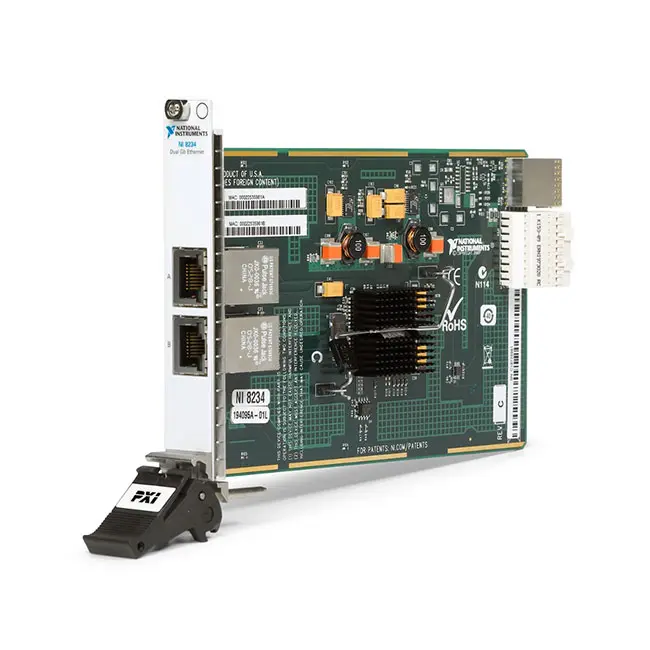
PXIe-8234 2-Port Gigabit Ethernet and GigE Vision Module
The PXIe-8234 is a two-port Gigabit Ethernet interface module for PXI Express and CompactPCI Express systems. It provides two independent 1000BASE-T connections for Ethernet communication, GigE Vision image acquisition and high-speed data transfer.
When supplied with NI Vision Acquisition Software, the PXIe-8234 operates as a dual-port GigE Vision frame grabber capable of transferring image data at full Gigabit Ethernet bandwidth on both ports simultaneously. The module is optimized to reduce CPU loading during demanding machine vision and scientific imaging applications.
Two ordering versions were offered. Part number 780244-01 includes the PXIe-8234 Ethernet interface hardware without a Vision Acquisition Software license. Part number 780263-01 includes the same dual-port hardware with NI Vision Acquisition Software.
Key Features of the PXIe-8234
- Two independent Gigabit Ethernet ports
- 1000BASE-T Ethernet support
- Full Gigabit Ethernet bandwidth on both ports simultaneously
- Designed for GigE Vision camera acquisition
- Supports as many as two directly connected cameras
- Optimized for low CPU utilization
- Native x4 PCI Express connection
- Installs in one PXI Express or hybrid peripheral slot
- Two 10P10C modular front-panel connectors
- Intel 82572EI Ethernet controller
- Supports Category 5 four-pair Ethernet cabling
- Compatible with NI Vision Acquisition Software
- LabVIEW and text-based programming support
- Suitable for machine vision and scientific imaging
- Compatible with PXI Express and CompactPCI Express systems
PXIe-8234 Technical Specifications
| Product Model | PXIe-8234 |
|---|---|
| Product Type | Dual-port Gigabit Ethernet interface and GigE Vision frame grabber |
| Ethernet Interface | 1000BASE-T Gigabit Ethernet |
| Number of Ethernet Ports | 2 |
| Number of Supported Cameras | 2 GigE Vision cameras |
| Simultaneous Port Operation | Full Gigabit Ethernet bandwidth available on both ports simultaneously |
| Front-Panel Connectors | 2 × 10P10C modular jack connectors |
| Ethernet Cable | Four-pair Category 5 or better cable |
| Ethernet Controller | Intel 82572EI Ethernet controller |
| Bus Connection | PXI Express |
| Native Link Width | x4 PCI Express |
| Slot Requirement | One PXIe, cPCIe or compatible PXIe hybrid peripheral slot |
| PXI Express Compatibility | PXI Express Specification 1.0 |
| CompactPCI Express Compliance | Version 1.0a |
| Camera Power over Interface | No |
| TTL Inputs | 0 |
| Quadrature Encoder Inputs | 0 |
| Isolated Digital Inputs | 0 |
| FPGA Reconfigurable | No |
| Maximum Power Consumption | 5.2 W |
| Dimensions | 10.0 cm × 16.0 cm |
| Weight | 158 g |
| Operating Temperature | 0°C to 55°C |
| Operating Humidity | 10% to 90%, noncondensing |
| Storage Temperature | −40°C to 70°C |
| Storage Humidity | 5% to 95%, noncondensing |
| Maximum Altitude | 2,000 m |
| Pollution Degree | 2 |
| Indoor Use | Yes |
PXIe-8234 Part Numbers
| Product Version | Part Number | Included Software |
|---|---|---|
| PXIe-8234 Ethernet Interface Module | 780244-01 | Vision Acquisition Software license not included |
| PXIe-8234 with Vision Acquisition Software | 780263-01 | NI Vision Acquisition Software included |
Choose 780244-01 when the system only requires two Gigabit Ethernet ports or when a valid NI Vision Acquisition Software license is already available.
Choose 780263-01 when building a GigE Vision application that requires both the PXIe-8234 hardware and an NI Vision Acquisition Software license.
The PXIe-8234 is now listed by NI as a limited-support legacy product. NI identifies the four-port PXIe-8246, part number 787314-01, as the recommended replacement for vision acquisition applications.
Dual-Port Gigabit Ethernet Architecture
The PXIe-8234 contains two independent Gigabit Ethernet interfaces. Each port can connect to a separate GigE Vision camera, Ethernet instrument or dedicated network segment.
Unlike a standard shared external Ethernet switch, the two onboard interfaces provide dedicated connections through the PXI Express bus. This architecture helps maintain predictable bandwidth when both ports are transferring image or measurement data.
Each interface is recognized by the operating system as a network adapter. Individual IP addresses, subnet masks and other network parameters can therefore be configured for the two ports.
Full Bandwidth on Both Ports
The PXIe-8234 is designed to transfer data at full Gigabit Ethernet bandwidth on both ports simultaneously. This is particularly valuable when two high-speed cameras must acquire images at the same time.
The 1 Gbit/s rating represents the Ethernet link rate for each port. Actual image or application throughput is lower after Ethernet, IP, UDP and GigE Vision protocol overhead is considered.
Performance also depends on camera packet configuration, image size, frame rate, PXI Express controller, system memory, processing workload and storage speed.
GigE Vision Camera Acquisition
The PXIe-8234 with Vision Acquisition Software is designed as a GigE Vision PXI frame grabber. It can acquire, display, record and monitor images from compatible GigE Vision cameras.
GigE Vision provides a standardized method for transporting machine vision images and camera-control commands over Ethernet. Engineers can select cameras from different manufacturers while using a common acquisition architecture.
The PXIe-8234 supports as many as two directly connected GigE Vision cameras. Each camera can use a dedicated interface, helping avoid bandwidth contention between the two image streams.
NI Vision Acquisition Software
NI Vision Acquisition Software provides the drivers and programming functions required to acquire images with the PXIe-8234. Its IMAQdx components support camera discovery, configuration, acquisition, display and image logging.
The software includes example programs and APIs for LabVIEW, C, C++, C#, Visual Basic and Visual Basic .NET. Available programming-language support depends on the installed software version.
Vision Acquisition Software is different from the NI Vision Development Module. Vision Acquisition Software handles camera communication and image capture, while the Vision Development Module provides additional image-processing and inspection algorithms.
Low CPU Utilization
The PXIe-8234 is optimized to transfer image data with low processor overhead. Reducing CPU load leaves more controller resources available for image analysis, test sequencing, user-interface operation and result storage.
Actual processor utilization depends on image resolution, camera frame rate, packet size, buffer management, image conversion and the analysis functions executed after acquisition.
For high-speed inspection, use a PXI controller with sufficient processor, memory and storage performance for the total image-data rate produced by both cameras.
PCI Express x4 Interface
The PXIe-8234 uses a native x4 PCI Express connection to communicate with the PXI Express backplane. The high-bandwidth bus connection supports simultaneous Gigabit data transfer from both Ethernet ports.
The module requires one peripheral slot that supplies an x4 PCI Express link. Compatible locations include PXI Express peripheral slots, CompactPCI Express peripheral slots and suitable PXI Express hybrid peripheral slots.
The module must not be installed in a conventional PXI-only slot. Confirm the slot type using the chassis documentation before insertion.
Front-Panel Ethernet Connections
The front panel contains two 10P10C modular jack connectors. Each connector provides a 1000BASE-T connection using four pairs of Category 5 or better twisted-pair cable.
Use correctly terminated cables that support Gigabit Ethernet. Damaged contacts, split pairs, poor shielding or excessive cable length can cause packet loss, unstable camera acquisition or failure to establish a link.
The PXIe-8234 does not provide camera power through its Ethernet interface. Each connected camera requires a compatible external power supply unless it receives power through a separate supported connection.
Machine Vision Applications
The PXIe-8234 is suitable for automated machine vision systems that require one or two GigE Vision cameras. Typical tasks include dimensional inspection, surface-defect detection, assembly verification, label inspection and presence or absence checking.
A PXI Express system can combine image acquisition with motion control, data acquisition, digital I/O, switching and instrument measurements within a single automated platform.
Scientific Imaging
Scientific imaging applications often generate large amounts of data from high-resolution or high-frame-rate cameras. The dual-port PXIe-8234 architecture allows two cameras to transfer images to the PXI controller through dedicated Gigabit Ethernet interfaces.
Applications can include microscopy, fluid analysis, materials research, high-speed event recording and experimental monitoring. Camera and software compatibility should be confirmed before system integration.
Production Inspection Systems
In a production environment, the PXIe-8234 can acquire images used to inspect parts while other PXI modules control the fixture and measure electrical performance.
For example, digital I/O can trigger a fixture, a camera can capture an image, and analysis software can determine whether the product passes the inspection criteria. Test results and images can then be stored for traceability.
Dual-Camera Inspection
Two cameras can inspect different sides of a product or capture different fields of view. Connecting each camera to a dedicated PXIe-8234 port helps both image streams operate without sharing the bandwidth of one Ethernet connection.
Software triggering can coordinate acquisition when precise electrical timing is not required. Applications requiring tightly synchronized exposures may need cameras with external trigger inputs and separate timing hardware because the PXIe-8234 has no onboard TTL or isolated digital inputs.
Ethernet Instrument Communication
The hardware-only PXIe-8234 can also function as a two-port Ethernet interface for connecting network instruments, controllers and other Ethernet devices.
Each interface can be assigned to a separate subnet. This is useful when a test system must communicate with devices that use conflicting address ranges or when high-bandwidth device traffic must be separated from the facility network.
When using the module as a general network interface, NI Vision Acquisition Software is not required unless the application also acquires images from GigE Vision cameras.
PXIe-8234 Software and Operating-System Compatibility
The original getting-started documentation describes Microsoft Windows 2000, Windows XP and Windows Vista. These operating systems reflect the software environment available when the PXIe-8234 was introduced.
Do not interpret the legacy documentation as a guarantee of support for every modern Windows or NI real-time release. Verify the selected operating system, PXI controller, Intel Ethernet driver and NI software versions before upgrading or building a replacement system.
The PXIe-8234 uses an Intel 82572EI Ethernet controller. Legacy Phar Lap real-time systems require the applicable Intel 8254x Ethernet driver. NI Linux Real-Time compatibility depends on the controller, kernel support and installed NI PXI Platform Services.
PXIe-8234 Installation Workflow
Step 1: Confirm the Chassis Slot
Verify that the chassis has an available PXI Express or compatible hybrid peripheral slot with an x4 PCI Express connection.
Step 2: Power Down the Chassis
Turn off and disconnect chassis power before inserting the PXIe-8234. Follow appropriate electrostatic-discharge precautions when handling the module.
Step 3: Install the Module
Align the module with the chassis guides, slide it into the selected slot and use the injector/ejector handle to seat the backplane connectors. Tighten both front-panel retaining screws.
Step 4: Install the Required Software
Install the supported Intel Ethernet driver. For camera acquisition, install and activate NI Vision Acquisition Software unless an appropriate license is already present.
Step 5: Connect the Cameras or Ethernet Devices
Connect one device to each front-panel port using suitable four-pair Gigabit Ethernet cables. Supply external power to cameras because the PXIe-8234 does not power them through the Ethernet interface.
Step 6: Configure the Network Interfaces
Assign suitable IP addresses and subnet masks. A directly connected camera and the associated PXIe-8234 port must use compatible network settings.
Step 7: Test Image Acquisition
Use NI MAX or the appropriate vision software to discover the cameras, configure acquisition parameters and capture test images before creating the complete application.
PXIe-8234 Troubleshooting
The PXIe-8234 Is Not Detected
Confirm that the module is installed in a PXI Express or compatible hybrid peripheral slot. A conventional PXI-only slot does not provide the required PCI Express connection.
Check the operating system’s network-adapter list and verify installation of the correct Intel Ethernet driver. Ethernet modules do not always appear like conventional measurement instruments under NI MAX Devices and Interfaces.
A GigE Vision Camera Is Not Found
Verify camera power, Ethernet cabling and the port’s link status. Confirm that the camera and network adapter have compatible IP addresses and subnet masks.
Check that NI Vision Acquisition Software and its IMAQdx components are installed. Temporarily review firewall settings if discovery packets are being blocked.
Only One Ethernet Port Works
Inspect both cables and exchange the connected devices between the two ports. Use the operating system or NI MAX Network Settings to determine whether both Intel Ethernet interfaces are enabled.
Additional interfaces in some real-time configurations may initially be disabled and require manual network configuration.
Images Contain Missing Frames
Check the camera data rate, packet size, acquisition buffers and controller workload. Make sure the receiving application processes or stores images quickly enough to prevent buffer overflow.
Inspect the Ethernet statistics for dropped packets and use known-good Gigabit cables. If a network switch is present, confirm that it can sustain the required traffic.
CPU Utilization Is Higher Than Expected
Review image conversion, display, analysis and logging operations. The camera-transfer architecture is optimized for low CPU load, but image processing and file compression can still require substantial processor resources.
Reduce unnecessary image copies, use appropriate buffer management and confirm that the controller meets the processing requirements of both camera streams.
The Camera Does Not Receive Power
The PXIe-8234 does not provide camera power over its interface. Connect each camera to an appropriate external power supply according to the camera manufacturer’s instructions.
The Link Does Not Operate at Gigabit Speed
Verify that the connected device supports 1000BASE-T and that all four cable pairs are correctly terminated. Replace the cable and inspect the modular connectors for damage or contamination.
Vision Acquisition Software Reports a License Error
Confirm whether the module is part number 780244-01 or 780263-01. The 780244-01 hardware version does not include a Vision Acquisition Software license, while 780263-01 was sold with the software.
PXIe-8234 Comparison with Similar Ethernet and Vision Modules
| Model | Primary Configuration | Best Suited For |
|---|---|---|
| PXI-8231 | One-port, 1 Gigabit Ethernet, conventional PXI | Adding standard Ethernet connectivity to legacy PXI systems |
| PXIe-8234 | Two-port, 1 Gigabit Ethernet per port, PXI Express | Dual-camera GigE Vision and Ethernet networking |
| PXIe-8246 | Four-port GigE Vision frame grabber | Current systems requiring additional camera density |
| PXIe-8280 | One-port 50 Gigabit Ethernet with RDMA | Very-high-throughput PXI Express data transfer |
| PXIe-8285 | Two-port 25 Gigabit Ethernet with RDMA | High-bandwidth peer-to-peer data streaming |
| PXIe-1489 | High-speed automotive camera interface | ADAS and automotive camera testing |
PXIe-8234 vs PXI-8231
The PXI-8231 provides one Gigabit Ethernet port and uses a conventional PXI bus connection. The PXIe-8234 provides two Gigabit Ethernet ports and uses a native x4 PXI Express interface.
Choose the PXI-8231 for an existing conventional PXI system requiring one additional network interface. Choose the PXIe-8234 when two independent Gigabit interfaces or dual-camera image acquisition is required in a PXI Express system.
PXIe-8234 vs PXIe-8246
The PXIe-8234 supports two GigE Vision cameras, while the PXIe-8246 provides four Gigabit Ethernet camera ports and supports power-over-Ethernet functionality.
NI identifies the PXIe-8246 as the recommended replacement for the limited-support PXIe-8234 with Vision Acquisition Software. The PXIe-8246 is preferable for new designs requiring more cameras, current software support or interface-powered camera operation.
The PXIe-8234 remains useful when maintaining an existing validated system that already uses its dual-port architecture and compatible software environment.
PXIe-8234 vs PXIe-8285
Both modules provide two Ethernet ports, but their purposes and performance are significantly different. The PXIe-8234 provides two 1 Gigabit copper interfaces for cameras and general networking.
The PXIe-8285 provides two 25 Gigabit Ethernet interfaces with RDMA capability for high-throughput data streaming between compatible PXI Express systems and computing equipment.
Select the PXIe-8234 for GigE Vision cameras. Select the PXIe-8285 when the application requires multi-gigabit data movement rather than camera acquisition through conventional GigE Vision.
PXIe-8234 vs PXIe-1489
The PXIe-8234 connects standardized GigE Vision cameras through 1000BASE-T Ethernet. The PXIe-1489 is intended for high-speed automotive camera and ADAS validation applications.
Use the PXIe-8234 for industrial or scientific GigE Vision cameras. Use an automotive camera interface when the DUT uses automotive serializer/deserializer technology rather than standard Gigabit Ethernet.
Selecting the Correct PXIe-8234 Version
Select part number 780244-01 if the application needs two Ethernet ports without a new NI Vision Acquisition Software license. This version is also appropriate when the required vision license is already installed.
Select part number 780263-01 when purchasing the legacy dual-port frame grabber together with Vision Acquisition Software. Confirm license-transfer status when purchasing previously owned equipment because the physical module and software entitlement are separate considerations.
For a new machine vision system, compare the PXIe-8234 with the PXIe-8246 before specifying hardware. The newer interface provides more ports and is the official NI replacement.
Recommended Related Products
- PXI-8231 1-Port Gigabit Ethernet Interface Module
- PXIe-8246 4-Port GigE Vision Frame Grabber
- PXIe-8280 50 Gigabit Ethernet Interface Module
- PXIe-8285 Dual-Port 25 Gigabit Ethernet Interface Module
- PXIe-1489 Automotive Camera Interface Module
- PXIe-8521 Automotive Ethernet Interface Module
- View More NI PXI and PXI Express Modules
Why Choose the PXIe-8234?
- Provides two independent Gigabit Ethernet ports
- Supports full-bandwidth operation on both ports simultaneously
- Connects as many as two GigE Vision cameras
- Uses a native x4 PXI Express connection
- Is optimized for low CPU utilization
- Supports machine vision and scientific imaging
- Can function as a general dual-port Ethernet interface
- Integrates with NI Vision Acquisition Software
- Supports LabVIEW and compatible text-based languages
- Helps maintain validated legacy PXI vision systems
Frequently Asked Questions
What is the PXIe-8234?
The PXIe-8234 is a two-port Gigabit Ethernet PXI Express module used for GigE Vision camera acquisition, Ethernet instrument communication and high-speed network connectivity.
How many cameras can the PXIe-8234 support?
It supports as many as two GigE Vision cameras, with one camera connected to each Ethernet port.
Can both Ethernet ports operate simultaneously?
Yes. The PXIe-8234 is designed to provide full Gigabit Ethernet bandwidth on both ports at the same time.
Does the PXIe-8234 power connected cameras?
No. Camera power over the interface is not supported. Connected cameras require compatible external power supplies.
What is the difference between 780244-01 and 780263-01?
Part number 780244-01 is the PXIe-8234 Ethernet interface without a Vision Acquisition Software license. Part number 780263-01 includes NI Vision Acquisition Software.
Which connector does the PXIe-8234 use?
The module provides two front-panel 10P10C modular jack connectors carrying 1000BASE-T Ethernet signals over four cable pairs.
What PXI Express slot is required?
The PXIe-8234 requires one PXI Express, CompactPCI Express or compatible PXI Express hybrid peripheral slot supporting an x4 PCI Express connection.
Which Ethernet controller does it use?
The module uses an Intel 82572EI Ethernet controller.
Does the PXIe-8234 have camera trigger inputs?
No. It does not provide onboard TTL inputs, isolated digital inputs or quadrature encoder inputs. Applications requiring hardware camera triggering need compatible external timing or I/O hardware.
Is the PXIe-8234 still available from NI?
NI lists the PXIe-8234 with Vision Acquisition Software as no longer available for purchase with limited support. Availability may be limited to remaining inventory or tested previously owned modules.
What is the recommended replacement?
NI identifies the four-port PXIe-8246, part number 787314-01, as the recommended replacement for the PXIe-8234 vision-acquisition version.
Request a Quote for the PXIe-8234
Contact us for current availability, condition, lead time and project pricing for the PXIe-8234 2-Port Gigabit Ethernet and GigE Vision Module. Please specify whether you require part number 780244-01 or 780263-01 and whether an NI Vision Acquisition Software license is needed.















