







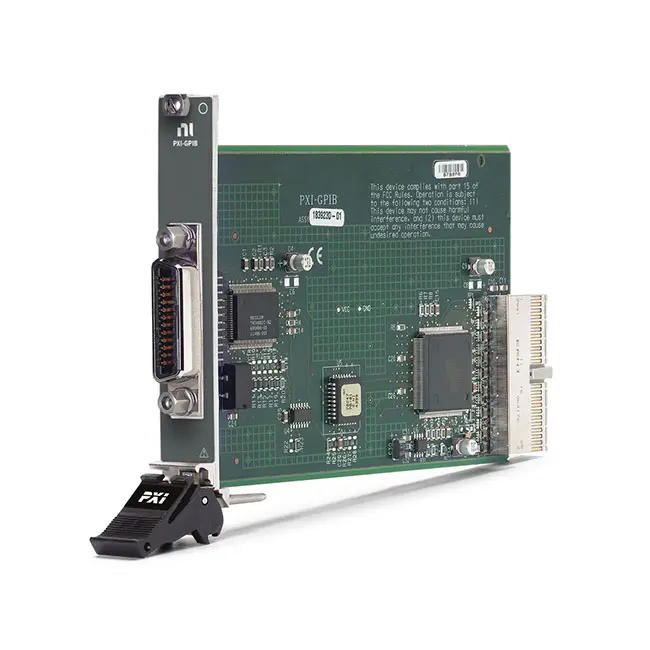
PXI-GPIB IEEE 488 Instrument Control Module
The PXI-GPIB is an IEEE 488 instrument control module that integrates GPIB-equipped benchtop instruments and other external devices into a PXI automated test system. It provides one standard GPIB interface and communicates with the PXI controller through a PXI hybrid connection.
The module supports IEEE 488.2 instrument communication and provides a maximum transfer rate of 7,885 kB/s under supported high-speed operating conditions. It includes NI-488.2 driver software support, allowing applications to communicate with oscilloscopes, digital multimeters, power supplies, spectrum analyzers, signal generators and other programmable instruments.
Key Features of the PXI-GPIB
- Single-port IEEE 488 GPIB controller module
- Standard front-panel GPIB connector
- Maximum transfer rate up to 7,885 kB/s
- IEEE 488.2 instrument control support
- HS488 high-speed transfer capability
- Controls as many as 14 connected GPIB instruments
- PXI hybrid bus connection
- 3U single-slot PXI module
- Bus-powered operation
- NI-488.2 driver software support
- Compatible with Windows and supported real-time operating systems
- Integrates external instruments into PXI test systems
- Supports third-party GPIB instruments
- Suitable for automated test and laboratory applications
PXI-GPIB Technical Specifications
| Product Model | PXI-GPIB |
|---|---|
| Part Number | 778039-01 |
| Product Type | PXI GPIB instrument control module |
| GPIB Ports | One |
| Communication Standard | IEEE 488 and IEEE 488.2 |
| High-Speed Protocol | HS488 |
| Maximum Transfer Rate | 7,885 kB/s |
| Maximum Instruments | Up to 14 instruments connected to one controller |
| Front Connector | Standard GPIB, IEEE 488 connector |
| Bus Connection | PXI hybrid |
| Module Format | 3U, single-slot PXI module |
| Power Source | PXI bus powered |
| Ethernet Port | None |
| Driver | NI-488.2 |
| Supported Operating Systems | Windows and supported real-time operating systems |
| Operating Temperature | 0°C to 55°C |
PXI-GPIB Part Number and Accessories
| Item | Part Number or Type | Description |
|---|---|---|
| PXI-GPIB | 778039-01 | IEEE 488 PXI GPIB instrument control module with NI-488.2 |
| Type X2 GPIB Cable Five-Pack | 777781-25 | Five double-shielded 2 m GPIB cables |
| Standard GPIB Cable | Length dependent | IEEE 488 cable for connecting the module to an instrument or GPIB cable chain |
The PXI-GPIB has one standard front-panel IEEE 488 connector. At least one compatible GPIB cable is normally required to connect the module to an external instrument.
When connecting several instruments, verify the required number of cables, connector orientation and total cable length. GPIB cables use stackable connectors, allowing several instruments to be connected through a linear or star-shaped cable arrangement.
What Is the PXI-GPIB?
The PXI-GPIB functions as the GPIB system controller inside a PXI chassis. It allows the PXI controller to send commands to and receive measurement data from external instruments equipped with an IEEE 488 interface.
This architecture is useful when a test system combines modular PXI instruments with conventional benchtop equipment. Existing GPIB instruments can remain in service while test sequencing, data collection and result processing are centralized in the PXI system.
IEEE 488 Instrument Control
GPIB was originally developed as a standardized method for connecting programmable laboratory instruments. The interface is also known as IEEE 488, HP-IB or General Purpose Interface Bus.
The PXI-GPIB manages controller functions such as addressing instruments, sending commands, receiving responses and handling interface-management operations. Each connected instrument must use a unique primary GPIB address.
GPIB is widely used with oscilloscopes, frequency counters, digital multimeters, power supplies, spectrum analyzers, RF signal generators and other automated test equipment.
IEEE 488.2 Support
IEEE 488.2 adds standardized controller behavior, status reporting and communication conventions to the underlying IEEE 488 electrical bus. The PXI-GPIB supports IEEE 488.2 communication through the NI-488.2 software environment.
IEEE 488.2 should not be confused with the SCPI command language. IEEE 488.2 defines common communication behavior, while SCPI provides standardized text commands used by many programmable instruments.
Maximum GPIB Transfer Rate
The PXI-GPIB provides a maximum specified transfer rate of 7,885 kB/s under supported high-speed conditions. This performance helps reduce data-transfer time when retrieving waveforms, traces or large measurement records from compatible instruments.
The actual transfer rate may be lower because it depends on the instrument, communication mode, cable arrangement, controller software, data-block size and total bus configuration. Older instruments may support only conventional IEEE 488 transfer rates.
HS488 High-Speed Operation
HS488 is a high-speed extension of conventional GPIB communication. It increases transfer performance while retaining the familiar IEEE 488 cabling and instrument-control architecture.
To obtain HS488 performance, every relevant component in the active communication path must support the required high-speed operation. If an instrument does not support HS488, communication continues at a rate compatible with that instrument.
High-speed capability is most valuable when an application repeatedly transfers large waveform files, trace data or measurement arrays. It may provide little benefit when commands and responses contain only a few bytes.
Controlling Multiple GPIB Instruments
A GPIB controller can communicate with as many as 14 instruments on the same bus. Each instrument must be assigned a unique GPIB address so the controller can select the correct talker or listener.
The PXI-GPIB itself acts as the system controller. Instrument addresses usually range from 0 to 30, but duplicate addresses must not be used on the same connected bus.
The practical number of instruments can also be limited by cable length, instrument behavior, connector access and the electrical loading of the complete system.
GPIB Cable Topology
GPIB cables have stackable connectors, allowing instruments to be connected in a linear chain, star arrangement or a combination of both. The cable arrangement should remain within the limits of the IEEE 488 system.
For reliable communication, use high-quality shielded cables and avoid unnecessarily long cable runs. Tight connector screws help prevent intermittent communication caused by cable movement.
A common GPIB guideline is to keep the average cable length at no more than approximately 2 m per connected device and the total cable length at no more than 20 m. Shorter cables are preferable when the system must operate at high transfer rates.
PXI Hybrid Compatibility
The PXI-GPIB uses a PXI hybrid bus connection. It can be installed in a compatible PXI hybrid slot in a PXI or PXI Express chassis that supports hybrid-compatible peripheral modules.
Before installation, inspect the chassis slot diagram. A PXI Express-only peripheral slot may not accept a legacy PXI hybrid-compatible module even when the mechanical dimensions appear similar.
The PXI-GPIB occupies one 3U chassis slot and receives its operating power from the PXI backplane.
Integrating Benchtop Instruments with PXI
Many automated test systems require measurement functions that are already available in existing GPIB benchtop instruments. The PXI-GPIB allows those instruments to operate alongside modular PXI hardware.
For example, a test system can use PXI switching and data acquisition modules while controlling an external programmable power supply, spectrum analyzer or electronic load through GPIB.
This approach can reduce the cost of replacing proven laboratory instruments and simplify migration from traditional rack-and-stack systems to a modular PXI platform.
NI-488.2 Software Support
The PXI-GPIB is supported by the NI-488.2 driver. NI-488.2 provides the low-level communication functions, configuration utilities and diagnostic tools required for NI GPIB interfaces.
Applications can use NI-488.2 functions to open an instrument connection, assign an address, write commands, read responses, perform serial polling and manage interface-level operations.
The appropriate NI-488.2 license and software support are included with the module. Install a driver version compatible with the PXI controller operating system and development environment.
NI Measurement & Automation Explorer
NI Measurement & Automation Explorer can detect the PXI-GPIB, display connected interfaces and help identify GPIB instruments. The Scan for Instruments function can locate responsive devices on the bus.
After an instrument is found, engineers can open a communication panel, send identification commands and verify the response before developing the full test application.
A successful scan confirms basic communication but does not verify every command or operating mode supported by the instrument.
NI-VISA Integration
Applications may communicate with GPIB instruments through NI-VISA. VISA provides a common programming interface for instruments connected through GPIB, Ethernet, USB, serial and other communication buses.
A typical GPIB VISA resource name uses a format such as GPIB0::5::INSTR, where GPIB0 identifies the controller interface and 5 identifies the instrument address.
Using VISA can simplify software that controls several interface types because the application follows a consistent resource-based communication model.
LabVIEW Integration
LabVIEW applications can use NI-VISA or NI-488.2 functions to control instruments connected to the PXI-GPIB. Test software can configure instruments, initiate measurements, retrieve results and record the data automatically.
Many instrument manufacturers provide LabVIEW Plug and Play drivers containing instrument-specific VIs. These drivers can reduce development time by presenting named functions instead of requiring developers to manually construct every command string.
Third-Party Instrument Support
The PXI-GPIB is not limited to NI instruments. It can communicate with compatible third-party equipment from manufacturers such as Keysight, Agilent, Hewlett-Packard, Tektronix, Rohde & Schwarz, Keithley and other test-equipment suppliers.
Compatibility depends on the instrument’s GPIB implementation, command language and software documentation. Consult the instrument programming manual for supported commands, termination settings and data formats.
Typical PXI-GPIB Applications
- Automated test equipment
- Production functional testing
- Benchtop instrument integration
- Laboratory automation
- Electronic design validation
- Power-supply control
- Oscilloscope waveform transfer
- Spectrum analyzer control
- Signal generator automation
- Digital multimeter integration
- Semiconductor characterization
- Aerospace and defense testing
- Calibration systems
- Legacy test-system modernization
Production Test Systems
In production testing, the PXI-GPIB can automate instruments used to apply power, generate stimulus and acquire measurement results. Test software can configure each instrument according to the product and test step.
Automating GPIB communication reduces manual setup and improves repeatability. Instrument error queues and status registers should be checked so communication or configuration problems can be identified before they affect production results.
Laboratory Automation
Research and engineering laboratories can use the PXI-GPIB to coordinate several programmable instruments from one application. Automated sweeps, long-duration measurements and repeated characterization sequences can operate without manual adjustment.
Data returned from the instrument can be combined with measurements from PXI modules and stored in a common result file or database.
Legacy Test-System Modernization
Many older but fully functional instruments use GPIB as their primary automation interface. The PXI-GPIB allows these instruments to be incorporated into a newer PXI-based control and measurement system.
Maintaining GPIB compatibility can reduce the cost and technical risk of replacing an entire test rack at once. The control application should still be evaluated for operating-system, driver and command compatibility.
PXI-GPIB Troubleshooting
The PXI-GPIB is not detected
Confirm that the module is fully installed in a compatible PXI hybrid slot. Check chassis power, controller communication and NI-488.2 installation, then restart the system and inspect the interface in NI MAX.
No GPIB instruments are found
Verify that the instrument is powered on, the GPIB cable is securely connected and the instrument interface is enabled. Check the instrument address and use NI MAX to scan the bus again.
Two instruments cannot communicate correctly
Make sure every instrument has a unique GPIB address. Duplicate addresses can cause both devices to respond to the same command and produce communication errors.
Communication produces a timeout error
Increase the timeout only after verifying that the command is valid. Check the instrument’s termination characters, command syntax, operating state and expected response format.
The transfer rate is lower than expected
Confirm that the instrument supports HS488 and that the cable configuration meets high-speed requirements. Small commands and responses will not normally reach the maximum transfer-rate specification.
Communication is intermittent
Tighten the GPIB connector screws and inspect the cables for damage. Reduce the total cable length, remove unnecessary stacked connectors and test each instrument individually.
The instrument responds in NI MAX but not in the application
Compare the application resource name, GPIB address, timeout and termination configuration with the working NI MAX session. Make sure another program does not have the instrument locked.
The instrument returns unreadable data
Review the instrument programming manual to determine whether the response uses ASCII, binary block or manufacturer-specific formatting. Configure the application to decode the returned format correctly.
The module cannot be inserted into the selected slot
The PXI-GPIB requires a slot compatible with its PXI hybrid connector. Check the chassis slot map and do not force the module into a PXI Express-only peripheral slot.
PXI-GPIB Comparison with Other GPIB Interfaces
| Model or Interface | Host Connection | Best Suited For |
|---|---|---|
| PXI-GPIB | PXI hybrid | Integrating GPIB instruments directly into PXI systems |
| PXI-8232 | PXI | PXI systems requiring GPIB and additional instrument connectivity |
| PCIe-GPIB+ | Desktop PCI Express | High-performance GPIB control from a desktop computer |
| GPIB-USB-HS+ | USB | Portable GPIB connection for computers without an expansion slot |
| GPIB-ENET/1000 | Ethernet | Remote or shared control of GPIB instruments across a network |
PXI-GPIB vs GPIB-USB-HS+
The PXI-GPIB installs directly inside a PXI chassis and creates an integrated instrument-control system. The GPIB-USB-HS+ connects to an external computer through USB and is better suited to portable or temporary laboratory setups.
Choose the PXI-GPIB for permanent PXI automated test systems. Choose a USB interface when portability and rapid connection to different computers are more important.
PXI-GPIB vs GPIB-ENET/1000
The PXI-GPIB connects GPIB instruments directly to a PXI controller. The GPIB-ENET/1000 places the GPIB interface on an Ethernet network, allowing instruments to be controlled from a remote computer.
A network interface is useful when the instruments are located far from the controller or must be accessed over existing Ethernet infrastructure. The PXI-GPIB provides a simpler integrated connection when the instruments are installed near the PXI chassis.
Recommended Related Products
- PXI-8232 GPIB and Ethernet Interface Module
- GPIB-USB-HS+ Instrument Control Interface
- GPIB-USB-HS Instrument Control Interface
- GPIB-ENET/1000 Ethernet Interface
- PCIe-GPIB+ Instrument Control Interface
- PCIe-GPIB Instrument Control Interface
- View More NI PXI and PXI Express Modules
Selecting the Right GPIB Interface
Choose the PXI-GPIB when a PXI system must control external instruments through IEEE 488. It provides an integrated single-slot solution with NI-488.2 support and high-speed GPIB communication.
Before ordering, verify that the chassis has a compatible PXI hybrid slot. Also confirm the controller operating system, driver version, number of instruments, cable lengths and whether the connected equipment supports HS488.
Consider a USB interface for portable computer-based applications or an Ethernet interface when instruments must be controlled remotely across a network.
Why Choose the PXI-GPIB?
- Integrates external GPIB instruments into PXI systems
- Supports IEEE 488 and IEEE 488.2 communication
- Provides transfer rates up to 7,885 kB/s
- Supports HS488-compatible instruments
- Controls as many as 14 GPIB instruments
- Uses one PXI chassis slot
- Receives power directly from the PXI backplane
- Supports NI-488.2 and NI-VISA applications
- Works with compatible third-party instruments
- Supports laboratory, production and validation systems
Frequently Asked Questions
What is the PXI-GPIB?
The PXI-GPIB is an IEEE 488 controller module that allows a PXI system to communicate with external GPIB instruments.
What is the PXI-GPIB part number?
The standard NI part number for the PXI-GPIB with NI-488.2 is 778039-01.
How many GPIB ports does it provide?
The module provides one standard front-panel IEEE 488 GPIB port.
What is the maximum transfer rate?
The maximum specified transfer rate is 7,885 kB/s under supported high-speed GPIB conditions.
How many instruments can it control?
One GPIB controller can control as many as 14 connected instruments, provided the cable and system configuration remain within IEEE 488 limits.
Does it support HS488?
Yes. The PXI-GPIB supports high-speed GPIB transfers with compatible HS488 instruments.
Which driver controls the PXI-GPIB?
The module is supported by the NI-488.2 driver. Applications may also communicate with connected instruments through NI-VISA.
Can it control third-party instruments?
Yes. It can control compatible GPIB instruments from NI and other manufacturers using the command set documented by the instrument supplier.
Does the PXI-GPIB work in a PXI Express chassis?
It can operate in a PXI Express chassis that provides a compatible PXI hybrid peripheral slot. It cannot be installed in an incompatible PXI Express-only slot.
Is a GPIB cable included?
Confirm the package contents when ordering. A compatible GPIB cable is generally selected separately according to the required length and number of instruments.
Does the PXI-GPIB have an Ethernet port?
No. It provides a GPIB interface and does not include Ethernet connectivity.
Can it replace a USB-to-GPIB interface?
Yes, when the application uses a compatible PXI chassis and requires an internally installed GPIB controller. Software and resource-name changes may be required during migration.
Request a Quote for the PXI-GPIB
Contact us for current availability, lead time and project pricing for the PXI-GPIB IEEE 488 Instrument Control Module. We can also help identify compatible GPIB cables, PXI chassis, controllers and alternative USB or Ethernet GPIB interfaces for your automated test system.
















