






PCIe-GPIB IEEE 488.2 Instrument Control Interface
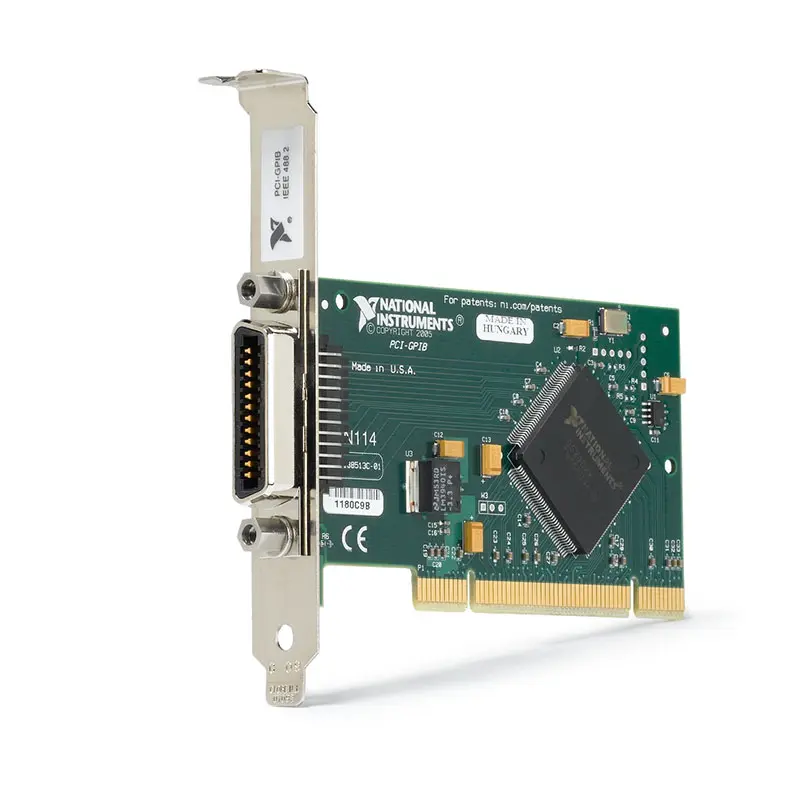
The NI PCIe-GPIB is a PCI Express instrument-control interface that adds an IEEE 488 GPIB port to desktop computers, industrial computers and automated test workstations. It allows compatible computers to communicate with oscilloscopes, digital multimeters, power supplies, signal generators, spectrum analyzers and other programmable GPIB instruments.
The interface supports standard IEEE 488 transfers and the higher-speed HS488 protocol. Its onboard bus-master DMA controller transfers data without requiring continuous processor intervention, helping improve test throughput when retrieving waveforms, measurement records or other large data blocks.
PCIe-GPIB versions are available for standard-height and low-profile computers. NI also offers a package intended for Linux systems. Before ordering, verify the part number, computer bracket height, operating-system requirements and GPIB cable configuration.
Key Features of the PCIe-GPIB
- PCI Express IEEE 488 instrument-control interface
- One IEEE 488 GPIB port
- IEEE 488 and IEEE 488.2 compatibility
- Controller, Talker and Listener capability
- Standard three-wire transfers up to 1,670 kB/s
- HS488 transfers up to 7,980 kB/s, depending on version
- Onboard bus-master DMA controller
- Supports as many as 14 GPIB instruments
- Standard 24-pin IEEE 488 connector
- PCI Express x1 host connection
- Standard-height and low-profile versions available
- NI-488.2 driver software support
- Compatible with NI-VISA instrument-control applications
- Suitable for LabVIEW, LabWindows/CVI and text-based programming
- Designed for automated laboratory and production test systems
PCIe-GPIB Technical Specifications
| Product Model | PCIe-GPIB |
|---|---|
| Product Type | PCI Express GPIB instrument-control interface |
| Host Bus | PCI Express |
| PCI Express Link | x1 |
| Number of GPIB Ports | 1 |
| GPIB Interface | IEEE 488 and IEEE 488.2 |
| GPIB Connector | 24-pin IEEE 488 connector, Version 1.1 |
| Supported GPIB Roles | System Controller, Controller-in-Charge, Talker and Listener |
| Standard Three-Wire Transfer Rate | Up to 1,670 kB/s |
| HS488 Transfer Rate | Up to 7,980 kB/s, depending on part number and system configuration |
| Maximum Instruments | 14 instruments in addition to the controller |
| Data Transfer Architecture | Onboard bus-master DMA |
| Onboard GPIB Analyzer | No |
| Driver | NI-488.2 |
| Additional Software Interface | NI-VISA |
| Operating Temperature | 0°C to 55°C |
| Operating Humidity | 10% to 90%, noncondensing |
| Storage Temperature | -20°C to 70°C |
| Storage Humidity | 5% to 95%, noncondensing |
| Power Requirement | 320 mA typical and 500 mA maximum from the 3.3 V PCI Express supply |
| Board Dimensions | 9.754 cm × 6.888 cm |
| Computer Form Factor | Standard-height or low-profile, depending on part number |
The maximum data rate represents the interface capability under suitable conditions. Actual throughput depends on the connected instrument, command-processing time, cable length, driver configuration, operating system and whether all devices support HS488.
PCIe-GPIB Part Number and Accessories
| Item | Part Number | Description |
|---|---|---|
| PCIe-GPIB Low-Profile | 780575-01 | Low-profile PCI Express GPIB interface supplied with NI-488.2; maximum listed rate of 7,980 kB/s |
| PCIe-GPIB Standard Height | 778930-01 | Standard-height PCI Express GPIB interface supplied with NI-488.2 for Windows; maximum listed rate of 7,230 kB/s |
| PCIe-GPIB Linux Package | 779779-01 | Standard-height PCI Express GPIB interface packaged with NI-488.2 for Linux; maximum listed rate of 7,980 kB/s |
| 24M/F-24M/F X2 Cable | 777781-25 | Package of five double-shielded Type X2, 2 m GPIB cables |
| 24M/F-24M/F X2 Cable | 763061-05 | Double-shielded Type X2, 5 m GPIB cable assembly |
The 780575-01 is the low-profile version for compact computers. The 778930-01 is the conventional standard-height Windows package, while the 779779-01 is packaged with the Linux version of NI-488.2.
All three products use a standard 24-pin IEEE 488 connection and do not include an onboard protocol analyzer. Operating-system compatibility can depend on the installed NI-488.2 release, so verify the computer operating system and driver support before ordering replacement or expansion hardware.
Standard-Height and Low-Profile Versions
A standard-height PCI Express board is appropriate for most tower computers, industrial PCs and rackmount controllers. Compact desktop computers may require the low-profile PCIe-GPIB and its shorter mounting bracket.
The electrical GPIB function is similar, but the mechanical bracket is not interchangeable in every installation. Inspect the computer chassis and available slot opening before selecting a part number.
24-Pin IEEE 488 Connector
The PCIe-GPIB uses the conventional 24-pin IEEE 488 connector found on laboratory instruments. A compatible GPIB cable typically has male and female connector interfaces that permit cables to be stacked at an instrument connector.
Stackable connectors make daisy-chain and star-style wiring possible, but excessive connector stacking can place mechanical stress on the instrument. Secure heavy cables and avoid unsupported cable bundles.
IEEE 488 and IEEE 488.2 Instrument Control
IEEE 488 defines the physical bus, electrical signals and interface functions used for communication between a controller and programmable instruments. IEEE 488.2 adds standardized controller behavior, command handling, status reporting and data formats.
The interface uses eight parallel data lines together with handshake and management signals. These lines coordinate command transmission and ensure that data is accepted by the receiving instrument before the next byte is transferred.
Many IEEE 488.2 instruments also support SCPI commands. This combination provides a widely used method for controlling equipment from different manufacturers within one automated test system.
Controller, Talker and Listener Operation
A GPIB system contains one active Controller-in-Charge. The controller assigns devices as Talkers or Listeners and manages bus operations such as addressing, interface clearing and remote enable.
Controller
The PCIe-GPIB normally acts as the system controller. It configures the bus, addresses connected instruments and determines which device can transmit or receive information.
Talker
A Talker sends data onto the GPIB bus. For example, a digital multimeter becomes a Talker when returning a measurement result to the computer.
Listener
A Listener receives commands or data. A programmable power supply acts as a Listener when it receives a voltage-setting command from the test application.
The controller can change Talker and Listener assignments during a test sequence, allowing one interface to manage several different instruments.
HS488 High-Speed Transfers
HS488 is a high-speed extension of the conventional GPIB protocol. The PCIe-GPIB supports HS488 transfer rates as high as 7,980 kB/s on applicable versions, compared with standard three-wire transfers up to 1,670 kB/s.
HS488 is most beneficial when transferring large waveform files, trace data, test records or other blocks of measurement information. Short command-and-response transactions may show less improvement because instrument processing time and software overhead can dominate the total operation.
All participating devices and the cable topology must support the required transfer mode. When an instrument does not support HS488, communication can continue using conventional IEEE 488 handshaking.
Bus-Master DMA Architecture
The onboard bus-master DMA controller can transfer information between the PCIe-GPIB and computer memory without requiring processor intervention for every byte. This helps reduce processor overhead during sustained communication.
DMA operation is useful in test systems that collect large data blocks while simultaneously performing analysis, logging results, controlling fixtures or updating an operator interface.
The presence of DMA does not eliminate delays inside the instrument. Measurement aperture, trigger latency, command execution and internal waveform processing can still determine overall test speed.
Connecting Up to 14 Instruments
One PCIe-GPIB interface can control as many as 14 instruments on a standard bus. Each instrument must use a unique primary GPIB address so the controller can identify it correctly.
Addresses are normally configured through the instrument’s front panel or system menu. When two instruments share the same address, commands may reach the wrong device or communication may fail entirely.
Applications requiring more instruments can use additional GPIB interfaces, appropriate bus extenders or a distributed test architecture. Separating instruments across multiple interfaces may also improve throughput when several devices transfer data simultaneously.
GPIB Cable Length and Topology
A conventional GPIB system should follow the applicable IEEE 488 cable and device-count rules. A commonly used design limit is a maximum total cable length of 20 m, with an average of no more than 2 m of cable for each connected device.
At least two-thirds of the connected devices should normally be powered on. Every unpowered device can affect signal loading and may reduce communication reliability.
Daisy-Chain Configuration
In a daisy chain, one cable connects the controller to the first instrument and additional cables connect subsequent instruments. This arrangement is simple and usually reduces connector stacking.
Star Configuration
A star configuration connects multiple cables at a common connector. It may be convenient for rack wiring, but excessive stacking should be avoided because of connector loading and mechanical strain.
Cable Selection
Use shielded cables with secure connector screws. Shorter cables generally provide better signal integrity, particularly when using HS488 or when the test environment contains electrical noise.
NI-488.2 Driver Support
The PCIe-GPIB is controlled through the NI-488.2 driver. NI-488.2 provides the low-level functions required to configure the controller, address instruments, write commands, read responses and manage GPIB status conditions.
The driver also provides diagnostic and interactive utilities that help users verify the interface before developing a complete application. Available operating-system support depends on the selected driver release.
When replacing an older GPIB interface, confirm that the installed NI-488.2 version supports both the PCIe-GPIB hardware and the operating system used by the computer.
NI-VISA and SCPI Integration
NI-VISA provides a common instrument-control API for GPIB, USB, serial, Ethernet and other interfaces. A VISA resource name can be used to identify a connected GPIB instrument in LabVIEW or a text-based application.
For example, an instrument using primary address 8 is commonly represented by a resource name similar to GPIB0::8::INSTR. The exact interface number and address depend on the computer configuration.
SCPI instruments can be controlled by sending commands such as identification queries, measurement instructions, trigger commands and configuration parameters. Always terminate commands using the format expected by the instrument.
LabVIEW and Automated Test Software
LabVIEW applications can communicate with GPIB instruments through NI-VISA or NI-488.2 functions. Instrument drivers may provide higher-level VIs for frequently used operations such as configuring measurements, initiating acquisitions and retrieving results.
The PCIe-GPIB can also be integrated into TestStand sequences, LabWindows/CVI applications and compatible C, C++, .NET or Python programs. Software support depends on the installed driver and development environment.
For reliable automation, applications should implement timeouts, error handling, instrument reset procedures and validation of returned data.
PCIe-GPIB Applications
- Automated instrument control
- Production functional testing
- Electronic device validation
- Laboratory measurement automation
- Rack-and-stack instrument integration
- Power-supply and electronic-load control
- Oscilloscope waveform transfer
- Spectrum-analyzer control
- Digital multimeter measurements
- Signal-generator programming
- Calibration and metrology systems
- Semiconductor characterization
- Research and development
- Legacy GPIB system modernization
Automated Production Testing
The PCIe-GPIB can connect a production computer to programmable instruments used for power-up testing, functional verification, calibration and final inspection. Test software can configure each instrument, collect measurements and determine whether the device under test meets the required limits.
Automated control reduces repeated manual setup and helps maintain consistent instrument configurations across multiple operators and test stations.
Oscilloscope and Digitizer Control
Many oscilloscopes use GPIB for remote configuration and waveform transfer. An application can configure voltage ranges, timebase, triggering and acquisition modes before retrieving measurement values or complete waveform records.
HS488 and DMA operation can be beneficial when the oscilloscope returns large waveform arrays. Actual transfer time also depends on the oscilloscope’s internal processing and supported GPIB implementation.
Power-Supply and Electronic-Load Testing
Programmable power supplies and electronic loads can be controlled through the PCIe-GPIB to create automated voltage, current and load profiles. The test application can set operating conditions, collect readings and respond to protection events.
Hardware safety interlocks and current protection should remain independent of software communication. GPIB control should not be treated as the sole safety mechanism for high-energy test systems.
Calibration and Metrology Systems
Calibration laboratories often use GPIB because many precision calibrators, digital multimeters, frequency counters and reference instruments provide IEEE 488 interfaces.
A PCIe-GPIB-based workstation can execute calibration procedures, collect traceable measurement results and create standardized records. Instrument warm-up time, calibration status and environmental requirements must still be observed.
Legacy Instrument Integration
Many high-quality laboratory instruments remain useful even when the original control computer has become obsolete. The PCIe-GPIB allows GPIB instruments to be integrated into a computer equipped with PCI Express slots.
Before migrating an old application, verify the driver architecture, operating-system compatibility, instrument command set and source-code dependencies. Some older programs may require updates even when the physical GPIB instruments remain unchanged.
Multi-Instrument Test Racks
A single PCIe-GPIB interface can coordinate multiple rack instruments through one bus. A typical system may include a multimeter, power supply, oscilloscope, signal generator and switching unit, each configured with a unique address.
Test throughput can be improved by minimizing unnecessary configuration commands, grouping compatible operations and retrieving data in blocks instead of making many small queries.
PCIe-GPIB Installation Workflow
Step 1: Verify Computer Compatibility
Confirm that the computer has an available PCI Express slot and that its chassis accepts the selected standard-height or low-profile bracket. Review the operating-system and NI-488.2 compatibility requirements.
Step 2: Install the Required Driver
Install a compatible version of NI-488.2 according to the applicable installation instructions. Installing the driver before the hardware may simplify device detection on supported systems.
Step 3: Power Down the Computer
Shut down the operating system, disconnect power and follow electrostatic-discharge precautions before opening the computer chassis.
Step 4: Install the PCIe-GPIB
Insert the card into an available compatible PCI Express slot without forcing it. Secure the mounting bracket and confirm that the board is correctly seated.
Step 5: Connect the GPIB Cable
Attach a compatible 24-pin GPIB cable to the PCIe-GPIB and tighten the connector screws. Connect the other end to the first instrument and add other instruments while observing cable-length and device-count limits.
Step 6: Configure Instrument Addresses
Assign a unique primary address to every GPIB instrument. Record the address of each instrument for use in NI MAX, VISA resource names and test software.
Step 7: Detect the Hardware
Power on the instruments and computer. Use NI Measurement & Automation Explorer or the applicable NI configuration utility to verify that the PCIe-GPIB is recognized.
Step 8: Scan for Instruments
Use the available GPIB instrument scan to locate connected devices. Confirm that every expected primary address appears and that no duplicate address is present.
Step 9: Run an Identification Query
Open an interactive communication utility and send an appropriate identification command, commonly *IDN? on SCPI-compatible instruments. Confirm that the returned manufacturer and model information are correct.
Step 10: Integrate the Application
Configure the correct VISA resource name or NI-488.2 board and address settings in the test application. Add suitable timeouts, command termination, error handling and instrument-state initialization.
PCIe-GPIB Troubleshooting
The PCIe-GPIB is not detected by the computer
Verify that the interface is fully seated in the PCI Express slot and that the bracket does not prevent complete insertion. Check the operating-system device list and confirm that a compatible NI-488.2 driver is installed.
No GPIB instruments are found
Confirm that the instruments are powered on, the GPIB cables are secure and the connector screws are tightened. Check that each instrument’s remote interface is set to GPIB rather than USB, serial or Ethernet.
Two instruments appear to use the same address
Open the front-panel communication settings for each instrument and assign a unique primary GPIB address. Restart the instrument scan after changing the address.
The instrument does not respond to commands
Verify the instrument address, command spelling and termination character. Consult the instrument programming manual to determine whether it supports SCPI or a manufacturer-specific command language.
A query times out
Increase the timeout when the instrument needs more time to complete a measurement. Ensure that the application performs a read after a query and does not attempt to read after a command that produces no response.
Communication works intermittently
Inspect cables for damage, loose screws and excessive length. Reduce connector stacking, confirm that at least two-thirds of connected devices are powered and temporarily disconnect instruments to isolate the affected part of the bus.
HS488 performance is lower than expected
Confirm that the connected instruments support HS488 and review the configured cable length. A slow instrument, long cable network or many small transactions may prevent the system from approaching the interface’s maximum transfer rate.
The low-profile card does not fit the computer
Verify that the ordered part number matches the computer’s slot opening. The 780575-01 is the low-profile version, while the other listed configurations use a conventional standard-height arrangement.
The application worked with an older GPIB card but not with PCIe-GPIB
Check the NI-488.2 driver version, interface number, board name and VISA resource strings. An application configured specifically for GPIB0 may require modification if the new interface is assigned another board number.
NI MAX detects the instrument but the program cannot communicate
Compare the resource name used by the application with the resource displayed by NI MAX. Check software bitness, driver installation, permissions and whether another program has retained control of the instrument session.
The wrong response is returned
Verify that every query is followed by the correct read operation. An unread response from an earlier query can remain in the instrument output queue and be returned after a later command.
PCIe-GPIB Comparison
| Interface | Host Connection | Primary Advantage | Best Suited For |
|---|---|---|---|
| PCIe-GPIB | PCI Express | Internal interface with DMA and HS488 performance | Modern desktop, industrial and rackmount computers |
| PCI-GPIB | Conventional PCI | Compatibility with older PCI-based computers | Maintaining existing test stations with legacy PCI slots |
| PXI-GPIB | PXI chassis | Direct integration with modular PXI instrumentation | PXI automated test and measurement systems |
| GPIB-USB-HS | USB | Portable installation without opening the computer | Laptops, service systems and temporary test setups |
| GPIB-ENET/1000 | Ethernet | Remote and network-based instrument access | Distributed laboratories and instruments located away from the host |
PCIe-GPIB vs PCI-GPIB
The PCIe-GPIB connects to a PCI Express slot, while the PCI-GPIB uses the older conventional PCI bus. PCIe-GPIB is generally the appropriate choice for newer computers that no longer provide legacy PCI slots.
A PCI-GPIB may remain useful when maintaining an existing validated test station. Before replacing either interface, verify the computer slot, operating system and installed driver.
PCIe-GPIB vs GPIB-USB-HS
The PCIe-GPIB is installed inside a computer and provides a fixed connection for permanent test stations. The GPIB-USB-HS connects externally through USB and can be moved between compatible computers.
Select PCIe-GPIB for an integrated industrial or rackmount workstation. Select a USB interface when portability, rapid installation or laptop compatibility is more important.
PCIe-GPIB vs PXI-GPIB
PCIe-GPIB is intended for desktop and industrial computers equipped with PCI Express slots. PXI-GPIB installs in a compatible PXI chassis and allows GPIB instruments to be incorporated into a modular PXI test platform.
The communication standard is similar, but the host form factor is different. Choose according to whether the main test controller is a conventional PC or a PXI system.
PCIe-GPIB vs GPIB-ENET/1000
PCIe-GPIB provides a direct internal connection to the host computer. GPIB-ENET/1000 uses an Ethernet network, allowing instruments to be positioned farther from the host and accessed through a networked architecture.
A direct PCI Express interface is suitable for a local test rack, while an Ethernet interface can be preferable for distributed laboratories or installations where the computer and instruments are physically separated.
Selecting the Correct GPIB Interface
Choose PCIe-GPIB when the computer has an available PCI Express slot and the application requires a permanent, high-performance GPIB connection. Select the low-profile version for compact computers and the standard-height version for conventional workstations.
Consider a USB interface when portability is essential, a PXI interface when the system is based on a PXI chassis or an Ethernet interface when remote instrument access is required.
Why Choose the PCIe-GPIB?
- Adds IEEE 488 instrument control to PCI Express computers
- Supports conventional IEEE 488 and HS488 transfers
- Provides transfer rates up to 7,980 kB/s on applicable versions
- Uses onboard bus-master DMA to reduce processor overhead
- Controls as many as 14 instruments from one interface
- Works with a wide range of laboratory and production instruments
- Supports NI-488.2 and NI-VISA software
- Available in standard-height and low-profile formats
- Suitable for both new systems and legacy-instrument modernization
- Provides a stable internal interface for permanent test stations
PCIe-GPIB Frequently Asked Questions
What is the PCIe-GPIB?
The PCIe-GPIB is a PCI Express interface that enables a computer to control IEEE 488 and IEEE 488.2 instruments through a GPIB connection.
How many GPIB ports does it provide?
The PCIe-GPIB provides one 24-pin IEEE 488 GPIB port.
How many instruments can it control?
One PCIe-GPIB interface can control as many as 14 GPIB instruments when the bus follows the applicable device-count, addressing and cable-length requirements.
What is its maximum GPIB transfer rate?
The current specification lists standard three-wire transfers up to 1,670 kB/s and HS488 transfers up to 7,980 kB/s. The 778930-01 product configuration is listed with a maximum rate of 7,230 kB/s.
Does the PCIe-GPIB support HS488?
Yes. It supports the HS488 high-speed GPIB protocol. The connected instrument and overall cable system must also support the required mode to obtain the higher transfer rate.
What is the low-profile PCIe-GPIB part number?
The low-profile PCIe-GPIB with NI-488.2 is part number 780575-01.
What is the standard-height Windows part number?
The standard-height PCIe-GPIB packaged with NI-488.2 for Windows is part number 778930-01.
Which part number is packaged for Linux?
Part number 779779-01 is the standard-height PCIe-GPIB package supplied with NI-488.2 for Linux.
Does the PCIe-GPIB include an analyzer?
No. The currently listed PCIe-GPIB configurations do not include an onboard GPIB protocol analyzer.
Which driver is required?
The interface uses the NI-488.2 driver. NI-VISA can also be used as the instrument-control API in compatible applications.
Can the PCIe-GPIB control SCPI instruments?
Yes. It can communicate with SCPI-compatible GPIB instruments by sending the commands defined in the instrument’s programming manual.
Can it be installed in a longer PCI Express slot?
The card uses a PCI Express x1 connection. A PCIe x1 card can commonly operate in mechanically and electrically compatible longer PCI Express slots, subject to the computer manufacturer’s slot configuration.
Does PCIe-GPIB supply power to an instrument?
No. GPIB is a communication interface. Connected instruments require their own appropriate power source.
Can multiple PCIe-GPIB cards be installed in one computer?
Multiple interfaces may be used when the computer, operating system and NI-488.2 configuration support them. Each interface is assigned a separate board number, such as GPIB0 or GPIB1.
What GPIB cable should be used?
Use a compatible shielded 24-pin IEEE 488 cable. Select the cable length according to the system topology and avoid exceeding the applicable total-length and average-length limits.
Recommended Related Products
- PCI-GPIB IEEE 488 Instrument Control Interface
- PXI-GPIB Instrument Control Module
- GPIB-USB-HS Instrument Control Interface
- GPIB-ENET/1000 Ethernet-to-GPIB Controller
- PCI-GPIB+ Interface with GPIB Analyzer
- PXI-8430/4 Serial Interface Module
- PXIe-8234 Gigabit Ethernet Interface Module
- View More NI Instrument-Control and PXI Modules
Request a Quote for the PCIe-GPIB
Contact us for current availability, lead time and project pricing for the NI PCIe-GPIB IEEE 488.2 Instrument Control Interface. We can help identify the correct standard-height, low-profile or Linux package and select compatible GPIB cables for your instrument-control system.















