






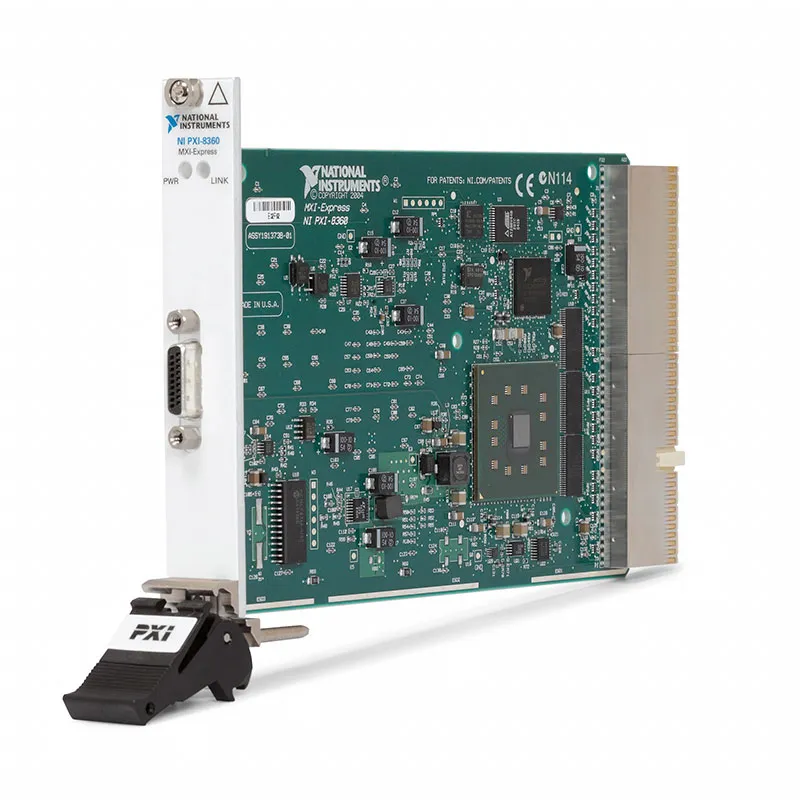
PXI-8360 MXI-Express x1 Remote Control Module
The NI PXI-8360 is a PXI remote control module that connects a PXI or CompactPCI chassis to an external computer through an MXI-Express x1 copper link. It allows the host computer to control installed PXI instruments as though they were directly connected through its PCI Express bus.
The module installs in the controller slot of the chassis and operates with a compatible PCI, PCI Express or ExpressCard host-side MXI interface. The transparent architecture generally allows existing instrument drivers and applications to access the remote PXI hardware without a specialized network communication layer.
Key Features of the PXI-8360
- MXI-Express x1 remote control interface
- Controls PXI and CompactPCI chassis from an external computer
- Copper MXI-Express cable support
- Up to 7 m supported cable length
- Transparent PCI Express architecture
- Approximately 100 MB/s class sustained throughput
- Installs in one PXI controller slot
- Compatible with several host-side MXI interfaces
- No embedded operating system required
- Suitable for desktop, workstation and laptop-controlled PXI systems
PXI-8360 Technical Specifications
| Product Model | PXI-8360 |
|---|---|
| Part Number | 779501-01 |
| Product Type | PXI remote control module |
| Interface Family | MXI-Express x1 |
| Host Connection | Compatible PCI, PCI Express or ExpressCard MXI interface |
| Cable Type | Copper MXI-Express |
| Maximum Cable Length | Up to 7 m |
| Typical Sustained Throughput | Approximately 100 MB/s class, system dependent |
| Chassis Support | PXI and compatible CompactPCI systems |
| Slot Requirement | One PXI controller slot |
| Operating Temperature | 0°C to 55°C |
| Module Format | 3U PXI |
| Weight | Approximately 0.25 kg |
Transparent Remote PXI Control
MXI-Express extends the host computer’s PCI Express bus to the PXI chassis. From the operating system’s perspective, the PXI instruments appear as locally installed PCI resources rather than network instruments.
This design allows compatible NI and third-party drivers to access the remote modules without rewriting the application around TCP/IP communication.
External Computer Flexibility
The remote-control approach allows users to select a desktop, industrial computer, rackmount controller or compatible laptop interface according to the required processor, storage and operating-system configuration.
The host interface, PXI-8360 and cable must belong to a supported MXI-Express family. Mechanically similar connectors do not guarantee electrical or generation compatibility.
PXI-8360 Part Number and Accessories
| Item | Part Number | Description |
|---|---|---|
| PXI-8360 | 779501-01 | MXI-Express x1 PXI remote control module |
| PCIe-8361 | Configuration dependent | PCI Express host interface for a compatible desktop computer |
| ExpressCard-8360 | Configuration dependent | Host interface for compatible laptops with an ExpressCard slot |
| MXI-Express Copper Cable | Length dependent | Available in supported lengths up to 7 m |
| PXI Chassis | Model dependent | Provides the controller slot and peripheral-module slots |
A complete remote-control system requires the PXI-8360, a compatible host-side interface and the correct MXI-Express copper cable. Verify all three components before ordering.
PXI-8360 Applications
- Remote PXI chassis control
- Desktop-controlled measurement systems
- Laptop-controlled PXI systems
- Automated production testing
- Laboratory instrumentation
- Legacy PXI system maintenance
- High-capacity data storage applications
- Industrial computer integration
- Custom workstation-controlled ATE
- PXI system expansion
Production Test Systems
A rackmount or industrial PC can run the production application while the PXI chassis remains close to the fixture. This simplifies access to computer components and can provide greater storage flexibility than an embedded controller.
Legacy PXI Systems
The PXI-8360 remains useful for maintaining systems that were validated around MXI-Express x1. When replacing one component, verify the generation and compatibility of the complete host-card, cable and chassis-side interface chain.
PXI-8360 Installation Workflow
Step 1: Verify the Components
Confirm that the host interface, copper cable and PXI-8360 are a supported combination.
Step 2: Power Down Both Systems
Shut down the computer and switch off the PXI chassis before installing hardware or connecting the MXI cable.
Step 3: Install the Host Interface
Install the compatible host card in the required computer slot and secure it according to its hardware instructions.
Step 4: Install the PXI-8360
Insert the PXI-8360 into the PXI chassis controller slot and secure the front panel.
Step 5: Connect the MXI Cable
Attach the copper cable without bending it sharply or forcing the connectors. Tighten any retention hardware evenly.
Step 6: Follow the Correct Power Sequence
Power on the PXI chassis before starting the host computer unless the documented system configuration specifies a different sequence.
PXI-8360 Troubleshooting
The PXI chassis is not detected
Shut down both systems and reseat the host card, PXI-8360 and cable. Confirm that the chassis was powered before the host began PCI bus enumeration.
PXI modules are missing
Check PXI Platform Services and the drivers for the individual modules. Inspect the host BIOS for resource-allocation or PCI bridge settings.
The system works only after restarting
Use a complete power-off sequence rather than a software restart. The host must enumerate the MXI-connected chassis during startup.
Data transfer is slower than expected
Review the x1 link limitation, host computer architecture, module bandwidth and storage performance. Several devices share the available MXI path.
The cable becomes disconnected during operation
Do not hot-disconnect the MXI cable unless the complete system explicitly supports that operation. Power down before reconnecting to avoid crashes and hardware enumeration errors.
PXI-8360 Comparison
| Model | MXI Architecture | Best Suited For |
|---|---|---|
| PXI-8360 | MXI-Express x1 copper | Conventional PXI remote control |
| PXI-8366 | Fiber-optic MXI connection | Long-distance or electrically isolated links |
| PXIe-8370 | PXI Express remote control | PXI Express chassis and higher bandwidth |
| PXIe-8388 | MXI-Express Gen2 x16 | High-throughput PXI Express systems |
| Embedded PXI Controller | Controller installed inside chassis | Self-contained systems without an external host |
PXI-8360 Frequently Asked Questions
What is the PXI-8360?
It is an MXI-Express x1 remote control module that connects a PXI chassis to an external computer.
Does it work without a host interface?
No. A complete system requires a compatible computer-side MXI interface and copper cable.
What is the maximum cable length?
Supported copper-cable configurations are available in lengths up to 7 m.
Does the PXI-8360 contain an operating system?
No. The external host computer runs the operating system and test application.
Can the cable be disconnected while operating?
Normally, no. Power down the computer and chassis before disconnecting or replacing the MXI cable.
Request a Quote for the PXI-8360
Contact us for availability and pricing for the PXI-8360 remote control module, part number 779501-01. We can also supply compatible host interfaces, copper cables and PXI chassis.















