






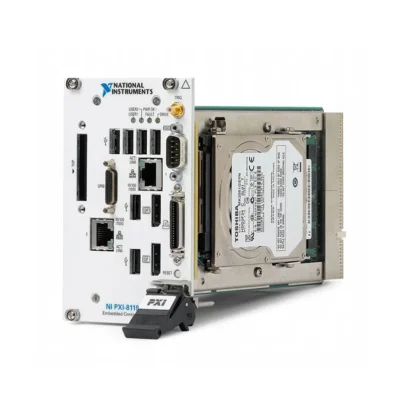
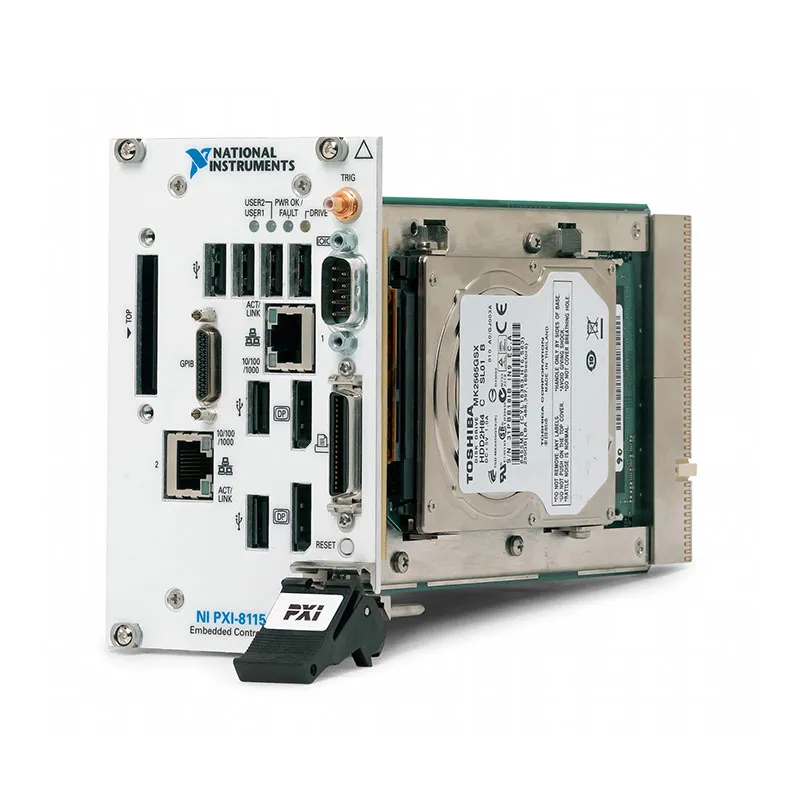
PXI-8115 2.5 GHz Dual-Core Intel Core i5 PXI Controller
The PXI-8115 is an embedded PXI system controller designed for processor-intensive automated test, modular instrumentation and data acquisition applications. It installs directly in the system-controller position of a compatible PXI chassis and eliminates the need for an external desktop computer.
The controller features a second-generation Intel Core i5-2510E dual-core processor with a base clock frequency of 2.5 GHz and Intel Turbo Boost operation up to 3.1 GHz. It includes dual Gigabit Ethernet interfaces, six Hi-Speed USB ports, two DisplayPort video outputs, GPIB, serial, parallel and trigger connections.
Standard configurations include DDR3 memory and integrated storage, with operating-system options that originally included Windows and LabVIEW Real-Time variants. The PXI-8115 is discontinued, but used and refurbished units remain useful for maintaining established PXI test systems.
Key Features of the PXI-8115
- Intel Core i5-2510E dual-core processor
- 2.5 GHz base processor frequency
- Up to 3.1 GHz single-core Turbo Boost frequency
- Two processor cores and four execution threads
- 3 MB processor cache
- 2 GB standard DDR3-1333 memory
- Up to 8 GB maximum RAM
- Integrated hard-disk or solid-state storage options
- Two 10/100/1000BASE-T Gigabit Ethernet ports
- Six Hi-Speed USB 2.0 ports
- Two DisplayPort video outputs
- Integrated GPIB instrument-control interface
- RS-232 serial port
- IEEE 1284 parallel port
- Front-panel SMB trigger connector
- PXI backplane trigger routing
- In-ROM memory and storage diagnostics
- Windows and LabVIEW Real-Time configurations
- Designed for four-slot PXI system-controller positions
PXI-8115 Technical Specifications
| Product Model | PXI-8115 |
|---|---|
| Product Type | Embedded PXI system controller |
| Processor | Intel Core i5-2510E |
| Processor Generation | Second-generation Intel Core architecture |
| Processor Cores | 2 |
| Processor Threads | 4 |
| Base Clock Frequency | 2.5 GHz |
| Maximum Turbo Frequency | Up to 3.1 GHz in single-core operation |
| Processor Cache | 3 MB |
| Standard Memory | 2 GB DDR3-1333, configuration dependent |
| Maximum Memory | 8 GB |
| Memory Type | Single-channel PC3-10600 DDR3 SO-DIMM |
| Standard Storage | 250 GB integrated hard drive, configuration dependent |
| Storage Options | Hard-disk and solid-state-drive configurations |
| Ethernet Interfaces | 2 × 10/100/1000BASE-T Gigabit Ethernet |
| Ethernet Connectors | 2 × RJ45 |
| USB Ports | 6 × Hi-Speed USB 2.0 |
| Video Outputs | 2 × DisplayPort |
| Serial Interface | 1 × RS-232 |
| Serial Connector | 9-pin male D-Sub |
| Parallel Interface | IEEE 1284 parallel port |
| GPIB Interface | Integrated IEEE 488.2 controller |
| GPIB Connector | 25-pin Micro D |
| Front-Panel Trigger | SMB connector routable to PXI trigger lines |
| Bus Interface | Conventional PXI and CompactPCI backplane interface |
| Maximum Theoretical PXI Bus Bandwidth | 132 MB/s |
| Operating-System Options | Windows, LabVIEW Real-Time or no operating system, depending on part number |
| BIOS | Configuration utility with PXI and LabVIEW Real-Time settings |
| Diagnostics | In-ROM memory and storage diagnostics |
| Standard Operating Temperature | 5°C to 50°C |
| Extended Operating Temperature | 0°C to 55°C on eligible extended-temperature configurations |
| Controller Width | Four PXI slots |
| Module Format | 3U PXI embedded controller |
| Approximate Dimensions | 8.1 × 13.0 × 21.6 cm |
| Approximate Weight | 1.32 kg |
| Lifecycle Status | Discontinued |
PXI-8115 Part Numbers and Configurations
| Part Number | Typical Configuration | Status |
|---|---|---|
| 781860-00 | PXI-8115 controller without a preinstalled operating system | Discontinued |
| 781860-01 | PXI-8115 with a factory Windows configuration | Discontinued |
| 781860-04 | PXI-8115 with a later factory Windows configuration | Discontinued |
| 781860-33 | PXI-8115 LabVIEW Real-Time configuration | Discontinued |
| 781862-01 | PXI-8115 alternate or extended-temperature Windows configuration | Discontinued |
| 781862-04 | PXI-8115 alternate or extended-temperature Windows configuration | Discontinued |
| 781862-33 | PXI-8115 alternate or extended-temperature real-time configuration | Discontinued |
PXI-8115 part numbers can identify differences in operating system, storage, memory, language and temperature range. Verify the complete ordering number and the controller’s current installed configuration before purchasing a replacement.
Used controllers may have been upgraded or reimaged after leaving the factory. The currently installed operating system, memory and storage capacity should therefore be confirmed directly from the unit rather than inferred only from its original order number.
Intel Core i5-2510E Processor
The PXI-8115 uses an Intel Core i5-2510E dual-core embedded processor. Its 2.5 GHz base frequency provides sufficient performance for automated test sequencing, measurement analysis, data acquisition and instrument control.
Intel Turbo Boost technology can increase the active processor frequency to approximately 3.1 GHz when thermal and workload conditions permit. This improves performance for test operations that depend primarily on one processor core.
The processor supports two physical cores and four threads, allowing Windows and compatible real-time applications to distribute acquisition, analysis, logging and user-interface tasks across multiple execution resources.
DDR3 Memory
Standard PXI-8115 configurations were supplied with 2 GB of DDR3-1333 memory. The controller supports up to 8 GB through a compatible SO-DIMM.
Additional memory can improve performance when running large LabVIEW applications, multiple instrument drivers, TestStand sequences, data-analysis routines or memory-intensive acquisition buffers.
The installed memory capacity should be verified before ordering. Used controllers may contain a different memory configuration from the original factory specification.
Integrated Storage
The PXI-8115 includes integrated storage for its operating system, NI software, test programs and measurement data. A 250 GB hard disk was commonly supplied, although storage capacity varies by configuration and production date.
Some controllers may have a solid-state drive or a replacement hard disk installed. An SSD can improve boot time, application loading and resistance to mechanical vibration.
Before using a previously owned controller, review the storage health, securely erase unneeded data and install or restore a validated operating-system image.
Dual Gigabit Ethernet Interfaces
Two 10/100/1000BASE-T Ethernet ports allow the PXI-8115 to connect to laboratory networks, company infrastructure, remote user interfaces and Ethernet-controlled instruments.
The two interfaces can be assigned to separate networks. For example, one port can connect to a corporate network while the other provides an isolated connection to test equipment or a device under test.
Network performance depends on the cable, switch, protocol, operating system and software workload. Gigabit Ethernet connectivity does not increase the bandwidth of the conventional PXI backplane.
Six Hi-Speed USB Ports
The PXI-8115 provides six USB 2.0 ports for keyboards, mice, storage devices, license dongles and USB-controlled instruments.
USB devices share controller resources and can introduce nondeterministic traffic. In real-time systems, avoid unnecessary USB peripherals and validate any device that must remain connected during deterministic operation.
Dual DisplayPort Video Outputs
Two DisplayPort connectors support local monitor connections and dual-display applications. Engineers can use one monitor for test control and another for measurement displays, debugging tools or documentation.
Appropriate DisplayPort adapters can be used for compatible VGA or DVI monitors. Confirm the adapter type and display resolution before ordering accessories.
Integrated GPIB Controller
The built-in IEEE 488.2 GPIB interface allows the PXI-8115 to control compatible oscilloscopes, power supplies, signal generators, digital multimeters and other traditional laboratory instruments.
Integrated GPIB control can eliminate the need for a separate PXI GPIB module, preserving chassis slots for measurement hardware. A suitable Micro D GPIB adapter or cable is required.
RS-232 Serial Port
The controller includes a standard RS-232 serial interface through a 9-pin D-Sub connector. It can communicate with programmable instruments, industrial controllers, motion systems and other serial devices.
Verify the required baud rate, data format, flow control and cable pinout before connecting external equipment. RS-232 should not be confused with RS-422 or RS-485 differential serial interfaces.
Parallel Port
An IEEE 1284 parallel port provides compatibility with legacy laboratory and industrial peripherals. It may also be used by established fixtures that rely on parallel digital control.
New test systems generally use USB, Ethernet or dedicated PXI digital I/O instead. The parallel port remains valuable when maintaining a test station built around older equipment.
Front-Panel Trigger Connector
The front-panel SMB trigger connection can route a trigger signal to or from the PXI backplane trigger bus. This allows external equipment to participate in synchronized PXI test sequences.
Trigger routing should be configured carefully. Two devices must not drive the same trigger line at the same time because electrical contention can disrupt the system or damage hardware.
Conventional PXI Backplane Interface
The PXI-8115 is a conventional PXI controller rather than a PXI Express controller. It communicates with peripheral modules through the PCI-based PXI backplane and provides a maximum theoretical bandwidth of 132 MB/s.
This bandwidth is suitable for many digital multimeter, switch, industrial I/O and moderate-speed data acquisition applications. High-speed digitizers and RF instruments may require a PXI Express controller and chassis.
Four-Slot Controller Design
The PXI-8115 occupies four chassis slots, beginning with the system-controller slot. Confirm that the chassis supports an embedded controller of this width and that adjacent peripheral slots are available.
Its wider design accommodates the processor, cooling assembly, integrated storage and extensive peripheral interfaces. The remaining chassis slot count should be considered when planning the complete measurement system.
In-ROM Diagnostics
The PXI-8115 includes diagnostic functions that can test system memory and storage during startup. These tools help identify hardware problems without requiring the primary operating system to load successfully.
Diagnostics are useful when investigating boot failures, data corruption, unexpected system crashes or intermittent memory errors. Important data should be backed up before performing storage tests or recovery procedures.
Windows Operating-System Support
Factory configurations were available with Windows versions appropriate to the controller’s production period, including Windows XP and Windows 7 variants.
These operating systems have reached the end of normal security support. A legacy Windows controller should be isolated from untrusted networks and used with suitable cybersecurity controls.
Before reinstalling Windows, confirm the availability of PXI-8115 firmware, peripheral drivers, chipset drivers and compatible versions of NI software.
LabVIEW Real-Time Support
Selected PXI-8115 configurations support the LabVIEW Real-Time operating system. A real-time application can execute test, measurement and control tasks with more predictable timing than a general-purpose desktop operating system.
Real-time operation is useful for hardware-in-the-loop testing, deterministic data acquisition, automated control and long-duration unattended systems.
Software support depends on the installed LabVIEW Real-Time and NI driver versions. Verify compatibility with every PXI peripheral module before modifying an established system.
Typical PXI-8115 Applications
- Automated production testing
- Modular instrumentation control
- Data acquisition and logging
- Hardware-in-the-loop testing
- Electronic device validation
- Semiconductor test systems
- Aerospace and defense testing
- Industrial monitoring and control
- Laboratory instrument automation
- Reliability and environmental testing
- GPIB instrument control
- Legacy PXI system maintenance
Automated Production Testing
The PXI-8115 can execute LabVIEW or TestStand applications that configure instruments, collect measurements, evaluate test limits and generate production reports.
Integrated Ethernet, USB, serial and GPIB interfaces allow the controller to communicate with barcode readers, external instruments, manufacturing networks and other equipment without occupying additional PXI slots.
Data Acquisition Systems
The controller can coordinate PXI data acquisition modules, apply signal-processing routines and save measurement results to local or network storage.
Before selecting the PXI-8115 for continuous high-speed acquisition, calculate the required backplane, memory, storage and network throughput. Applications exceeding conventional PXI bandwidth should use a PXI Express controller.
Hardware-in-the-Loop Testing
A LabVIEW Real-Time PXI-8115 can operate simulation models and coordinate PXI I/O modules in hardware-in-the-loop test systems.
The suitability of the processor depends on model complexity, loop rate and I/O workload. Newer controllers provide significantly higher multicore performance for demanding real-time simulations.
Laboratory Instrument Control
The built-in GPIB, serial, Ethernet and USB interfaces allow the PXI-8115 to control both modular PXI instruments and traditional benchtop equipment.
This combination is valuable in mixed-instrument systems that must maintain established GPIB or serial equipment while adding PXI measurement modules.
PXI-8115 Software Compatibility
The PXI-8115 works with compatible releases of NI Measurement & Automation Explorer, NI-VISA, NI-488.2, LabVIEW, LabVIEW Real-Time and relevant instrument drivers.
Compatibility depends on the operating system and the release date of each software component. Check the support matrix before upgrading Windows, LabVIEW, TestStand or hardware drivers.
PXI-8115 Firmware and Additional Drivers packages can provide BIOS, chipset and peripheral support when rebuilding the controller independently from its original recovery media.
PXI-8115 Installation
Install the PXI-8115 in the system-controller position of a compatible PXI chassis. Turn off the chassis and use electrostatic-discharge precautions before inserting or removing the controller.
Make sure the controller is fully seated and secure all retaining screws. Connect the display, keyboard and other required peripherals before powering on the chassis for the initial configuration.
Allow adequate airflow around the controller. Blocked chassis vents, incorrect fan settings or operation outside the temperature range can cause thermal shutdown or unstable operation.
PXI-8115 Troubleshooting
The PXI-8115 does not power on
Confirm that the chassis is connected to a working power source and that the controller is fully seated in the system slot. Check the chassis power switch, status indicators and controller retaining screws.
No image appears on the monitor
Verify the DisplayPort cable, adapter and monitor input selection. Try the second DisplayPort connector and confirm that the display supports the selected resolution.
The controller cannot find the operating system
Open the BIOS setup and confirm that the internal storage device is detected and included in the boot order. A missing drive may indicate a loose connection or failed storage device.
The controller repeatedly restarts
Run the built-in memory and storage diagnostics. Check chassis cooling, memory installation, storage health and operating-system event logs.
NI MAX does not detect the PXI modules
Confirm that NI Measurement & Automation Explorer and the required instrument drivers are installed. Check the chassis connection, restart the system and inspect Device Manager for unresolved hardware.
An Ethernet port does not connect
Check the Ethernet cable, switch port and network configuration. Confirm that the correct network interface is enabled and that its IP address does not conflict with another device.
A USB peripheral is not recognized
Try another USB port and inspect the device in the operating system. Some peripherals require additional drivers or more power than the port can provide.
A GPIB instrument is not detected
Verify NI-488.2 installation, the GPIB adapter cable, instrument address and cable termination. Use NI MAX to scan for instruments and check for address conflicts.
The system runs slowly
Check processor and memory utilization, available storage space, drive health and background services. Increasing RAM or replacing an aging hard disk with a compatible SSD may improve performance.
The controller overheats
Inspect chassis airflow, fan operation and ambient temperature. Clean obstructed air filters and verify that empty chassis slots have appropriate filler panels.
LabVIEW Real-Time cannot connect
Verify the controller’s network configuration, real-time boot settings and supported software versions. Reset the IP address or start in safe mode when an invalid configuration prevents normal access.
The BIOS settings are incorrect
Enter the BIOS setup and load the appropriate defaults. If necessary, power down the chassis and follow the documented CMOS-clearing procedure before reinstalling the controller.
PXI-8115 Comparison with Related PXI Controllers
| Model | Processor Configuration | Best Suited For |
|---|---|---|
| PXI-8115 | 2.5 GHz dual-core Intel Core i5 | Maintaining processor-intensive conventional PXI systems |
| PXIe-8115 | 2.5 GHz dual-core Intel Core i5 with PXI Express | Similar applications requiring a PXI Express interface |
| PXI-8119 | 2.3 GHz quad-core Intel Core i7 | Legacy PXI systems requiring additional processor cores |
| PXI-8840 | Newer-generation Intel Core processor | Updated conventional PXI controller applications |
| PXIe-8840 | Newer Intel Core processor with PXI Express | Higher-performance PXI Express test systems |
| PXIe-8861 | Newer high-performance multicore controller | Modern Windows applications requiring higher performance |
PXI-8115 vs PXIe-8115
The PXI-8115 and PXIe-8115 use the same Intel Core i5-2510E processor and provide similar memory, storage and peripheral interfaces.
The main difference is the chassis backplane interface. The PXI-8115 uses the conventional PCI-based PXI bus, while the PXIe-8115 uses a PCI Express-based interface for compatible PXI Express chassis.
Select the controller that matches the system slot and backplane architecture of the chassis. The two models should not be treated as mechanically interchangeable without confirming chassis compatibility.
PXI-8115 vs PXI-8119
The PXI-8119 uses a quad-core Intel Core i7 processor, while the PXI-8115 uses a dual-core Intel Core i5 processor.
The PXI-8119 is more suitable for applications that can use four processor cores, including parallel analysis, simulation and high-throughput test execution. The PXI-8115 remains suitable for less demanding systems and established software configurations.
PXI-8115 vs PXI-8840
The PXI-8840 uses a newer Intel processor generation and supports newer software environments than the PXI-8115.
Choose the PXI-8115 when exact compatibility with an existing system image, fixture or validated software configuration is required. Consider the PXI-8840 when upgrading processor performance and software support while retaining a compatible PXI architecture.
Recommended Related Products
- PXIe-8115 2.5 GHz Dual-Core PXI Express Controller
- PXI-8119 Quad-Core Intel Core i7 PXI Controller
- PXI-8840 Embedded PXI Controller
- PXIe-8840 Embedded PXI Express Controller
- PXIe-8861 High-Performance PXI Express Controller
- PXI-1042 PXI Chassis
- PXI-1045 18-Slot PXI Chassis
- View More NI PXI and PXI Express Controllers
Selecting the Right PXI Controller
Choose the PXI-8115 when maintaining a conventional PXI system that requires an Intel Core i5 processor, integrated GPIB and compatibility with an established Windows or LabVIEW Real-Time software image.
For high-speed digitizers, RF instruments or other data-intensive modules, consider a PXI Express controller with greater backplane bandwidth. For new Windows systems, select a newer controller that supports a currently maintained operating system.
Before ordering a replacement PXI-8115, confirm the full part number, operating system, storage type, memory capacity, temperature rating and chassis compatibility.
Why Choose the PXI-8115?
- Provides an integrated computer for conventional PXI systems
- Uses a 2.5 GHz dual-core Intel Core i5 processor
- Supports up to 8 GB of DDR3 memory
- Includes integrated storage for software and measurement data
- Provides dual Gigabit Ethernet connections
- Offers six USB ports for peripherals and instruments
- Supports dual-monitor operation through DisplayPort
- Includes GPIB, serial and parallel interfaces
- Supports front-panel and PXI backplane triggering
- Works with Windows and LabVIEW Real-Time configurations
- Maintains compatibility with established PXI test systems
Frequently Asked Questions
What is the PXI-8115?
The PXI-8115 is an embedded controller for conventional PXI systems. It combines a 2.5 GHz Intel Core i5 processor, memory, storage and peripheral interfaces in a four-slot PXI module.
Which processor does the PXI-8115 use?
It uses an Intel Core i5-2510E dual-core processor with a 2.5 GHz base frequency and Turbo Boost operation up to approximately 3.1 GHz.
How much memory does the PXI-8115 support?
The controller was commonly supplied with 2 GB of DDR3 memory and supports up to 8 GB.
Does the PXI-8115 include a hard drive?
Yes. It includes integrated storage. A 250 GB hard drive was common, but the installed capacity and drive type vary by configuration and previous upgrades.
How many Ethernet ports does it provide?
The PXI-8115 provides two 10/100/1000BASE-T Gigabit Ethernet ports.
How many USB ports does it have?
It provides six Hi-Speed USB 2.0 ports for peripherals, removable storage and USB instruments.
Does the PXI-8115 include GPIB?
Yes. It includes an integrated IEEE 488.2 GPIB controller for communicating with compatible laboratory instruments.
Does the PXI-8115 support two monitors?
Yes. The controller provides two DisplayPort video outputs for dual-monitor configurations.
Can the PXI-8115 run LabVIEW Real-Time?
Yes. Specific PXI-8115 configurations support LabVIEW Real-Time. Software and driver versions must be checked for compatibility.
Can the PXI-8115 run Windows 10?
The controller was designed for older Windows releases. Before installing Windows 10, verify processor, firmware, peripheral-driver and NI software compatibility. A newer controller is generally preferable for a maintained Windows 10 environment.
How many chassis slots does it occupy?
The PXI-8115 occupies four slots, beginning with the PXI system-controller slot.
What is the PXI-8115 backplane bandwidth?
It uses the conventional PCI-based PXI bus, which provides maximum theoretical bandwidth of 132 MB/s.
What is the difference between PXI-8115 and PXIe-8115?
The PXI-8115 uses a conventional PXI backplane interface, while the PXIe-8115 uses a PXI Express interface. Their processor and front-panel peripheral features are otherwise similar.
Is the PXI-8115 discontinued?
Yes. The PXI-8115 is discontinued. Used and refurbished units may remain available for maintaining legacy PXI systems.
What are the PXI-8115 part numbers?
Common ordering numbers include 781860-00, 781860-01, 781860-04, 781860-33, 781862-01, 781862-04 and 781862-33. Confirm the operating system, temperature range, memory and storage associated with the exact unit.
Request a Quote for the PXI-8115
Contact us for current availability, lead time and project pricing for the PXI-8115 2.5 GHz Dual-Core Intel Core i5 PXI Controller. We can also help verify the operating system, memory, storage, temperature range, compatible PXI chassis and suitable replacement controller for your test system.















