






Product Introduction
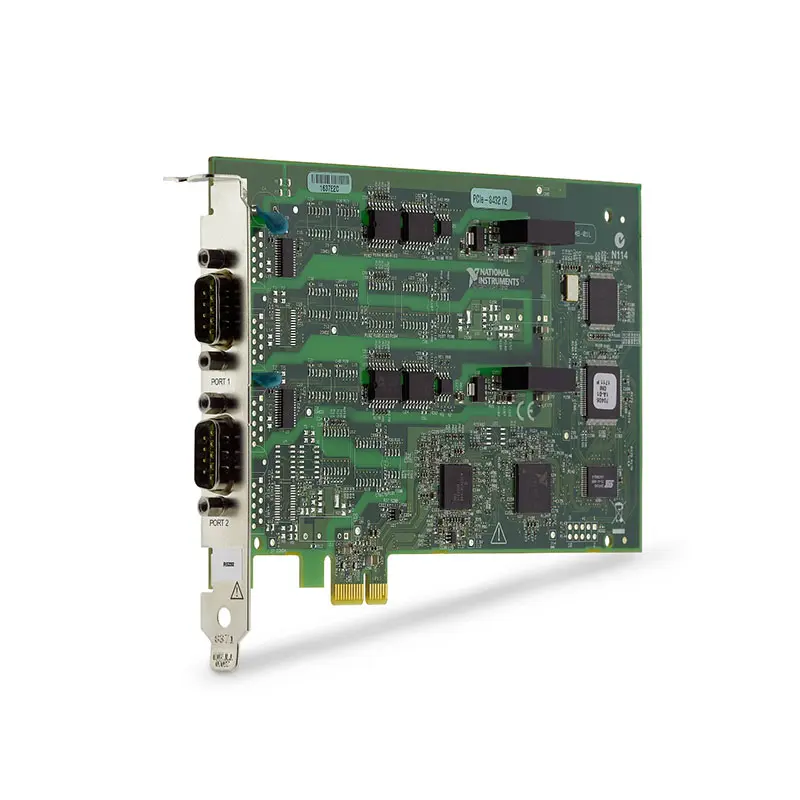
The NI PCIe-8432/2 is a 2-port RS-232 serial interface device designed for PCI Express-based desktop computers, industrial PCs, and automated test systems. It provides two independent RS-232 serial communication ports for connecting instruments, controllers, embedded devices, industrial equipment, and other serial devices to a host computer.
As part of the National Instruments serial interface family, the PCIe-8432/2 provides reliable hardware-based serial communication for applications requiring instrument control, device communication, automated testing, industrial automation, and legacy RS-232 system integration.
The PCI Express architecture allows the PCIe-8432/2 to be installed directly into a compatible host computer, making it suitable for systems that require dedicated physical RS-232 interfaces rather than USB-to-serial adapters or network-based serial converters.
Product Overview
The National Instruments PCIe-8432/2 provides two RS-232 serial ports through a PCI Express interface.
A typical system architecture is:
Host PC → PCI Express → PCIe-8432/2 → RS-232 → Instruments / Controllers / Devices
Each serial port can be used to communicate with compatible RS-232 equipment, allowing a single host computer to control multiple serial devices in automated measurement and industrial systems.
Key Features
2-Port RS-232 Interface
The PCIe-8432/2 provides two independent RS-232 serial ports.
The two-port architecture is useful for systems that need to communicate with multiple serial instruments or devices from a single host computer.
RS-232 Serial Communication
The PCIe-8432/2 is designed for RS-232 serial communication, one of the most widely used interfaces for instrument control, embedded systems, industrial devices, and legacy electronic equipment.
Typical RS-232 devices include:
- Test and measurement instruments
- Industrial controllers
- Embedded systems
- Barcode readers
- Motion controllers
- Scientific instruments
- Programmable power supplies
- Environmental chambers
- Laboratory equipment
PCI Express Host Interface
The PCIe-8432/2 installs into a compatible PCI Express slot in a desktop computer, industrial PC, or rackmount computer.
This provides a dedicated hardware interface between the computer and external RS-232 equipment.
High-Performance Serial Communication
The PCIe-8432/2 is designed for applications requiring reliable and repeatable serial communication between a host computer and external equipment.
Compared with basic consumer USB-to-serial adapters, an internal PCI Express serial interface can provide a more integrated architecture for permanent automated test and industrial systems.
Independent Serial Ports
The two RS-232 ports can be used independently, allowing the host computer to communicate with two separate serial devices.
For example:
Port 1 → Programmable Power Supply
Port 2 → Environmental Chamber
The host test application can coordinate communication with both devices as part of an automated test sequence.
Hardware Flow Control
The PCIe-8432/2 supports standard RS-232 communication functions used in instrument and industrial applications, including hardware flow-control signals when supported by the connected equipment and selected cabling.
Flow control can help manage communication between devices operating at different processing rates.
NI Software Integration
The PCIe-8432/2 can be integrated into NI-based automated test environments and used with serial communication software interfaces.
Typical software environments can include:
- NI-VISA
- LabVIEW
- LabWindows/CVI
- TestStand
- Custom Windows applications
- Instrument-control software
Technical Specifications
| Parameter | Specification |
|---|---|
| Product Type | Serial Interface Device |
| Model | PCIe-8432/2 |
| Manufacturer | National Instruments |
| Host Interface | PCI Express |
| Serial Interface | RS-232 |
| Number of Serial Ports | 2 |
| Communication Type | Asynchronous Serial Communication |
| Port Operation | Independent RS-232 Ports |
| Primary Function | PC-to-Instrument Serial Communication |
| Installation | Desktop / Industrial / Rackmount PC |
| Typical Software | NI-VISA / LabVIEW / TestStand / Custom Applications |
| Primary Applications | Instrument Control, Automation, Industrial Communication and Automated Test |
How Does the PCIe-8432/2 Work?
The PCIe-8432/2 acts as a communication interface between the PCI Express bus of a host computer and external RS-232 devices.
The basic signal path is:
Application Software → PCI Express Bus → PCIe-8432/2 → RS-232 Cable → External Device
Commands generated by the host application are transmitted through the appropriate serial port to the connected device. Responses from the device are received by the PCIe-8432/2 and made available to the host application.
What Is RS-232?
RS-232 is a serial communication standard widely used for point-to-point communication between computers, instruments, controllers, and electronic devices.
RS-232 remains common in industrial and laboratory environments because many instruments and control devices use serial interfaces for command and data communication.
Typical RS-232 communication parameters include:
- Baud rate
- Data bits
- Parity
- Stop bits
- Flow control
These parameters must be configured correctly on both the host computer and connected device for successful communication.
Instrument Control
One of the primary applications of the PCIe-8432/2 is controlling RS-232 instruments from an automated test computer.
Compatible instruments can include:
- Power supplies
- Electronic loads
- Temperature controllers
- Environmental chambers
- Motion-control systems
- Measurement instruments
- Industrial controllers
The test application can send commands to the instrument and retrieve measurement data or device status through the serial connection.
Automated Test Systems
The PCIe-8432/2 can be integrated into automated test equipment where RS-232 instruments must operate together with other measurement hardware.
A typical architecture can be:
Test PC
↓
PCIe-8432/2
↓
RS-232 Instruments
↓
Device Under Test
The host software can coordinate serial instruments with PXI, PXIe, USB, Ethernet, or GPIB measurement equipment.
Industrial Automation
Many industrial devices continue to use RS-232 for configuration, monitoring, diagnostics, and control.
The PCIe-8432/2 can provide dedicated serial connectivity for industrial computers used to communicate with these devices.
Applications can include:
- Machine control
- Equipment monitoring
- Production automation
- Device configuration
- Data collection
- Industrial diagnostics
Laboratory Instrument Communication
Laboratories often contain instruments from different generations and manufacturers. Many legacy and current instruments provide RS-232 communication ports for remote control.
The PCIe-8432/2 allows these instruments to be integrated into computer-controlled measurement systems without replacing equipment solely because it uses a serial interface.
Legacy Equipment Integration
RS-232 remains important for maintaining and upgrading existing automated systems.
When a legacy computer is replaced with a newer PCI Express-based computer, the PCIe-8432/2 can provide the serial communication capability required by existing RS-232 instruments.
Before replacing an older serial interface card, engineers should verify software, connector, cable, port, operating system, and application compatibility.
PCIe-8432/2 vs USB-to-Serial Adapter
| Feature | PCIe-8432/2 | Typical USB-to-Serial Adapter |
|---|---|---|
| Host Interface | PCI Express | USB |
| RS-232 Ports | 2 | Device Dependent |
| Internal Installation | Yes | No |
| Permanent Test-System Integration | Well Suited | Possible |
| NI Software Ecosystem | Designed for NI Instrument-Control Applications | Device Dependent |
| Primary Application | Automated Test / Industrial Systems | General Serial Connectivity |
PCIe-8432/2 vs PCIe-8432/4
The PCIe-8432 family includes configurations with different numbers of serial ports.
| Feature | PCIe-8432/2 | PCIe-8432/4 |
|---|---|---|
| Serial Interface | RS-232 | RS-232 |
| Number of Ports | 2 | 4 |
| Host Interface | PCI Express | PCI Express |
| Best For | Systems Requiring Two RS-232 Ports | Systems Requiring More RS-232 Ports |
The appropriate model should be selected according to the number of serial devices that must be connected to the host computer.
PCIe Serial Interface vs PXI Serial Interface
A PCIe serial interface is installed directly in an external desktop or industrial computer, while a PXI serial interface is installed in a PXI or PXI Express chassis.
| Feature | PCIe-8432/2 | PXI/PXIe Serial Interface |
|---|---|---|
| Installation Platform | Host PC | PXI/PXIe Chassis |
| Host Bus | PCI Express | PXI/PXI Express |
| RS-232 Communication | Yes | Model Dependent |
| Best Application | PC-Based Systems | Modular PXI Test Systems |
NI-VISA Integration
The PCIe-8432/2 can be used with NI-VISA for serial instrument communication.
NI-VISA provides a standardized software interface for communicating with instruments through interfaces such as serial, GPIB, USB, and TCP/IP.
A typical application workflow is:
Open Serial Resource → Configure Port → Write Command → Read Response → Process Data → Close Resource
LabVIEW Applications
The PCIe-8432/2 can be integrated into LabVIEW applications for automated serial communication.
Typical LabVIEW functions can include:
- Serial port configuration
- Command transmission
- Response acquisition
- Data logging
- Device monitoring
- Automated test sequencing
- Error handling
TestStand Applications
In automated production test systems, TestStand can coordinate serial communication with other measurement and control hardware.
For example, a test sequence can:
- Configure an RS-232 instrument.
- Send operating commands.
- Acquire measurements from another instrument.
- Read status information through the PCIe-8432/2.
- Evaluate pass/fail limits.
- Store the test results.
Communication Configuration
For successful RS-232 communication, both the PCIe-8432/2 and the connected device must use compatible serial settings.
Important settings include:
- Baud rate
- Data bits
- Parity
- Stop bits
- Flow control
- Termination characters
Incorrect serial settings are one of the most common causes of communication failure in RS-232 systems.
RS-232 Cable Selection
The correct serial cable depends on the connector and pinout of the connected device.
Before selecting a cable, verify:
- Connector type
- Connector gender
- DTE/DCE configuration
- Straight-through or null-modem wiring
- Required hardware flow-control signals
- Cable length
Using an incorrect straight-through or null-modem cable can prevent communication even when the software configuration is correct.
Troubleshooting PCIe-8432/2 Communication
If an RS-232 device does not communicate correctly through the PCIe-8432/2, check the following:
- Verify that the PCIe-8432/2 is detected by the operating system.
- Verify that the correct NI driver is installed.
- Check the assigned serial port.
- Confirm baud rate settings.
- Confirm data bits, parity, and stop bits.
- Check hardware or software flow control.
- Verify the RS-232 cable wiring.
- Check whether a null-modem cable is required.
- Verify that another application is not using the same serial port.
- Test communication using NI MAX or an appropriate serial terminal.
How to Choose a Serial Interface Device
Before selecting the PCIe-8432/2, evaluate:
- Required serial standard
- RS-232, RS-422, or RS-485 requirement
- Number of serial ports
- Required baud rate
- Host computer interface
- Available PCI Express slots
- Connector requirements
- Cable requirements
- Flow-control requirements
- Operating system compatibility
- Driver compatibility
- Application software compatibility
Industries
- Automated Test
- Industrial Automation
- Electronic Manufacturing
- Laboratory Measurement
- Aerospace and Defense
- Semiconductor Test
- Scientific Research
- Production Test
- Research and Development
Applications
Instrument Control
The PCIe-8432/2 can control compatible RS-232 test and measurement instruments from a PCI Express-based computer.
Industrial Equipment Communication
The two RS-232 ports can communicate with industrial controllers, embedded equipment, and other serial devices.
Automated Production Test
The PCIe-8432/2 can be integrated into automated production test systems that require serial communication with instruments or devices under test.
Laboratory Automation
Laboratory instruments with RS-232 interfaces can be controlled and monitored from LabVIEW or other host applications.
Legacy System Upgrades
The PCIe-8432/2 can help retain existing RS-232 instruments when upgrading a test system to a newer PCI Express-based host computer.
Recommended Related Products
| PCIe-8432/2 | 2-port RS-232 PCI Express serial interface device for instrument control and automated test systems. |
| PCIe-8432/4 | 4-port PCI Express serial interface option for systems requiring additional RS-232 connections. |
| PCIe-8431 Series | PCI Express serial interface devices for applications requiring compatible RS-485/RS-422 communication. |
| PXI Serial Interface Modules | Modular serial communication interfaces for systems built around PXI or PXI Express instrumentation. |
| NI-VISA | NI software architecture for communicating with serial and other instrument interfaces. |
Why Choose PCIe-8432/2?
- 2 independent RS-232 serial ports
- PCI Express host interface
- Dedicated PC-based serial communication
- Designed for instrument control
- Suitable for automated test systems
- Suitable for industrial communication
- Integration with NI-VISA
- Integration with LabVIEW
- Suitable for legacy equipment integration
- Useful for laboratory automation
- Suitable for production test systems
Frequently Asked Questions
What is the NI PCIe-8432/2?
The NI PCIe-8432/2 is a PCI Express serial interface device that provides two RS-232 ports for communicating with instruments, controllers, industrial equipment, and other serial devices.
How many serial ports does the PCIe-8432/2 have?
The PCIe-8432/2 provides two independent serial ports.
What serial standard does the PCIe-8432/2 support?
The PCIe-8432/2 is designed for RS-232 serial communication.
What is the host interface of the PCIe-8432/2?
The PCIe-8432/2 connects to the host computer through a PCI Express interface.
Can PCIe-8432/2 communicate with two devices simultaneously?
Yes. The two independent RS-232 ports can be used to communicate with two compatible serial devices within the same test or control system.
Can PCIe-8432/2 be used with LabVIEW?
Yes. The PCIe-8432/2 can be integrated into LabVIEW-based serial communication and automated test applications using compatible NI software and drivers.
Can PCIe-8432/2 be used with NI-VISA?
Yes. NI-VISA can provide the software interface for communicating with serial instruments connected through the PCIe-8432/2.
Can PCIe-8432/2 communicate with RS-485 devices?
No. The PCIe-8432/2 is intended for RS-232 communication. For RS-422 or RS-485 applications, select an NI serial interface designed for the required electrical standard.
What is the difference between PCIe-8432/2 and PCIe-8432/4?
The primary difference is the number of serial ports. The PCIe-8432/2 provides two RS-232 ports, while the PCIe-8432/4 provides four ports.
Can PCIe-8432/2 replace a USB-to-RS-232 adapter?
It can provide RS-232 connectivity for many of the same types of devices, but the architecture is different. The PCIe-8432/2 is installed internally in a compatible PCI Express host computer and is generally better suited to permanent automated test and industrial system integration.
Can PCIe-8432/2 control laboratory instruments?
Yes. It can communicate with compatible laboratory instruments that provide an RS-232 interface and support remote serial commands.
Why is my RS-232 device not communicating with the PCIe-8432/2?
Check the serial port assignment, baud rate, data bits, parity, stop bits, flow-control settings, cable pinout, straight-through versus null-modem wiring, device communication settings, and driver configuration.
Does PCIe-8432/2 require a special RS-232 cable?
Cable requirements depend on the connected equipment. Verify the connector type, DTE/DCE configuration, pinout, and whether the device requires a straight-through or null-modem connection.
Can PCIe-8432/2 be used in an automated test system?
Yes. Automated test and instrument control are primary applications for the PCIe-8432/2, particularly when the test system includes RS-232 instruments or devices.
What should I check before purchasing a PCIe-8432/2?
Before purchasing, verify that the target equipment uses RS-232, confirm the required number of ports, communication speed, connector and cable configuration, available PCI Express slot, operating system, NI driver version, NI-VISA compatibility, and application software requirements.
Conclusion
The NI PCIe-8432/2 Serial Interface Device provides two dedicated RS-232 serial communication ports through a PCI Express host interface. Designed for instrument control, industrial equipment communication, laboratory automation, legacy system integration, and automated production testing, the PCIe-8432/2 provides a practical way to integrate RS-232 devices into PC-based National Instruments test and measurement systems.















