






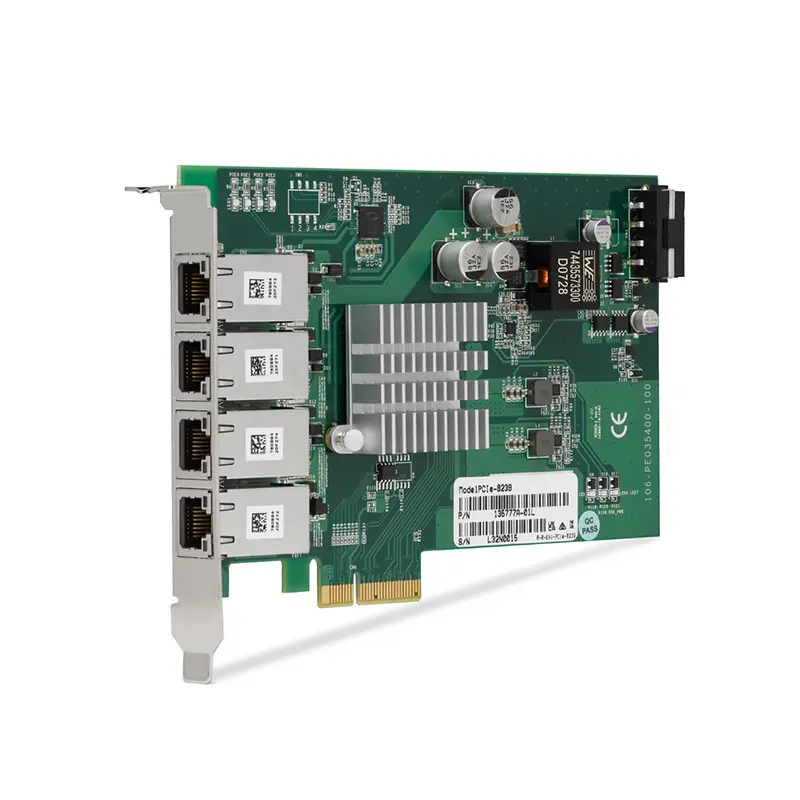
PCIe-8239 4-Port GigE Vision Frame Grabber
The PCIe-8239 is a four-port PCI Express GigE Vision frame grabber designed for high-resolution and high-frame-rate machine vision applications. Each independent Gigabit Ethernet port can connect to a compatible GigE Vision camera.
Power over Ethernet allows the PCIe-8239 to provide compatible cameras with both data connectivity and electrical power through one Ethernet cable. This reduces external power supplies, simplifies cable routing and supports compact multicamera inspection systems.
The device includes NI Vision Acquisition Software and works with the NI-IMAQdx driver. It is suitable for industrial inspection, scientific imaging, motion analysis, assembly verification and synchronized multicamera acquisition.
Key Features of the PCIe-8239
- Four independent GigE Vision camera ports
- Supports as many as four cameras
- Power over Ethernet on all supported ports
- Gigabit Ethernet camera connectivity
- Optimized for high-resolution cameras
- Suitable for high-frame-rate acquisition
- PCI Express computer interface
- Standard RJ45 Ethernet connections
- NI Vision Acquisition Software included
- NI-IMAQdx driver support
- Compatible with Vision Development Module applications
- Designed for machine vision and scientific imaging
PCIe-8239 Technical Specifications
| Product Model | PCIe-8239 |
|---|---|
| Part Number | 787790-01 |
| Product Type | GigE Vision frame grabber device |
| Bus Interface | PCI Express |
| Camera Interface | GigE Vision |
| Camera Ports | 4 independent ports |
| Maximum Number of Cameras | 4 |
| Port Speed | Gigabit Ethernet per port |
| Power over Ethernet | Supported |
| Camera Connectors | RJ45 |
| Hardware Trigger Inputs | None onboard |
| Quadrature Encoder Inputs | None onboard |
| Reconfigurable FPGA | No |
| Driver | NI-IMAQdx |
| Included Software | NI Vision Acquisition Software |
PCIe-8239 Part Number and Accessories
| Item | Part Number | Description |
|---|---|---|
| PCIe-8239 | 787790-01 | Four-port PoE GigE Vision frame grabber device |
| GigE Vision Camera | Camera dependent | Industrial or scientific camera compliant with GigE Vision |
| Cat 5e or Cat 6 Cable | Length dependent | Shielded Ethernet cable supporting Gigabit Ethernet and PoE |
| Industrial Camera Lens | Application dependent | Lens selected for sensor size, field of view and working distance |
| External Trigger Hardware | Configuration dependent | Provides synchronized camera trigger signals when required |
Four Independent GigE Vision Ports
The PCIe-8239 provides four separate Gigabit Ethernet camera interfaces. Independent ports provide dedicated network paths and avoid the shared bandwidth limitations of connecting several cameras through one conventional Ethernet switch uplink.
Total system performance still depends on camera data rates, PCI Express bandwidth, processor load, memory throughput and image-processing requirements.
Power over Ethernet
PoE supplies compatible cameras through the same cable carrying image data. This simplifies installation and can eliminate four separate camera power adapters.
Verify the camera’s PoE standard and power demand. Cameras exceeding the board’s supported PoE budget require an external power source or compatible PoE injector.
GigE Vision Camera Support
GigE Vision is an industrial imaging standard that defines camera discovery, control and image streaming over Gigabit Ethernet. It supports long cable distances compared with many direct-attached camera interfaces.
The connected camera must be GigE Vision compliant and supported by the installed NI-IMAQdx version.
Multicamera Acquisition
Four cameras can observe different product surfaces, separate inspection stations or the same process from multiple angles. Software can acquire images independently or coordinate the cameras using their trigger capabilities.
The PCIe-8239 does not provide built-in isolated trigger or encoder inputs. External timing hardware may be required for deterministic synchronization with machinery.
NI Vision Software Integration
NI Vision Acquisition Software provides camera discovery, configuration and image acquisition through NI-IMAQdx. The Vision Development Module can add image processing, measurements, pattern matching, optical character recognition and inspection logic.
PCIe-8239 Applications
- Automated optical inspection
- Four-camera production inspection
- High-resolution scientific imaging
- Electronics assembly verification
- Packaging and label inspection
- Surface and defect detection
- Dimensional measurement
- Robotics and machine guidance
- Motion and behavioral analysis
- Laboratory imaging systems
Automated Optical Inspection
The PCIe-8239 can acquire images from cameras positioned above, below or around a product. Vision software can inspect dimensions, orientation, labels, connectors and surface defects.
Scientific Imaging
High-resolution GigE Vision cameras can capture experiments, motion and optical phenomena while the computer records and analyzes the image data.
PCIe-8239 Installation Workflow
Step 1: Confirm Computer Resources
Verify PCI Express slot availability, power, cooling, memory and storage performance.
Step 2: Install Vision Acquisition Software
Install the required NI-IMAQdx and Vision Acquisition Software components.
Step 3: Install the PCIe-8239
Power down the computer and install the board using proper ESD procedures.
Step 4: Connect the Cameras
Use suitable shielded Cat 5e or Cat 6 cables and verify the camera PoE requirements.
Step 5: Configure Camera Attributes
Set exposure, gain, pixel format, region of interest, packet size, frame rate and triggering.
Step 6: Test Multicamera Throughput
Acquire from all required cameras simultaneously and check for incomplete images, packet loss and processing delays.
PCIe-8239 Troubleshooting
A camera is not detected
Check the Ethernet cable, PoE status, camera compatibility, NI-IMAQdx installation and Windows firewall configuration.
Images contain missing packets
Reduce the camera data rate, adjust packet size and interpacket delay, and verify cable quality.
The camera does not receive PoE power
Confirm PoE compatibility and total power demand. Test the camera with an external supply where supported.
Frame rate is lower than expected
Review exposure time, pixel format, region of interest, camera bandwidth and host processing load.
Four cameras cannot acquire reliably together
Calculate the total image-data rate and verify PCI Express, system memory, processor and storage performance.
PCIe-8239 Comparison
| Interface | Cable Type | Typical Strength | Consideration |
|---|---|---|---|
| PCIe-8239 GigE Vision | Ethernet | Long cables and PoE | Network packet configuration |
| Camera Link Frame Grabber | Camera Link | Deterministic dedicated interface | Shorter specialized cables |
| USB3 Vision Interface | USB 3.x | Simple direct connection | Cable length and host-controller sharing |
| CoaXPress Frame Grabber | Coaxial cable | Very high bandwidth and triggering | Higher system cost |
PCIe-8239 Frequently Asked Questions
How many cameras can the PCIe-8239 connect?
It provides four independent ports and supports as many as four compatible GigE Vision cameras.
Does it provide camera power?
Yes. The ports support Power over Ethernet for compatible cameras.
Is Vision Acquisition Software included?
Yes. The standard device package includes a perpetual NI Vision Acquisition Software license.
Does the PCIe-8239 include hardware trigger inputs?
No. External timing hardware or the camera’s own trigger interface may be required.
What is the PCIe-8239 part number?
The standard part number is 787790-01.
Recommended Related Products
- PCIe-1433 Camera Link Frame Grabber
- PCIe-1437 Camera Link Frame Grabber
- PCIe-1477 Image Acquisition Device
- NI-1483 Camera Link Adapter Module
Request a Quote for the PCIe-8239
Contact us for availability and project pricing for the PCIe-8239 four-port PoE GigE Vision frame grabber. We can also help select compatible cameras, Ethernet cables and vision software.















