






Product Introduction
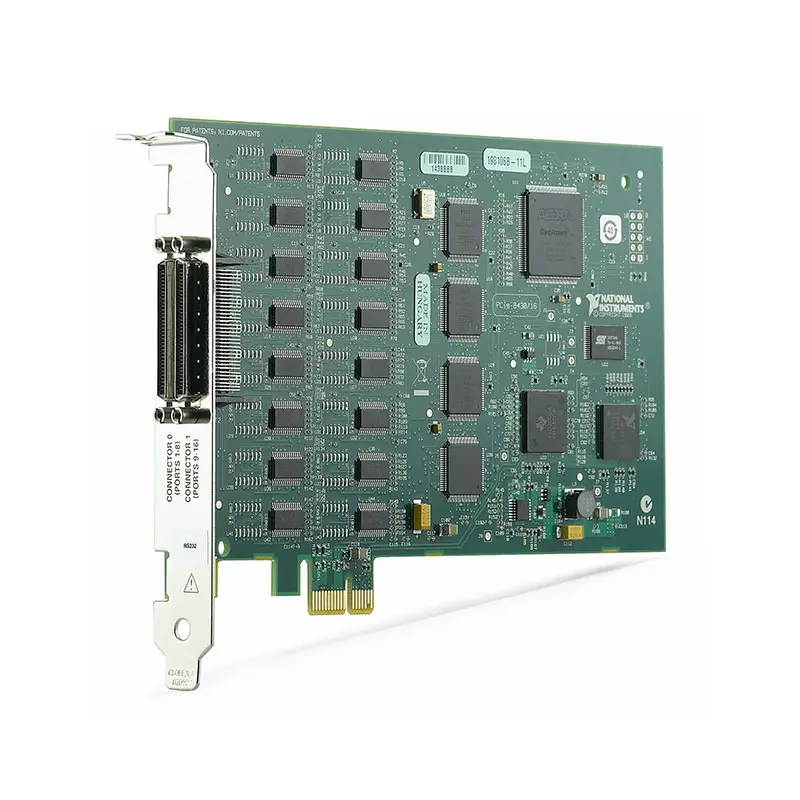
The NI PCIe-8430/16 is a 16-port RS-232 serial interface device designed for PCI Express-based computers and high-density serial communication applications. It provides sixteen independent RS-232 ports, allowing a single desktop, industrial, or rackmount computer to communicate with multiple instruments, controllers, embedded devices, and other serial equipment.
The high port density of the PCIe-8430/16 makes it particularly suitable for automated test systems, manufacturing equipment, laboratory automation, industrial control, and legacy system integration where many RS-232 devices must be controlled from one host computer.
By installing the PCIe-8430/16 in a compatible PCI Express host computer, engineers can create a centralized serial communication platform for controlling and monitoring multiple devices through application software such as LabVIEW, TestStand, NI-VISA, or custom test programs.
Product Overview
The National Instruments PCIe-8430/16 combines a PCI Express host interface with sixteen RS-232 serial communication ports.
A typical system architecture is:
Host Computer → PCI Express → PCIe-8430/16 → 16 RS-232 Ports → Instruments / Controllers / Devices
This architecture allows one computer to communicate with numerous RS-232 devices without requiring multiple individual USB-to-serial adapters.
Key Features
16 RS-232 Serial Ports
The PCIe-8430/16 provides 16 independent RS-232 serial communication ports.
The high channel count is one of the primary advantages of this model and makes it suitable for systems containing large numbers of serial instruments and devices.
Typical connected equipment can include:
- Programmable power supplies
- Electronic loads
- Environmental chambers
- Temperature controllers
- Motion controllers
- Barcode readers
- Industrial controllers
- Laboratory instruments
- Embedded devices
- Manufacturing equipment
RS-232 Communication
The PCIe-8430/16 uses the widely adopted RS-232 serial communication standard.
RS-232 remains common in automated test, industrial control, scientific instrumentation, and laboratory environments because many instruments and embedded devices use serial interfaces for configuration, command transmission, status monitoring, and data transfer.
PCI Express Host Interface
The PCIe-8430/16 installs in a compatible PCI Express slot inside a desktop, workstation, industrial, or rackmount computer.
The PCI Express architecture provides a dedicated internal communication interface suitable for permanent automated test and industrial system installations.
High-Density Serial Communication
With sixteen RS-232 ports available from a single PCI Express interface device, the PCIe-8430/16 reduces the number of individual serial adapters required in systems containing many serial devices.
This can simplify:
- System wiring
- Computer configuration
- Serial port management
- Rack integration
- Automated test development
- Maintenance and troubleshooting
Independent Port Operation
Each RS-232 port can communicate with a separate compatible device.
For example, an automated test system could use:
Port 1 → Power Supply
Port 2 → Electronic Load
Port 3 → Temperature Controller
Port 4 → Environmental Chamber
Port 5 → Motion Controller
Ports 6–16 → Additional Serial Instruments
The host application can coordinate communication with these devices as part of a complete automated test sequence.
Hardware Flow Control
The PCIe-8430/16 supports standard RS-232 communication functions, including hardware flow-control signals where supported by the connected device and selected cable configuration.
Flow control can help prevent communication errors when devices transmit and receive serial data at different processing rates.
NI Software Integration
The PCIe-8430/16 can be integrated into NI-based instrument control and automated test environments.
Typical software environments can include:
- NI-VISA
- LabVIEW
- LabWindows/CVI
- TestStand
- Custom Windows applications
- Instrument-control software
Technical Specifications
| Parameter | Specification |
|---|---|
| Product Type | Serial Interface Device |
| Model | PCIe-8430/16 |
| Manufacturer | National Instruments |
| Host Interface | PCI Express |
| Serial Interface | RS-232 |
| Number of Serial Ports | 16 |
| Communication Type | Asynchronous Serial Communication |
| Port Operation | Independent Serial Ports |
| Primary Function | High-Density RS-232 Instrument and Device Communication |
| Installation Platform | Desktop / Industrial / Rackmount Computer |
| Typical Software | NI-VISA / LabVIEW / TestStand / Custom Applications |
| Primary Applications | Automated Test, Instrument Control, Industrial Automation and Laboratory Systems |
How Does the PCIe-8430/16 Work?
The PCIe-8430/16 acts as an interface between the PCI Express bus of the host computer and multiple external RS-232 devices.
A simplified communication architecture is:
Application Software
↓
Host PCI Express Bus
↓
PCIe-8430/16
↓
16 Independent RS-232 Connections
↓
External Instruments and Devices
The host application sends serial commands through a selected port. The connected device receives the command and can return measurement data, status information, configuration values, or other responses through the same serial connection.
What Is RS-232?
RS-232 is a point-to-point serial communication standard widely used for communication between computers and electronic equipment.
Common RS-232 configuration parameters include:
- Baud rate
- Data bits
- Parity
- Stop bits
- Flow control
The host interface and connected device must use compatible communication settings for reliable data transfer.
Why Use a 16-Port Serial Interface?
Many automated test and industrial systems contain more than one RS-232 device. Using individual USB serial adapters for every instrument can increase wiring complexity and make system configuration more difficult.
The PCIe-8430/16 consolidates up to sixteen serial interfaces into a single PCI Express-based solution.
This makes it particularly useful for:
- High-density automated test racks
- Production test stations
- Burn-in systems
- Laboratory automation
- Industrial equipment control
- Device programming systems
- Legacy equipment integration
Automated Test Systems
The PCIe-8430/16 can be integrated into automated test equipment where multiple RS-232 instruments must be controlled from one computer.
For example, a test rack may contain several power supplies, loads, environmental controllers, switching devices, and other serial instruments.
The PCIe-8430/16 allows the host test application to communicate with these devices through separate serial ports while coordinating the overall test sequence.
Production Test Applications
Production test systems often require communication with multiple instruments and devices under test.
The PCIe-8430/16 can provide the serial communication infrastructure for:
- Device configuration
- Test initialization
- Instrument control
- Status monitoring
- Serial number collection
- Production data acquisition
- Pass/fail test sequences
Industrial Automation
Many industrial machines and controllers continue to use RS-232 interfaces for configuration, monitoring, diagnostics, and control.
The PCIe-8430/16 allows an industrial PC to communicate with multiple serial devices through a centralized interface.
Applications can include:
- Machine control
- Equipment monitoring
- Production-line automation
- Device configuration
- Process monitoring
- Industrial diagnostics
Laboratory Automation
Laboratories often contain instruments from multiple manufacturers and generations. Many of these instruments provide RS-232 interfaces for remote operation.
The PCIe-8430/16 allows numerous compatible instruments to be integrated into a single computer-controlled laboratory system.
Legacy Equipment Integration
RS-232 remains widely used in existing industrial and automated test installations.
When replacing an older computer with a newer PCI Express-based host, the PCIe-8430/16 can provide the multiple serial ports required to retain existing instruments and equipment.
This can help extend the operating life of existing test systems without requiring all serial equipment to be replaced.
PCIe-8430/16 vs PCIe-8432/2
| Feature | PCIe-8430/16 | PCIe-8432/2 |
|---|---|---|
| Serial Standard | RS-232 | RS-232 |
| Number of Ports | 16 | 2 |
| Host Interface | PCI Express | PCI Express |
| Primary Advantage | High Port Density | Lower Port Count |
| Typical Application | Large Automated Test Systems | Small Serial Communication Systems |
The PCIe-8430/16 is the more appropriate option when a system requires a large number of RS-232 connections, while a lower-port-count interface may be sufficient for smaller systems.
PCIe-8430/16 vs USB-to-Serial Adapters
| Feature | PCIe-8430/16 | Multiple USB-to-Serial Adapters |
|---|---|---|
| Host Interface | PCI Express | USB |
| Serial Ports | 16 Integrated Ports | Adapter Dependent |
| Internal Installation | Yes | No |
| High-Density Integration | Strong Advantage | Requires Multiple Devices |
| Permanent Test Rack Installation | Well Suited | Possible |
| Cable Management | Centralized | Can Become Complex |
NI-VISA Integration
The PCIe-8430/16 can be used with NI-VISA for serial instrument communication.
NI-VISA provides a standardized software architecture for communicating with test and measurement instruments through serial and other supported interfaces.
A typical serial communication sequence is:
Open Serial Port → Configure Communication → Write Command → Read Response → Process Data → Close Port
LabVIEW Applications
The PCIe-8430/16 can be integrated into LabVIEW applications for controlling multiple RS-232 devices.
Typical LabVIEW functions can include:
- Serial port configuration
- Command transmission
- Instrument response acquisition
- Multi-device communication
- Data logging
- Device monitoring
- Error handling
- Automated test sequencing
TestStand Applications
TestStand can coordinate communication with multiple serial instruments as part of an automated test sequence.
A typical sequence can:
- Initialize the required RS-232 ports.
- Configure connected instruments.
- Send commands to individual devices.
- Read instrument or device responses.
- Perform measurement operations.
- Evaluate test limits.
- Store test results.
- Close the serial communication sessions.
Serial Communication Configuration
Each connected device must use communication parameters compatible with the corresponding PCIe-8430/16 serial port.
Important parameters include:
- Baud rate
- Data bits
- Parity
- Stop bits
- Hardware flow control
- Software flow control
- Termination characters
Different ports can be configured according to the communication requirements of their connected devices.
RS-232 Cable Selection
Correct cable selection is essential for reliable RS-232 communication.
Before connecting equipment, verify:
- Connector type
- Connector gender
- Pinout
- DTE or DCE configuration
- Straight-through or null-modem wiring
- Required handshake signals
- Cable length
The PCIe-8430/16 uses a high-density multiport architecture, so the correct compatible breakout cable or connection accessory should be selected for the specific hardware configuration.
Troubleshooting PCIe-8430/16
If a connected serial device cannot communicate through the PCIe-8430/16, check:
- PCIe-8430/16 hardware detection
- NI driver installation
- Serial port assignment
- Baud rate
- Data bits
- Parity
- Stop bits
- Flow-control configuration
- RS-232 cable pinout
- Straight-through versus null-modem wiring
- Breakout cable connections
- Whether another application is using the port
- Connected device communication settings
How to Choose a Serial Interface
Before selecting the PCIe-8430/16, evaluate:
- Required serial communication standard
- Number of serial devices
- Required number of RS-232 ports
- Communication speed requirements
- Flow-control requirements
- Host computer PCI Express compatibility
- Connector and breakout cable requirements
- Operating system compatibility
- NI driver compatibility
- NI-VISA compatibility
- LabVIEW or TestStand requirements
Industries
- Automated Test
- Industrial Automation
- Electronics Manufacturing
- Semiconductor Test
- Laboratory Automation
- Aerospace and Defense
- Scientific Research
- Production Test
- Research and Development
Applications
Multi-Instrument Control
The PCIe-8430/16 provides sixteen RS-232 ports for controlling multiple serial instruments from a single computer.
Automated Production Test
The high-density serial interface can be integrated into production test racks requiring communication with numerous instruments and devices.
Industrial Equipment Communication
Industrial computers can use the PCIe-8430/16 to communicate with multiple RS-232 controllers and machines.
Laboratory Automation
Multiple laboratory instruments with RS-232 interfaces can be centrally controlled by LabVIEW or other host applications.
Legacy Test System Upgrades
The PCIe-8430/16 can help retain existing RS-232 equipment when upgrading legacy systems to newer PCI Express-based host computers.
Recommended Related Products
| PCIe-8430/16 | 16-port RS-232 PCI Express serial interface for high-density instrument and device communication. |
| PCIe-8430 Series | PCI Express RS-232 serial interfaces available in configurations for different port-count requirements. |
| PCIe-8432/2 | 2-port RS-232 PCI Express serial interface for systems requiring fewer serial connections. |
| PCIe-8431 Series | Serial interface devices intended for compatible RS-422/RS-485 communication applications. |
| PXI Serial Interface Modules | Serial communication hardware for modular PXI and PXI Express automated test systems. |
Why Choose PCIe-8430/16?
- 16 independent RS-232 ports
- High-density serial communication
- PCI Express host interface
- Centralized multi-device control
- Designed for automated test systems
- Suitable for industrial automation
- Suitable for production test racks
- Suitable for laboratory automation
- NI-VISA integration
- LabVIEW integration
- TestStand integration
- Useful for legacy equipment integration
- Reduces the need for multiple serial adapters
Frequently Asked Questions
What is the NI PCIe-8430/16?
The NI PCIe-8430/16 is a PCI Express serial interface device that provides 16 RS-232 ports for connecting multiple serial instruments, controllers, and other devices to a host computer.
How many serial ports does the PCIe-8430/16 have?
The PCIe-8430/16 provides 16 independent serial communication ports.
What serial standard does PCIe-8430/16 support?
The PCIe-8430/16 is designed for RS-232 serial communication.
What is the host interface of PCIe-8430/16?
The PCIe-8430/16 connects to a compatible host computer through a PCI Express interface.
Can PCIe-8430/16 control multiple instruments?
Yes. Its sixteen independent RS-232 ports make it particularly suitable for controlling multiple instruments and serial devices from a single computer.
Can PCIe-8430/16 be used with LabVIEW?
Yes. The PCIe-8430/16 can be integrated into LabVIEW-based serial communication, instrument control, and automated test applications using compatible NI software and drivers.
Can PCIe-8430/16 be used with NI-VISA?
Yes. NI-VISA can be used as the software interface for communicating with compatible serial instruments connected through the PCIe-8430/16.
Can PCIe-8430/16 communicate with RS-485 equipment?
No. The PCIe-8430/16 is designed for RS-232 communication. For RS-422 or RS-485 equipment, select a serial interface designed for the required electrical standard.
Can all 16 ports be used in the same test system?
Yes. The PCIe-8430/16 is specifically designed to provide high-density multiport serial communication. Individual ports can be configured according to the communication requirements of their connected devices.
Does every RS-232 device need to use the same baud rate?
No. Independent serial ports can be configured according to the communication settings required by their respective connected devices.
Does PCIe-8430/16 require a breakout cable?
The high-density multiport architecture requires the appropriate connection accessories to expose the individual RS-232 connections. Verify the exact connector, breakout cable, and accessory requirements for the specific PCIe-8430/16 configuration before purchasing.
Can PCIe-8430/16 replace multiple USB-to-RS-232 adapters?
Yes, in many applications. The PCIe-8430/16 provides sixteen integrated RS-232 interfaces through a single PCI Express-based device, making it particularly suitable for permanent high-density automated test installations.
Is PCIe-8430/16 suitable for production testing?
Yes. High-density production test and automated instrument control are important applications for the PCIe-8430/16.
Why is my serial device not communicating?
Verify the port assignment, baud rate, data bits, parity, stop bits, flow-control configuration, cable pinout, breakout cable, straight-through versus null-modem wiring, device settings, and NI driver configuration.
What should I check before purchasing a PCIe-8430/16?
Before purchasing, verify that the connected equipment uses RS-232, confirm the required number of ports, communication settings, host PCI Express compatibility, connector and breakout cable requirements, operating system, NI driver version, NI-VISA support, and application software compatibility.
Conclusion
The NI PCIe-8430/16 Serial Interface Device provides sixteen RS-232 serial ports through a PCI Express host interface, making it a practical solution for high-density instrument communication and device control. Its 16-port architecture is particularly suitable for automated test racks, production testing, industrial automation, laboratory systems, and legacy equipment integration where numerous RS-232 devices must be centrally controlled from a single computer.















