






Quick Answer: The best way to buy a PXI system is to define the required measurements, signal ranges, channel count, sampling rate, accuracy, synchronization, software, and operating environment before choosing hardware. Select the instrument modules first, then choose a compatible chassis and controller with enough slots, bandwidth, power, cooling, and expansion capacity. The complete purchase should also include cables, terminal blocks, adapters, fixtures, software licenses, calibration, documentation, and technical support.
What Is a PXI System?
A PXI system is a modular, computer-based test and measurement platform. It combines a PXI or PXIe chassis, an embedded or remote controller, instrument modules, drivers, test software, and application-specific accessories.
Unlike a fixed benchtop instrument, PXI allows the buyer to select individual functions and integrate them into one automated platform. A system may contain digitizers, digital multimeters, signal generators, source measure units, switches, RF instruments, data acquisition modules, FPGA devices, communication interfaces, and timing modules.
This flexibility creates a purchasing challenge: each component must be evaluated as part of the complete system. A module can have the correct measurement range but still be unsuitable because of an incompatible slot, insufficient bandwidth, missing connector, unsupported driver, or inadequate cooling.
Start With the Test Requirements
The most reliable buying process begins with the signals and test objectives, not a chassis model number. Before requesting a quotation, create a system-requirements document that answers the following questions.
Measurement FunctionsWhat must the system measure, generate, switch, control, or communicate?
Signal SpecificationsWhat voltage, current, frequency, bandwidth, impedance, and accuracy are required?
System ScaleHow many channels, instruments, simultaneous operations, and future additions are expected?
Timing RequirementsDo modules need only a common start, or precise sample, phase, and absolute-time synchronization?
Define Every Signal Type
List analog voltage, current, resistance, temperature, strain, vibration, digital, RF, serial, automotive, avionics, Ethernet, or other signals. Include source and load characteristics, connector types, grounding, isolation, and protection requirements.
Specify Channel Count
State the number of channels for each measurement type and whether they must operate simultaneously. A multiplexed module may offer many channels at a lower cost, while a simultaneous-sampling module may be necessary for phase or transient measurements.
Define Sampling Rate and Bandwidth
Sampling rate and analog bandwidth are different specifications. The sample rate determines how often data is recorded, while analog bandwidth defines the frequency range that the input path can accurately pass. Include continuous and burst requirements.
Set Accuracy and Resolution Requirements
Do not select a module only from ADC resolution. Review absolute accuracy, gain error, offset, noise, temperature coefficient, input range, calibration interval, and measurement uncertainty. Higher nominal bit resolution does not always produce better usable accuracy.
Describe the Operating Sequence
Explain whether the system performs sequential measurements, continuous streaming, triggered records, closed-loop control, waveform generation, switching, or parallel testing. The sequence affects controller performance, synchronization, data storage, and software architecture.
Buying principle: Select the measurement and generation modules first. Their slot type, width, bandwidth, power, cooling, and timing requirements should determine the chassis and controller.
PXI or PXIe: Which Should You Buy?
Traditional PXI uses a parallel PCI data bus. PXI Express, or PXIe, uses PCI Express links and switches. PXIe also adds advanced differential timing resources while retaining important PXI clocks and triggers.
PXIe is normally the better choice for a new high-performance system, especially when it includes high-speed digitizers, RF signal analyzers, waveform generators, FPGA modules, or continuous data streaming. Traditional PXI can remain cost-effective for lower-bandwidth applications and legacy systems.
| Buying Factor | Choose PXI When | Choose PXIe When |
|---|---|---|
| Data rate | Measurements produce limited data | Modules stream large data volumes |
| Instrument type | DMM, relay, switch, serial or industrial I/O | Digitizer, RF, FPGA or high-speed DAQ |
| Timing | 10 MHz reference and standard triggers are sufficient | 100 MHz differential timing or DSTAR is required |
| Existing hardware | Maintaining a verified legacy PXI platform | Building a new expandable system |
| Budget | Compatible legacy equipment lowers cost | Performance and lifecycle justify higher investment |
For a mixed system, consider a PXIe chassis with hybrid-compatible slots. Confirm each traditional PXI module is actually hybrid-compatible; not every legacy PXI card fits a hybrid slot.
How to Select PXI Instrument Modules
Instrument modules define what the system can measure or generate. Create a separate specification table for each required function and compare complete published specifications.
Digitizers and Oscilloscopes
Compare analog bandwidth, sample rate, vertical resolution, input range, memory depth, channel count, coupling, impedance, triggering, streaming capability, and synchronization. Determine whether all channels sample simultaneously.
Digital Multimeters
Review supported measurements, digits of resolution, reading rate, input protection, isolation, accuracy, calibration interval, and trigger capability. A fast production DMM and a precision laboratory DMM solve different problems.
Data Acquisition Modules
Check channel architecture, sample rate per channel, multiplexed or simultaneous sampling, input range, resolution, isolation, sensor support, signal conditioning, terminal block, and cabling.
Signal Generators and Arbitrary Waveform Generators
Compare update rate, bandwidth, output range, resolution, memory, channel synchronization, waveform sequencing, load impedance, and required calibration.
Source Measure Units and Power Instruments
Review voltage and current ranges, four-quadrant operation, measurement resolution, accuracy, compliance behavior, transient response, channel isolation, pulsing, power dissipation, and connector safety.
Switch Modules
Choose the topology first: multiplexer, matrix, multiplexer/matrix combination, general-purpose relay, RF switch, or fault-insertion unit. Then evaluate channel count, maximum voltage and current, bandwidth, impedance, relay type, switching speed, expected relay life, and terminal accessories.
RF Instruments
Specify frequency range, instantaneous bandwidth, output power, noise floor, phase noise, dynamic range, modulation support, calibration, RF connectors, external references, and phase-coherent operation.
FPGA and Reconfigurable I/O
Evaluate I/O type, logic level, transceiver rate, onboard processing resources, memory, latency, development environment, adapter modules, cables, and long-term maintenance of FPGA code.
Communication Interfaces
Confirm protocol, port count, speed, transceiver type, isolation, termination, cable pinout, driver API, bus-monitoring requirements, and any necessary software toolkit.
How to Choose a PXI Chassis
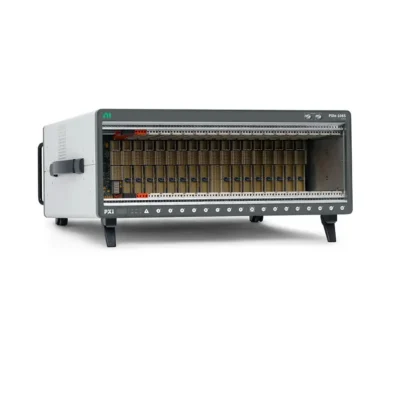
The PXI chassis is more than an enclosure. Its backplane defines the slot types, data topology, timing resources, power distribution, and system expansion limits.
Slot Count and Module Width
Count the controller slot, peripheral modules, system timing module, and any modules wider than one slot. Add spare positions for planned expansion. Physical slot count alone is insufficient because the available slots must also have the correct connector type.
Slot Types
Identify PXI peripheral, PXIe peripheral, hybrid-compatible, system controller, and system timing slots. Map every module to a valid position before purchasing the chassis.
Per-Slot and System Bandwidth
For PXIe systems, inspect the backplane block diagram. Different slots may use different lane widths or share one PCI Express switch. Compare the combined data rate of modules on each branch with its upstream connection.
Power and Cooling
Add the maximum power consumption of all modules and compare it with the chassis power budget. Check the cooling capacity per slot, total airflow, ambient-temperature rating, fan behavior, and required filler panels. High-speed RF, digitizer, FPGA, and power modules may demand substantially more cooling than low-speed cards.
Timing and Triggering
Review PXI_CLK10, PXIe_CLK100, trigger-bus segmentation, PXI Star, PXIe Differential Star, external reference inputs, and timing-slot support. Use the PXI Timing and Synchronization Guide to define the required architecture.
Physical and Environmental Requirements
Check rack width, height, depth, weight, input voltage, acoustic noise, operating temperature, altitude, vibration, shock, EMC, and airflow direction. A laboratory chassis and a factory-floor chassis may require different priorities.
| Chassis Requirement | What to Verify | Common Mistake |
|---|---|---|
| Capacity | Usable compatible slots and module widths | Counting physical slots only |
| Bandwidth | Per-slot links, switches and upstream topology | Using aggregate marketing bandwidth |
| Power | Total and per-slot power availability | Assuming an empty slot guarantees power |
| Cooling | Watts per slot, airflow and ambient rating | Ignoring high-power module requirements |
| Timing | Clock, trigger, star and timing-slot resources | Assuming every slot has identical timing |
| Installation | Rack dimensions, noise, voltage and grounding | Checking only front-panel dimensions |
How to Choose a PXI Controller
The PXI controller runs drivers and test software, transfers data, processes measurements, stores results, and connects the system to networks or operators.
Embedded vs. Remote Controller
An embedded controller is installed directly in the chassis. It creates a compact standalone platform and reduces external cabling. A remote controller connects the chassis to an external computer and may provide easier upgrades, workstation-class processing, large storage, or centralized control.
Processor Performance
Choose CPU core count, clock speed, and processor generation according to analysis, logging, database, user-interface, and parallel-test workloads. More cores help only when the software can use them effectively.
Memory
Memory must accommodate the operating system, drivers, application, waveform buffers, data analysis, and simultaneous tasks. Large high-speed acquisitions may need substantial RAM to prevent streaming interruptions.
Storage
Evaluate capacity, sustained write speed, endurance, interface, redundancy, and data-retention policy. A fast backplane cannot prevent data loss if the storage device cannot sustain the recording rate.
Controller-to-Chassis Bandwidth
Confirm that the controller or remote interface provides enough PCI Express bandwidth for the planned modules. The slowest shared connection in the path can limit total performance.
Operating System and Lifecycle
Verify Windows or real-time operating-system support, driver versions, security policy, software lifecycle, and upgrade plan. An older controller may be electrically compatible but unable to run current drivers or corporate software.
External I/O
List required Ethernet, USB, display, serial, removable storage, trigger, and remote-management connections. Do not assume every controller includes the same ports.
Calculate System Data Throughput
Estimate the raw data rate of each acquisition module before selecting the chassis and controller. A basic uncompressed estimate is:
Data rate = number of channels × samples per second × bytes per sample
Add protocol overhead, metadata, multiple records, processing buffers, and a safety margin. Then map modules to the PXIe switch topology and compare combined rates with every upstream link.
The practical sustained rate also depends on controller memory, CPU, driver architecture, storage, file format, and concurrent tasks. If continuous recording is required, test the complete path rather than relying only on theoretical specifications.
Bandwidth planning steps:
- Calculate each module's maximum sustained output.
- Identify the slot link width and PCIe generation.
- Group modules by their shared backplane switch.
- Compare combined traffic with each upstream link.
- Check controller, memory, and storage throughput.
- Add margin for bursts, overhead, and future channels.
Plan Timing and Synchronization Before Buying
Define whether the system needs only a common start event, long-term frequency alignment, sample-level synchronization, phase coherence, timestamping, or coordination across multiple chassis.
The PXI Trigger Bus is flexible for distributing start, reference, pause, and handshake events. PXI Star and PXIe Differential Star provide lower slot-to-slot skew. PXI_CLK10 and PXIe_CLK100 supply common reference clocks.
Multiple chassis may require external 10 MHz references, trigger cables, timing modules, GPS, IRIG-B, PPS, or IEEE 1588. Include timing modules and cables in the initial bill of materials rather than adding them after discovering that software starts are not sufficiently accurate.
Verify Software and Driver Compatibility
Operating System
Check the exact operating-system edition and version supported by the controller, instrument drivers, development environment, and test-management software.
Instrument Drivers
Confirm driver availability, supported APIs, required runtime packages, firmware dependencies, and compatibility between modules from different manufacturers.
Programming Environment
Determine whether the engineering team will use LabVIEW, TestStand, C/C++, C#, Python, MATLAB, or another environment. Feature coverage can vary between APIs even when they control the same hardware.
License Costs
Include development licenses, deployment licenses, test-management software, analysis toolkits, protocol packages, FPGA compilation tools, and annual support where required.
Source Code and Long-Term Support
Define who owns the test code, how it is version-controlled, which compiler and driver versions are required, and how the system will be restored after a controller or disk replacement.
Do Not Forget Accessories
A PXI module often cannot connect directly to the device under test without accessories. Build a complete bill of materials that includes:
- Terminal blocks and breakout boxes
- Front-panel connectors and backshells
- Shielded analog and digital cables
- RF cables, adapters and attenuators
- Probes, fixtures and test sockets
- Sensor excitation and signal conditioning
- Synchronization and reference-clock cables
- Rack-mount kits, slides and filler panels
- Power cords and regional plug types
- Software licenses and installation media
- Calibration certificates and documentation
- Spare relays, fans, cables or modules
Common quotation problem: A low module price may exclude the proprietary terminal block, cable, adapter, software license, or calibration required to make the instrument usable.
New vs. Refurbished vs. Used PXI Equipment
New Equipment
New equipment is appropriate when the project requires original packaging, manufacturer warranty, current lifecycle support, full traceability, or customer authorization. Confirm lead time, warranty start date, calibration status, country of origin, and exact part number.
Refurbished Equipment
Refurbished equipment should be supplied under a documented inspection, repair, cleaning, testing, and calibration process. Ask who performed the refurbishment, which tests were completed, and what warranty is provided.
Used Equipment
Used equipment can reduce cost and improve availability for discontinued systems. Request actual photographs, serial number, hardware revision, self-test results, calibration status, cosmetic condition, connector condition, fan and power-supply health, return terms, and warranty.
| Condition | Main Advantage | Main Risk | Best Use |
|---|---|---|---|
| New | Traceability, current support and warranty | Higher price or longer lead time | New projects and regulated procurement |
| Refurbished | Lower cost with defined testing | Quality depends on refurbishment process | Budget-sensitive professional systems |
| Used | Lowest cost and access to legacy models | Variable history, calibration and lifetime | Repair, spares, prototypes and legacy support |
Calibration and Measurement Traceability
Determine whether the project requires a basic certificate, accredited calibration, measurement data, uncertainty statements, or traceability to a national standard. Confirm the calibration date and recommended interval.
Calibration requirements vary by module. Switches and digital interfaces may have different needs from DMMs, digitizers, SMUs, RF analyzers, and signal generators. Include shipping time and recalibration cost in the lifecycle budget.
Evaluate the Supplier
A reliable supplier should be able to identify the exact manufacturer, model, part number, condition, quantity, lead time, warranty, and included accessories. For high-value or critical purchases, request traceability and clear acceptance terms.
Supplier Verification Checklist
- Legal company name and contact information
- Manufacturer and exact model or part number
- New, refurbished, or used condition
- Actual stock or manufacturer-order status
- Serial numbers when available
- Warranty scope and return procedure
- Calibration status and certificate type
- Packaging and shipping method
- Export, end-use, and regional restrictions
- Technical support and compatibility review
Understand Lead Time and Lifecycle Risk
PXI systems may combine products with different availability. One module may be in stock while another requires factory production or has reached end of life. Ask for the lead time of each line item rather than one general delivery estimate.
For long-lived production systems, check product lifecycle status, last-order dates, driver support, operating-system support, calibration availability, and recommended replacements. Consider purchasing critical spares when a validated module is difficult to substitute.
Estimate the Total Cost of Ownership
The purchase price is only one part of system cost. Include:
- Chassis, controller and modules
- Cables, terminal blocks and fixtures
- Software and deployment licenses
- Engineering and integration time
- Calibration and maintenance
- Rack space, power and cooling
- Training and technical support
- Replacement modules and spares
- Shipping, taxes and import costs
- Production downtime and lifecycle migration
A higher-cost platform can have a lower total ownership cost if it shortens test time, reduces integration work, improves reliability, or provides a longer supported lifecycle.
PXI System Purchasing Checklist
| Category | Information to Confirm |
|---|---|
| Application | Test objective, DUT, environment and production volume |
| Signals | Types, ranges, frequencies, impedances and protection |
| Measurements | Channels, sample rate, bandwidth, resolution and accuracy |
| Modules | Exact models, quantities, widths, connectors and power |
| Chassis | Slot map, bandwidth, timing, power, cooling and expansion |
| Controller | CPU, RAM, storage, OS, I/O and chassis bandwidth |
| Synchronization | Clock, trigger, skew, phase and multi-chassis requirements |
| Software | Drivers, APIs, licenses, source code and deployment |
| Accessories | Terminal blocks, cables, adapters, fixtures and rack hardware |
| Quality | Condition, calibration, traceability, warranty and acceptance |
| Commercial | Price, delivery, payment, shipping, tax and import terms |
| Lifecycle | Support period, spares, replacement plan and maintenance |
Common PXI Buying Mistakes
- Choosing the chassis before defining the modules
- Assuming every PXIe slot supports every PXI or PXIe module
- Comparing only sample rate while ignoring bandwidth and accuracy
- Using theoretical bus bandwidth as guaranteed application throughput
- Ignoring per-slot cooling and total power
- Forgetting terminal blocks, cables, adapters, and software
- Assuming one trigger automatically provides full synchronization
- Purchasing an older controller without checking OS and driver support
- Ordering by model name without verifying the exact part number
- Buying used hardware without serial numbers, test results, or return terms
- Failing to plan for calibration, spares, and product lifecycle
Frequently Asked Questions About Buying a PXI System
Should I buy PXI or PXIe for a new system?
PXIe is generally preferred for a new system because it offers higher bandwidth, newer controller options, and advanced timing. Traditional PXI may be suitable for maintaining legacy hardware or building a low-bandwidth system at a lower cost.
How many spare slots should I allow?
There is no fixed rule, but allow enough compatible slots, power, cooling, and bandwidth for realistic expansion. One or two physical spare slots are not useful if they lack the required connector or system resources.
Do I need an embedded controller?
No. You can use an embedded controller or a compatible remote interface connected to an external computer. Select based on processing, maintenance, space, storage, and lifecycle requirements.
Can I mix module brands?
Yes, if the modules and chassis comply with the PXI standard and the controller supports their drivers. Verify operating-system, API, trigger, and software compatibility before purchasing.
Can one PXI system replace several benchtop instruments?
Yes, especially in automated or multichannel applications. Confirm that the modular instruments meet the required measurement performance and that switching, signal conditioning, and software are included.
What should be included in a quotation?
The quotation should list exact models and part numbers, condition, quantity, unit price, included accessories, software, calibration, warranty, lead time, shipping terms, validity, and payment terms.
Is used PXI equipment safe to buy?
It can be appropriate when the supplier provides accurate condition, serial number, test results, calibration information, warranty, and return terms. New and traceable equipment may be required for regulated or customer-controlled projects.
How can I confirm module and chassis compatibility?
Compare official manuals and compatibility documents for bus type, slot connector, form factor, power, cooling, timing, controller, driver, and operating system. Do not rely only on appearance or model-family names.
How can I prevent missing accessories?
Create a signal-by-signal connection diagram from the device under test to every instrument. The diagram will reveal terminal blocks, cables, adapters, fixtures, attenuators, probes, and grounding accessories.
What information should I send to a supplier?
Send model numbers if known, plus application, signal ranges, channels, sampling rate, bandwidth, accuracy, synchronization, software, required condition, calibration, delivery country, and target date.
Conclusion
Buying a PXI system requires more than selecting a chassis and several modules. The system must be engineered around the measurement requirements, signal interfaces, throughput, timing, software, environment, lifecycle, and support expectations.
Begin by defining the required functions and selecting suitable instrument modules. Then choose a chassis with the correct slot types, bandwidth, power, cooling, and timing resources. Select an embedded or remote controller that can sustain the processing and data workload. Finally, complete the bill of materials with software, cables, terminal blocks, fixtures, calibration, and spares.
A complete compatibility and lifecycle review before ordering reduces integration delays, prevents missing accessories, and ensures that the finished PXI platform can deliver the required performance throughout the project.
Categories
Latest Articles
Products on Sale


Need Help Choosing a Product?
Contact our sales team for product selection, pricing, availability and lead-time information.
sales@pxisource.com