






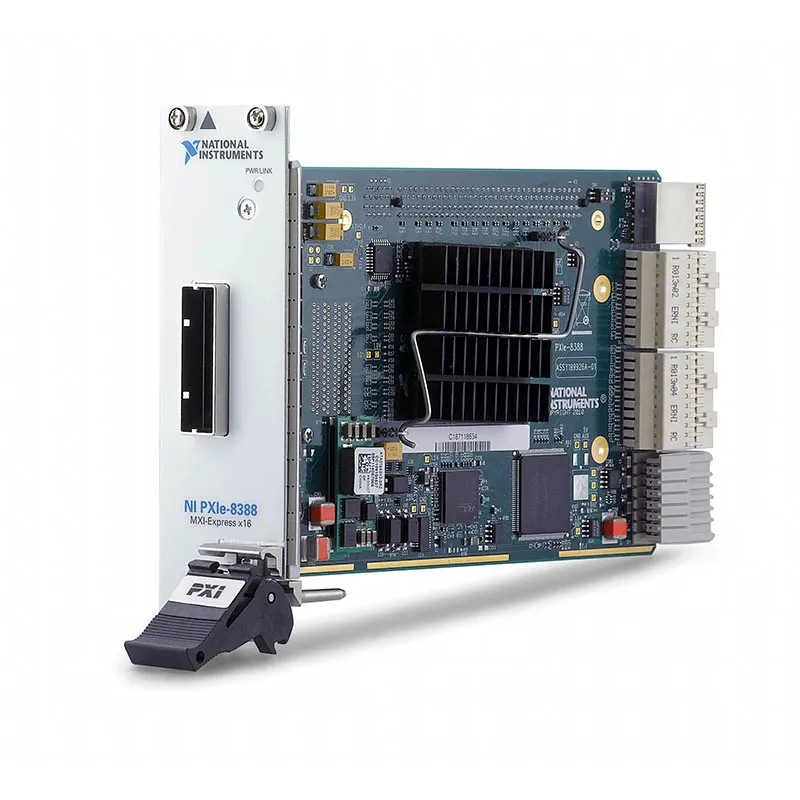
PXIe-8388 Gen2 x16 MXI-Express Remote Control Module
The NI PXIe-8388 is a high-bandwidth PXI Express remote control module that allows an approved external computer to control a PXI Express or CompactPCI Express chassis. It uses a transparent MXI-Express Gen2 x16 copper link to extend the host computer’s PCI Express bus into the chassis.
The PXIe-8388 provides a theoretical maximum MXI bandwidth of 8 GB/s and is designed for systems that transfer large amounts of waveform, image or RF measurement data. It is normally connected to a compatible PCIe-8388 host interface through a dedicated x16 MXI-Express cable.
Key Features of the PXIe-8388
- MXI-Express Gen2 x16 architecture
- 8 GB/s theoretical maximum bandwidth
- High-bandwidth copper connection
- Transparent PCI Express extension
- One x16 MXI-Express cable port
- Compatible with an approved PCIe-8388 host interface
- Controls PXI Express and CompactPCI Express chassis
- Supports high-throughput measurement systems
- Does not support chassis daisy chaining
- 0°C to 55°C operating range
- NI part number 781760-01
PXIe-8388 Technical Specifications
| Product Model | PXIe-8388 |
|---|---|
| Part Number | 781760-01 |
| Product Type | PXI Express remote control module |
| Interface Family | MXI-Express Gen2 x16 |
| Theoretical MXI Bandwidth | 8 GB/s |
| MXI Ports | 1 |
| Cable Type | Copper x16 MXI-Express cable |
| Typical Supported Cable Lengths | 1 m or 3 m, configuration dependent |
| Host Interface | Compatible PCIe-8388 |
| Daisy Chaining | Not supported |
| Bus Connection | PXI Express controller interface |
| Chassis Role | Installed in the PXI Express system-controller location |
| Operating Temperature | 0°C to 55°C |
| Product Lifecycle | Discontinued |
Gen2 x16 MXI-Express Connection
The x16 Gen2 link provides substantially more theoretical bandwidth than earlier x1 and x4 MXI systems. This makes the PXIe-8388 suitable for digitizers, RF instruments, image-acquisition modules and other devices that generate large data streams.
The 8 GB/s value represents the theoretical bidirectional capability of the underlying link. Sustained application throughput is lower and depends on the host, chipset, chassis topology, instruments, transfer size and software.
Transparent PCI Express Operation
MXI-Express presents the remote PXI Express chassis as an extension of the host computer’s PCI Express hierarchy. Compatible instrument drivers can access installed modules without converting every measurement transaction into a conventional network message.
This transparency also means that host BIOS compatibility and PCI resource allocation are important. Not every computer with a physical x16 slot is guaranteed to support the system correctly.
Host Compatibility Requirements
The PXIe-8388 and its matching PCIe-8388 host interface require an approved platform with a sufficiently stable clock and compatible BIOS behavior. NI documentation notes that this family is intended for supported rackmount-controller architectures rather than arbitrary desktop motherboards.
Verify the exact host model before purchasing replacement hardware. Physical PCI Express slot compatibility alone is insufficient.
PXIe-8388 Part Number and Accessories
| Item | Part Number | Description |
|---|---|---|
| PXIe-8388 | 781760-01 | Gen2 x16 MXI-Express PXI remote control module |
| PCIe-8388 | 781762-01 | Compatible computer-side x16 MXI-Express interface |
| x16 MXI-Express Copper Cable | Length dependent | Connects the host interface to the PXIe-8388 |
| Approved Rackmount Controller | Model dependent | Provides the host platform for the PCIe-8388 interface |
| PXI Express Chassis | Model dependent | Provides the system-controller slot and peripheral-module slots |
The PXIe-8388 has been discontinued by NI. When replacing an existing unit, confirm the module, PCIe-8388 host card, cable, chassis and host computer as one compatible system.
PXIe-8388 Applications
- High-bandwidth PXI Express remote control
- High-speed digitizer systems
- Wideband RF test systems
- Image acquisition
- Large waveform streaming
- Semiconductor production testing
- Automated validation systems
- External rackmount-computer control
- Data-intensive research systems
- Maintaining legacy Gen2 x16 MXI systems
High-Speed Data Acquisition
The PXIe-8388 can connect a high-performance host computer to PXI Express digitizers and acquisition modules. Large records can be transferred to host memory for analysis or disk streaming.
RF and Semiconductor Testing
RF production systems often combine vector signal transceivers, switches, SMUs and digital instruments. A high-bandwidth remote link helps the external host coordinate these modules and process measurement data.
PXIe-8388 Installation Workflow
Step 1: Validate Host Compatibility
Confirm that the selected computer or rackmount controller is approved for use with the PCIe-8388 and PXIe-8388.
Step 2: Install Required Software
Install PXI Platform Services and the drivers required for the instruments in the remote chassis.
Step 3: Power Down the Equipment
Shut down the host and disconnect chassis power before installing the cards or cable.
Step 4: Install Both Interfaces
Install the PCIe-8388 in the correct host slot and the PXIe-8388 in the PXI Express system-controller location.
Step 5: Connect the x16 Cable
Attach the approved copper cable to both interfaces. Avoid twisting the connector or applying excessive strain to the cable.
Step 6: Power On in the Correct Order
Power on the PXI Express chassis before starting the host so the BIOS can enumerate all remote PCI Express resources.
Step 7: Verify the Complete System
Use NI MAX and the operating system device manager to verify the chassis and every installed PXI instrument.
PXIe-8388 Troubleshooting
The host does not detect the chassis
Perform a complete power shutdown and reseat the host interface, PXIe-8388 and cable. Power the chassis before starting the computer.
The system reports insufficient PCI resources
Update or configure the host BIOS according to the supported-system documentation. Large PXI Express systems may require sufficient preallocated PCI address space.
The link works with one host but not another
The PXIe-8388 requires a compatible host architecture and stable reference clock. A physical x16 slot does not guarantee support.
Data throughput is lower than 8 GB/s
The 8 GB/s specification is theoretical link bandwidth. Actual throughput depends on the host, chassis, modules, transfer direction, packet size and application architecture.
The user wants to add another chassis
The PXIe-8388 does not support daisy chaining. A different interface architecture or an additional host-side connection is required for multichassis expansion.
PXIe-8388 Comparison
| Model | Interface | Best Suited For |
|---|---|---|
| PXIe-8388 | Gen2 x16, 8 GB/s theoretical | Legacy high-bandwidth remote control |
| PXIe-8389 | Gen2 x16 expansion interface | Applicable multichassis and daisy-chain systems |
| PXIe-8370 | Lower-lane-count MXI-Express connection | General PXI Express remote control |
| PXI-8360 | MXI-Express x1 for PXI | Conventional PXI rather than PXI Express |
| PXIe-8383 | Newer remote-control architecture | Applications requiring a different supported host link |
Selecting a Replacement
For an existing validated system, replacing a failed PXIe-8388 with the same model may minimize integration changes. For a new system, compare current remote-control products based on host compatibility, sustained bandwidth, cable length, chassis topology and software lifecycle.
PXIe-8388 Frequently Asked Questions
What is the PXIe-8388?
It is a Gen2 x16 MXI-Express module used to control a PXI Express chassis from an approved external computer.
What is its theoretical bandwidth?
The specified theoretical maximum MXI bandwidth is 8 GB/s.
Which host card works with it?
The standard paired computer-side interface is the PCIe-8388.
Does it support daisy chaining?
No. The PXIe-8388 does not support chassis daisy chaining.
Can it work in any computer with an x16 slot?
No. Host BIOS, chipset and reference-clock compatibility must be verified. NI identifies specific supported host architectures.
Is the PXIe-8388 still active?
No. NI currently lists the PXIe-8388 as discontinued, making compatibility verification especially important when sourcing replacement units.
Request a Quote for the PXIe-8388
Contact us for availability and pricing for the PXIe-8388 Gen2 x16 MXI-Express module, part number 781760-01. We can also help locate the PCIe-8388 host interface, compatible x16 cable, PXI Express chassis and current replacement options.















