







PXIe-8861 2.8 GHz Quad-Core Xeon PXI Express Controller
The NI PXIe-8861 is a high-performance embedded controller designed for processor-intensive PXI Express test, measurement and automation systems. It combines a 2.8 GHz quad-core Intel Xeon E3-1515M v5 processor, DDR4 memory, NVMe solid-state storage and up to 16 GB/s maximum controller bandwidth.
The PXIe-8861 is particularly suitable for RF testing, modular instrumentation, high-speed data acquisition and automated validation applications. Its embedded architecture places the processor, system storage and peripheral interfaces directly inside the PXI Express chassis, creating a self-contained test platform without requiring an external host computer.
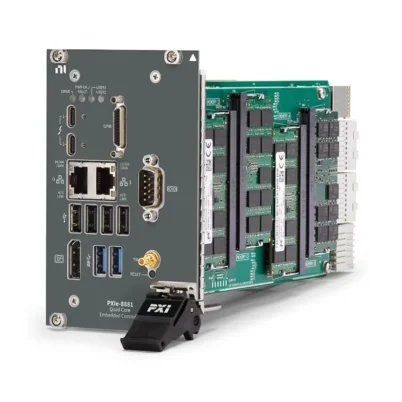
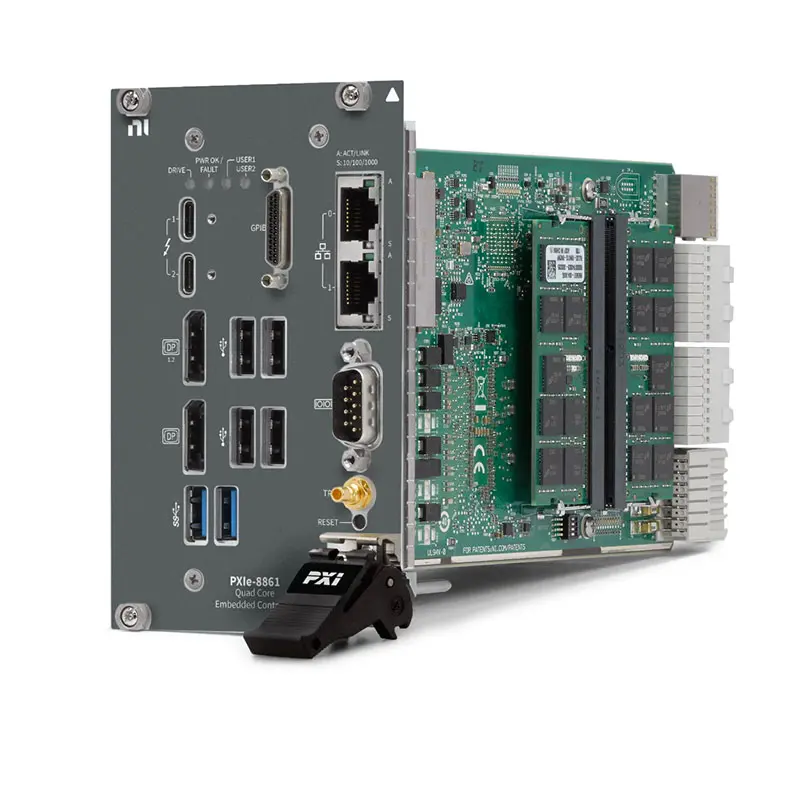
Front-panel connectivity includes two Gigabit Ethernet ports, two Thunderbolt 3 ports, two DisplayPort outputs, two USB 3.0 ports, four USB 2.0 ports, RS-232 serial, Micro-GPIB and an SMB connector for PXI trigger-bus routing. Windows 10 and NI Linux Real-Time configurations are available, together with TPM and no-TPM variants.
Key Features of the PXIe-8861
- 2.8 GHz Intel Xeon E3-1515M v5 processor
- Four processor cores for parallel test execution
- 8 MB Intel SmartCache
- 8 GB standard DDR4-2133 memory
- 32 GB maximum supported memory
- 512 GB or greater NVMe solid-state drive on standard versions
- Optional front-removable storage configuration
- 16 GB/s maximum PXI Express controller bandwidth
- Four-link x4, x4, x4 and x4 backplane configuration
- Two-link x8 and x8 backplane configuration
- Two 10/100/1000BASE-T Ethernet ports
- IEEE 1588-capable Intel I210 Ethernet interface
- Two Thunderbolt 3 USB Type-C ports
- Two DisplayPort video outputs
- Two USB 3.0 Type-A ports
- Four USB 2.0 Type-A ports
- One DB-9 RS-232 serial port
- One Micro-GPIB IEEE 488 controller port
- One SMB PXI trigger-bus input/output
- Windows 10 IoT Enterprise and NI Linux Real-Time options
- TPM 2.0 and no-TPM ordering configurations
- 0°C to 55°C operating-temperature range
Intel Xeon Processing Architecture
The PXIe-8861 uses an Intel Xeon E3-1515M v5 processor operating at a base frequency of 2.8 GHz. Its four-core architecture allows automated test applications to execute multiple software processes and measurement tasks in parallel.
One processor core can manage test sequencing while other cores handle waveform acquisition, signal processing, database communication and operator-interface tasks. This helps the controller support complex systems containing several simultaneous PXI Express instruments.
The Xeon processor platform is intended for demanding computing workloads and provides 8 MB of SmartCache. Applications that perform RF waveform analysis, high-speed digitizer processing or repeated mathematical calculations can benefit from the additional processor resources compared with entry-level embedded controllers.
8 GB DDR4 Memory
The standard PXIe-8861 includes 8 GB of DDR4-2133 memory. The controller supports up to 32 GB for applications that require larger waveform buffers, additional software processes or more intensive analysis.
Memory requirements depend on the operating system, number of installed drivers, development environment, waveform size and amount of simultaneously processed data. A simple instrument-control system may operate effectively with the standard memory, while RF analysis and large data-acquisition systems can benefit from an expanded configuration.
Use only compatible SODIMM memory modules and follow NI service instructions when upgrading the controller. Mixing unsupported memory types or specifications can prevent the controller from starting or reduce system stability.
NVMe Solid-State Storage
Standard PXIe-8861 configurations include a 512 GB or greater NVMe solid-state drive. NVMe storage provides fast operating-system startup, application loading and test-data access while avoiding the moving parts used in conventional mechanical hard drives.
The system drive stores the operating system, NI drivers, development software, configuration files and locally recorded test data. Available storage should be monitored in production applications that generate large waveform files, diagnostic logs or continuous measurement records.
Critical test data should be transferred to approved network or external storage on a regular schedule. Maintaining a validated recovery image can reduce downtime if the operating system or internal drive must be restored.
Removable Drive Configuration
Part number 786986-01 is a specialized PXIe-8861 version with a front removable-drive shuttle. NI identifies this version as shipping without a storage drive or operating system, allowing the customer to implement a qualified removable-storage configuration.
A removable drive can be useful in secure laboratories, defense applications and shared test environments where test data or operating-system images must be physically removed from the equipment.
The removable-drive configuration should not be assumed to include an SSD. Confirm the drive, shuttle, operating system and recovery requirements before ordering or deploying this variant.
16 GB/s PXI Express Bandwidth
The PXIe-8861 provides up to 16 GB/s maximum controller-to-backplane bandwidth. This high-throughput architecture supports demanding PXI Express systems containing digitizers, RF instruments, FPGA modules and high-speed data-acquisition devices.
The controller supports a four-link configuration of x4, x4, x4 and x4, as well as a two-link configuration of x8 and x8. The active topology depends on the PXI Express chassis backplane.
Actual measurement throughput depends on the chassis, installed instruments, slot configuration, driver architecture, storage performance and application software. The controller bandwidth rating represents the maximum backplane transfer capability rather than a guaranteed sustained recording rate for every system.
Dual Gigabit Ethernet Interfaces
The controller provides two independent 10/100/1000BASE-T Ethernet ports through RJ45 connectors. One interface uses an Intel I219 controller, while the second uses an Intel I210 controller with IEEE 1588 support.
Dual Ethernet ports allow the test system to separate different types of network traffic. One port can communicate with Ethernet-controlled instruments or devices under test while the other connects to a laboratory, enterprise or production network.
IEEE 1588 can support time coordination in compatible network architectures. Overall synchronization accuracy depends on the software, network switches, connected instruments and complete timing configuration.
Two Thunderbolt 3 Ports
The PXIe-8861 provides two Thunderbolt 3 interfaces through USB Type-C connectors. Thunderbolt technology supports high-speed peripheral connectivity and can transport compatible PCI Express, DisplayPort and USB traffic.
Supported Thunderbolt peripherals may include storage devices, displays and compatible expansion equipment. Verify the device, cable, operating system and driver combination before using a Thunderbolt peripheral in a production test system.
Power delivered to external devices through the Thunderbolt ports must be included in the chassis power budget. A USB Type-C connector does not automatically guarantee that every Type-C cable or peripheral supports Thunderbolt operation.
Dual DisplayPort Video Outputs
The PXIe-8861 provides one DisplayPort 1.1 output and one DisplayPort 1.2 output. These interfaces support local monitors used for software development, BIOS configuration, system diagnostics and operator displays.
Dual video outputs can be useful when one display presents the test interface while another shows waveform analysis, system status or development tools. Monitor resolution and multi-display support depend on the operating system, graphics settings and display hardware.
NI includes a 7-inch DisplayPort-to-VGA adapter cable with standard controller configurations. A direct digital DisplayPort connection is preferable when supported by the monitor.
USB Peripheral Connectivity
Two USB 3.0 Type-A ports provide SuperSpeed connections for compatible high-throughput peripherals. Four additional USB 2.0 Type-A ports support keyboards, mice, software-license devices and other lower-bandwidth equipment.
USB 3.0 ports are backward compatible with USB 2.0 devices. External storage and other high-data-rate peripherals should normally use the USB 3.0 ports, leaving the USB 2.0 interfaces available for operator and configuration devices.
Bus-powered USB devices add to the complete system power requirement. Permanent installations should use secure cable routing and avoid unsupported hubs or peripherals that exceed the available port power.
Integrated Micro-GPIB Interface
A Micro-GPIB connector allows the PXIe-8861 to control compatible IEEE 488 instruments. This interface is valuable in laboratories that combine modern PXI Express modules with existing oscilloscopes, power supplies, signal generators and other GPIB equipment.
A compatible Micro-GPIB cable or adapter is required when connecting instruments with conventional full-size GPIB connectors. NI-488.2 software must be installed and configured for GPIB communication.
Every instrument on the bus must use a valid, nonconflicting GPIB address. Cable length, number of connected devices and instrument response time can affect communication reliability and overall test throughput.
RS-232 Serial Communication
The DB-9 RS-232 port provides communication with serial instruments, industrial controllers, environmental chambers, programmable devices and legacy test fixtures.
Serial operation requires matching baud rate, data bits, parity, stop bits and flow-control settings. A cable that fits the connector may still have an incorrect straight-through or null-modem wiring configuration, so the required pinout should be verified.
PXI Trigger Bus Interface
The front-panel SMB connector can route PXI trigger signals between external equipment and the chassis backplane trigger bus. This enables external events to start PXI measurements or allows the PXI system to provide a trigger to another instrument.
Trigger direction, backplane line assignment and electrical compatibility must be configured correctly. The SMB connector is intended for timing and control signals rather than general analog signal acquisition.
Windows and NI Linux Real-Time Options
The PXIe-8861 is available with Windows 10 IoT Enterprise or NI Linux Real-Time. The correct operating system depends on driver compatibility, software requirements, timing behavior and organizational security policies.
Windows 10 IoT Enterprise
Windows configurations support conventional desktop test applications and software such as LabVIEW, TestStand and InstrumentStudio. They are suitable when the application requires a graphical desktop, third-party Windows software or broad instrument compatibility.
NI Linux Real-Time
NI Linux Real-Time configurations are intended for supported deterministic test, measurement and control applications. They can be used for hardware-in-the-loop testing, closed-loop control and automated systems that require predictable software execution.
Before choosing the real-time version, confirm that every installed PXI module, instrument driver and application component supports the planned NI Linux Real-Time software release.
TPM 2.0 Configuration Options
Selected PXIe-8861 configurations include a Trusted Platform Module 2.0. TPM hardware can support security functions such as protected key storage, system identity and operating-system drive-encryption workflows.
Other part numbers are supplied without TPM. Regional availability also applies: NI specifies Infineon or ST TPM hardware for the global market and indicates that TPM is not available for the China-market configuration.
The exact part number should therefore be checked whenever TPM is required by an organization’s cybersecurity policy.
PXIe-8861 Technical Specifications
| Product Model | PXIe-8861 |
|---|---|
| Product Type | High-performance PXI Express embedded controller |
| Processor | Intel Xeon E3-1515M v5 |
| Processor Frequency | 2.8 GHz base frequency |
| Processor Cores | 4 |
| Processor Cache | 8 MB Intel SmartCache |
| Standard Memory | 8 GB |
| Maximum Memory | 32 GB |
| Memory Type | DDR4-2133, PC-17000 |
| Standard Storage | 512 GB or greater NVMe solid-state drive |
| Removable Drive Option | Available on part number 786986-01; drive and OS not included |
| Maximum Controller Bandwidth | 16 GB/s |
| Four-Link Configuration | x4, x4, x4, x4 |
| Two-Link Configuration | x8, x8 |
| Ethernet | 2 × 10/100/1000BASE-T RJ45 ports |
| Ethernet Controllers | Intel I219 and Intel I210; IEEE 1588 supported by I210 |
| Thunderbolt | 2 × Thunderbolt 3 USB Type-C ports |
| USB 3.0 | 2 × Type-A ports |
| USB 2.0 | 4 × Type-A ports |
| Video Output | 1 × DisplayPort 1.1 and 1 × DisplayPort 1.2 |
| Serial Interface | 1 × DB-9 RS-232 port |
| GPIB Interface | 1 × Micro-GPIB IEEE 488 controller port |
| Trigger Interface | 1 × SMB PXI trigger-bus input/output |
| Operating System Options | Windows 10 IoT Enterprise or NI Linux Real-Time |
| Security Hardware | Optional TPM 2.0, configuration and region dependent |
| Module Dimensions | Four-wide 3U PXI Express module |
| Slot Requirement | One system slot plus three controller expansion slots |
| Typical Weight | 1.2 kg |
| PXI Compatibility | PXI Express Specification 1.0 |
| Operating Temperature | 0°C to 55°C |
| Operating Humidity | 10% to 90%, noncondensing |
| Storage Temperature | -40°C to 71°C |
| Storage Humidity | 5% to 95%, noncondensing |
| Maximum Altitude | 4,600 m at 25°C ambient |
| Operating Shock | 30 g peak, half-sine, 11 ms pulse |
| Operating Random Vibration | 5 Hz to 500 Hz, 0.3 grms with solid-state drive |
| Nonoperating Random Vibration | 5 Hz to 500 Hz, 2.4 grms |
| Operating Environment | Indoor use, Pollution Degree 2 |
PXIe-8861 Electrical Requirements
| Power Rail | Typical Current | Maximum Current |
|---|---|---|
| +3.3 V | 3.75 A | 4.25 A |
| +5 V | 2.0 A | 2.5 A |
| +12 V | 6.0 A | 7.6 A |
| -12 V | 0 A | 0 A |
| +5 V auxiliary | 0.75 A | 0.8 A |
These electrical values do not include devices powered through the USB or Thunderbolt 3 interfaces. External peripherals and all PXI modules must be included when calculating the complete chassis power requirement.
PXIe-8861 Part Number and Accessories
| Part Number | Operating System | Storage Configuration | TPM |
|---|---|---|---|
| 785831-01 | Windows 10 IoT Enterprise LTSC 21H2, 64-bit | 512 GB or greater internal NVMe SSD | TPM 2.0 |
| 787567-01 | Windows 10 IoT Enterprise LTSC 21H2, 64-bit | 512 GB or greater internal NVMe SSD | No TPM |
| 785831-33 | NI Linux Real-Time | 512 GB or greater internal NVMe SSD | TPM 2.0 configuration |
| 787567-33 | NI Linux Real-Time | 512 GB or greater internal NVMe SSD | No TPM |
| 786986-01 | No operating system | Front removable-drive shuttle; storage drive not included | TPM 2.0 configuration |
The PXIe-8861 is available under several configuration-specific part numbers. Confirm the operating system, TPM requirement and fixed or removable storage arrangement before ordering.
TPM availability can vary by regional configuration. If TPM is mandatory, verify the full ordering description and destination market rather than relying only on the PXIe-8861 model name.
Included Items
- PXIe-8861 embedded controller in the selected configuration
- 7-inch DisplayPort-to-VGA adapter cable
- Recovery media for the installed operating system and drivers
- Four M3 mounting screws
- PXIe-8861/PXIe-8862 removable-drive shuttle with part number 786986-01
- Safety, environmental and regulatory documentation
Recommended Supporting Hardware
- Compatible PXI Express chassis with one system slot and three adjacent expansion slots
- DisplayPort-compatible monitor, keyboard and mouse
- Micro-GPIB-to-standard-GPIB cable for IEEE 488 instruments
- Cat 5e or better Ethernet cables
- Certified Thunderbolt 3 cables and compatible peripherals
- USB storage or network storage for test-result archiving
- Qualified SODIMM memory when expanding controller RAM
- Qualified SSD for the removable-drive version
Recommended Software
- LabVIEW for test, measurement and automation development
- TestStand for automated test sequencing and reporting
- InstrumentStudio for supported instrument configuration
- NI Linux Real-Time for deterministic test and control
- NI-488.2 for GPIB instrument communication
- NI-VISA for compatible serial and instrument-control interfaces
- Drivers required by each installed PXI instrument
Selecting the Correct PXIe-8861 Version
Select a Windows version when the system uses desktop applications, Windows-based development tools or third-party software. Select an NI Linux Real-Time version when deterministic execution is required and every planned PXI module has compatible real-time driver support.
Choose the removable-drive version when storage must be physically removed for security, data transfer or operating-system separation. Remember that part number 786986-01 does not include the actual drive or operating system.
PXIe-8861 Applications
Processor-Intensive RF Testing
The PXIe-8861 is designed for RF systems that require instrument control, waveform processing and automated result analysis. It can coordinate compatible vector signal transceivers, analyzers, generators and RF switch modules within one PXI Express chassis.
The 16 GB/s backplane bandwidth helps move data between the controller and compatible RF instruments. The Xeon processor can perform measurements such as modulation analysis, spectral processing and limit evaluation while the test sequence continues.
High-Speed Data Acquisition
High-speed digitizers and multifunction DAQ modules can transfer acquired records to the controller for processing and storage. The PXIe-8861 is suitable for systems where several modules must acquire data simultaneously or where large waveforms are processed between test steps.
Sustained recording performance must be calculated from the aggregate channel count, sample rate, resolution and acquisition duration. The NVMe drive, application software and file system must all sustain the required data rate.
Automated Production Testing
The controller can operate a complete production test station containing measurement instruments, power supplies, switches and communication interfaces. Test software can identify the DUT, configure instruments, perform measurements and save pass-or-fail results.
Dual Ethernet interfaces allow manufacturing-network traffic to be separated from DUT or instrument communication. This can improve system organization and simplify troubleshooting.
Electronic Design Validation
Design-validation systems can use the PXIe-8861 to coordinate multiple measurements across voltage, current, RF, digital and timing domains. Automated switching enables the same group of instruments to access many DUT test points without manual reconnection.
Multicore processing allows analysis and reporting to run alongside instrument control, helping reduce total validation time for complex electronic assemblies.
Hardware-in-the-Loop Testing
NI Linux Real-Time configurations can support compatible hardware-in-the-loop and closed-loop control applications. The controller can execute deterministic test software while communicating with FPGA, DAQ, automotive and fault-insertion modules.
Before deployment, verify required loop rates, driver support, CPU load, interrupt behavior and system jitter. Processor performance alone does not guarantee real-time determinism.
Semiconductor Test Systems
The controller can coordinate SMUs, digital instruments, waveform generators, digitizers and switching hardware used in semiconductor characterization and production testing.
Its processing capability supports multi-instrument sequencing and result analysis, while the PXI Express backplane provides a compact architecture for scalable test configurations.
Aerospace and Defense Testing
The PXIe-8861 can be used in aerospace and defense test systems that combine RF, avionics communication, data acquisition and programmable switching. The removable-drive option can assist environments with strict data-handling requirements.
System integrators must still confirm environmental, security, export-control and application-specific compliance requirements for the complete test platform.
Legacy Instrument Integration
Micro-GPIB and RS-232 interfaces allow the controller to communicate with existing laboratory equipment. This helps organizations incorporate older instruments into a modern PXI Express automation system without replacing every device at once.
PXIe-8861 Installation Workflow
Step 1: Confirm the Ordered Configuration
Check the part number, operating system, TPM option and storage arrangement. If part number 786986-01 was ordered, obtain a qualified removable storage drive and prepare the required operating-system image.
Step 2: Verify Chassis Compatibility
Confirm that the chassis provides a PXI Express system-controller slot and three adjacent controller expansion slots. The PXIe-8861 is a four-wide module and requires all four positions.
Step 3: Calculate Power Requirements
Add the controller’s maximum rail requirements to those of all installed PXI modules. Include power consumed by USB and Thunderbolt devices. Verify that the chassis provides sufficient cooling and electrical capacity.
Step 4: Apply ESD Protection
Keep the controller in its antistatic packaging until installation. Wear a grounded wrist strap or touch a grounded chassis surface before handling the module. Avoid contact with exposed connector pins and components.
Step 5: Power Off the Chassis
Connect the chassis to protective ground according to its manual but keep chassis power off while installing the controller. Remove the filler panels covering the system-controller and adjacent expansion slots.
Step 6: Insert the PXIe-8861
Place the injector/ejector handle in the downward position. Align the controller with the upper and lower card guides, slide it into the chassis and use the handle to seat the backplane connectors.
Secure the front panel with the supplied retaining screws. Do not force the module if it does not align smoothly with the guides or connectors.
Step 7: Connect Local Peripherals
Connect a DisplayPort monitor, USB keyboard and mouse when local configuration is required. Attach Ethernet, Thunderbolt, serial, GPIB and trigger cables according to the test-system design.
Step 8: Install the Storage Drive
For the removable-drive configuration, install a qualified drive in the supplied shuttle while the chassis is powered off. Do not remove or insert storage during operation unless the complete hardware and software procedure specifically supports it.
Step 9: Start the Controller
Power on the chassis and monitor the front-panel LEDs and display output. Enter the BIOS only when boot order, security, power-restoration behavior or other system settings must be changed.
Step 10: Configure the Operating System
Complete Windows or NI Linux Real-Time setup. Configure network addresses, time settings, user accounts, security policies and remote-management options according to the installation requirements.
Step 11: Install Drivers and Applications
Install the NI drivers required by every PXI module. Add LabVIEW, TestStand, InstrumentStudio or the relevant application runtime. Keep a record of all software versions for future maintenance.
Step 12: Validate the Complete System
Confirm that the chassis and every installed module are detected correctly. Test Ethernet, Thunderbolt, USB, serial, GPIB, video and trigger connections before running the final production or validation sequence.
Step 13: Create Recovery Media and Backups
Retain the original recovery media and create a validated application backup. Document BIOS settings, network configuration, driver versions, licenses and calibration information.
PXIe-8861 Troubleshooting
The PXIe-8861 Does Not Power On
Recommended Checks
Verify chassis power, input voltage, fuse condition and inhibit settings. Confirm that the controller is fully seated in the system slot. Disconnect unnecessary USB and Thunderbolt devices when checking for a power-capacity issue.
The Controller Does Not Boot
Recommended Checks
Remove external bootable USB devices and verify the BIOS boot order. Confirm that the internal or removable NVMe drive is detected. On the removable version, check that a qualified drive is installed securely in the shuttle.
No Video Is Displayed
Recommended Checks
Check the DisplayPort cable, monitor input and adapter. Test the other DisplayPort connector and restart the controller with only one monitor connected. Confirm that the display supports the selected resolution and signal format.
PXI Modules Are Not Detected
Recommended Checks
Power down the chassis and reseat the affected modules. Confirm chassis slot compatibility and install the correct NI drivers. Review the system in NI Measurement & Automation Explorer or the appropriate real-time configuration utility.
Data Throughput Is Lower Than Expected
Recommended Checks
Calculate the actual aggregate data rate and inspect the chassis link topology. Review DMA configuration, record size, application buffer management, storage activity and CPU utilization. The 16 GB/s rating is a maximum controller-backplane capability rather than guaranteed application throughput.
An Ethernet Connection Runs Slowly
Recommended Checks
Confirm that the controller and network switch negotiated a Gigabit connection. Inspect the cable, adapter settings and network-switch configuration. Storage speed, protocol overhead and other traffic can reduce real file-transfer performance.
A Thunderbolt Device Is Not Recognized
Recommended Checks
Use a certified Thunderbolt 3 cable and verify operating-system and driver compatibility. Test the peripheral without an intermediate hub or adapter and confirm that its power requirement is supported.
A GPIB Instrument Does Not Respond
Recommended Checks
Install NI-488.2 and confirm that the controller and instrument appear in the configuration software. Check the Micro-GPIB adapter, cable connections and instrument address. Make sure no two devices share the same GPIB address.
RS-232 Communication Fails
Recommended Checks
Verify baud rate, parity, data bits, stop bits and flow control. Confirm whether the connected equipment requires a straight-through or null-modem cable and inspect the DB-9 pinout.
The Controller Overheats
Recommended Checks
Confirm that chassis air intake and exhaust openings are clear. Check fan mode, ambient temperature and adjacent module loading. Clean chassis filters according to the maintenance schedule and do not exceed the controller’s 55°C operating limit.
NI Linux Real-Time Performance Is Not Deterministic
Recommended Checks
Measure processor utilization, loop execution time and background network activity. Review task priorities, memory allocation, driver support and BIOS power-management settings. Move nondeterministic file, display or database operations outside critical loops.
The System Does Not Restart After Power Loss
Recommended Checks
Review the BIOS power-restoration setting. Configure automatic restart only when it is required and consistent with the safety design of the DUT and complete test system.
The NVMe Drive Is Nearly Full
Recommended Checks
Archive large waveform files and historical reports to approved external or network storage. Review application logs and temporary data. Maintain adequate free space for operating-system updates and database operations.
PXIe-8861 Comparison
| Model | Processor | Controller Bandwidth | Best Suited For |
|---|---|---|---|
| PXIe-8840 | Intel Core i5 | Lower than PXIe-8861 | General automated test and established systems |
| PXIe-8842 | Newer six-core Intel Core i5 | 8 GB/s | Multifunction DAQ and moderate streaming |
| PXIe-8861 | 2.8 GHz quad-core Intel Xeon | 16 GB/s | Processor-intensive RF, modular instrumentation and DAQ |
| PXIe-8862 | Newer eight-core Intel Core i7 | Generation dependent | Modern high-performance test and analysis systems |
| PXIe-8880 | Eight-core Intel Xeon | Up to 24 GB/s | Very demanding RF and computational workloads |
| PXIe-8881 | Multiple Intel Xeon configurations | Up to 24 GB/s | Large, processor-intensive automated test systems |
PXIe-8861 vs PXIe-8842
The PXIe-8861 uses a quad-core Intel Xeon processor and provides up to 16 GB/s controller bandwidth. The newer PXIe-8842 uses a six-core Intel Core i5 processor but is specified for up to 8 GB/s controller bandwidth.
The PXIe-8861 is attractive for systems requiring its higher backplane bandwidth, dual Thunderbolt 3 ports, integrated GPIB and optional removable storage. The PXIe-8842 provides a newer processor platform, dual 2.5GbE networking and Windows 11 ordering options.
PXIe-8861 vs PXIe-8862
The PXIe-8862 is a newer-generation controller with an eight-core Intel Core i7 processor, faster memory and updated connectivity. The PXIe-8861 retains advantages for installations requiring its established platform, 16 GB/s architecture or removable-drive configuration.
Before migrating, verify operating-system compatibility, drivers, chassis link configuration, software licensing and external connector requirements.
PXIe-8861 vs PXIe-8880
The PXIe-8880 provides an eight-core Intel Xeon processor and as much as 24 GB/s controller bandwidth. It is designed for workloads requiring more processing and backplane performance than the PXIe-8861.
Select the PXIe-8861 when its quad-core processing and 16 GB/s bandwidth meet the application requirements. Select the PXIe-8880 for more demanding RF analysis, high-channel-count acquisition and parallel processing.
PXIe-8861 vs PXIe-8881
The PXIe-8881 family provides several Xeon processor configurations, including higher-core-count versions for computationally intensive test systems. The PXIe-8861 offers a more moderate four-core architecture while retaining high PXI Express bandwidth.
The correct controller should be selected from measured processor usage, memory requirements, data rate, operating-system compatibility and expected future expansion.
Embedded Controller vs Remote Control
The PXIe-8861 installs directly in the chassis and creates a self-contained PXI computer. Remote-control systems instead connect the chassis to an external workstation through MXI-Express or another compatible interface.
Embedded control reduces cabling and simplifies deployment. Remote control can be preferable when the application needs a specialized workstation, centralized computing resources or independent computer upgrades.
Recommended Related Products
- PXIe-8842 Six-Core PXI Express Controller
- PXIe-8862 Eight-Core PXI Express Controller
- PXIe-8840 PXI Express Embedded Controller
- PXIe-8880 High-Performance PXI Controller
- PXIe-8881 High-Performance PXI Controller
- PXIe-1095 PXI Express Chassis
- PXIe-1092 PXI Express Chassis
- View More NI PXI Controllers
Why Choose the PXIe-8861?
- Provides 2.8 GHz quad-core Intel Xeon processing
- Supports up to 16 GB/s controller bandwidth
- Includes NVMe solid-state storage on standard versions
- Supports memory expansion up to 32 GB
- Provides dual Gigabit Ethernet interfaces
- Includes two Thunderbolt 3 ports
- Provides two DisplayPort video outputs
- Integrates GPIB and RS-232 instrument control
- Supports Windows and NI Linux Real-Time
- Offers fixed and removable-storage configurations
- Suitable for demanding RF, DAQ and automated test systems
Frequently Asked Questions
What is the PXIe-8861?
The PXIe-8861 is a four-wide embedded controller that provides the processor, memory, storage and peripheral interfaces needed to operate a compatible PXI Express chassis.
Which processor does the PXIe-8861 use?
It uses a 2.8 GHz Intel Xeon E3-1515M v5 processor with four cores and 8 MB of SmartCache.
What is the maximum PXIe-8861 bandwidth?
The maximum controller-to-backplane bandwidth is 16 GB/s. Actual application throughput depends on the chassis, modules, drivers and software architecture.
How much memory is included?
The standard memory capacity is 8 GB of DDR4-2133 memory.
Can the memory be expanded?
Yes. The PXIe-8861 supports as much as 32 GB of compatible DDR4 memory.
What storage does the PXIe-8861 use?
Standard versions include a 512 GB or greater NVMe solid-state drive. The removable-drive version does not include a drive or operating system.
Which part number has the removable drive?
Part number 786986-01 includes the removable-drive architecture and shuttle. The storage drive and operating system must be provided separately.
Does the PXIe-8861 support Windows 11?
The listed factory operating-system configurations use Windows 10 IoT Enterprise or NI Linux Real-Time. Confirm driver and hardware compatibility before attempting any operating-system change.
Can it run NI Linux Real-Time?
Yes. Dedicated NI Linux Real-Time part numbers are available for deterministic test and control applications.
Does every PXIe-8861 include TPM 2.0?
No. Both TPM and no-TPM configurations exist, and TPM availability also depends on the destination region. Verify the complete part-number description before ordering.
How many Ethernet ports are provided?
The controller provides two independent 10/100/1000BASE-T Ethernet ports.
Does the PXIe-8861 support IEEE 1588?
Yes. The Intel I210 Ethernet interface supports IEEE 1588 functionality for compatible network-timing applications.
How many Thunderbolt ports are included?
The controller provides two Thunderbolt 3 ports using USB Type-C connectors.
Does it include GPIB?
Yes. The PXIe-8861 includes a Micro-GPIB IEEE 488 controller interface. A compatible cable or adapter is required for conventional GPIB instruments.
Does it include an RS-232 port?
Yes. One DB-9 RS-232 serial port is provided for compatible instruments and industrial equipment.
Can the controller use two monitors?
Yes. It provides one DisplayPort 1.1 output and one DisplayPort 1.2 output. Final multi-monitor capability depends on the operating system and display configuration.
How many chassis slots does it occupy?
The four-wide controller occupies the system-controller slot and three adjacent controller expansion slots.
What is the operating-temperature range?
The specified operating-temperature range is 0°C to 55°C. Chassis cooling must keep the controller within this limit.
Is the PXIe-8861 suitable for RF testing?
Yes. NI identifies processor-intensive RF applications as one of its primary use cases. Required processing and data throughput should still be calculated for the specific RF instruments and measurements.
Is the PXIe-8861 suitable for high-speed DAQ?
Yes. Its 16 GB/s backplane architecture supports demanding acquisition systems, subject to chassis, module, software and storage limitations.
Does it require an external computer?
No. The PXIe-8861 is an embedded controller and functions as the computer for the PXI Express chassis.
What is included with the controller?
NI lists the controller, DisplayPort-to-VGA adapter cable, operating-system recovery media, four M3 screws and documentation. The removable-drive shuttle is included only with part number 786986-01.
How should I select the correct part number?
Determine whether the application needs Windows or NI Linux Real-Time, TPM or no TPM, and fixed or removable storage. Then match those requirements to the complete ordering table.
Request a Quote for the PXIe-8861
Contact us for current availability, lead time and project pricing for the NI PXIe-8861 2.8 GHz Quad-Core Xeon PXI Express Embedded Controller. Please include the required operating system, TPM configuration and storage arrangement in your request.
We can also help identify compatible PXI Express chassis, memory, storage, GPIB cables and related embedded controllers for RF, data-acquisition, validation and automated production test systems.















