







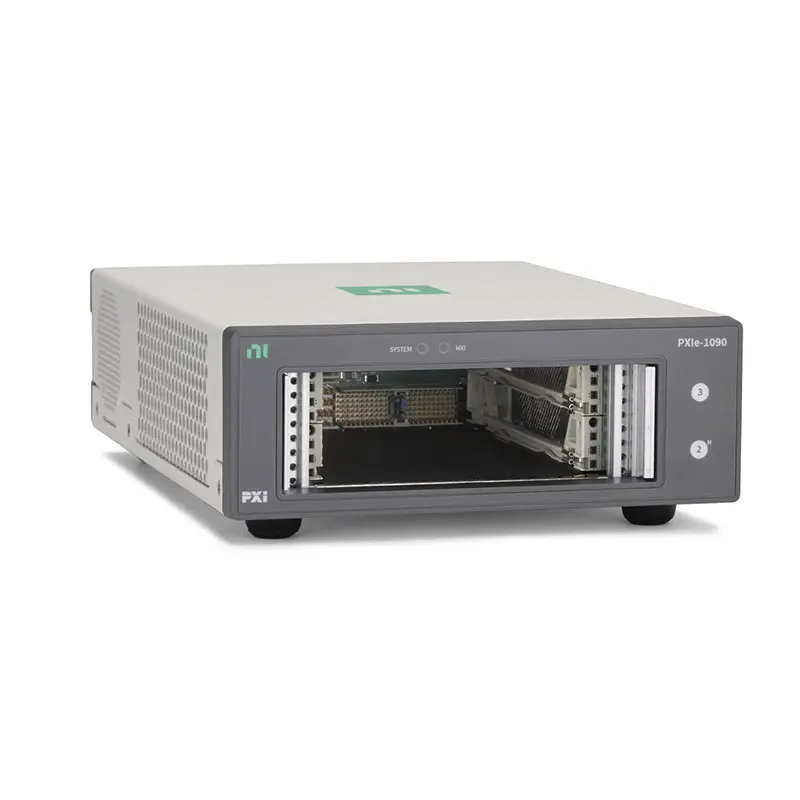
PXIe-1090 2-Slot Thunderbolt 3 PXI Express Chassis
The NI PXIe-1090 is a compact two-slot PXI Express chassis with an integrated Thunderbolt 3 MXI-Express controller. It allows compatible PXI Express instruments to be connected directly to a Thunderbolt-equipped laptop, desktop computer or engineering workstation without requiring a separate PXI embedded controller.
The chassis provides one PXI Express peripheral slot and one PXI Express hybrid peripheral slot. The hybrid position accepts PXI Express modules as well as supported conventional PXI hybrid-compatible modules, allowing engineers to create portable and space-efficient measurement systems.
With up to 2 GB/s maximum system bandwidth, approximately 985 MB/s of dedicated single-direction bandwidth per PXI Express slot and as much as 58 W of cooling per slot, the PXIe-1090 supports many oscilloscopes, digitizers, DAQ modules, communication interfaces, switches and FPGA-based instruments.
Its small enclosure, quiet 38 W cooling profile, external 10 MHz reference input and two rear-panel Thunderbolt ports make it suitable for benchtop development, mobile measurements, field diagnostics and distributed automated test systems.
Key Features of the PXIe-1090
- Compact two-slot PXI Express chassis
- Integrated Thunderbolt 3 MXI-Express controller
- No separate embedded PXI controller required
- One PXI Express peripheral slot
- One PXI Express hybrid peripheral slot
- Up to 2 GB/s maximum system bandwidth
- Up to 985 MB/s dedicated single-direction bandwidth per slot
- PCI Express Gen 3 x1 connection to each peripheral slot
- Two rear-panel Thunderbolt 3 ports
- Up to 15 W of power available from each Thunderbolt port
- Supports Thunderbolt bus extension
- 116 W maximum available card-cage power
- 38 W and 58 W cooling profiles
- 58 W maximum cooling capacity per slot
- Quiet operation in the 38 W cooling profile
- External 10 MHz reference input
- Low-jitter 10 MHz and 100 MHz backplane clocks
- Variable-speed fan control
- Power, temperature and fan monitoring
- Horizontal or supported vertical installation
- Compact benchtop and portable-system design
PXIe-1090 Technical Specifications
| Product Model | PXIe-1090 |
|---|---|
| Product Type | Thunderbolt-controlled PXI Express chassis |
| Chassis Format | 3U, two-slot |
| Total Peripheral Slots | 2 |
| PXI Express Peripheral Slots | 1 |
| PXI Express Hybrid Slots | 1 |
| System Controller Slot | Not required; Thunderbolt 3 MXI-Express controller is integrated |
| System Timing Slot | No |
| Conventional PXI-Only Slots | 0 |
| Host Interface | Thunderbolt 3 through USB Type-C connectors |
| Thunderbolt Ports | 2 |
| Power Available Per Thunderbolt Port | 15 W maximum, 5 V at 3 A |
| Maximum System Bandwidth | 2 GB/s |
| Dedicated Slot Bandwidth | Up to 985 MB/s, single direction |
| Peripheral Slot Connection | PCI Express Gen 3 x1 |
| Maximum Card-Cage Power | 116 W |
| Maximum +12 V Current | 8.0 A |
| Maximum +5 V Current | 2.5 A |
| Maximum +3.3 V Current | 6.0 A |
| Maximum −12 V Current | 0.25 A |
| Maximum +5 V Auxiliary Current | 0.5 A |
| Cooling Profiles | 38 W and 58 W |
| Maximum Slot Cooling | 58 W per slot |
| Primary Module Cooling | Two 42 CFM fans with positive-pressure forced-air circulation |
| Power-Supply Cooling | One 17 CFM fan |
| Horizontal Airflow | Right-side intake to left-side exhaust |
| Vertical Airflow | Bottom intake to top exhaust |
| Minimum Intake Clearance | 44.5 mm (1.75 in.) |
| Minimum Exhaust Clearance | 44.5 mm (1.75 in.) |
| Power Supply Type | Universal AC power supply |
| AC Input Rating | 100 VAC to 240 VAC, 50/60 Hz, 3 A to 1.5 A |
| Operating Voltage Range | 90 VAC to 264 VAC |
| Operating Frequency Range | 47 Hz to 63 Hz |
| Typical Power-Supply Efficiency | 93.5% |
| Onboard Oscillator | VCXO |
| Reference Clock Accuracy | ±25 ppm maximum |
| PXI_CLK10 Slot-to-Slot Skew | 250 ps maximum |
| PXI_CLK10 Maximum Jitter | 5 ps RMS |
| PXIe_CLK100 Slot-to-Slot Skew | 100 ps maximum |
| PXIe_CLK100 Maximum Jitter | 3 ps RMS from 10 Hz to 12 kHz; 2 ps RMS from 12 kHz to 20 MHz |
| External Reference Input | 10 MHz through rear-panel SMA connector |
| External Reference Frequency | 10 MHz ±25 ppm |
| External Reference Input Level | 100 mVpp to 5 Vpp sine or square wave |
| External Reference Input Impedance | 50 Ω ±5 Ω |
| External Reference Output | No |
| External Trigger Access | No integrated front- or rear-panel trigger connector |
| Operating Temperature | 0°C to 50°C with modules requiring no more than 38 W cooling |
| 58 W Module Operating Range | 0°C to 40°C |
| Storage Temperature | −40°C to 71°C |
| Operating Humidity | 20% to 80%, noncondensing |
| Maximum Operating Altitude | 2,000 m at 25°C in High fan mode |
| Operational Shock | 30 g peak, half-sine, 11 ms |
| Operational Random Vibration | 5 Hz to 500 Hz, 0.3 grms |
| Dimensions with Feet | 80 mm × 190 mm × 272 mm (3.2 in. × 7.5 in. × 10.7 in.) |
| Dimensions without Feet | 67 mm × 190 mm × 272 mm (2.6 in. × 7.5 in. × 10.7 in.) |
| Weight | 3.24 kg (7.15 lb) |
| Security Provision | Kensington security slot |
| Configuration Software | NI Measurement & Automation Explorer and PXI Platform Services |
The 2 GB/s rating represents the maximum theoretical aggregate bandwidth of the chassis. Each peripheral position uses an x1 PCI Express Gen 3 connection and provides up to approximately 985 MB/s of theoretical single-direction bandwidth.
Actual throughput depends on the host computer’s Thunderbolt controller, cable, operating system, system security configuration, installed PXI Express module, driver, DMA transfer and storage performance.
PXIe-1090 Part Number and Accessories
| Item | Part Number | Description |
|---|---|---|
| PXIe-1090 | 787040-01 | Two-slot PXI Express chassis with integrated Thunderbolt 3 MXI-Express control |
| Thunderbolt 3 Male-to-Male Cable | 785608-02 | 2 m passive USB Type-C Thunderbolt 3 cable, 20 Gbps, 5 A |
| Thunderbolt 4 Male-to-Male Cable | 785607-02 | 2 m active USB Type-C Thunderbolt 4 cable, 40 Gbps, 5 A |
| U.S. IEC Power Cord | 763830-01 | 125 VAC, 15 A AC power cord |
| China IEC Power Cord | 784686-01 | 250 V, 10 A AC power cord for China |
| Korea IEC Power Cord | 784685-01 | 240 V, 10 A right-angle AC power cord |
| Brazil IEC Power Cord | 785626-01 | 250 V, 10 A AC power cord |
| Japan IEC Power Cord | 786377-01 | 125 VAC, 12 A AC power cord for Japan |
| Europe IEC Power Cord | 763067-01 | 240 V, 10 A right-angle AC power cord |
| India IEC Power Cord | 763072-01 | 250 V, 10 A AC power cord for India |
| PXI Filler Panel | Included | Covers an unused slot to preserve cooling airflow and EMC performance |
| Panel-Mount Hardware | Configuration dependent | Mounting hardware for fixed, vertical or integrated test-system installations |
The PXIe-1090 chassis includes one PXI filler panel and the applicable safety, environmental and regulatory documentation. A compatible Thunderbolt cable and regional AC power cord should be selected according to the host and installation location.
A USB Type-C connector or cable does not automatically support Thunderbolt. Verify that the host port and cable are specifically certified for the required Thunderbolt operation.
Integrated Thunderbolt 3 MXI-Express Controller
The PXIe-1090 integrates the PXI Express system-control interface into the chassis. It does not require an embedded controller or a separate PXIe remote-control module to communicate with a compatible computer.
The Thunderbolt connection extends the host computer’s PCI Express architecture into the chassis. From the operating system’s perspective, supported PXI Express instruments are detected as PCI Express devices.
This architecture makes it possible to use a laptop or engineering workstation as the processing and user-interface platform while retaining the modular instrumentation benefits of PXI Express.
Two Thunderbolt 3 Ports
Two rear-panel Thunderbolt 3 ports provide host connectivity and Thunderbolt bus-extension capability. The cable connectors are reversible, and either chassis port can be used for the host connection.
The second port can be used with compatible Thunderbolt devices and supported system architectures. The complete connection topology must remain within the host, operating-system and Thunderbolt-device limitations.
Each Thunderbolt port can provide up to 15 W at 5 V and 3 A to a compatible downstream device. This power is separate from the 116 W available to the PXI card cage.
Host Computer Compatibility
The host computer must provide a compatible Thunderbolt port with PCI Express tunneling support. A standard USB-C port that supports only USB data or DisplayPort video cannot control the PXIe-1090.
Some computers require Thunderbolt or PCI Express tunneling to be enabled in BIOS or firmware. The operating system may also require the chassis to be authorized before installed PXI modules become visible.
Compatibility should be verified for the computer model, Thunderbolt controller, operating system, NI PXI Platform Services version and instrument drivers.
PXI Express Peripheral Slot
One position is a dedicated PXI Express peripheral slot. It supports compatible PXI Express and CompactPCI Express Type-2 peripheral modules through an x1 PCI Express Gen 3 connection.
This slot is suitable for PXIe digitizers, DAQ devices, communication interfaces and other instruments whose power, cooling and bandwidth requirements remain within the chassis limits.
A conventional PCI-based PXI module cannot be installed in the dedicated PXI Express position.
PXI Express Hybrid Peripheral Slot
The hybrid position supports PXI Express modules and compatible conventional PXI instruments. It provides PCI Express connectivity for PXIe devices and PCI-based signaling for supported PXI modules.
The hybrid slot is useful when an application requires a legacy PXI switch, serial interface or data-acquisition module alongside a newer PXI Express instrument.
Not every conventional PXI module is hybrid-slot compatible. Check the module connector, driver support and chassis compatibility before installation.
2 GB/s Maximum System Bandwidth
The PXIe-1090 provides two x1 PCI Express Gen 3 peripheral links, producing up to 2 GB/s of theoretical aggregate system bandwidth.
Each slot can provide up to approximately 985 MB/s in one direction. The interface is appropriate for many compact digitizer, DAQ and communication applications but may limit modules designed for wider x4 or x8 PCI Express links.
Before selecting a high-throughput instrument, compare its sustained transfer requirement with the PXIe-1090’s per-slot link. The module may operate correctly while providing lower maximum streaming performance than it would in a higher-bandwidth chassis.
116 W Available Card-Cage Power
The chassis provides up to 116 W of total power to the two module positions. This is sufficient for many two-module systems, including configurations using one high-power PXIe instrument and one lower-power support module.
The total power calculation must include consumption from every voltage rail. A configuration can remain below 116 W while exceeding the available current on the +12 V, +5 V or +3.3 V supply.
Thunderbolt port power should not be counted as additional PXI module power. The 15 W available from each Thunderbolt connection is intended for compatible external Thunderbolt devices.
38 W Cooling Profile
The 38 W profile supports modules dissipating up to 38 W per slot and provides the lowest acoustic-noise operating mode.
At ambient temperatures up to 30°C in Auto fan mode, the specified sound pressure level is approximately 32.3 dBA at the operator position. This makes the chassis suitable for quiet offices, laboratories and benchtop development areas.
When all installed modules require no more than 38 W of cooling, the PXIe-1090 can operate across its full 0°C to 50°C ambient-temperature range.
58 W Cooling Profile
The 58 W profile supports modules dissipating more than 38 W and up to 58 W per slot. When this profile is required, the permitted ambient-temperature range is reduced to 0°C to 40°C.
The increased airflow produces more acoustic noise. Sound pressure in 58 W Auto mode is approximately 48.9 dBA at ambient temperatures up to 30°C.
Use the 58 W profile when required by the module rather than selecting the lower profile solely to reduce fan noise.
Horizontal and Vertical Cooling
In the standard horizontal orientation, cooling air enters from the right side and exits through the left side. Module airflow travels from the bottom edge toward the top edge of the installed instruments.
When the chassis is installed vertically using an appropriate mounting arrangement, the airflow can operate from the lower intake toward the upper exhaust.
Maintain at least 44.5 mm of unobstructed clearance at both the intake and exhaust. Avoid installing the chassis where hot exhaust air can circulate back into the intake.
External 10 MHz Reference Input
A rear-panel SMA connector accepts an external 10 MHz reference from a compatible frequency standard or measurement system. The input accepts a 100 mVpp to 5 Vpp sine- or square-wave signal into 50 Ω.
When an external reference is used, supported PXI and PXI Express modules can derive their timing from the common source. This reduces relative frequency drift between instruments.
The PXIe-1090 provides an external reference input but does not provide a rear-panel 10 MHz reference output.
10 MHz PXI Reference Clock
The chassis distributes PXI_CLK10 with ±25 ppm maximum accuracy, maximum slot-to-slot skew of 250 ps and maximum RMS phase jitter of 5 ps.
Compatible PXI and PXI Express modules can use this clock as a common frequency reference for synchronized measurement or generation.
100 MHz PXI Express Reference Clock
PXIe_CLK100 and PXIe_SYNC100 are distributed to the PXI Express positions. The 100 MHz clock provides ±25 ppm accuracy and maximum slot-to-slot skew of 100 ps.
The differential clock architecture provides improved noise immunity and supports synchronization between compatible PXI Express modules.
Power, Temperature and Fan Monitoring
The PXIe-1090 monitors the power supply, chassis temperature and cooling fans. Front-panel System and MXI indicators provide information about chassis operation and the Thunderbolt communication link.
Supported monitoring information can also be reviewed through NI Measurement & Automation Explorer and PXI Platform Services.
Power Inhibit Modes
The rear-panel power-inhibit switch controls how the chassis responds to AC power and the connected Thunderbolt host. This allows the chassis power behavior to be adapted to benchtop or integrated-system requirements.
The appropriate mode should be selected before the system is placed into unattended service. Incorrect inhibit configuration can make the chassis appear unable to power on or cause it to follow an unexpected host power state.
Compact and Portable Design
The enclosure measures approximately 190 mm wide and 272 mm deep, with a weight of approximately 3.24 kg. Its compact size is suitable for portable test kits and workspaces that cannot accommodate a conventional eight- or eighteen-slot chassis.
Removable rubber feet expose threaded mounting points for compatible installation hardware. A Kensington security slot can help secure the chassis in shared laboratories or field environments.
PXIe-1090 Applications
- Portable PXI Express measurement systems
- Laptop-controlled instrumentation
- Benchtop design validation
- Field diagnostics and troubleshooting
- Compact automated test equipment
- High-speed data acquisition
- Oscilloscope and digitizer applications
- Automotive diagnostic testing
- Laboratory research
- Communication interface testing
- Compact RF measurement systems
- Manufacturing station diagnostics
- Education and university laboratories
- Distributed measurement nodes
- Temporary test-system expansion
Portable PXI Express Systems
The integrated Thunderbolt controller allows the chassis to be connected to a compatible laptop without a separate PCIe host adapter or embedded PXI controller.
This arrangement is useful for field measurements, vehicle testing, on-site diagnostics and temporary laboratory setups where portability is more important than maximum slot count.
Benchtop Design Validation
Engineers can combine a digitizer or DAQ module with a switch, communication interface or other support instrument in a compact development system.
The low acoustic output of the 38 W profile makes the chassis suitable for continuous operation near the user.
High-Speed Data Acquisition
A compatible PXI Express digitizer can transfer waveform data to a Thunderbolt-equipped host at up to the bandwidth supported by the chassis slot, module and host computer.
Applications requiring sustained acquisition should verify host memory, processor and storage performance. The PXIe-1090 link may also limit instruments designed for wider PCI Express connections.
Compact RF Measurement
The PXIe-1090 can support compatible RF instruments that fit within the available slot, bandwidth, power and cooling limits.
The external 10 MHz reference input allows the chassis to use a common laboratory frequency reference. However, many vector signal transceivers occupy multiple slots or require more bandwidth, so physical and electrical compatibility must be checked carefully.
Automotive and Field Diagnostics
A portable system can combine a PXI Express acquisition module with a hybrid-compatible CAN, LIN, FlexRay or automotive Ethernet interface.
The host laptop can run diagnostic or validation software while the PXIe-1090 provides modular measurement and vehicle-communication hardware.
Distributed Measurement Nodes
The compact chassis can be placed near a device under test while the host computer remains in a convenient operating position. Shorter sensor or RF connections can reduce signal loss and interference.
The second Thunderbolt port can participate in a supported bus-extension architecture when additional compatible Thunderbolt devices are required.
Education and Research
University laboratories can use the PXIe-1090 to provide students with access to modular PXI Express instruments without dedicating a full-size chassis and embedded controller to each workstation.
The system can be moved between benches and connected to different compatible computers as required.
PXIe-1090 Installation Workflow
Step 1: Confirm Host Compatibility
Verify that the host computer has a Thunderbolt port with PCI Express tunneling support. A USB-C connector alone is not sufficient.
Thunderbolt Hardware
Check the computer manufacturer’s specifications for Thunderbolt 3 or Thunderbolt 4 support. Confirm that the port is enabled in the system BIOS or firmware.
Operating System and Drivers
Verify support for the operating system, PXI Platform Services and the drivers required by the intended PXI modules.
Step 2: Inspect the Chassis and Accessories
Inspect the chassis, backplane connectors, Thunderbolt ports, cooling vents, power connector and supplied filler panel. Do not use equipment that appears damaged.
Step 3: Select the Installation Orientation
Place the chassis horizontally on its rubber feet or use a supported mounting accessory for vertical or fixed-panel installation.
Horizontal Installation
Keep at least 44.5 mm of clearance on the right-side intake and left-side exhaust.
Vertical Installation
Orient the chassis so that cooling air enters from below and exhausts upward. Do not place the exhaust beneath another heat-sensitive device.
Step 4: Connect Protective Earth
Connect the approved AC power cord to the chassis and a properly grounded outlet. The protective-earth connection must be established before installing modules or connecting signals.
Step 5: Plan the Module Positions
Identify whether each instrument requires a dedicated PXI Express slot or can operate in the hybrid position.
Dedicated PXI Express Slot
Use this position for compatible PXI Express or CompactPCI Express Type-2 modules.
Hybrid Slot
Use the hybrid position for a PXI Express module or a conventional PXI instrument specifically designed for hybrid-slot installation.
Step 6: Calculate Power and Cooling
Confirm that the combined module consumption remains within the 116 W card-cage limit and all individual voltage-rail limits.
Select the 58 W profile if either instrument dissipates more than 38 W. Keep the ambient temperature at or below 40°C when using a module that requires the 58 W profile.
Step 7: Install the PXI Modules
Power off the chassis and use appropriate electrostatic-discharge protection. Align each module with the chassis guides and slide it evenly toward the backplane.
Use the injector/ejector handle to engage the connectors fully, then tighten the module retaining screws.
Step 8: Install the Filler Panel
If only one module is installed, cover the unused position with the supplied filler panel. This preserves cooling airflow and electromagnetic compatibility.
Step 9: Connect the Thunderbolt Cable
Connect an approved Thunderbolt cable between either PXIe-1090 port and the compatible host computer. The connectors are reversible and the cable has no required end orientation.
Avoid using an ordinary USB-C charging cable. It may fit the connector but fail to provide Thunderbolt PCI Express communication.
Step 10: Connect the External Reference
If external clocking is required, connect a compatible 10 MHz signal to the rear-panel SMA reference input using a 50 Ω coaxial cable.
Step 11: Select the Power-Inhibit Mode
Configure the rear-panel inhibit switch for the desired relationship between AC power, the chassis and the host computer.
Step 12: Power On and Authorize the Chassis
Power on the chassis and host in the sequence specified for the computer and Thunderbolt environment. Approve or authorize the Thunderbolt device if requested by the operating system.
Step 13: Verify the System in NI MAX
Open NI Measurement & Automation Explorer and confirm that the PXIe-1090 and both installed instruments appear correctly.
Check the System and MXI indicators if the hardware is not detected. Run the available instrument self-tests before connecting the DUT.
PXIe-1090 Troubleshooting
Thunderbolt Connection Problems
The PXIe-1090 is not detected
Confirm that the host port supports Thunderbolt and PCI Express tunneling. Check BIOS settings, Thunderbolt authorization, PXI Platform Services and the cable.
The USB-C cable fits but the chassis does not connect
Replace it with a certified Thunderbolt cable. Many USB-C charging and data cables do not carry Thunderbolt PCI Express traffic.
The MXI indicator does not show an active link
Reconnect the cable, test the other chassis port and restart the host and chassis using the recommended power-on sequence.
The connection drops intermittently
Inspect the Thunderbolt connectors and cable. Avoid unsupported adapters, excessive cable length and connections through incompatible USB-C hubs or docks.
Module Detection Problems
A PXI Express module is missing in NI MAX
Power off the chassis and confirm that the module is fully seated. Check the instrument driver and verify that the device can operate through an x1 Gen 3 PXI Express connection.
A conventional PXI module does not fit
Install it only in the hybrid slot and confirm that it supports hybrid-slot operation. The dedicated PXI Express position does not accept conventional PCI-based PXI modules.
A module requires more than one slot
Check whether its primary connector and secondary physical width align with the two available positions. Some multi-slot instruments cannot be installed because both positions contain active backplane connectors or because the required link is unavailable.
Bandwidth Problems
Transfer speed is below 2 GB/s
The 2 GB/s value is the aggregate theoretical chassis rating. Each module link is limited to approximately 985 MB/s in one direction, and actual performance also depends on the host and application.
A high-speed digitizer loses data
Check the module’s required PCI Express link width and sustained data rate. Increase DMA buffers and verify host memory and storage speed.
Performance changes when a second device is connected
Review the Thunderbolt topology and bandwidth shared with other devices on the same host controller. Docks, displays and storage devices may consume available Thunderbolt resources.
Power Problems
The chassis does not power on
Check the AC outlet, regional power cord and rear-panel power-inhibit mode. Disconnect unnecessary external devices and test the system again.
The chassis shuts down after installing a module
Calculate total card-cage power and individual rail current. Confirm that neither instrument exceeds the 58 W maximum per-slot dissipation.
A downstream Thunderbolt device does not receive enough power
Each chassis Thunderbolt port provides up to 15 W. Devices requiring more power must use their own approved power supply.
Cooling Problems
The module reports excessive temperature
Select the correct cooling profile, install the filler panel and maintain at least 44.5 mm around the intake and exhaust.
The fans are louder than expected
The 58 W profile produces substantially more airflow than the 38 W profile. High intake temperature can also cause Auto mode to increase fan speed.
The chassis becomes hot in vertical mounting
Confirm that the intake is below the exhaust and that neither opening is obstructed. Prevent hot exhaust air from returning to the intake.
Clock Problems
The external 10 MHz reference does not lock
Verify the reference frequency, amplitude, 50 Ω source impedance and SMA cable. The signal must remain within the specified 100 mVpp to 5 Vpp range.
Two instruments drift relative to each other
Configure both modules to use the same chassis reference. A common frequency reference reduces drift but does not automatically provide a common start trigger.
No 10 MHz signal is available from the rear panel
The rear-panel SMA is an input only. The PXIe-1090 does not provide an integrated external 10 MHz reference output.
PXIe-1090 Comparison
PXIe-1090 vs PXIe-1083
| Feature | PXIe-1090 | PXIe-1083 |
|---|---|---|
| Host Interface | Integrated Thunderbolt 3 | Integrated Thunderbolt control |
| Total Slots | 2 | 5 |
| Hybrid Slots | 1 | More peripheral capacity |
| Maximum System Bandwidth | 2 GB/s | Higher aggregate capacity, configuration dependent |
| Portability | Very high | Moderate |
| Best Suited For | One- or two-module portable systems | Larger Thunderbolt-controlled systems |
Choose the PXIe-1090 when compact size and portability are the main requirements. Choose the PXIe-1083 when additional PXI Express instrument slots are more important.
PXIe-1090 vs PXIe-1092
| Feature | PXIe-1090 | PXIe-1092 |
|---|---|---|
| Chassis Size | Compact two-slot | 10-slot |
| Controller Architecture | Integrated Thunderbolt 3 | Separate embedded or remote controller |
| Maximum System Bandwidth | 2 GB/s | 24 GB/s |
| Maximum Slot Bandwidth | Approximately 985 MB/s | Up to 8 GB/s |
| Maximum Cooling | 58 W per slot | 82 W per slot |
| Maximum Available Module Power | 116 W total | 988 W total |
| Best Suited For | Portable and benchtop measurements | High-performance multi-instrument systems |
PXIe-1090 vs PXIe-1073
| Feature | PXIe-1090 | PXIe-1073 |
|---|---|---|
| Remote Interface | Thunderbolt 3 | Integrated MXI-Express cable interface |
| Total Slots | 2 | 5 |
| Host Computer Type | Compatible Thunderbolt computer | Computer with supported host-side MXI interface |
| Separate Host Adapter | Usually not required | Required |
| Best Suited For | Modern laptop and workstation connectivity | Established MXI-Express systems |
PXIe-1090 vs USB DAQ
| Feature | PXIe-1090 | USB DAQ System |
|---|---|---|
| Instrument Architecture | Modular PXI Express | USB-connected DAQ hardware |
| Module Selection | Supports compatible PXI/PXIe instruments | Limited to the selected USB device family |
| PCI Express Access | Yes, through Thunderbolt tunneling | No direct PCI Express module support |
| Synchronization | PXI backplane clocking | Device dependent |
| Best Suited For | Compact modular instrumentation | Simple DAQ and sensor measurements |
Selecting the Right PXI Express Chassis
Choose the PXIe-1090 when the application requires one or two PXI instruments, laptop control, easy transport and a compact footprint.
Choose a larger Thunderbolt chassis when more than two modules are required. Select the PXIe-1092 or PXIe-1095 when the system requires substantially higher bandwidth, additional slots, higher cooling capacity or an embedded controller.
Before selecting the PXIe-1090 for a high-speed digitizer or RF instrument, confirm the required PCI Express link width, physical width, total power and cooling demand.
Why Choose the PXIe-1090?
- Connects PXI Express instruments directly to a Thunderbolt computer
- Does not require a separate embedded PXI controller
- Provides a highly compact two-slot architecture
- Includes one flexible hybrid peripheral slot
- Provides up to 2 GB/s system bandwidth
- Supports up to 58 W cooling per slot
- Provides 116 W of total card-cage power
- Supports an external 10 MHz reference input
- Includes two Thunderbolt 3 ports
- Provides Thunderbolt bus-extension capability
- Offers quiet operation for benchtop environments
- Supports horizontal and vertical installation
- Suitable for portable, field and laboratory systems
PXIe-1090 Frequently Asked Questions
What is the PXIe-1090?
The PXIe-1090 is a compact two-slot PXI Express chassis with an integrated Thunderbolt 3 MXI-Express controller.
What is the PXIe-1090 part number?
The standard NI part number for the PXIe-1090 is 787040-01.
Does the PXIe-1090 require an embedded controller?
No. The chassis contains an integrated Thunderbolt 3 control interface and connects to a compatible external computer.
Can it connect directly to a laptop?
Yes, provided the laptop has a compatible Thunderbolt port with PCI Express tunneling support and runs the required NI software and drivers.
Will any USB-C port work?
No. USB-C describes the connector shape. The computer port and cable must specifically support Thunderbolt and PCI Express tunneling.
How many PXI modules can be installed?
The chassis provides two peripheral positions: one dedicated PXI Express slot and one PXI Express hybrid slot.
Can conventional PXI modules be installed?
One supported conventional PXI hybrid-compatible module can be installed in the hybrid slot. Conventional PXI modules cannot be installed in the dedicated PXI Express position.
What is the maximum system bandwidth?
The maximum theoretical aggregate system bandwidth is 2 GB/s.
What is the bandwidth of each slot?
Each slot uses an x1 PCI Express Gen 3 connection and provides up to approximately 985 MB/s in one direction.
Can an x4 or x8 PXIe module be installed?
Physical and electrical compatibility depends on the module. A compatible module may operate through the chassis’s x1 link but will not receive x4 or x8 data bandwidth.
What is the maximum available module power?
The chassis provides up to 116 W of total card-cage power for the two installed modules.
What is the maximum cooling capacity?
The PXIe-1090 provides up to 58 W of cooling per slot from 0°C to 40°C.
Can it operate at 50°C?
Yes, when all installed modules require no more than 38 W of cooling per slot. Modules requiring more than 38 W reduce the maximum ambient temperature to 40°C.
Does the PXIe-1090 support an external reference clock?
Yes. It includes a rear-panel SMA input for a compatible 10 MHz external reference.
Does it provide a 10 MHz reference output?
No. The PXIe-1090 provides an external reference input but no integrated rear-panel reference output.
Why are there two Thunderbolt ports?
Either port can be used for the host connection, while the other supports compatible Thunderbolt bus-extension configurations.
How much power can the Thunderbolt ports provide?
Each port can provide up to 15 W at 5 V and 3 A to a compatible Thunderbolt device.
Can the PXIe-1090 be mounted vertically?
Yes, with an appropriate mounting arrangement and correct airflow orientation. The intake should remain below the exhaust in vertical installations.
Which software is required?
Install a compatible version of NI PXI Platform Services and the drivers required by the selected PXI or PXI Express instruments.
Is the PXIe-1090 suitable for portable testing?
Yes. Its small dimensions, 3.24 kg weight and direct Thunderbolt host connection make it suitable for portable and field measurement systems.
Recommended Related Products
- PXIe-1083 Thunderbolt PXI Express Chassis
- PXIe-1073 Remote-Control PXI Express Chassis
- PXIe-1092 10-Slot PXI Express Chassis
- PXIe-1095 18-Slot PXI Express Chassis
- PXIe-5108 Multichannel Oscilloscope
- PXIe-6321 Multifunction I/O Module
- PXIe-6351 Multifunction I/O Module
- PXIe-8523 Automotive Ethernet Interface
- View More NI PXI and PXI Express Chassis
- View More NI PXI and PXI Express Modules
Request a Quote for the PXIe-1090
Contact us for current availability, lead time and project pricing for the NI PXIe-1090 Two-Slot Thunderbolt 3 PXI Express Chassis. We can also help identify compatible Thunderbolt cables, regional power cords and PXI Express modules.
When requesting a quote, provide the host computer model, operating system and a list of the intended PXI modules. This allows the Thunderbolt compatibility, slot type, module width, bandwidth, power consumption and cooling requirements to be reviewed before ordering.















