






Product Introduction
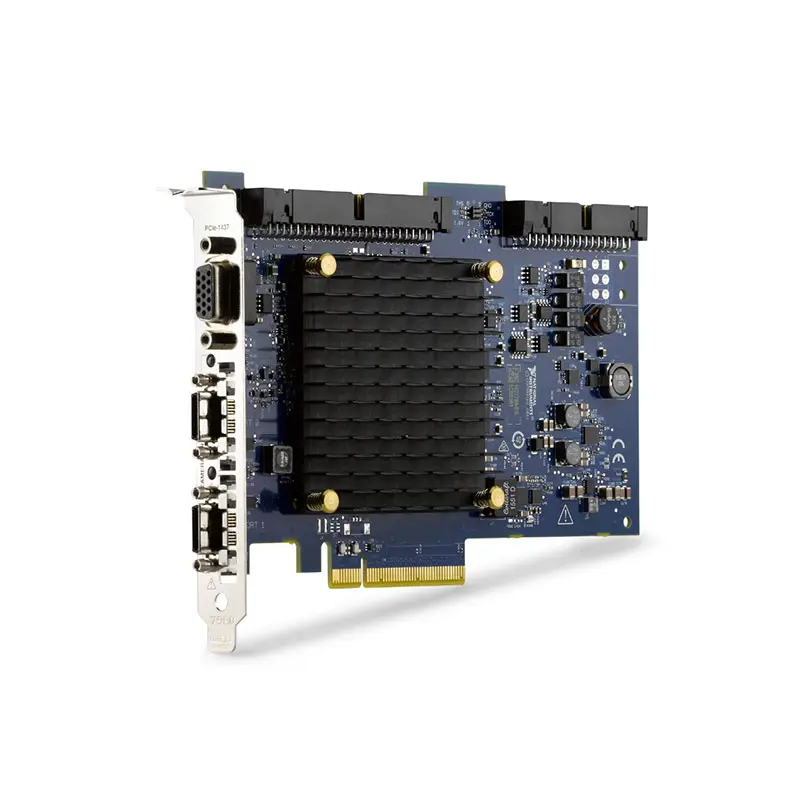
The NI PCIe-1437 is a high-performance Camera Link frame grabber designed for machine vision, scientific imaging, industrial inspection, life science, biomedical imaging, and high-throughput image acquisition applications.
The PCIe-1437 supports Base, Medium, Full, and Extended-Full Camera Link configurations with data widths up to 80 bits and pixel clock frequencies up to 85 MHz. It also supports Power over Camera Link (PoCL), allowing compatible cameras to receive power through a PoCL-enabled Camera Link cable.
Installed in a compatible PCI Express host computer, the PCIe-1437 provides a high-bandwidth interface between an industrial Camera Link camera and NI vision acquisition software.
Product Overview
The National Instruments PCIe-1437 is designed for applications where conventional USB or GigE cameras may not provide the required deterministic image-transfer architecture, Camera Link compatibility, or acquisition bandwidth.
A typical vision system architecture is:
Camera Link Camera → Camera Link Cable → PCIe-1437 → PCI Express → Host Computer → Vision Software
The frame grabber receives image data from the camera and transfers it to the host computer for processing, inspection, analysis, display, and storage.
Key Features
80-Bit Camera Link Interface
The PCIe-1437 supports Camera Link configurations with data widths up to 80 bits.
This makes it suitable for demanding high-throughput cameras used in machine vision and scientific imaging applications.
Base Camera Link Support
The PCIe-1437 supports compatible Base-configuration Camera Link cameras.
Base Camera Link is commonly used for industrial cameras with moderate image-data bandwidth requirements.
Medium Camera Link Support
The PCIe-1437 also supports Medium-configuration Camera Link cameras, providing additional data paths for higher-throughput image acquisition.
Full Camera Link Support
For applications requiring increased image-transfer bandwidth, the PCIe-1437 supports Full Camera Link camera configurations.
Extended-Full Camera Link Support
One of the major capabilities of the PCIe-1437 is support for Extended-Full Camera Link configurations up to 80 bits.
This capability makes the PCIe-1437 particularly suitable for high-resolution and high-speed cameras that generate large amounts of image data.
Up to 85 MHz Pixel Clock
The PCIe-1437 supports Camera Link pixel clock frequencies up to 85 MHz.
The combination of high pixel-clock capability and up to 80-bit data width enables high-throughput image acquisition for demanding vision systems.
Power over Camera Link (PoCL)
The PCIe-1437 supports Power over Camera Link (PoCL).
With a compatible PoCL camera and PoCL-enabled cable, camera power can be supplied through the Camera Link connection.
A simplified PoCL configuration is:
PCIe-1437 → PoCL Camera Link Cable → Camera
This can simplify system wiring by reducing the need for a separate camera power connection.
Onboard FIFO
The PCIe-1437 incorporates an onboard FIFO to support demanding image-acquisition applications with high data throughput.
Buffering helps manage image data as it is transferred between the Camera Link interface and host computer.
PCI Express Interface
The PCIe-1437 installs directly into a compatible PCI Express slot in the host computer.
This architecture is suitable for:
- Industrial PCs
- Machine vision computers
- Desktop workstations
- Rackmount test systems
- Scientific imaging systems
Single-Camera Acquisition
The PCIe-1437 is designed to support one Camera Link camera.
Although the device has two Camera Link connectors for higher Camera Link configurations, these connectors should not be interpreted as two independent Base-camera interfaces.
NI Vision Software Integration
The PCIe-1437 integrates with NI Vision Acquisition Software and compatible NI image-acquisition drivers.
Software can be used to configure:
- Camera selection
- Image acquisition
- Acquisition parameters
- Image buffers
- Camera attributes
- Triggering
- Camera communication
Technical Specifications
| Parameter | Specification |
|---|---|
| Product Type | Camera Link Frame Grabber |
| Model | PCIe-1437 |
| Manufacturer | National Instruments |
| Part Number | 785605-01 |
| Host Interface | PCI Express |
| Camera Interface | Camera Link |
| Camera Link Configuration | Base, Medium, Full and Extended-Full |
| Maximum Data Width | 80 Bit |
| Maximum Pixel Clock | 85 MHz |
| Number of Cameras Supported | 1 |
| Power over Camera Link | Supported |
| PoCL | Yes |
| Onboard FIFO | Yes |
| Primary Software | NI Vision Acquisition Software |
| Camera Link Driver Support | NI-IMAQ / NI-IMAQdx with Compatible Software Versions |
| Primary Applications | Machine Vision, Scientific Imaging, Industrial Inspection, Life Science and Biomedical Imaging |
How Does the PCIe-1437 Work?
The PCIe-1437 receives digital image data directly from a compatible Camera Link camera.
A simplified acquisition path is:
Object → Camera → Camera Link Interface → PCIe-1437 → PCI Express → Host Memory → Vision Application
The camera converts optical information into digital image data, while the PCIe-1437 receives and transfers that data to the computer for subsequent processing.
What Is a Camera Link Frame Grabber?
A Camera Link frame grabber is an interface device that connects a Camera Link industrial or scientific camera to a computer.
Unlike cameras that connect directly through USB or Ethernet, Camera Link cameras require a compatible frame grabber.
The frame grabber provides the physical and logical interface required to receive image data and camera-control signals.
Camera Link Configurations
Camera Link supports several configurations that provide different image-data widths and throughput capabilities.
| Configuration | Relative Data Capacity | PCIe-1437 Support |
|---|---|---|
| Base | Standard | Yes |
| Medium | Higher | Yes |
| Full | High | Yes |
| Extended-Full | Very High / Up to 80 Bit | Yes |
80-Bit Extended-Full Acquisition
The PCIe-1437 supports Camera Link image-data widths up to 80 bits.
This is especially important when selecting a frame grabber for cameras that exceed conventional Full Camera Link configurations.
Before purchasing the PCIe-1437 for an Extended-Full camera, verify:
- Camera Link configuration
- Data width
- Tap geometry
- Pixel depth
- Pixel clock
- Connector type
- Cable requirements
- Camera file compatibility
Pixel Clock and Image Throughput
The PCIe-1437 supports pixel clock frequencies up to 85 MHz.
Image throughput depends on more than pixel clock alone.
Important factors include:
- Pixel clock frequency
- Camera Link configuration
- Number of taps
- Pixel bit depth
- Image width
- Image height
- Frame rate
- Host computer performance
- Image-processing workload
Power over Camera Link
Power over Camera Link allows compatible cameras to receive power through the Camera Link cable.
Without PoCL:
Frame Grabber → Camera Link Cable → Camera
External Power Supply → Camera
With PoCL:
PCIe-1437 → PoCL Cable → PoCL Camera
The camera, cable, and frame grabber must all support the required PoCL configuration.
Camera Compatibility
The PCIe-1437 works with compatible Camera Link cameras using Base, Medium, Full, or Extended-Full configurations.
Before selecting a camera, verify:
- Camera Link standard
- Base / Medium / Full / Extended-Full configuration
- Pixel clock frequency
- Data width
- Pixel depth
- Tap geometry
- PoCL requirements
- Connector type
- Camera file availability
Can PCIe-1437 Connect Two Cameras?
The PCIe-1437 supports one Camera Link camera.
The two physical Camera Link connectors are used together when required by higher-bandwidth Camera Link configurations.
They cannot be treated as two identical independent interfaces for connecting two Base-configuration cameras simultaneously.
Camera Link Cable Selection
Cable selection depends on the camera connector and whether PoCL is required.
For PCIe-1437 systems, compatible configurations can include:
- MDR camera to SDR frame-grabber cable
- SDR camera to SDR frame-grabber cable
- PoCL-compatible Camera Link cable when camera power is supplied through the link
Always verify the exact camera connector, frame-grabber connector, required length, Camera Link configuration, and PoCL requirement before ordering a cable.
Machine Vision Applications
The PCIe-1437 can acquire images for high-performance machine vision systems.
Typical applications include:
- Presence inspection
- Defect detection
- Dimensional inspection
- Assembly verification
- Surface inspection
- Character recognition
- Position measurement
- High-speed production inspection
Industrial Inspection
High-speed Camera Link acquisition makes the PCIe-1437 suitable for automated industrial inspection systems where image data must be captured rapidly and reliably.
A typical system is:
Production Line → Camera → PCIe-1437 → Vision Algorithm → Pass / Fail Decision
Scientific Imaging
The PCIe-1437 can also be used with compatible scientific Camera Link cameras.
Applications can include:
- Microscopy
- High-speed imaging
- Experimental imaging
- Research instrumentation
- Motion analysis
- Scientific visualization
Life Science and Biomedical Imaging
NI identifies life science and biomedical imaging as application areas for the PCIe-1437.
High-throughput Camera Link acquisition can be useful when scientific cameras generate large image streams that must be transferred to a host computer for processing and analysis.
High-Speed Image Acquisition
For high-frame-rate applications, the complete acquisition chain must provide sufficient performance.
A simplified data path is:
Camera Sensor → Camera Link → PCIe-1437 FIFO → PCI Express → Host Memory → Image Processing
Performance should therefore be evaluated at the complete system level rather than from the frame grabber specification alone.
Hardware Triggering
Industrial vision systems often require image acquisition to be synchronized with external events.
Typical trigger sources can include:
- Photoelectric sensors
- PLC outputs
- Encoder events
- Machine timing signals
- External test equipment
Triggering allows image capture to be coordinated with the position or state of the inspected object.
Camera Control
Camera Link provides camera-control and serial communication capabilities in addition to image-data transfer.
Depending on the camera and software configuration, these capabilities can be used for functions such as:
- Exposure configuration
- Camera operating modes
- Frame acquisition settings
- Gain settings
- Camera-specific commands
Camera Files
Camera Link acquisition commonly uses a camera file that describes how the frame grabber should interpret the image stream produced by a specific camera.
Camera-file parameters can include:
- Image dimensions
- Pixel format
- Bit depth
- Tap configuration
- Timing information
- Camera-control parameters
If a compatible camera file is not already available, the camera specifications should be reviewed before creating or configuring the required acquisition settings.
NI Vision Acquisition Software
The PCIe-1437 is supported by compatible versions of NI Vision Acquisition Software.
Vision Acquisition Software provides tools for:
- Detecting the frame grabber
- Configuring Camera Link cameras
- Acquiring images
- Displaying images
- Saving acquired images
- Configuring camera attributes
- Managing acquisition buffers
NI-IMAQ and NI-IMAQdx
Compatible Vision Acquisition Software versions provide Camera Link support through NI image-acquisition drivers including NI-IMAQ and NI-IMAQdx.
Software compatibility should be verified against the operating system, Vision Acquisition Software version, existing application code, and camera configuration before changing drivers in an existing vision system.
NI MAX Configuration
The PCIe-1437 and connected Camera Link camera can be configured and tested using compatible versions of NI Measurement & Automation Explorer (NI MAX).
A typical setup process is:
- Install the PCIe-1437 in the host computer.
- Install compatible NI Vision Acquisition Software.
- Verify that the frame grabber appears in NI MAX.
- Connect the Camera Link camera using the correct cable.
- Provide external camera power if PoCL is not being used.
- Select or configure the appropriate camera file.
- Configure acquisition parameters.
- Use Snap or Grab to test image acquisition.
PCIe-1437 vs PCIe-1433
The PCIe-1437 and PCIe-1433 are both PCI Express Camera Link frame grabbers, but the PCIe-1437 provides newer capabilities that can be important for demanding camera configurations.
| Feature | PCIe-1437 | PCIe-1433 |
|---|---|---|
| Interface | Camera Link | Camera Link |
| Host Bus | PCI Express | PCI Express |
| Maximum Pixel Clock | 85 MHz | 85 MHz |
| Maximum Data Width | 80 Bit | Configuration Dependent |
| Extended-Full / 80-Bit Support | Yes | More Limited |
| PoCL | Yes | Verify Configuration |
| Primary Use | High-Throughput Camera Link | Camera Link Acquisition |
PCIe-1437 vs PCIe-1427
The PCIe-1427 is an earlier Camera Link frame grabber with lower Camera Link data-width capability.
| Feature | PCIe-1437 | PCIe-1427 |
|---|---|---|
| Camera Link | Yes | Yes |
| Maximum Data Width | 80 Bit | Up to 24 Bit |
| Maximum Pixel Clock | 85 MHz | 80 MHz |
| High-Bandwidth Camera Support | Much Greater | More Limited |
| PoCL | Supported | Verify Exact Requirement |
PCIe-1437 vs PXIe-1435
The PCIe-1437 and PXIe-1435 target similar Camera Link image-acquisition applications but use different host platforms.
| Feature | PCIe-1437 | PXIe-1435 |
|---|---|---|
| Platform | PCI Express PC | PXI Express |
| Installation | Desktop / Industrial PC | PXIe Chassis |
| Camera Interface | Camera Link | Camera Link |
| Best Fit | PC-Based Vision Systems | Modular PXIe Test Systems |
PCIe-1437 vs GigE Vision
| Feature | PCIe-1437 / Camera Link | GigE Vision |
|---|---|---|
| Camera Interface | Camera Link | Ethernet |
| Frame Grabber Required | Yes | Usually No Dedicated Frame Grabber |
| Typical Cable Length | Camera Link Dependent | Longer |
| PoCL | Supported | Uses Different Power Architecture |
| Typical Strength | Deterministic High-Throughput Imaging | Network-Based Flexibility |
PCIe-1437 vs USB3 Vision
USB3 Vision cameras offer convenient direct computer connectivity, while the PCIe-1437 targets Camera Link cameras requiring a dedicated frame grabber.
The correct architecture depends on:
- Existing camera interface
- Required bandwidth
- Triggering requirements
- Camera availability
- Cable requirements
- System architecture
- Existing vision software
Legacy Vision System Replacement
The PCIe-1437 can also be used when maintaining or upgrading existing Camera Link machine-vision systems.
Before replacing another frame grabber with a PCIe-1437, verify:
- Camera manufacturer and model
- Camera Link configuration
- Camera connector
- Pixel clock
- Data width
- Tap configuration
- Pixel depth
- PoCL requirements
- Existing Camera Link cable
- Camera file
- Trigger wiring
- Host PCI Express slot
- Vision Acquisition Software version
- NI-IMAQ / NI-IMAQdx compatibility
- Operating system
- Existing application software
A frame grabber should not be selected solely by its Camera Link connector because supported configurations, data widths, PoCL capabilities, and software compatibility can differ significantly.
How to Choose a Camera Link Frame Grabber
Before selecting the PCIe-1437, determine:
- Camera Link Base, Medium, Full or Extended-Full requirement
- Camera pixel clock
- Required data width
- Number of taps
- Pixel depth
- Required frame rate
- Image resolution
- PoCL requirement
- Camera connector type
- Cable type and length
- Triggering requirements
- PCI Express slot availability
- Camera file compatibility
- NI Vision software compatibility
Industries
- Machine Vision
- Industrial Automation
- Electronic Manufacturing
- Semiconductor Inspection
- Life Science
- Biomedical Imaging
- Scientific Research
- Automotive Manufacturing
- Quality Inspection
- Laboratory Imaging
Applications
Machine Vision
The PCIe-1437 provides high-throughput Camera Link image acquisition for automated machine vision systems.
Industrial Inspection
High-speed cameras can capture production images for defect detection, dimensional inspection, assembly verification, and quality control.
Scientific Imaging
The PCIe-1437 can acquire large image streams from compatible scientific cameras for research, microscopy, and experimental imaging applications.
Life Science Imaging
Camera Link acquisition can be used in life science systems that require high-resolution or high-throughput digital imaging.
Biomedical Imaging
The PCIe-1437 is suitable for compatible biomedical imaging systems requiring reliable high-bandwidth transfer from Camera Link cameras.
High-Speed Production Inspection
Up to 85 MHz pixel clocks and high-data-width Camera Link configurations make the PCIe-1437 suitable for demanding production inspection systems.
Recommended Related Products
| PCIe-1437 | 80-bit PoCL-compatible Camera Link frame grabber for high-throughput machine vision and scientific imaging. |
| PCIe-1433 | PCI Express Camera Link frame grabber for Base, Medium and Full camera acquisition applications. |
| PCIe-1427 | Earlier-generation PCI Express Camera Link frame grabber for lower-data-width Camera Link cameras. |
| PXIe-1435 | PXI Express Camera Link frame grabber for modular PXIe vision and automated test systems. |
| PCIe-1477 | Vision acquisition hardware for applications requiring a different high-performance machine-vision architecture. |
Why Choose PCIe-1437?
- 80-bit Camera Link capability
- Base Camera Link support
- Medium Camera Link support
- Full Camera Link support
- Extended-Full Camera Link support
- Up to 85 MHz pixel clock
- Power over Camera Link support
- PoCL-compatible architecture
- Onboard FIFO
- PCI Express host interface
- High-throughput image acquisition
- Machine vision applications
- Industrial inspection
- Scientific imaging
- Life science imaging
- Biomedical imaging
- NI Vision Acquisition Software integration
Frequently Asked Questions
What is the NI PCIe-1437?
The NI PCIe-1437 is an 80-bit Camera Link PCI Express frame grabber designed for high-throughput machine vision, industrial inspection, scientific imaging, life science, and biomedical imaging applications.
What is the part number of PCIe-1437?
The NI PCIe-1437 is available under part number 785605-01.
What Camera Link configurations does PCIe-1437 support?
The PCIe-1437 supports Base, Medium, Full, and Extended-Full Camera Link configurations.
What is the maximum data width of PCIe-1437?
The PCIe-1437 supports Camera Link data widths up to 80 bits.
What is the maximum pixel clock of PCIe-1437?
The PCIe-1437 supports pixel clock frequencies up to 85 MHz.
Does PCIe-1437 support PoCL?
Yes. The PCIe-1437 supports Power over Camera Link (PoCL) for compatible cameras and cables.
How many cameras can PCIe-1437 support?
The PCIe-1437 supports one Camera Link camera.
PCIe-1437 has two Camera Link connectors. Can I connect two Base cameras?
No. The two connectors are not two identical independent Base-camera ports. They are used according to the Camera Link configuration required by the connected camera.
Does PCIe-1437 support Extended-Full Camera Link?
Yes. Extended-Full and up to 80-bit Camera Link capability is one of the important features of the PCIe-1437.
Does PCIe-1437 require a separate camera power supply?
Not necessarily. If the camera and cable support PoCL, the PCIe-1437 can provide camera power through the Camera Link connection. Non-PoCL cameras require the appropriate external camera power supply.
What cable does PCIe-1437 use?
Cable selection depends on the camera connector. An MDR-camera configuration requires an appropriate MDR-to-SDR cable, while an SDR camera can use an appropriate SDR-to-SDR connection. A PoCL-compatible cable is required when using Power over Camera Link.
What software is used with PCIe-1437?
The PCIe-1437 is supported by compatible versions of NI Vision Acquisition Software, including Camera Link acquisition support through NI image-acquisition drivers.
Can PCIe-1437 be configured in NI MAX?
Yes. Compatible Vision Acquisition Software allows the PCIe-1437 and connected camera to be detected, configured, and tested in NI Measurement & Automation Explorer.
What is the difference between PCIe-1437 and PCIe-1433?
Both are Camera Link frame grabbers, but the PCIe-1437 provides capabilities for demanding configurations including 80-bit Extended-Full Camera Link and PoCL-supported system architectures.
Can PCIe-1437 replace PCIe-1433?
Potentially, but compatibility must be verified. Check the camera model, Camera Link configuration, connector and cable, camera file, PoCL requirements, triggering, Vision Acquisition Software version, driver, operating system, and existing application before migration.
Is PCIe-1437 suitable for high-speed machine vision?
Yes. Its support for up to 80-bit Camera Link data, 85 MHz pixel clocks, onboard FIFO buffering, and PCI Express connectivity makes it suitable for demanding high-throughput machine vision applications.
What should I check before purchasing PCIe-1437?
Verify the camera model, Camera Link configuration, pixel clock, data width, tap geometry, pixel depth, PoCL requirement, connector type, Camera Link cable, camera file, triggering requirements, PCI Express slot, Vision Acquisition Software version, driver compatibility, operating system, and application software.
Conclusion
The NI PCIe-1437 Camera Link Frame Grabber provides up to 80-bit Camera Link image acquisition, support for Base, Medium, Full and Extended-Full camera configurations, pixel clock frequencies up to 85 MHz, Power over Camera Link, onboard FIFO buffering, and PCI Express connectivity. These capabilities make it particularly suitable for high-throughput machine vision, automated industrial inspection, scientific imaging, life science, biomedical imaging, and other demanding Camera Link acquisition systems.















