






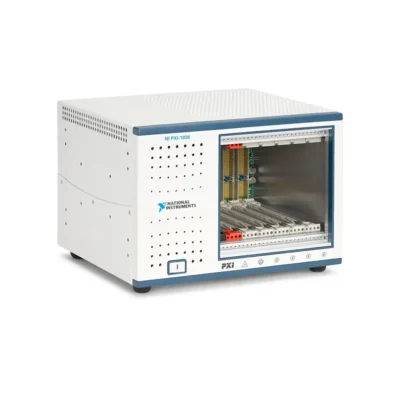
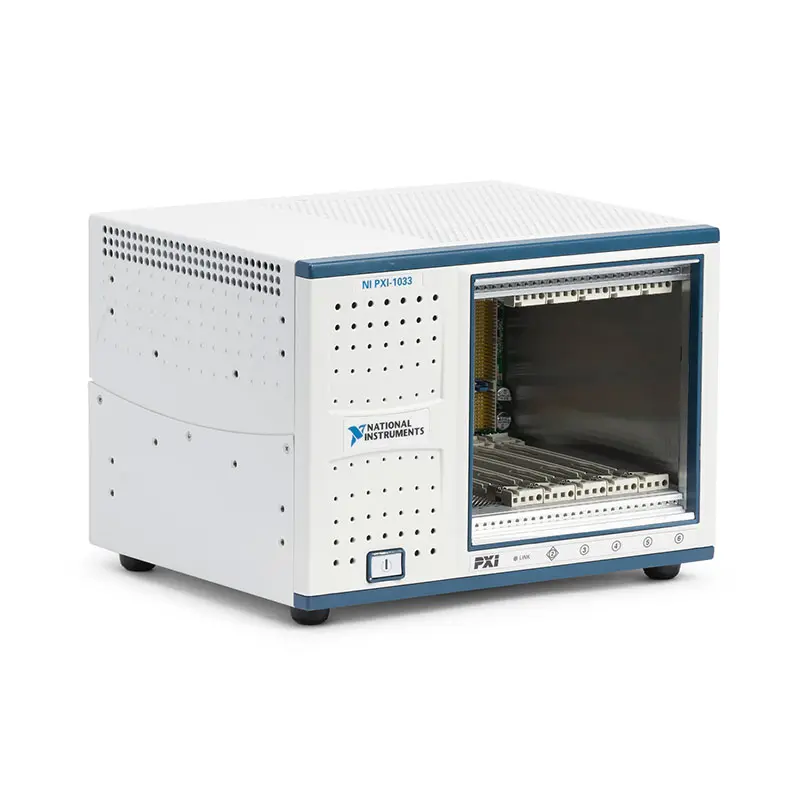
PXI-1033 5-Slot PXI Chassis with Integrated MXI-Express Controller
Земля NI PXI-1033 is a compact PXI chassis designed for remotely controlled automated test, measurement and data-acquisition systems. It combines five PXI peripheral slots with an integrated MXI-Express x1 controller, allowing a desktop computer or compatible laptop to control the installed PXI instruments through a transparent PCI Express connection.
Unlike a conventional PXI chassis that requires a separate embedded controller or a system-slot remote-control module, the PXI-1033 incorporates the chassis-side MXI-Express interface into the enclosure. This architecture preserves all five peripheral positions for measurement, switching, communication and control modules.
The chassis provides up to 110 MB/s sustained MXI-Express throughput, 25 W cooling capacity per peripheral slot, a built-in 10 MHz reference clock and an operating temperature range from 0°C to 50°C. Its compact 5 kg construction, quiet AUTO fan mode and optional carrying hardware make it suitable for portable and desktop test systems.
Key Features of the PXI-1033
- Five PXI peripheral slots for 3U modules
- Integrated MXI-Express x1 remote controller
- Up to 110 MB/s sustained remote-link throughput
- Compatible with desktop PCI Express and laptop ExpressCard host interfaces
- Accepts PXI and CompactPCI 3U modules
- 25 W cooling capacity per peripheral slot
- Built-in 10 MHz PXI system reference clock
- 250 ps maximum reference-clock skew between slots
- Eight-line PXI trigger bus for synchronization and handshaking
- Universal 100–240 VAC nominal input
- AUTO and HIGH fan-speed settings
- 37.4 dBA sound pressure in AUTO mode at 25°C
- 0°C to 50°C operating-temperature range
- Compact 177 × 257.1 × 212.8 mm enclosure
- 5 kg chassis weight
- Optional rack-mount and side-handle kits
Integrated Remote-Control Architecture
The PXI-1033 is specifically designed for remote-control applications. Its built-in MXI-Express interface extends the PCI Express bus from an external computer to the PXI backplane, allowing compatible PXI modules to appear as locally installed PCI devices to the host operating system.
This transparent architecture enables the host computer to use standard NI instrument drivers without requiring Ethernet command translation or a separate controller application inside the chassis. Once the hardware and drivers are installed correctly, software can communicate directly with the PXI instruments.
The remote architecture is valuable when the application requires the processing power, storage capacity or upgrade flexibility of an external workstation. It also allows the chassis to be positioned near the device under test while the controlling computer remains at an operator station.
Five PXI Peripheral Slots
The PXI-1033 provides five peripheral slots for 3U PXI or compatible CompactPCI modules. Because the MXI-Express controller is integrated into the chassis, users do not need to sacrifice one of these five peripheral positions for a separate PXI remote-control module.
The available slots can accommodate instruments such as oscilloscopes, digital multimeters, waveform generators, data-acquisition boards, digital I/O modules, serial interfaces and switch modules. Actual compatibility depends on the electrical, software and cooling requirements of each installed module.
Before assembling a system, calculate the total consumption on the +3.3 V, +5 V, +12 V and −12 V rails. Each module must also remain within the chassis’s 25 W per-slot cooling capability.
MXI-Express x1 Connectivity
MXI-Express extends PCI Express communication over a cable between the host computer and the PXI chassis. The integrated PXI-1033 interface supports sustained transfers of up to 110 MB/s, making it suitable for many automated measurement and control applications.
A desktop system can use a compatible PCI Express MXI host board such as the NI PCIe-8361 or PCIe-8362. A supported notebook computer can use an ExpressCard-8360 interface when the computer provides an ExpressCard slot with PCI Express connectivity.
The required host adapter and MXI-Express cable depend on the computer and system configuration. These components should be verified before ordering because similarly shaped connectors do not guarantee electrical or architectural compatibility.
Remote Desktop and Laptop Operation
The PXI-1033 supports remote control from both desktop and suitable laptop platforms. Desktop computers are generally preferred when the test system requires high processing performance, additional PCI Express resources or large amounts of local data storage.
An ExpressCard-equipped laptop can provide a more portable test configuration. This approach is useful for field service, mobile diagnostics, demonstrations and temporary laboratory setups where a full desktop workstation is impractical.
Host computers should be checked for compatible expansion slots, supported operating systems and appropriate NI software. ExpressCard slots that provide USB connectivity only are not suitable for a PCI Express-based MXI connection.
PXI-1033 Technical Specifications
| Product Model | PXI-1033 |
|---|---|
| Product Type | PXI chassis with integrated MXI-Express remote controller |
| Peripheral Slots | 5 |
| Module Format | 3U PXI and CompactPCI |
| Remote Interface | Integrated MXI-Express x1 |
| Maximum Sustained Throughput | Up to 110 MB/s |
| PXI Bus Architecture | 32-bit conventional PXI/CompactPCI |
| Backplane V(I/O) | +5 V |
| PXI Reference Clock | Built-in 10 MHz clock |
| Reference-Clock Accuracy | ±25 ppm over the operating-temperature range |
| Maximum Clock Skew Between Slots | 250 ps |
| PXI Триггерная шина | Eight trigger lines |
| Nominal AC Input | 100–240 VAC |
| Operating AC Input Range | 90–264 VAC |
| Nominal Input Frequency | 50/60 Hz |
| Operating Frequency Range | 47–63 Hz |
| Input Current | 4–2 A |
| Power-Supply Efficiency | Greater than 70% at full load and normal input voltage |
| +3.3 V Current Capacity | 10 A from 0°C to 50°C |
| +5 V Current Capacity | 15 A from 0°C to 50°C |
| +12 V Current Capacity | 2.5 A from 0°C to 50°C |
| −12 V Current Capacity | 0.8 A from 0°C to 50°C |
| Per-Slot Cooling Capacity | 25 W |
| Module Airflow Direction | Bottom to top, from P1 toward P2 |
| Fan Modes | AUTO and HIGH |
| AUTO-Mode Sound Pressure | 37.4 dBA at 25°C ambient temperature |
| HIGH-Mode Sound Pressure | 51.5 dBA |
| Operating Temperature | 0°C to 50°C |
| Operating Humidity | 20% to 80%, noncondensing |
| Storage Temperature | −40°C to 85°C |
| Storage Humidity | 10% to 95%, noncondensing |
| Maximum Altitude | 2,000 m at 25°C ambient |
| Operational Shock | 20 g peak, half-sine, 11 ms pulse |
| Operating Random Vibration | 5 Hz to 500 Hz, 0.3 grms |
| Nonoperating Random Vibration | 5 Hz to 500 Hz, 2.4 grms |
| Dimensions | 177 × 257.1 × 212.8 mm |
| Weight | 5 kg |
| Intended Environment | Indoor use, Pollution Degree 2 |
Universal AC Power Supply
The PXI-1033 accepts a nominal input from 100 VAC to 240 VAC and operates over a wider 90 VAC to 264 VAC range. Automatic input-voltage support simplifies deployment in laboratories and production facilities across different regions.
The backplane supplies +3.3 V, +5 V, +12 V and −12 V power rails. The chassis provides 10 A on +3.3 V, 15 A on +5 V, 2.5 A on +12 V and 0.8 A on −12 V throughout the specified operating-temperature range.
System designers should calculate rail-by-rail consumption instead of relying only on a single total-wattage figure. A configuration can exceed the capacity of one voltage rail even when its combined power appears acceptable.
Power Protection
All power-supply outputs include short-circuit protection. The chassis also provides overvoltage protection for the principal positive rails, helping protect the backplane and installed instruments from certain internal power-supply faults.
These internal protections do not replace appropriate facility protection, grounding or application-specific fusing. The chassis must be operated with a correctly grounded power cord and within its specified environmental conditions.
25 W Per-Slot Cooling
Each PXI peripheral position supports up to 25 W of cooling. Forced air enters through the bottom of the chassis and moves upward through the modules from the P1 connector area toward P2.
Warm air exits along the rear, right side and top of the enclosure. The intake and exhaust openings must remain unobstructed, particularly when the chassis is installed in a rack, placed beside other equipment or used with high-power instruments.
Unused peripheral positions should be fitted with slot filler panels. Filler panels improve airflow management, reduce recirculation and help maintain the intended electromagnetic compatibility of the assembled system.
AUTO and HIGH Fan Modes
The rear-panel fan selector provides AUTO and HIGH operating modes. In AUTO mode, the PXI-1033 monitors intake-air temperature and adjusts fan speed to balance acoustic performance with cooling demand.
At an ambient temperature of 25°C, the specified sound pressure at the operator position is 37.4 dBA in AUTO mode. HIGH mode runs the fan at increased speed for maximum cooling and produces a specified sound pressure of 51.5 dBA.
HIGH mode may be appropriate for densely populated systems, high-power modules or installations with restricted ambient airflow. AUTO mode is often preferred for desktop and laboratory environments where lower noise is important.
PXI Timing and Synchronization
The PXI-1033 distributes a built-in 10 MHz reference clock independently to the peripheral slots. Maximum slot-to-slot clock skew is 250 ps, supporting synchronization between compatible measurement and generation modules.
The chassis also provides the PXI trigger bus for instrument triggering and handshaking. These backplane resources allow installed modules to coordinate operations without requiring a separate front-panel trigger cable for every connection.
Actual synchronization performance depends on the capabilities of the installed modules and their drivers. Applications requiring tighter timing should verify the trigger topology, clock-routing options and timing specifications of every instrument in the system.
Compact and Portable Construction
The chassis measures 177 mm high, 257.1 mm wide and 212.8 mm deep. Its 5 kg weight makes it easier to transport than a large rackmount PXI chassis while still providing five usable peripheral positions.
An optional side-handle and rubber-feet kit can convert the chassis into a convenient portable or benchtop configuration. An optional rack-mount kit is available when the chassis must be integrated into a fixed test rack.
The enclosure uses aluminum, cold-rolled steel and engineered polymer components to provide a balance of mechanical strength, thermal performance and manageable weight.
PXI-1033 Part Number and Accessories
| Item | Part Number or Model | Описание |
|---|---|---|
| PXI-1033 | 779760-01 | Five-peripheral-slot PXI chassis with integrated MXI-Express controller |
| Side Handle and Rubber Feet Kit | 781482-01 | Portable and benchtop installation kit for compatible PXI-103x and PXIe-107x chassis |
| Rack-Mount Kit | 778948-01 | Rack installation hardware for compatible PXI-103x and PXIe-107x chassis |
| PCI Express Host Interface | PCIe-8361 or compatible interface | Connects a desktop computer to the integrated MXI-Express controller |
| Dual-Port PCI Express Host Interface | PCIe-8362 | Provides two compatible MXI-Express x1 links for supported system configurations |
| Laptop Host Interface | ExpressCard-8360 | Connects a compatible ExpressCard laptop to the chassis |
| MXI-Express Cable | Configuration dependent | Connects the host-side interface to the PXI-1033 integrated controller |
| PXI Slot Filler Panel | Chassis compatible | Covers unused slots and helps preserve intended airflow and EMC performance |
| Regional AC Power Cord | Region dependent | Grounded mains cable selected for the installation country |
The host interface and MXI-Express cable are essential parts of a complete PXI-1033 remote-control system. Confirm the computer’s available expansion interface before ordering a desktop or laptop connection kit.
Part numbers can vary between standalone chassis, bundled host-interface kits, cable lengths and regional power-cord configurations. When purchasing a used system, verify exactly which host board, cable, mounting hardware and power cord are included.
Desktop Host Configuration
A typical desktop configuration consists of the PXI-1033, a compatible PCI Express MXI host board and an MXI-Express cable. The host board is installed in an available PCI Express slot in the computer.
The computer should provide a PCI Express slot that meets the host-interface requirements. Mechanical slot width, available lanes, BIOS resource allocation and operating-system support should all be checked before installation.
Laptop Host Configuration
A portable configuration can use a compatible ExpressCard-8360 interface and MXI-Express cable. The laptop must provide a genuine ExpressCard connection with PCI Express support.
Modern laptops rarely include ExpressCard slots, so buyers replacing an older computer should verify host connectivity before assuming that the existing PXI-1033 can be connected directly to the new platform.
Rack and Benchtop Accessories
The 778948-01 rack-mount kit supports fixed installation, while the 781482-01 side-handle and rubber-feet kit is intended for portable and benchtop use. Select the mounting arrangement according to service access, ventilation and cable routing.
When mounting the chassis in a rack, preserve clearance around the bottom air intake and rear, top and side exhaust areas. Nearby equipment should not discharge heated air directly into the PXI-1033 intake.
PXI-1033 Applications
- Portable automated test equipment
- Desktop PXI measurement systems
- Production functional testing
- Electronic device validation
- Data-acquisition and sensor measurement
- Laboratory instrument automation
- Field diagnostics and maintenance
- Remote instrumentation control
- Educational and research laboratories
- Signal generation and digitizer systems
- Switching and multiplexing platforms
- Industrial test-station upgrades
Portable Automated Test Equipment
The compact enclosure and optional carrying hardware make the PXI-1033 suitable for transportable ATE systems. A laptop-equipped configuration can be deployed for field diagnostics, equipment commissioning or temporary data-acquisition work.
The chassis is considerably easier to transport than a full-size rackmount system, yet it retains five peripheral slots for combining several measurement and control functions.
Desktop Laboratory Systems
Quiet AUTO-mode operation makes the PXI-1033 appropriate for engineering benches and academic laboratories. The chassis can sit near the DUT while a connected workstation provides software control, analysis and data storage.
A desktop configuration can combine a digitizer, waveform generator, digital multimeter, switch and communication module in one synchronized platform.
Production Functional Testing
Production test stations can use the PXI-1033 to automate stimulus, signal routing, measurements and pass/fail analysis. The external host PC can run LabVIEW, TestStand or a custom application while the PXI chassis houses the required instruments.
For production deployments, verify long-term availability of compatible MXI hardware, replacement chassis, cables and application drivers. Maintaining a documented spare configuration can reduce downtime for legacy systems.
Data Acquisition and Monitoring
The five peripheral positions can accommodate multifunction DAQ, simultaneous-sampling, temperature, strain or digital I/O hardware. Backplane timing resources help coordinate compatible modules in multichannel monitoring systems.
Because the PXI-1033 provides a conventional PXI backplane, required data rate and bus usage should be evaluated when several acquisition modules operate simultaneously.
Remote Instrument Placement
The PXI chassis can be located close to sensors, a fixture or the device under test while the host computer remains at a more convenient operator location. Shorter analog signal wiring can reduce pickup and fixture complexity in some applications.
The allowed separation is determined by the selected MXI-Express cable and supported link configuration. Use only compatible cables and avoid tight bends or mechanical stress at the connectors.
Legacy PXI System Support
The PXI-1033 is useful when maintaining a validated system based on conventional PXI modules and an external host computer. Replacing the chassis with a newer PXI Express platform may require changes to modules, drivers, cables and system qualification.
For long-life industrial systems, matching the original PXI-1033 configuration can minimize software changes and preserve existing fixtures and test procedures.
PXI-1033 Installation Workflow
Step 1: Verify the Complete Configuration
Confirm that the system includes the PXI-1033 chassis, a supported host-side MXI-Express adapter, a compatible cable, a grounded AC power cord and the required PXI modules.
Check operating-system and driver support before replacing the original host computer. Legacy PXI systems may depend on specific driver versions or BIOS resource behavior.
Step 2: Select the Installation Location
Place the chassis on a stable surface or install it with the correct rack-mount hardware. Keep the bottom intake and the rear, side and top exhaust openings clear.
Do not position loose paper, fabric or other objects near the intake. The chassis is intended for indoor use in a Pollution Degree 2 environment.
Step 3: Install the Host Interface
Power off and unplug the host computer before installing a PCI Express MXI interface. Insert the board into a supported PCI Express slot and secure it according to the computer manufacturer’s instructions.
For a laptop system, insert the compatible ExpressCard interface into a supported slot. Confirm that the laptop’s ExpressCard implementation exposes PCI Express connectivity.
Step 4: Install PXI Modules
With chassis power disconnected, remove the required filler panels and insert each 3U PXI or compatible CompactPCI module into the correct slot. Tighten the module retaining screws evenly.
Review each module’s power, cooling, bus and software requirements. Reinstall filler panels over all unused positions.
Step 5: Connect the MXI-Express Cable
Connect the compatible MXI-Express cable between the host adapter and the integrated chassis controller. Seat and secure both ends without applying excessive force.
Do not substitute cables solely because their connectors appear similar. Use a cable approved for the specific MXI-Express generation and interface combination.
Step 6: Apply Power in the Correct Sequence
Connect the grounded AC power cord and power on the PXI-1033 before starting the host computer. This sequence allows the computer firmware and operating system to enumerate the remote PCI devices during startup.
If the chassis is powered after the computer has already booted, a restart may be required. MXI-Express systems should not be treated as ordinary hot-plug USB devices unless the complete hardware configuration explicitly supports that operation.
Step 7: Install Software and Drivers
Install NI system software and the drivers required by every PXI instrument. NI Measurement & Automation Explorer can be used to confirm chassis and module recognition.
Use driver versions that support both the installed hardware and operating system. For an established test station, preserve a record of the working driver set before performing upgrades.
Step 8: Validate the System
Confirm that all expected PXI modules appear in the operating system and NI MAX. Run self-tests and simple functional checks before connecting sensitive DUT hardware.
Verify triggering, clock routing, acquisition throughput and application communication under representative operating conditions.
Step 9: Document the Installation
Record chassis and module serial numbers, slot assignments, cable types, host-board model, software versions and fan setting. This information simplifies troubleshooting and future system replacement.
For production equipment, retain a system image or controlled software installer set that can reproduce the validated configuration.
PXI-1033 Troubleshooting
The PXI-1033 or installed modules are not detected
Confirm that the chassis was powered before the host computer started. Check the MXI-Express cable at both ends, verify link indicators and make sure the host adapter is fully seated.
Restart the chassis and computer using the recommended power sequence. Then check the operating system and NI MAX for the host interface and installed PXI devices.
The MXI-Express link does not initialize
Verify that the selected host adapter is compatible with the PXI-1033. Inspect the cable and connector pins for damage, then confirm that the computer’s BIOS has assigned sufficient PCI resources.
Move the host adapter to another supported PCI Express slot if necessary. Some computers allocate resources differently across motherboard slots.
The chassis works with one computer but not another
Compare PCI Express slot configuration, BIOS settings, operating system, chipset behavior and NI driver versions. Confirm that the replacement computer provides native PCI Express connectivity to the selected slot.
If a laptop is involved, verify that its ExpressCard interface is not USB-only.
A PXI module is not recognized
Power down the complete system and reseat the affected module. Inspect the backplane connector and confirm that the module supports the chassis’s 5 V V(I/O) configuration.
Install the correct instrument driver and test the module in another slot. If other modules work in the same position, the problem may be specific to the instrument or its software.
The system reports PCI resource conflicts
Reduce the number of installed modules temporarily and confirm whether enumeration succeeds. Update the host computer BIOS if an appropriate supported update is available.
Large PXI configurations can require substantial memory-mapped I/O resources. A different host computer or BIOS configuration may be necessary for some combinations of instruments.
The chassis becomes unusually hot
Check that the bottom intake and all exhaust paths are clear. Install filler panels in unused slots and use HIGH fan mode while diagnosing the airflow condition.
Verify the power consumption and thermal dissipation of every installed module. No peripheral position should exceed the chassis’s 25 W cooling rating.
The fan is louder than expected
Confirm that the selector is set to AUTO. In AUTO mode, fan speed increases as intake temperature rises, so elevated ambient temperature or restricted airflow can increase acoustic output.
Clean external ventilation areas using an approved procedure and move heat-producing equipment away from the chassis intake.
Data transfer is slower than expected
The PXI-1033 supports up to 110 MB/s sustained MXI-Express throughput, but actual performance depends on the host interface, computer chipset, acquisition module, driver, storage system and application architecture.
Check whether several modules are sharing the bus and whether the application performs inefficient small transfers. Use streaming, buffering and transfer sizes recommended by the instrument driver.
Measurements lose synchronization
Verify that all participating modules use the intended 10 MHz reference and trigger routes. Check trigger polarity, direction and destination settings in the application.
Confirm that the modules support the requested synchronization method. Backplane clock distribution does not automatically synchronize devices unless their hardware and software are configured accordingly.
The system does not restart after a power fault
Disconnect AC power, allow the internal supply to discharge and remove any suspected overloaded module. Inspect the system’s rail requirements before reapplying power.
If the chassis repeatedly enters protection with all peripheral modules removed, it may require qualified service.
PXI-1033 Comparison
| Модель | Конфигурация | Controller Architecture | Best Suited For |
|---|---|---|---|
| PXI-1033 | 5 PXI peripheral slots | Integrated MXI-Express x1 | Compact remotely controlled conventional PXI systems |
| ПХИ-1036 | 5 PXI peripheral slots plus system-controller position | Embedded or separate remote controller | Compact systems requiring controller flexibility |
| PXIe-1073 | 5 PXI Express hybrid peripheral slots | Integrated MXI-Express | Compact remote systems requiring PXI Express compatibility |
| PXI-1042 | 8-slot PXI chassis | Separate embedded or remote controller | Systems requiring more conventional PXI capacity |
| ПХИ-1045 | 18-слотное PXI шасси | Separate embedded or remote controller | Large rackmount conventional PXI systems |
PXI-1033 vs PXI-1036
The PXI-1033 integrates its MXI-Express remote controller into the chassis and dedicates its five usable slots to peripheral modules. The ПХИ-1036 provides a conventional system-controller position, allowing users to select an embedded controller or a separate remote interface.
Choose the PXI-1033 when integrated remote control, compact size and straightforward connection to an external computer are priorities. Choose the PXI-1036 when controller flexibility or reuse of an existing PXI system controller is more important.
PXI-1033 vs PXIe-1073
Земля PXIe-1073 is the closer PXI Express-era counterpart to the PXI-1033. Both provide compact chassis architectures with integrated remote control and five peripheral positions.
The PXI-1033 is intended for conventional 32-bit PXI modules, while the PXIe-1073 supports PXI Express and hybrid-compatible modules. Module connector compatibility, bus requirements and software support should be checked before migration.
PXI-1033 vs PXI-1042
Земля PXI-1042 provides a larger conventional PXI chassis for applications requiring more instrument positions. It uses a separate system controller rather than the PXI-1033’s integrated remote interface.
The PXI-1033 is more compact and portable. The PXI-1042 is more appropriate when the test system needs additional peripheral modules or an embedded-controller architecture.
PXI-1033 vs PXI-1045
Земля ПХИ-1045 is an 18-slot rackmount chassis intended for high-channel-count systems. The PXI-1033 emphasizes portability, quiet operation and efficient use of five peripheral positions.
Select the PXI-1045 for large switching, data-acquisition or mixed-instrument systems. Select the PXI-1033 when five positions are sufficient and a compact remotely controlled chassis is preferred.
Selecting the Right PXI Chassis
Choose the PXI-1033 when the existing application uses conventional PXI modules and requires a compact chassis controlled by an external desktop or compatible laptop. Its integrated controller eliminates the need for a chassis-side remote interface module.
Select a PXI Express chassis when the system requires newer PXIe instruments, higher backplane bandwidth or hybrid slot support. For a validated legacy installation, replacing the PXI-1033 with the same model may reduce migration and requalification effort.
Recommended Related Products
- PXI-1036 Compact PXI Chassis
- PXIe-1073 Integrated MXI-Express Chassis
- PXI-1042 8-Slot PXI Chassis
- PXI-1045 18-Slot PXI Chassis
- PXI-8360 MXI-Express Interface Module
- PXIe-8370 Remote-Control Module
- View More NI PXI and PXI Express Chassis
Why Choose the PXI-1033?
- Preserves five peripheral slots through an integrated remote controller
- Supports transparent PCI Express-based instrument communication
- Provides up to 110 MB/s sustained throughput
- Accepts conventional 3U PXI and CompactPCI modules
- Provides 25 W cooling capacity per slot
- Includes PXI clock and trigger resources
- Supports desktop and compatible laptop host systems
- Offers quiet temperature-controlled fan operation
- Provides compact dimensions and a 5 kg chassis weight
- Supports portable, benchtop and rack-mounted installations
Frequently Asked Questions
What is the PXI-1033?
The PXI-1033 is a compact NI PXI chassis with five peripheral slots and an integrated MXI-Express x1 remote controller. It allows an external computer to control installed PXI instruments.
How many usable peripheral slots does the PXI-1033 provide?
It provides five peripheral positions for 3U PXI or compatible CompactPCI modules. The chassis-side MXI controller is integrated and does not consume one of these five positions.
Is the PXI-1033 a PXI Express chassis?
No. The instrument backplane is conventional PXI/CompactPCI. MXI-Express describes the PCI Express-based remote link between the host computer and chassis, not a PXI Express peripheral backplane.
What is the maximum MXI-Express throughput?
The integrated remote controller supports sustained throughput of up to 110 MB/s. Application performance depends on the host, modules, driver, storage system and transfer configuration.
Can a desktop computer control the PXI-1033?
Yes. A desktop computer can control the chassis using a compatible PCI Express MXI host interface and cable.
Can a laptop control the PXI-1033?
Yes, when the laptop has a compatible ExpressCard slot with PCI Express support and uses the appropriate ExpressCard MXI interface. USB-only ExpressCard implementations are unsuitable.
Does the PXI-1033 accept CompactPCI modules?
Yes. The chassis accepts 3U PXI and compatible 3U CompactPCI modules. Electrical, software, V(I/O), cooling and driver requirements must still be verified.
What is the cooling capacity per slot?
The PXI-1033 provides 25 W of cooling capacity for each peripheral slot when installed and operated according to the specified airflow requirements.
What is the PXI-1033 operating-temperature range?
The specified ambient operating-temperature range is 0°C to 50°C.
How quiet is the PXI-1033?
At 25°C ambient temperature, the specified sound pressure at the operator position is 37.4 dBA in AUTO fan mode. HIGH mode has a specified sound pressure of 51.5 dBA.
Does the PXI-1033 provide a PXI reference clock?
Yes. It provides a built-in 10 MHz system reference clock with ±25 ppm accuracy and maximum slot-to-slot skew of 250 ps.
What power input does the chassis require?
The chassis accepts a nominal 100–240 VAC input and operates from 90–264 VAC at 47–63 Hz. A correctly grounded regional power cord is required.
What is the PXI-1033 part number?
The commonly listed NI part number for the PXI-1033 chassis is 779760-01. Verify whether a particular listing includes the host interface, MXI cable and regional power cord.
Can the PXI-1033 be rack mounted?
Yes. The compatible 778948-01 rack-mount kit supports fixed rack installation. Required ventilation clearances must be maintained.
Is the PXI-1033 suitable for portable testing?
Yes. Its compact enclosure, 5 kg weight, quiet operation and optional 781482-01 side-handle and rubber-feet kit make it suitable for portable and benchtop applications.
Should the chassis be powered before the computer?
Yes. In a typical MXI-Express configuration, power on the PXI-1033 before starting the host computer so that the remote PCI devices can be enumerated correctly during boot.
Can the PXI-1033 replace a PXIe-1073 directly?
Not necessarily. The PXI-1033 uses a conventional PXI backplane, whereas the PXIe-1073 supports PXI Express and hybrid-compatible modules. Module interfaces, bandwidth, host hardware and drivers must be checked before substitution.
Request a Quote for the PXI-1033
Contact us for current availability, condition, lead time and project pricing for the NI PXI-1033 5-Slot PXI Chassis with Integrated MXI-Express Controller. We can also help identify compatible PCI Express or ExpressCard host interfaces, MXI-Express cables, mounting hardware and conventional PXI modules.
When requesting a quotation, provide the host-computer type, operating system, required cable length and installed PXI module list. This information helps verify interface compatibility, power demand, cooling capacity and software support before shipment.















