






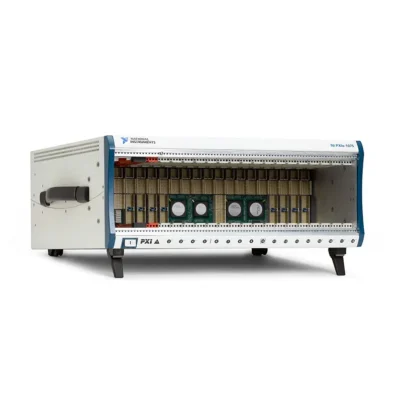
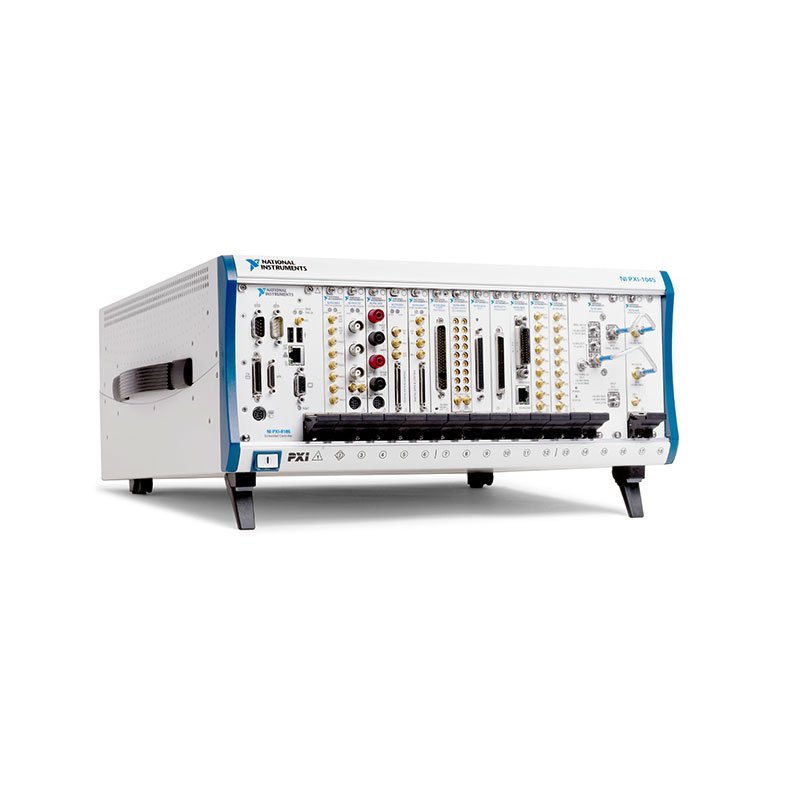
PXI-1045 18-Slot Universal AC PXI Chassis
Земля NI PXI-1045 is an 18-slot, 3U PXI chassis designed for high-channel-count automated test, measurement and control systems. It provides one system-controller slot and 17 PXI peripheral slots, including a dedicated star-trigger slot for applications requiring tightly coordinated instrument operation.
With a maximum system bandwidth of 132 MB/s, three bridged PXI bus segments, universal AC input and a removable high-performance power-supply shuttle, the PXI-1045 provides a practical platform for integrating digitizers, digital multimeters, waveform generators, data acquisition modules, switching instruments and communication interfaces.
The PXI-1045 is a conventional PCI-based PXI chassis rather than a PXI Express chassis. It accepts compatible 3U PXI and CompactPCI modules but does not provide native PCI Express data links or PXI Express hybrid peripheral slots.
Key Features of the PXI-1045
- 18-slot 3U PXI chassis architecture
- One system-controller slot
- 17 PXI peripheral slots
- Dedicated star-trigger functionality in slot 2
- Three PXI bus segments
- Two 32-bit, 33 MHz PCI-to-PCI bridges
- 132 MB/s maximum system bandwidth
- Eight PXI trigger lines per trigger-bus segment
- Programmable trigger routing between bus segments
- Low-jitter 10 MHz PXI reference clock
- Rear-panel 10 MHz REF IN and REF OUT BNC connectors
- Universal 100–240 VAC input
- 25 W per-slot cooling capacity for the standard configuration
- Three high-capacity chassis cooling fans
- HIGH and AUTO fan-speed modes
- Removable power-supply shuttle
- Remote power inhibit and voltage monitoring
- PXI and CompactPCI module compatibility
- Bench-top and 19-inch rack-mount installation
- 0°C to 55°C operating-temperature range
High-Channel-Count PXI Platform
The PXI-1045 offers substantially more peripheral capacity than a typical eight-slot PXI chassis. Its 17 peripheral slots allow a single system to accommodate numerous measurement, stimulus, communication and switching modules.
This high slot count is useful in automated test equipment that would otherwise require several smaller chassis. Consolidating instruments in one chassis can simplify rack layout, controller selection, cabling, synchronization and system maintenance.
The actual instrument capacity depends on controller width, module width, power consumption, thermal output and any spacing required around high-power modules.
PXI-1045 Backplane Architecture
The chassis backplane contains three PXI bus segments linked by two 32-bit, 33 MHz PCI-to-PCI bridges. The segment boundaries are marked on the chassis front panel to help system integrators understand how installed modules share the PCI bus.
The segmented architecture allows the chassis to support 17 peripheral slots while maintaining PCI bus signal integrity. Communication between modules on different segments passes through the backplane bridges.
Because the backplane is based on conventional 32-bit PCI technology, 64-bit CompactPCI modules can operate only in 32-bit mode when installed in the PXI-1045.
PXI and CompactPCI Compatibility
The PXI-1045 accepts compatible 3U PXI modules and standard CompactPCI modules. The backplane supports 5 V and universal-keyed PXI-compatible products, and its V(I/O) voltage is connected to the +5 V power plane.
PXI modules can use the chassis timing, triggering and local-bus resources. Standard CompactPCI modules can use the applicable PCI and power connections but may not implement PXI-specific synchronization functions.
Always inspect the module’s mechanical keying, voltage requirements, connector compatibility and software support before installation. PCI Express-only PXIe modules cannot be installed in the PXI-1045.
PXI-1045 Technical Specifications
| Product Model | ПХИ-1045 |
|---|---|
| Product Type | Universal AC PXI chassis |
| Form Factor | 3U PXI |
| Total Physical Slots | 18 |
| System-Controller Slots | 1 system slot with three controller expansion positions |
| Peripheral Slots | 17, including the star-trigger slot |
| Star-Trigger Slot | Slot 2 |
| Native PXI Express Slots | 0 |
| PXI Express Hybrid Slots | 0 |
| Backplane Type | 32-bit conventional PXI/PCI |
| PCI Bus Frequency | 33 MHz |
| Bus Segments | 3 PXI bus segments |
| Backplane Bridges | 2 × 32-bit, 33 MHz PCI-to-PCI bridges |
| Maximum System Bandwidth | 132 MB/s |
| PXI Trigger Lines | 8 lines per trigger-bus segment |
| Local Bus | 13 lines between adjacent peripheral slots |
| Local-Bus Analog Voltage | Up to 42 V between compatible modules |
| System Reference Clock | 10 MHz PXI_CLK10 |
| Built-In Clock Accuracy | ±25 ppm over the operating-temperature range |
| Built-In Clock Jitter | 5 ps RMS maximum, 10 Hz to 1 MHz |
| Maximum Slot-to-Slot Clock Skew | 250 ps |
| External Reference Input | Rear-panel BNC or slot 2 PXI_CLK10_IN |
| Rear Reference Input Amplitude | 200 mVpp to 5 Vpp, sine or square wave |
| Reference Input Impedance | 50 Ω ±5 Ω |
| Reference Output | Rear-panel 10 MHz REF OUT BNC |
| Reference Output Level | 1 Vpp ±20% into 50 Ω; 2 Vpp into an open circuit |
| Nominal AC Input | 100–240 VAC, 50/60 Hz |
| Operating AC Range | 90–264 VAC, 47–63 Hz |
| Input Current Rating | 10–5 A |
| AC Overcurrent Protection | 12 A resettable circuit breaker |
| Power-Supply Efficiency | 70% minimum |
| +3.3 V DC Capacity | 40 A |
| +5 V DC Capacity | 59 A |
| +12 V Peripheral Capacity | 8.5 A |
| +12 V System-Slot Capacity | 0.5 A |
| −12 V DC Capacity | 4.5 A |
| Standard Slot Cooling Capacity | 25 W per slot with fan speed set to HIGH |
| Chassis Cooling | Forced-air positive pressurization |
| Chassis Fans | 3 × 140 cfm fans |
| Fan Modes | HIGH and temperature-controlled AUTO |
| Operating Temperature | 0°C to 55°C |
| Storage Temperature | −40°C to 71°C |
| Operating Humidity | 10% to 90%, noncondensing |
| Storage Humidity | 5% to 95%, noncondensing |
| Operating Altitude | Up to 2,000 m |
| Dimensions | 177 × 445.5 × 434.8 mm without feet |
| Weight | 12.6 kg |
| Installation | Bench-top or 19-inch instrument rack |
Configuration note: NI listed several PXI-1045 orderable variants. Product-page attributes indicate that some later or specialized configurations provide 30 W slot cooling or a timing-oriented backplane configuration. Verify the complete part number and chassis label instead of relying only on the PXI-1045 family name.
PXI-1045 Part Number and Accessories
| Item | Part Number | Описание |
|---|---|---|
| PXI-1045 Standard Chassis | 778645-01 | 18-slot 3U PXI chassis with universal AC power supply |
| PXI-1045 OEM Configuration | 778645-03 | OEM version of the 18-slot PXI-1045 chassis |
| PXI-1045 Specialized Rear-Panel Configuration | 778645-32 | Specialized PXI-1045 configuration; verify the installed rear-panel and timing features |
| PXI-1045 Backplane Assembly | 780973-01 | 18-slot PXI-1045 backplane-only configuration |
| PXI-1045 Power-Supply Shuttle | Configuration dependent | Field-replaceable assembly containing the power supply, cooling fans and fan-control circuitry |
| Front Rack-Mount Kit | Configuration dependent | Hardware for mounting the chassis in a standard 19-inch equipment rack |
| Rear Rack-Mount Kit | Configuration dependent | Provides additional chassis support in transportable or high-vibration rack installations |
| EMC Filler Panel Kit | Configuration dependent | Covers unused slots to improve airflow and electromagnetic compatibility |
| Slot Blocker Kit | Configuration dependent | Directs cooling air toward installed modules when the chassis is not fully populated |
The standard chassis part number is commonly listed as 778645-01. Because the PXI-1045 was offered in multiple configurations, buyers should confirm the complete part number, backplane assembly, power-supply shuttle, rear-panel connectors and included rack hardware before ordering.
NI currently identifies the PXI-1045 as a limited-support product that is no longer available for new purchase through its standard catalog. Availability, repair options and included accessories can therefore vary among refurbished and surplus units.
Removable Power-Supply Shuttle
The PXI-1045 incorporates a modular rear power-supply shuttle that includes the power supply, chassis fans and fan-control circuitry. This design allows the complete power and cooling assembly to be replaced without dismantling the chassis backplane.
NI specifies a power-supply shuttle replacement time of less than five minutes for qualified service personnel. AC power must be disconnected before the shuttle is removed, and electrostatic-discharge precautions must be observed during service.
Universal AC Power
The universal power supply accepts nominal input from 100 VAC to 240 VAC at 50 Hz or 60 Hz. Its guaranteed operating range extends from 90 VAC to 264 VAC and from 47 Hz to 63 Hz, allowing the same chassis architecture to be deployed in many regional power environments.
A rear-panel resettable circuit breaker provides protection against AC overcurrent. The DC outputs also include short-circuit, overload and automatic-recovery protection.
Remote Power Control and Monitoring
A rear-panel nine-pin D-Sub connector supports remote power inhibit and power-rail voltage monitoring. This interface is useful in rack systems where the chassis must be turned on or placed in standby by an external controller, interlock or facility-management system.
The remote monitoring connector does not replace appropriate electrical protection or system-level safety controls. Wiring should follow the documented pinout and voltage limitations.
Cooling and Airflow Management
The PXI-1045 uses positive-pressure forced-air cooling. Three 140 cfm fans draw air through the lower rear of the chassis and direct it from the P1 connector area toward P2, moving air from the bottom to the top of each installed module.
In HIGH mode, the standard chassis provides 25 W of cooling capacity per slot. The AUTO setting adjusts fan speed according to intake-air temperature and can reduce acoustic noise when the installed module load permits.
Unused slots should be covered with filler panels. Slot blockers can further improve cooling efficiency by preventing air from bypassing occupied slots.
PXI Trigger Routing
Each of the three PXI trigger-bus segments provides eight PXI trigger lines. Trigger-routing circuitry allows selected trigger lines to be routed between adjacent bus segments, enabling instruments in different parts of the chassis to participate in synchronized test operations.
Static trigger routes can be configured using NI Measurement & Automation Explorer. Compatible NI drivers can also assign supported routes dynamically.
A trigger line can be routed in either direction across a bridge, but it cannot be driven in both directions at the same time. System software should prevent multiple modules from driving the same trigger line simultaneously.
Star-Trigger Slot
Slot 2 is the PXI star-trigger slot. It provides dedicated, matched trigger paths to peripheral slots 3 through 15. Because the PXI specification defines 13 star-trigger lines, slots 16 through 18 do not receive dedicated star-trigger connections.
If star-trigger functionality is not required, slot 2 can accept a standard compatible PXI peripheral module. When a timing module is installed, it can provide individual trigger signals to participating instruments for tightly coordinated measurement and stimulus operations.
10 MHz System Reference Clock
The PXI-1045 distributes an independently buffered 10 MHz system reference clock to every peripheral slot. Maximum clock skew between slots is 250 ps, helping compatible instruments maintain a shared timebase.
The built-in clock has an accuracy of ±25 ppm across the specified operating-temperature range and maximum jitter of 5 ps RMS from 10 Hz to 1 MHz.
An external 10 MHz reference can enter through the rear-panel BNC connector or through the designated clock input in slot 2. The selected reference is distributed to the peripheral slots and made available at the rear REF OUT connector.
Multi-Chassis Synchronization
The rear 10 MHz REF IN and REF OUT connectors make it possible to distribute a common reference among multiple PXI chassis and external instruments. This is useful when a high-channel-count test system extends beyond the capacity of a single chassis.
A common reference clock improves frequency alignment, but application-level timing may also require shared triggers, matched cables and suitable timing modules. Reference-clock sharing alone does not guarantee simultaneous sampling.
PXI-1045 Applications
- High-channel-count automated test equipment
- Production functional testing
- Electronic device characterization
- Data acquisition and signal monitoring
- Mixed-signal validation systems
- Hardware-in-the-loop testing
- Power electronics validation
- Automotive electronic control-unit testing
- Aerospace and defense test systems
- Communication-interface validation
- Laboratory instrument automation
- Multi-instrument switching systems
- Research and development laboratories
- Maintaining established PCI-based PXI platforms
Automated Production Testing
The 17 peripheral slots allow the PXI-1045 to combine stimulus, measurement, switching and communication resources within one chassis. A production station can use PXI instruments to apply test signals, route connections, capture measurements and evaluate pass/fail limits through a centralized software sequence.
Trigger routing and the common 10 MHz reference can coordinate compatible instruments without requiring every timing signal to be connected through external cables.
High-Channel-Count Data Acquisition
Multiple PXI data acquisition modules can be installed to create systems for voltage, current, temperature, strain, vibration and digital-state monitoring. The large chassis capacity is especially useful when the application requires many conditioned measurement channels.
Before building a large acquisition system, calculate PCI bandwidth, power consumption and cooling requirements. The 132 MB/s PCI bus bandwidth is shared and may limit systems that attempt to stream continuously from numerous high-speed modules.
Functional Test and Signal Switching
The chassis can accommodate PXI switching modules alongside digital multimeters, sources and DAQ instruments. This architecture lets one measurement instrument access multiple DUT test points through software-controlled routes.
Switching systems should be designed with attention to signal level, isolation, cable impedance and measurement settling time. Chassis synchronization improves coordination but does not eliminate electrical errors introduced by fixtures and cables.
Системы аппаратно-программного моделирования
Legacy HIL systems can use the PXI-1045 to integrate analog I/O, digital I/O, communication buses, switching and fault-insertion resources. The chassis trigger lines support coordinated stimulus and acquisition across compatible modules.
For modern HIL applications that require high-throughput FPGA or peer-to-peer PCI Express data movement, a newer PXI Express chassis may be more appropriate.
Legacy System Sustainment
The PXI-1045 remains valuable when a validated test system depends on conventional PXI instruments, established software configurations or specialized fixtures. Replacing only a failed chassis may involve less engineering effort than migrating the complete station to PXI Express.
When sourcing a replacement chassis, compare the exact part number, cooling capacity, timing configuration, controller compatibility and backplane revision with the original installation.
PXI-1045 Installation Workflow
Step 1: Verify the Chassis Configuration
Record the complete PXI-1045 part number and inspect the rear-panel connections. Confirm that the unit includes the required power-supply shuttle, reference-clock connectors and rack-mount components.
Step 2: Select the Installation Location
Place the chassis on a stable bench or install it in a compatible 19-inch equipment rack. Allow at least 76.2 mm of clearance behind the rear air inlets and at least 44.5 mm above and along the sides when rack mounted.
Step 3: Establish Protective Grounding
Connect the chassis only to an appropriately grounded AC outlet. If the facility outlet does not provide the required protective earth, follow the manufacturer’s instructions for connecting the rear chassis-ground terminal before applying power.
Step 4: Calculate Power and Cooling Requirements
Add the power consumption of the controller and every peripheral module by voltage rail. Verify that the combined requirements remain within the chassis DC output limits and that individual modules remain within the applicable slot-cooling capacity.
Step 5: Install the PXI Controller
With chassis power disconnected, install the embedded controller or remote-control interface in system slot 1. Wider controllers can extend into the three controller expansion positions located to the left of slot 1 without consuming peripheral slots.
Step 6: Install Peripheral Modules
Install compatible 3U PXI or CompactPCI modules in the required peripheral slots. Use slot 2 for a star-trigger or timing module when dedicated trigger distribution is needed.
Step 7: Install Filler Panels and Slot Blockers
Cover all unused front openings with filler panels. Install slot blockers where appropriate to direct cooling air through occupied slots and improve thermal performance.
Step 8: Configure Fan Speed
Select HIGH for maximum cooling performance. AUTO can be used when lower acoustic noise is important and the installed module load allows temperature-controlled fan operation.
Step 9: Connect Reference and Remote-Control Cables
If the system uses an external clock, connect the 10 MHz reference to the rear REF IN BNC and observe the specified amplitude and impedance requirements. Connect remote inhibit or voltage-monitoring wiring only when required.
Step 10: Power and Configure the System
Connect AC power, turn on the chassis and verify that the front power LED remains steady green. Start the controller and use NI Measurement & Automation Explorer to identify installed modules and configure supported trigger routes.
Step 11: Validate the Complete Test System
Run instrument self-tests, confirm synchronization and execute a known reference measurement. Monitor chassis temperature and module behavior under the maximum expected workload before placing the station into service.
Rack-Mounting Considerations
The PXI-1045 is approximately 4U high and can be installed using compatible front and rear rack-mount hardware. Rear support is recommended when the rack will be transported or subjected to vibration.
Do not block the rear intake, side exhaust or top exhaust openings. High-power configurations may require more clearance than the stated minimum.
Controller Selection
The chassis requires a conventional PXI-compatible embedded controller or an appropriate remote-control interface. A PXI Express-only controller cannot communicate through the PXI-1045 backplane unless a specifically compatible system architecture is used.
Confirm the controller’s mechanical width, operating-system support, driver compatibility and PCI resource requirements before deployment.
PXI-1045 Troubleshooting
The PXI-1045 Does Not Power On
Confirm that the AC cord is connected to a grounded outlet and that input voltage is within the operating range. Check the front power switch and inspect the rear circuit breaker.
If the breaker has tripped, switch the chassis off, disconnect AC power and reset the breaker. Do not repeatedly reset a breaker when the cause of the overcurrent condition has not been identified.
The Circuit Breaker Trips Repeatedly
Disconnect the chassis from AC power and remove the installed modules. Test the empty chassis according to the documented procedure. If it powers normally, calculate the module power demand and reinstall modules individually to identify a possible overload or faulty device.
The Power LED Is Not Steady Green
A non-steady power indication can signal a power-supply problem. Turn off the chassis, disconnect power and inspect the power-supply shuttle installation. Qualified service personnel may need to replace the shuttle.
Installed PXI Modules Are Not Detected
Confirm that the controller and peripheral modules are fully seated. Check whether the module is compatible with a 5 V V(I/O), 32-bit, 33 MHz PXI backplane and verify that the correct device driver is installed.
If only modules on one backplane segment are missing, investigate the associated PCI bridge, module compatibility and chassis condition.
The Chassis or Modules Run Too Hot
Set the fan selector to HIGH, clean the rear filters and confirm that all air inlets and exhaust openings are unobstructed. Install filler panels over unused slots and use slot blockers to improve airflow.
Verify that no module exceeds the applicable cooling rating and that the surrounding ambient temperature remains within specification.
Trigger Routing Does Not Work
Verify the trigger-line selection, signal direction and bus-segment boundaries in NI MAX or the instrument driver. A trigger line cannot be routed in both directions simultaneously, and two devices must not drive the same line at the same time.
Star Trigger Is Unavailable in the Last Slots
The PXI-1045 provides 13 dedicated star-trigger lines from slot 2 to slots 3 through 15. Slots 16, 17 and 18 do not receive dedicated PXI star-trigger connections. Use another supported trigger-routing method for modules installed in those positions.
The External 10 MHz Reference Is Not Selected
Confirm that the input is 10 MHz and within the 200 mVpp to 5 Vpp rear-input range. Use suitable 50 Ω cabling and verify connector termination.
If valid clock signals are present at both the rear REF IN connector and the slot 2 clock input, the slot 2 source receives priority.
System Data Transfer Is Slower Than Expected
The 132 MB/s specification represents the maximum conventional PCI bus capability and is not a guaranteed sustained rate for every module. Multiple instruments share the segmented backplane, and traffic crossing PCI bridges can affect throughput.
Review module placement, acquisition rates, driver configuration, memory transfers and controller performance. High-throughput applications may require a newer PXI Express chassis.
Fan Noise Is Excessive
Confirm that the selector has not been set to HIGH unnecessarily. AUTO mode adjusts fan speed according to intake temperature, but it should be used only when the installed modules remain adequately cooled.
Clean clogged filters and improve rack ventilation. Restricted airflow can cause the fans to run faster while reducing actual cooling performance.
The Chassis Cannot Be Found in NI MAX
The PXI-1045 is primarily a backplane, power and timing platform rather than a network-connected device. NI MAX normally identifies the controller and installed instruments. Chassis-management visibility depends on the controller, software version and supported platform services.
Preventive Maintenance
Inspect and clean the chassis fan filters regularly. NI recommends washing the filters in a mild soap solution, then rinsing and drying them completely before reinstallation.
Check for dust accumulation, unusual fan noise, loose rack hardware, damaged power cables and intermittent module connections. Always disconnect AC power before cleaning or servicing the chassis.
PXI-1045 Comparison
| Модель | Platform and Slots | Maximum Bandwidth | Best Suited For |
|---|---|---|---|
| ПХИ-1045 | 18-slot conventional PXI chassis | 132 MB/s | High-channel-count legacy PCI-based PXI systems |
| PXI-1042Q | 8-slot conventional PXI chassis | 132 MB/s class | Compact, low-noise conventional PXI systems |
| PXIe-1065 | PXI Express шасси на 18 слотов | Up to 3 GB/s | Mixed PXI/PXIe systems requiring higher bandwidth |
| PXIe-1075 | PXI Express шасси на 18 слотов | Up to 4 GB/s | High-density PXI Express automated test |
| PXIe-1095 | 18-slot modern PXI Express chassis | Configuration dependent, substantially higher | High-performance, data-intensive PXIe systems |
PXI-1045 vs PXI-1042Q
The PXI-1045 provides 17 peripheral slots, while the PXI-1042Q is an eight-slot chassis intended for smaller systems and applications where quieter operation is important.
Choose the PXI-1045 when channel density and expansion capacity are the main requirements. Choose the PXI-1042Q when fewer modules are needed and rack space or acoustic output is more important.
PXI-1045 vs PXIe-1065
The PXI-1045 uses a conventional 32-bit, 33 MHz PCI backplane with a maximum bandwidth of 132 MB/s. The PXIe-1065 adds PCI Express connectivity, PXI Express peripheral positions and substantially greater system bandwidth while maintaining support for selected conventional PXI modules.
The PXI-1045 is appropriate for maintaining established PCI-based PXI systems. The PXIe-1065 is preferable when the system requires PXIe instruments, higher streaming throughput or a migration path combining PXI and PXI Express hardware.
PXI-1045 vs PXIe-1075
Both chassis offer an 18-slot physical format, but their backplane technologies differ substantially. The PXI-1045 is a conventional PXI chassis, whereas the PXIe-1075 provides PXI Express connections and multi-gigabyte-per-second system bandwidth.
Module compatibility must be reviewed carefully during migration. A PXI Express chassis can accept only conventional PXI modules that are mechanically and electrically compatible with its hybrid slots.
Selecting the Right PXI Chassis
Select the PXI-1045 when the system uses conventional PXI or CompactPCI modules, needs as many as 17 peripheral positions and does not require native PXI Express bandwidth.
Select a newer PXI Express chassis when the application requires PXIe-only modules, peer-to-peer streaming, high-speed digitizers, FlexRIO devices or significantly more than 132 MB/s of backplane throughput.
Recommended Related Products
- PXI-1042Q Low-Noise PXI Chassis
- PXIe-1065 18-Slot PXI Express Chassis
- PXIe-1075 18-Slot PXI Express Chassis
- PXIe-1085 High-Bandwidth PXI Express Chassis
- PXIe-1095 18-Slot PXI Express Chassis
- View More NI PXI and PXI Express Chassis
- View NI PXI and PXI Express Modules
Why Choose the PXI-1045?
- Provides 17 peripheral positions in one chassis
- Supports established conventional PXI instruments
- Accepts compatible 3U CompactPCI modules
- Includes segmented trigger routing across the chassis
- Provides a low-jitter 10 MHz system reference clock
- Supports external reference-clock input and output
- Operates from universal AC mains
- Supports bench-top and rack-mounted deployment
- Provides a field-replaceable power-supply shuttle
- Supports operation from 0°C to 55°C
- Helps sustain validated legacy PXI test systems
Frequently Asked Questions
What is the PXI-1045?
The PXI-1045 is an 18-slot, universal AC, conventional PXI chassis designed for automated test, data acquisition, signal routing and control applications.
How many peripheral slots does the PXI-1045 provide?
It provides 17 peripheral slots in addition to the system-controller slot. Slot 2 also functions as the PXI star-trigger slot.
Is the PXI-1045 a PXI Express chassis?
No. It is a conventional PCI-based PXI chassis. It does not provide native PXI Express or PXI Express hybrid peripheral slots.
Can PXIe modules be installed in the PXI-1045?
No. PXI Express-only modules require a compatible PXI Express chassis. The PXI-1045 is intended for compatible conventional PXI and 3U CompactPCI modules.
What is the maximum bandwidth of the PXI-1045?
The maximum system bandwidth is 132 MB/s. Actual sustained throughput depends on the controller, module placement, PCI bridge traffic and software configuration.
How is the PXI-1045 backplane divided?
The backplane contains three PXI bus segments connected by two 32-bit, 33 MHz PCI-to-PCI bridges.
Does the PXI-1045 support star triggering?
Yes. Slot 2 provides dedicated star-trigger paths to slots 3 through 15. Slots 16 through 18 do not receive dedicated star-trigger lines.
Does the chassis provide a reference clock?
Yes. It distributes a low-jitter 10 MHz PXI_CLK10 reference to each peripheral slot and provides rear-panel REF IN and REF OUT BNC connectors.
Can an external reference clock be used?
Yes. A 10 MHz external reference can be supplied through the rear REF IN BNC connector or through the designated input on a compatible module in slot 2.
What AC voltage does the PXI-1045 accept?
It accepts nominal 100–240 VAC at 50/60 Hz. The specified operating range is 90–264 VAC and 47–63 Hz.
What is the cooling capacity?
The standard 778645-01 configuration provides 25 W of cooling per slot with the fan selector set to HIGH. NI lists 30 W for certain other PXI-1045 configurations, so the complete part number should be verified.
What is the operating-temperature range?
The PXI-1045 is specified for operation from 0°C to 55°C when installed and ventilated according to the manufacturer’s requirements.
Can the PXI-1045 be rack mounted?
Yes. Optional front and rear rack-mount kits support installation in a standard 19-inch instrument rack.
Does the PXI-1045 support remote power control?
Yes. Its rear-panel nine-pin D-Sub connection supports remote inhibit and monitoring of the chassis power-supply voltages.
Is the power supply replaceable?
Yes. The modular power-supply shuttle includes the power supply, chassis fans and fan-control circuitry. Replacement should be performed only by qualified personnel with AC power disconnected.
What is the standard PXI-1045 part number?
The standard 18-slot chassis with universal AC power is commonly identified by part number 778645-01. Other listed configurations include 778645-03, 778645-32 and the 780973-01 backplane assembly.
Is the PXI-1045 still available from NI?
NI identifies the PXI-1045 as no longer available for standard new purchase and assigns it limited-support status. Refurbished and surplus availability depends on supplier inventory.
When should the PXI-1045 be replaced with a PXI Express chassis?
Consider migration when the application requires PXIe-only instruments, multi-gigabyte-per-second data transfers, high-speed peer-to-peer streaming or improved support for current controllers and software.
Request a Quote for the PXI-1045
Contact us for current availability, condition, lead time and project pricing for the NI PXI-1045 18-Slot Universal AC PXI Chassis. We can also help verify the complete part number, power-supply shuttle, rack-mount hardware, controller compatibility and installed PXI module requirements.















