






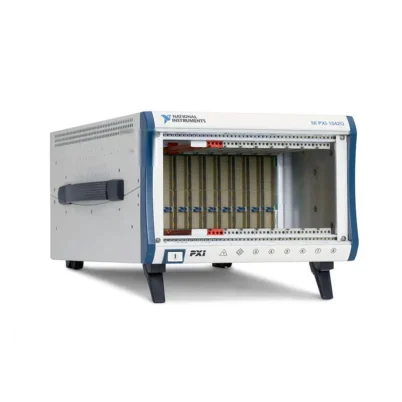
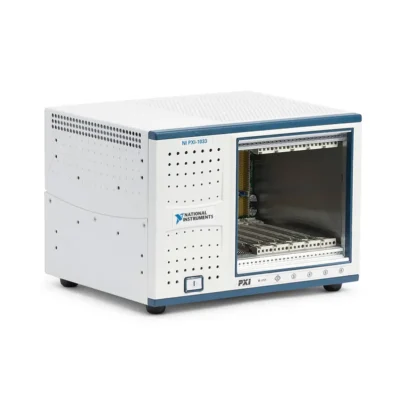
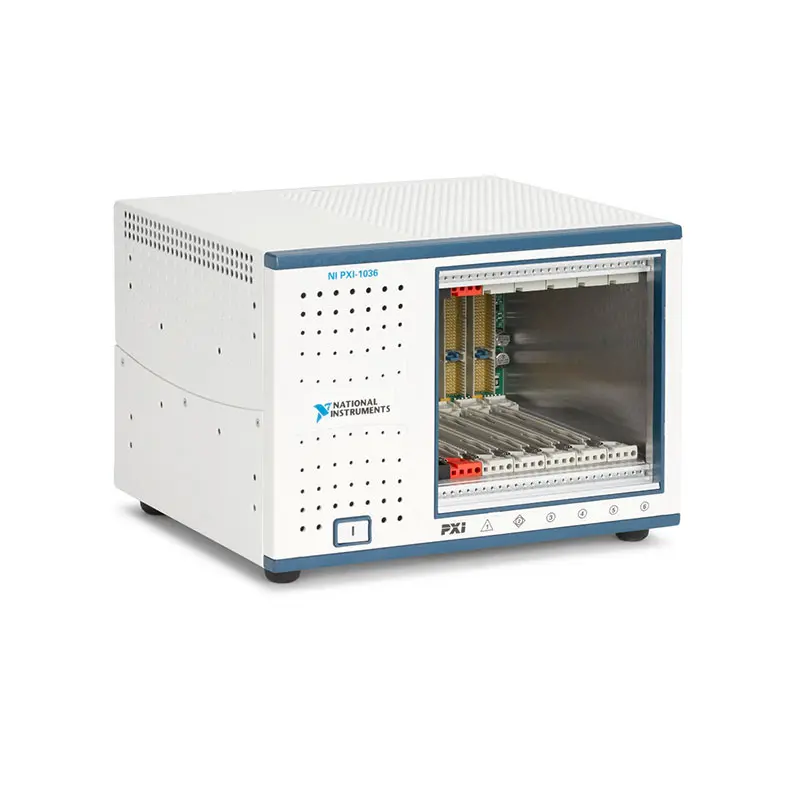
PXI-1036 6-Slot Universal AC PXI Chassis
Земля NI PXI-1036 is a compact six-slot, 3U PXI chassis developed for remote-control, real-time, data acquisition and automated test applications. It provides one system-controller slot and five PXI peripheral slots in the same compact enclosure format used by the four-slot PXI-1031.
The PXI-1036 supports compatible remote-control interfaces and one- or two-slot embedded PXI controllers. This controller arrangement preserves five positions for measurement, switching, communication and control modules while maintaining a small bench-top footprint.
With a 300 W universal AC power supply, 132 MB/s maximum conventional PXI bandwidth, 25 W per-slot cooling, low-noise AUTO fan operation and integrated PXI timing resources, the PXI-1036 provides a flexible platform for compact automated test systems.
The PXI-1036 is a conventional PCI-based PXI chassis. It does not contain native PXI Express or hybrid peripheral slots and should not be confused with the AC/DC-powered PXI-1036DC.
Key Features of the PXI-1036
- Six-slot 3U PXI chassis
- One PXI system-controller slot
- Five PXI peripheral slots
- One controller expansion position
- Compatible with one- and two-slot PXI embedded controllers
- Supports compatible PXI remote-control interfaces
- 132 MB/s maximum system bandwidth
- 32-bit conventional PCI backplane
- 300 W universal AC power supply
- 100–240 VAC nominal input range
- 25 W cooling capacity per slot
- 86 cfm module-cooling fan
- AUTO and HIGH fan-speed modes
- 40.7 dBA sound-pressure level in AUTO mode
- Dedicated star-trigger functionality in slot 2
- Eight PXI trigger lines
- Thirteen-line local bus between adjacent slots
- Low-skew 10 MHz PXI reference clock
- Compatible with supported 3U PXI and CompactPCI modules
- Optional rack-mount, handle and rubber-feet kits
- 0°C to 50°C operating-temperature range
- 30 g operational shock rating
Compact Six-Slot Architecture
The PXI-1036 combines six physical backplane slots with a chassis measuring only 177 × 257.1 × 212.8 mm. Its compact size makes it suitable for portable laboratory systems, space-constrained test benches and smaller automated test stations.
Slot 1 is reserved for the PXI system controller. Slots 2 through 6 are available for peripheral modules, with slot 2 also serving as the star-trigger position.
The chassis has one controller expansion position to the left of slot 1. It can therefore accommodate a two-slot embedded controller without sacrificing any of the five peripheral slots.
Designed for Remote-Control Systems
The PXI-1036 was designed primarily for compact remote-control configurations. A compatible PXI remote-control interface can connect the chassis to a desktop computer through an appropriate MXI interface.
NI documented support for remote-controller families including MXI-4 and MXI-Express. The precise host interface, PXI module and cable must be compatible with one another and with the operating system used by the host computer.
A remote-control architecture allows the computer to be upgraded or serviced separately from the PXI instrumentation. It can also reduce the heat generated inside the chassis because the system uses a compact interface module instead of a higher-power embedded controller.
Support for Compact Embedded Controllers
In addition to remote control, the PXI-1036 accepts compatible one- or two-slot embedded PXI controllers. This allows the chassis to operate as a compact self-contained test system without a separate desktop host.
A two-slot controller uses the system slot and the dedicated controller expansion position. It does not consume one of the five peripheral positions.
Controllers wider than two slots are not suitable for the PXI-1036 architecture. Confirm controller width, conventional PXI compatibility, power consumption and operating-system support before installation.
Conventional PXI Backplane
The PXI-1036 uses a 32-bit conventional PCI backplane with maximum system bandwidth of 132 MB/s. This bandwidth is shared among the system controller and installed peripheral modules.
The architecture supports many DAQ, switching, digital multimeter, communication and signal-generation applications. However, it does not provide the multi-gigabyte-per-second data paths available from modern PXI Express chassis.
Compatible 64-bit CompactPCI modules can operate in the chassis, but the PXI-1036 backplane limits them to 32-bit PCI operation.
PXI and CompactPCI Compatibility
The PXI-1036 supports compatible 3U PXI and CompactPCI modules. Its backplane is designed for 5 V and universal PXI-compatible products, with V(I/O) connected to the +5 V plane.
PXI instruments can use the timing, triggering and local-bus resources provided by the chassis. Standard CompactPCI devices can use the applicable PCI and power connections but may not implement PXI-specific synchronization features.
PXI Express-only modules cannot be installed because the PXI-1036 does not provide PXIe or PXI Express hybrid connectors.
PXI-1036 Technical Specifications
| Product Model | ПХИ-1036 |
|---|---|
| Part Number | 779382-01 |
| Product Type | Six-slot universal AC PXI chassis |
| Chassis Form Factor | 3U PXI |
| Total Physical Slots | 6 |
| System-Controller Slots | 1 |
| Controller Expansion Positions | 1 position to the left of the controller slot |
| Supported Embedded Controller Width | One or two slots |
| Peripheral Slots | 5, including the star-trigger slot |
| Star-Trigger Slot | Slot 2 |
| PXI Express Slots | 0 |
| PXI Express Hybrid Slots | 0 |
| Backplane Architecture | 32-bit conventional PCI-compatible PXI |
| Maximum System Bandwidth | 132 MB/s |
| PXI Hardware Specification | Revision 2.2 compliant |
| Module Compatibility | Compatible 3U PXI and CompactPCI modules |
| Backplane V(I/O) | +5 V |
| PXI Trigger Lines | 8 shared lines |
| Star-Trigger Connections | Dedicated equal-length paths from slot 2 to slots 3–6 |
| Local Bus | 13 lines between adjacent peripheral slots |
| Local-Bus Signal Capability | High-speed TTL or analog signals up to 42 V |
| System Reference Clock | 10 MHz PXI_CLK10 |
| Maximum Clock Skew Between Slots | Less than 250 ps |
| External Reference Source | Available through the PXI_CLK10_IN pin in slot 2 |
| External Clock Selection | Manual backplane switch configuration |
| Power-Supply Type | Universal AC |
| Power-Supply Rating | 300 W |
| Nominal AC Input | 100–240 VAC |
| Operating AC Range | 90–264 VAC |
| Nominal Input Frequency | 50/60 Hz |
| Operating Frequency Range | 47–63 Hz |
| Input Current Rating | 4–2 A |
| AC Overcurrent Protection | Internal 5 A fuse; no user-serviceable components |
| Power-Supply Efficiency | Greater than 65% at full load and normal input voltage |
| +3.3 V DC Capacity | 12 A |
| +5 V DC Capacity | 17 A |
| +12 V DC Capacity | 2 A |
| −12 V DC Capacity | 0.8 A |
| Per-Slot Cooling Capacity | 25 W |
| Module-Cooling Fan | 86 cfm |
| Fan Modes | AUTO and HIGH |
| Sound Pressure in AUTO Mode | 40.7 dBA at 25°C ambient |
| Sound Pressure in HIGH Mode | 49.4 dBA |
| Sound Power in AUTO Mode | 51.8 dBA at 25°C ambient |
| Sound Power in HIGH Mode | 57.5 dBA |
| Operating Temperature | 0°C to 50°C |
| Storage Temperature | −20°C to 70°C |
| Operating Humidity | 10% to 90%, noncondensing |
| Storage Humidity | 5% to 95%, noncondensing |
| Maximum Altitude | 2,000 m |
| Operational Shock | 30 g peak, half-sine, 11 ms pulse |
| Operational Random Vibration | 5–500 Hz, 0.3 grms |
| Nonoperational Random Vibration | 5–500 Hz, 2.4 grms |
| Dimensions Without Feet | 177 × 257.1 × 212.8 mm |
| Weight | 5 kg |
| Installation Environment | Indoor use |
| Mounting Options | Bench-top, portable or 19-inch rack mounting |
PXI-1036 Part Number and Accessories
| Item | Part Number | Описание |
|---|---|---|
| ПХИ-1036 | 779382-01 | Six-slot conventional PXI chassis with 300 W universal AC power supply |
| PXI-1036DC | 779383-01 | Related six-slot chassis with combined AC and DC input capability |
| PXI-103x Rack-Mount Kit | 778948-01 | Hardware for mounting a compatible PXI-103x chassis in a 19-inch rack |
| PXI Filler-Panel Kit | 778933-01 | Filler panels for covering unused chassis slots |
| PXI-103x Side-Handle and Rubber-Feet Kit | 778949-01 | Adds a carrying handle and bench-top rubber feet |
| PXI Chassis Slot-Blocker Kit | 778678-01 | Two single-slot blockers for improving cooling performance |
| US and Japanese AC Power Cord | 763000-01 | AC power cord for 120 V US or 100 V Japanese applications |
| United Kingdom AC Power Cord | 763064-01 | BS 1363-compatible AC power cable |
| Swiss AC Power Cord | 763065-01 | AC power cable for Swiss power outlets |
| Australian AC Power Cord | 763066-01 | AC power cable for Australian power outlets |
| Universal European AC Power Cord | 763067-01 | AC power cable for compatible European outlets |
| North American 240 V Power Cord | 763068-01 | NEMA 6-15 power cable for supported 240 V installations |
The standard PXI-1036 chassis is identified by NI part number 779382-01. The closely related PXI-1036DC uses part number 779383-01 and adds a DC input; it should be treated as a separate model when sourcing replacement hardware.
Every PXI-1036 was originally supplied with three single-slot filler panels and one double filler panel. Confirm the included accessories when purchasing a pre-owned or refurbished chassis.
PXI-103x Rack-Mount Kit
The 778948-01 rack-mount kit supports installation of the PXI-1036 in a standard 19-inch equipment rack. Its compact chassis width leaves room for other equipment or cable-routing hardware when installed in a suitable rack layout.
Maintain adequate ventilation above, behind and around both sides of the chassis. Rack hardware must not obstruct the bottom cooling-air intake.
Handle and Rubber-Feet Kit
The optional 778949-01 kit adds a side carrying handle and rubber feet for portable or bench-top operation. This configuration is useful for laboratory teams that move the chassis between development stations.
The chassis weighs approximately 5 kg before installing the controller, modules and cables. Consider the complete configured weight when selecting a carrying case or transport method.
Filler Panels and Slot Blockers
Filler panels cover unused module openings and help maintain electromagnetic compatibility and controlled airflow. All unused positions should remain covered during normal operation.
The 778678-01 slot-blocker kit contains two single-slot blockers. Slot blockers reduce air bypass through empty positions and redirect cooling airflow toward populated slots.
Regional Power-Cord Options
The universal AC supply supports multiple regional power standards, but the physical power cable must match the destination outlet and regulatory requirements.
Confirm the required connector before ordering. A used chassis may be supplied without an AC cable or may include a cable intended for a different country.
300 W Universal AC Power Supply
The PXI-1036 incorporates a 300 W universal AC supply with automatic voltage and frequency ranging. It accepts nominal input from 100 VAC to 240 VAC and operates across a wider 90–264 VAC range.
The power supply provides +3.3 V, +5 V, +12 V and −12 V rails to the backplane. Power budgeting must evaluate each rail individually because remaining within the total wattage does not guarantee that every rail remains below its current limit.
Five Peripheral Slots
The chassis provides five peripheral positions instead of the three available in the related PXI-1031 architecture. It achieves this increased module capacity by limiting the embedded controller to a maximum width of two slots.
This configuration is particularly efficient for remote control, where a single-slot interface leaves all five peripheral positions available for instruments.
Star-Trigger Slot
Slot 2 provides dedicated equal-length trigger lines to peripheral slots 3 through 6. A compatible timing module installed in this position can coordinate measurement and stimulus operations across the chassis.
If dedicated star triggering is not required, slot 2 can accept an ordinary compatible PXI peripheral module.
PXI Триггерная шина
All chassis slots share eight PXI trigger lines. Instruments can use these lines for start, stop, reference and event signals without requiring separate external cables for every connection.
Trigger lines can be reserved through NI Measurement & Automation Explorer. Reservation helps prevent software or multiple modules from attempting to drive the same trigger resource simultaneously.
PXI Local Bus
The 13-line local bus connects adjacent peripheral positions. Compatible devices can use this connection for high-speed TTL communication or analog signals as high as 42 V.
Local-bus functions depend on the installed modules. Verify electrical compatibility and pin assignments before relying on local-bus connections between adjacent instruments.
10 MHz System Reference Clock
The PXI-1036 distributes an independently buffered 10 MHz PXI_CLK10 reference signal to every peripheral slot. Slot-to-slot clock skew is less than 250 ps.
A compatible timing device in slot 2 can provide an external PXI_CLK10 source through the backplane. Unlike larger chassis such as the PXI-1042, the PXI-1036 does not provide rear-panel REF IN and REF OUT BNC connectors.
Routing an external slot 2 clock requires manual configuration of switch S1 on the chassis backplane. Changing this switch requires powering down the chassis and following the documented service procedure.
Low-Noise Cooling
The PXI-1036 provides 25 W of cooling capacity per slot through an 86 cfm fan. The rear selector offers AUTO and HIGH operating modes.
AUTO mode adjusts the fan speed according to the intake-air temperature and produces sound pressure as low as 40.7 dBA at 25°C ambient. HIGH mode maximizes airflow and produces a specified sound-pressure level of 49.4 dBA.
HIGH mode is recommended when the chassis contains high-power instruments or operates near the upper ambient-temperature limit.
PXI-1036 Applications
- Remote-controlled PXI test systems
- Portable data acquisition systems
- Compact automated test equipment
- Real-time measurement and control
- Electronic device validation
- Production functional testing
- Laboratory instrument automation
- Signal switching and routing
- Automotive electronic testing
- Aerospace and defense test systems
- Environmental monitoring
- Communication-interface testing
- Educational and university laboratories
- Field-service measurement systems
- Maintenance of conventional PXI platforms
Remote-Controlled PXI Systems
The PXI-1036 is well suited to systems controlled by an external desktop or industrial computer. A compatible MXI remote interface can extend the computer’s PCI or PCI Express connection to the PXI chassis.
Remote control allows users to select a host computer with the required processor, memory, storage and display capabilities without installing those resources inside the chassis.
Compact Data Acquisition
The five peripheral slots can accommodate multiple analog input, digital I/O, counter, communication and signal-conditioning modules. This makes the chassis suitable for mixed-signal acquisition without the footprint of a full-width 18-slot system.
The total acquisition rate must remain within the practical capabilities of the 132 MB/s shared PCI backplane and the selected remote or embedded controller.
Portable Test Systems
With a 5 kg chassis weight, optional carrying handle and compact dimensions, the PXI-1036 can form the foundation of a portable engineering or service system.
Installed modules, cables and fixtures increase total system weight. A protective transit case is recommended when the configured chassis will be transported frequently.
Real-Time Control
A compatible two-slot real-time PXI controller can create a compact standalone measurement and control system. This architecture can execute deterministic test and control applications without relying on a separate desktop computer.
The selected controller and real-time software must support the installed modules and required drivers.
Automated Functional Testing
The chassis can combine a digital multimeter, DAQ device, waveform generator, switch and communication interface for electronic functional testing. Software can apply stimulus, route connections, collect measurements and evaluate results automatically.
This architecture is useful for PCB validation, electronic assembly testing, sensor evaluation and production quality control.
Laboratory and Educational Systems
The 40.7 dBA AUTO-mode sound-pressure specification makes the PXI-1036 suitable for laboratories and teaching environments where excessive fan noise can be distracting.
AUTO mode should be used only when sufficient thermal margin remains for the installed instruments. High-power configurations should use HIGH fan mode.
Legacy Test-System Sustainment
The PXI-1036 remains useful when an established test station depends on conventional PXI instruments, legacy software or an existing remote-control architecture.
Replacing a failed chassis with the same model can reduce software, fixture and system-validation changes compared with migrating immediately to PXI Express.
PXI-1036 Installation Workflow
Step 1: Confirm the Chassis Model
Verify that the unit is a PXI-1036 with part number 779382-01. Do not assume that PXI-1036 and PXI-1036DC power and rear-panel requirements are identical.
Step 2: Inspect the Chassis
Check the enclosure, backplane connectors, power inlet, fan openings and module guides for visible damage or contamination. Confirm that required filler panels and mounting hardware are present.
Step 3: Select Bench or Rack Installation
Use the optional handle and feet for portable bench-top operation or install the chassis using the compatible PXI-103x rack-mount kit.
Step 4: Provide Ventilation Clearance
Maintain at least 44.5 mm of clearance above, behind and along both sides of the chassis. Keep the bottom air intake unobstructed.
Step 5: Establish Protective Grounding
Connect the chassis to a properly grounded AC outlet. Use the rear chassis-ground screw when required by the facility installation or applicable safety procedure.
Step 6: Calculate Power Requirements
Add the controller and module current requirements separately for the +3.3 V, +5 V, +12 V and −12 V rails. Confirm that the configuration remains within every rail limit and the available cooling capacity.
Step 7: Select the Controller Architecture
Choose a compatible single-slot remote-control interface or a one- or two-slot PXI embedded controller. Controllers wider than two slots are not compatible with the chassis layout.
Step 8: Install the Controller
Place the chassis power switch in standby. Install the controller in slot 1 using the red system-slot guides, engage the injector/ejector handle and secure its front-panel screws.
Step 9: Install Peripheral Modules
Install compatible conventional PXI or CompactPCI modules in slots 2 through 6. Use slot 2 for a timing module when star-trigger or external PXI_CLK10 functionality is required.
Step 10: Install Filler Panels
Cover all unused slots with the supplied filler panels. Add slot blockers when additional airflow control is required.
Step 11: Select the Fan Mode
Select HIGH for maximum cooling performance. Select AUTO for reduced acoustic noise only after confirming that the installed modules have adequate thermal margin.
Step 12: Connect the AC Supply
Use the correct regional grounded power cable. Apply AC power only after the controller and modules are secured and the ventilation openings are unobstructed.
Step 13: Configure the System in NI MAX
Start the host or embedded controller and open NI Measurement & Automation Explorer. Identify the PXI controller, PXI-1036 chassis and installed instruments if they do not appear automatically.
Step 14: Configure Trigger Resources
Reserve any PXI trigger lines required by the application. This prevents other software or modules from dynamically using the same trigger path.
Step 15: Validate the System
Run instrument self-tests and a known measurement sequence. Confirm communication, trigger operation, clock configuration, data throughput and thermal performance under the expected maximum workload.
Controller Compatibility Considerations
The PXI-1036 accepts only one- or two-slot-wide embedded controllers. A three- or four-slot controller may physically conflict with the chassis enclosure and should not be forced into the system.
For remote operation, verify the host interface, PXI remote-control module, cable, driver and operating-system compatibility as a complete set.
External Clock Configuration
An external 10 MHz clock can be supplied through the designated slot 2 PXI_CLK10_IN connection. The internal backplane switch must be configured for the required clock source.
Only qualified personnel should access the chassis backplane. Disconnect AC power and follow electrostatic-discharge precautions before changing internal switch settings.
PXI-1036 Troubleshooting
The PXI-1036 Does Not Power On
Confirm that the AC cable is properly connected and that the source voltage falls within the 90–264 VAC operating range. Check the front standby switch and verify protective grounding.
The internal AC fuse is not user-serviceable. If the chassis remains unpowered, qualified service or power-supply replacement may be required.
The Embedded Controller Does Not Boot
Verify that the controller is installed in system slot 1 and is fully seated. Confirm that it is a conventional PXI controller no more than two slots wide.
Check memory, storage, display connections and the controller’s own status indicators according to its user documentation.
The Remote Controller Is Not Detected
Inspect the host interface, MXI cable and PXI remote-control module. Verify that the host-side and chassis-side interfaces belong to a compatible family.
Power sequencing can affect PCI enumeration. Follow the controller documentation for the correct order in which to power the PXI chassis and host computer.
A Peripheral Module Is Missing in NI MAX
Power down the chassis and reseat the module. Confirm conventional PXI compatibility, 5 V V(I/O) support and correct driver installation.
If multiple devices are missing, inspect the controller connection and chassis backplane rather than assuming that every peripheral module has failed.
A PXIe Module Does Not Fit
The PXI-1036 does not contain PXI Express or hybrid slots. PXIe-only modules require a compatible PXI Express chassis.
The Chassis Runs Too Hot
Set the fan selector to HIGH and ensure that the bottom intake and upper exhaust openings are clear. Maintain at least 44.5 mm of ventilation space around the chassis.
Install filler panels and slot blockers, reduce the module load if necessary and confirm that no device exceeds the 25 W per-slot cooling capacity.
The Fan Is Too Loud
AUTO mode reduces fan speed according to intake temperature and can lower operator-position sound pressure to approximately 40.7 dBA at 25°C ambient.
Do not use AUTO solely to mask a thermal problem. Clean airflow paths and verify module temperatures before reducing fan speed.
The PXI Trigger Does Not Work
Confirm that the source and destination instruments support the selected trigger line. Reserve the line in NI MAX and ensure that multiple modules are not configured to drive it simultaneously.
The Star Trigger Does Not Reach Other Modules
Verify that the timing module is installed in slot 2. Dedicated star-trigger connections extend from slot 2 to slots 3, 4, 5 and 6.
The External Reference Clock Is Not Used
The PXI-1036 does not have rear-panel reference-clock BNC connectors. An external PXI_CLK10 source must enter through slot 2, and backplane switch S1 must be configured accordingly.
Data Transfer Is Slower Than Expected
The 132 MB/s value represents maximum conventional PCI system bandwidth. Actual sustained performance depends on controller speed, DMA transfers, remote-link bandwidth, bus sharing and software overhead.
For example, the chassis backplane may support 132 MB/s while an older remote-control interface provides a lower sustained transfer rate.
The System Becomes Unstable with Several Modules
Check the power demand on each backplane voltage rail. The combined module wattage may appear acceptable while one individual rail exceeds its current capacity.
Also verify cooling, controller resources, driver compatibility and the number of PCI devices supported by the operating system.
The Chassis Is Not Identified Correctly in NI MAX
Open the PXI System entry in NI MAX, right-click the unidentified chassis and select PXI-1036 from the appropriate identification menu. Confirm that PXI Platform Services is installed.
Preventive Maintenance
Periodically inspect the cooling fan, intake openings, filler panels and power cable. Dust buildup can restrict airflow and increase module temperature even when the fan appears to operate normally.
Disconnect AC power before cleaning the chassis. Internal service should be performed only by qualified personnel using appropriate electrostatic-discharge precautions.
PXI-1036 Comparison
| Модель | Platform and Slots | Power Configuration | Best Suited For |
|---|---|---|---|
| ПХИ-1036 | 6-slot PXI; 5 peripheral slots | 300 W universal AC | Compact remote or two-slot embedded-controller systems |
| PXI-1036DC | 6-slot PXI; 5 peripheral slots | AC plus DC input | Portable systems that must operate from DC power |
| PXI-1031 | 4-slot compact PXI chassis | Universal AC | Systems using fewer modules or wider embedded controllers |
| PXI-1042 | 8-slot PXI; 7 peripheral slots | Universal AC | Conventional PXI systems requiring more module capacity |
| PXIe-1073 | PXI Express шасси с 5 слотами | Universal AC with integrated remote control | Compact PXI Express remote-control applications |
PXI-1036 vs PXI-1036DC
Both models provide six physical slots, five peripheral positions, conventional PXI connectivity and 25 W per-slot cooling. The primary difference is the power architecture.
The PXI-1036 operates from universal AC only. The PXI-1036DC adds a DC input for portable or vehicle-powered systems while retaining an AC input.
Choose the PXI-1036 when AC power is always available. Choose the PXI-1036DC when the same test system must operate from both facility AC power and a suitable external DC source.
PXI-1036 vs PXI-1031
The PXI-1036 and PXI-1031 use a similarly sized enclosure. The PXI-1036 provides five peripheral slots by limiting the embedded controller to one or two slots.
The PXI-1031 provides fewer peripheral positions but can support certain wider controller configurations. The correct model therefore depends on controller width and required instrument count.
PXI-1036 vs PXI-1042
The PXI-1036 provides five peripheral slots in a compact 5 kg enclosure. The PXI-1042 provides seven peripheral positions, a wider chassis and external reference-clock BNC connectors.
Choose the PXI-1036 for portability, compact remote control or limited rack space. Choose the PXI-1042 when additional module capacity and rear external clock connections are required.
PXI-1036 vs PXIe-1073
The PXI-1036 is a conventional PCI-based PXI chassis that requires a separate remote-control or embedded-controller module. The PXIe-1073 is a PXI Express chassis with an integrated remote-control interface.
The PXIe-1073 supports compatible PXI Express instrumentation and higher-bandwidth communication. The PXI-1036 remains appropriate for established systems using conventional PXI modules.
Selecting the Right Compact PXI Chassis
Select the PXI-1036 when the system requires five conventional PXI peripheral positions, universal AC input, a remote-control interface or a controller no wider than two slots.
Select the PXI-1036DC when DC operation is required. Choose the PXI-1042 for more conventional PXI slots or a PXI Express chassis when the application requires PXIe instruments and higher data throughput.
Recommended Related Products
- PXI-1036DC AC/DC-Powered PXI Chassis
- PXI-1031 Compact PXI Chassis
- PXI-1042 8-Slot PXI Chassis
- PXI-1042Q Low-Noise PXI Chassis
- PXIe-1073 Integrated Remote-Control Chassis
- PXI-8360 MXI-Express Remote-Control Module
- View More NI PXI and PXI Express Chassis
- View NI PXI and PXI Express Modules
Why Choose the PXI-1036?
- Provides five peripheral slots in a compact enclosure
- Supports compatible PXI remote-control interfaces
- Accepts one- or two-slot embedded controllers
- Offers 132 MB/s conventional PXI bandwidth
- Includes a 300 W universal AC power supply
- Provides 25 W cooling capacity per slot
- Operates at only 40.7 dBA in AUTO mode
- Supports compatible PXI and CompactPCI modules
- Includes PXI trigger, star-trigger and local-bus resources
- Distributes a low-skew 10 MHz system reference
- Supports optional bench-top and rack-mount accessories
- Provides a 30 g operational shock rating
- Helps maintain compact legacy PXI test systems
Frequently Asked Questions
What is the PXI-1036?
The PXI-1036 is a compact six-slot conventional PXI chassis designed for remote-control, real-time, data acquisition and automated test applications.
What is the PXI-1036 part number?
The standard PXI-1036 universal AC chassis uses NI part number 779382-01.
How many peripheral slots does it provide?
The PXI-1036 provides five peripheral slots in addition to the system-controller slot.
What controller can be installed?
The chassis accepts a compatible remote-control interface or a conventional embedded PXI controller that occupies no more than two slots.
Is the PXI-1036 a PXI Express chassis?
No. It uses a 32-bit conventional PCI-based PXI backplane and provides no native PXI Express or hybrid slots.
Can PXIe modules be installed?
No. PXI Express-only modules require a compatible PXI Express chassis.
What is the maximum system bandwidth?
The maximum conventional PXI system bandwidth is 132 MB/s. Actual sustained performance depends on the controller, remote link, installed modules and software.
What is the power-supply rating?
The PXI-1036 has a 300 W universal AC power supply.
What AC voltage does it support?
It accepts nominal 100–240 VAC, with a specified operating range of 90–264 VAC and 47–63 Hz.
Can the PXI-1036 operate from DC power?
No. The standard PXI-1036 is an AC-powered chassis. Select the PXI-1036DC when DC input capability is required.
What is the cooling capacity?
The chassis provides 25 W cooling capacity per slot through an 86 cfm module-cooling fan.
How loud is the PXI-1036?
Sound pressure is specified at 40.7 dBA in AUTO mode at 25°C ambient and 49.4 dBA in HIGH mode.
What is the operating-temperature range?
The PXI-1036 operates from 0°C to 50°C.
Does it provide star triggering?
Yes. Slot 2 provides dedicated equal-length star-trigger connections to slots 3 through 6.
Does the PXI-1036 have external reference-clock BNC connectors?
No. An external PXI_CLK10 reference must be supplied through the designated slot 2 backplane connection.
Can the PXI-1036 be rack mounted?
Yes. The 778948-01 PXI-103x rack-mount kit supports installation in a compatible 19-inch equipment rack.
Can it be used as a portable chassis?
Yes. The compact 5 kg enclosure and optional 778949-01 side-handle and rubber-feet kit make it suitable for portable laboratory systems.
What is the difference between PXI-1036 and PXI-1036DC?
The PXI-1036 uses universal AC power. The PXI-1036DC adds a DC input for applications that must operate away from conventional AC mains.
Is the PXI-1036 suitable for high-speed streaming?
It supports many conventional PXI applications, but its shared 132 MB/s PCI bandwidth is lower than the multi-gigabyte-per-second throughput available from PXI Express chassis.
Request a Quote for the PXI-1036
Contact us for current availability, condition, lead time and project pricing for the NI PXI-1036 6-Slot Universal AC PXI Chassis. We can also help verify controller compatibility, rack-mount accessories, power cables and conventional PXI modules for your test system.















