






Product Introduction
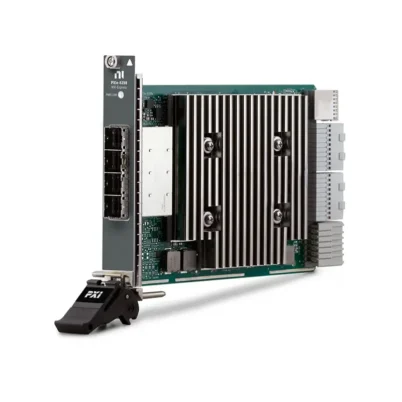
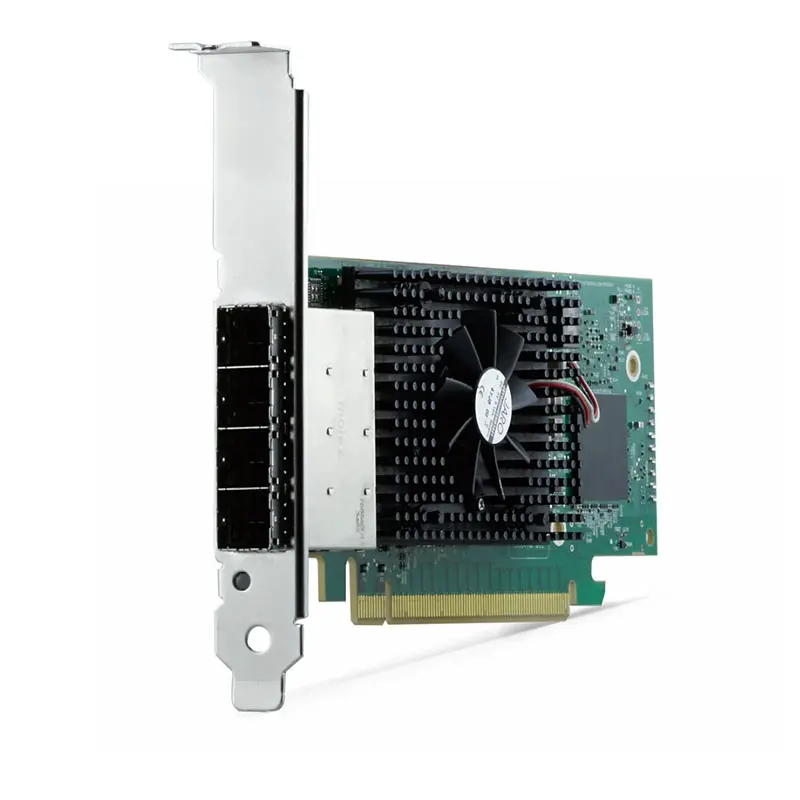
The NI PCIe-8398 is a high-performance PCI Express host interface card designed for remote control of PXI Express systems from an external desktop or rackmount computer. It provides a PCI Express Gen 3 x16 host interface and supports high-bandwidth communication between the host PC and compatible PXI Express remote control hardware.
Installed in a compatible PCI Express slot in the host computer, the PCIe-8398 connects to a compatible PXIe-8398 or PXIe-8399 PXI Remote Control Module using high-speed MXI-Express Gen 3 cabling.
This architecture allows a standard desktop PC, workstation, or rackmount computer to control PXI and PXI Express instrumentation through a software-transparent PCI Express connection. It is particularly suitable for automated test, high-speed data acquisition, RF testing, semiconductor validation, electronic test, and other applications requiring high-throughput communication between a host computer and PXIe instrumentation.
Product Overview
The National Instruments PCIe-8398 is a host-side component of a high-performance PXI Express remote control system.
A typical configuration is:
Desktop / Rackmount PC → PCIe-8398 → MXI-Express Gen 3 Cables → PXIe-8398 / PXIe-8399 → PXI Express Chassis
The PCIe-8398 allows the PXI Express chassis to operate as an extension of the host computer’s PCI Express bus. This provides a software-transparent architecture in which PXI Express modules can be accessed by the host system without requiring a conventional embedded PXI controller.
Key Features
PCI Express Gen 3 x16 Host Interface
The PCIe-8398 uses a PCI Express Gen 3 x16 host interface.
The high-bandwidth PCI Express architecture is designed for demanding PXI Express systems containing high-speed digitizers, RF instruments, FPGA modules, data acquisition hardware, and other bandwidth-intensive instruments.
Up to 13.6 GB/s Performance
NI specifies the PCIe-8398 as a 13.6 GB/s device for PXI remote control.
This high-throughput architecture is particularly valuable when large amounts of measurement data must be transferred between PXI Express instrumentation and the external host computer.
PXI Express Remote Control
The primary function of the PCIe-8398 is to allow an external computer to remotely control a compatible PXI Express chassis.
Instead of installing an embedded controller directly inside the PXIe chassis, engineers can use:
External PC + PCIe-8398 + PXIe Remote Control Module
This configuration provides access to the processing power, memory, storage, graphics capability, and upgrade flexibility of an external workstation or rackmount PC.
Software-Transparent PCI Express Connection
The PCIe-8398 creates a software-transparent PCI Express connection between the host computer and the PXI Express system.
From the software perspective, PXI Express instruments can be accessed through the host system without requiring a network-based communication layer between the PC and chassis.
Compatible with PXIe-8398
The PCIe-8398 can be paired with the PXIe-8398 PXI Remote Control Module.
A typical configuration is:
Host PC → PCIe-8398 → MXI-Express Gen 3 → PXIe-8398 → PXI Express Chassis
Compatible with PXIe-8399
The PCIe-8398 can also be connected to a compatible PXIe-8399 remote control module for supported PXI Express system configurations.
The exact cabling and system architecture should be selected according to the required chassis configuration and bandwidth.
Gen 3 x8 Copper Cable Connections
The PCIe-8398 connects to compatible PXIe remote control modules using Gen 3 x8 MXI-Express copper cables.
For a full x16 connection, multiple x8 cable links are used according to the supported connection architecture.
External PC Control
The PCIe-8398 enables engineers to use an external desktop, workstation, or rackmount computer as the controller for a PXI Express measurement system.
This can provide advantages when the application requires:
- High-performance CPUs
- Large system memory
- High-capacity storage
- Specialized GPUs
- Custom PCI Express expansion cards
- Easy computer upgrades
- Rackmount computing infrastructure
Technical Specifications
| Parameter | Specification |
|---|---|
| Product Type | PCI Express Host Interface for PXI Remote Control |
| Model | PCIe-8398 |
| Part Number | 784179-01 |
| Manufacturer | National Instruments |
| Host Interface | PCI Express Gen 3 x16 |
| Rated Performance | 13.6 GB/s |
| MXI Communication Level | MXI-Express Gen 3 x16 |
| Product Function | PXI / PXI Express Remote Control |
| Host System | Desktop or Rackmount PC |
| Compatible Remote Control Modules | PXIe-8398 / PXIe-8399 |
| Supported Cable Technology | MXI-Express Gen 3 |
| Supported Cable Types | Copper / Supported Fiber-Optic Configurations |
| PCIe Card Form | x16 PCI Express Host Interface Card |
| Software Architecture | Software-Transparent PCI Express Link |
| Product Status | Active |
How Does the PCIe-8398 Work?
The PCIe-8398 extends the host computer’s PCI Express bus to a compatible PXI Express chassis through MXI-Express technology.
The basic architecture is:
Host CPU
↓
Computer PCI Express Bus
↓
PCIe-8398
↓
MXI-Express Gen 3 Connection
↓
PXIe-8398 / PXIe-8399
↓
PXI Express Chassis Backplane
↓
PXIe Instruments
This allows compatible PXIe instrumentation to communicate with the external host computer through a high-speed PCI Express connection.
What Is PXI Remote Control?
PXI remote control allows an external computer to function as the controller for a PXI or PXI Express chassis.
Instead of using:
PXIe Chassis + Embedded PXIe Controller
a remote-control system can use:
PXIe Chassis + Remote Control Module + Cable + Host Interface + External PC
The PCIe-8398 provides the host interface portion of this architecture.
PCIe-8398 and PXIe-8398
The PCIe-8398 and PXIe-8398 have similar model numbers but perform different functions.
| Feature | PCIe-8398 | PXIe-8398 |
|---|---|---|
| Installation Location | External Host PC | PXI Express Chassis |
| Product Type | PCI Express Host Interface | PXI Remote Control Module |
| Part Number | 784179-01 | 784178-01 |
| PCI Express Generation | Gen 3 | Gen 3 |
| Link Architecture | x16 | x16 |
| Primary Function | Connect Host PC to MXI-Express | Connect PXIe Chassis to External Host |
In a typical remote-control configuration, these two devices work together to establish the PCI Express connection between the external computer and PXI Express chassis.
PCIe-8398 vs PXIe-8399
The PCIe-8398 is a host-side PCI Express interface card, while the PXIe-8399 is installed in the PXI Express chassis.
The PCIe-8398 can be used with compatible PXIe-8399 configurations when the system requires supported high-performance PXI remote control or expansion architectures.
PCIe-8398 vs Embedded PXIe Controller
| Feature | PCIe-8398 Remote Control | Embedded PXIe Controller |
|---|---|---|
| Processor Location | External PC | Inside PXIe Chassis |
| PC Upgrade Flexibility | High | Controller Dependent |
| Desktop GPU Support | Possible | Limited |
| Large Storage Options | Flexible | Controller Dependent |
| PXIe Chassis Slot Used | Remote Control Module Required | Embedded Controller Required |
| System Architecture | External Host | Integrated Controller |
High-Speed Data Acquisition Applications
The PCIe-8398 is particularly useful in PXI Express systems containing high-throughput measurement hardware.
Typical instruments can include:
- High-speed digitizers
- Oscilloscopes
- RF vector signal analyzers
- RF signal generators
- FlexRIO FPGA modules
- High-speed data acquisition modules
- High-throughput storage systems
The high-bandwidth host connection helps transfer measurement data between these instruments and the external computer.
RF Test Systems
RF test systems can generate large volumes of waveform and measurement data.
The PCIe-8398 can provide a high-performance host connection for PXIe systems containing RF signal analyzers, signal generators, transceivers, digitizers, and FPGA processing hardware.
Semiconductor Test Systems
Semiconductor characterization and production test systems can require high-throughput communication between multiple PXIe instruments and the test controller.
Using an external high-performance computer with the PCIe-8398 can provide the CPU, memory, storage, and PCI Express resources required for demanding semiconductor test applications.
High-Speed Data Streaming
PXIe digitizers and FPGA instruments can generate large continuous data streams.
The PCIe-8398 is designed for systems where high-throughput communication between the PXI Express chassis and external host is important.
Overall system streaming performance can depend on:
- Host PCI Express slot configuration
- Number of PCIe lanes
- MXI-Express cable configuration
- PXIe remote control module
- PXIe chassis backplane
- Installed instrumentation
- Host CPU and memory performance
- Storage subsystem performance
- Software architecture
PCIe x16 Slot Requirements
For maximum PCIe-8398 performance, a host computer with an electrically PCI Express x16 slot is recommended.
The PCIe-8398 can operate in some compatible PCI Express slots that provide fewer electrical lanes, provided the physical slot accepts the x16 card.
However, operating with fewer PCIe lanes reduces available bandwidth. Therefore, an electrically x16 PCI Express slot is recommended for applications requiring maximum MXI-Express throughput.
Using PCIe-8398 in a PCIe x8 Slot
The PCIe-8398 is a full-length x16 PCI Express card. It can operate in a compatible open-ended PCIe x8 slot or another slot that physically accepts its x16 edge connector.
PCI Express automatically negotiates the available number of lanes.
However, an x8 electrical connection provides approximately half the PCI Express lane bandwidth of an x16 connection. For maximum PXI remote-control performance, use an electrically x16 host slot whenever possible.
MXI-Express Gen 3 Cabling
The PCIe-8398 uses high-speed MXI-Express Gen 3 cabling to communicate with compatible PXIe remote control hardware.
For Gen 3 x16 configurations, the link can use multiple x8 cables. Correct cable installation is important for proper operation and maximum system performance.
Before powering the system, verify:
- Correct cable type
- Correct connector orientation
- Correct port sequence
- Secure cable connections
- Compatible remote control module
PCIe-8398 Remote Control Architecture
A complete PCIe-8398 remote control system typically includes:
Desktop / Rackmount Computer
↓
PCI Express Gen 3 x16 Slot
↓
PCIe-8398 Host Interface
↓
MXI-Express Gen 3 Cable Connection
↓
PXIe-8398 or PXIe-8399
↓
PXI Express Chassis
↓
PXI/PXIe Measurement Modules
PXIe-PCIe8398 Remote Control Bundle
NI also offers the PXIe-PCIe8398 remote control bundle for building a complete host-to-PXI Express connection.
The bundle includes:
- PCIe-8398 host interface device
- PXIe-8398 PXI remote control module
- High-speed copper cable connector
- Two MXI-Express cables
The bundle is useful when building a new PXI Express remote-control system because the required host and chassis interface hardware is supplied together.
Software Compatibility
Because the PCIe-8398 provides a software-transparent PCI Express connection, PXIe instruments are accessed by the host computer through their applicable NI drivers and application software.
Depending on the installed PXIe instruments, software can include:
- NI Measurement & Automation Explorer (NI MAX)
- LabVIEW
- TestStand
- InstrumentStudio
- Instrument-specific NI drivers
- Custom test applications
MXI-Express BIOS Compatibility
Some host computer BIOS and PCI Express architectures may require additional MXI-Express compatibility configuration.
NI provides MXI-Express BIOS Compatibility Software for supported systems that cannot boot correctly with an MXI-Express connection or cannot recognize the PXI/PXI Express devices behind the connection.
This software should only be installed when required for the specific computer and MXI-Express configuration.
Power-On Sequence
For applicable PCIe-8398 systems, the PXI Express chassis and MXI-Express connection should be established before starting the host computer.
A typical sequence is:
- Power off the host computer.
- Verify the PCIe-8398 is correctly installed.
- Connect the MXI-Express cables.
- Power on the PXI Express chassis.
- Power on the host computer.
- Verify the PXI/PXIe devices in NI MAX or the operating system.
Hot-Plug Considerations
The PCIe-8398 should not be treated as a hot-pluggable PCI Express host interface card during normal system operation.
Power down the system before installing, removing, or changing the PCIe-8398 hardware or MXI-Express cabling unless a specific NI procedure explicitly states otherwise.
How to Choose a PXI Remote Control Interface
Before selecting the PCIe-8398, evaluate:
- Host computer PCI Express generation
- Available PCIe slot size
- Available electrical PCIe lane width
- Required system bandwidth
- PXI Express chassis compatibility
- Remote control module compatibility
- Copper or fiber cable requirements
- Cable length requirements
- Number of PXIe chassis
- Installed PXIe instrumentation
- Continuous data-streaming requirements
- Host BIOS compatibility
- Operating system and driver compatibility
Industries
- Automated Test
- Semiconductor Test
- Aerospace and Defense
- RF and Wireless Test
- Electronic Validation
- High-Speed Data Acquisition
- Automotive Test
- Scientific Research
- Industrial Measurement
- Research and Development
Applications
PXI Express Remote Control
The PCIe-8398 enables an external desktop or rackmount PC to control a compatible PXI Express chassis through a high-speed PCI Express connection.
High-Speed Data Acquisition
The Gen 3 x16 architecture is suitable for PXIe systems containing high-throughput digitizers and data acquisition hardware.
RF Test
The PCIe-8398 can connect high-performance host computers to PXIe RF instrumentation for automated RF and wireless test systems.
Semiconductor Test
High-bandwidth host communication makes the PCIe-8398 suitable for demanding semiconductor characterization and production test architectures.
FPGA Data Streaming
The PCIe-8398 can be used in PXIe systems containing FlexRIO and other FPGA-based instrumentation requiring high-throughput communication with the host computer.
Automated Test Systems
External computer control provides a flexible architecture for automated test systems requiring custom processing, large storage capacity, or specialized host hardware.
Recommended Related Products
| PCIe-8398 | PCI Express Gen 3 x16 host interface card for high-performance PXI Express remote control. |
| PXIe-8398 | Gen 3 x16 PXI remote control module designed to connect a PXI Express chassis to an external host system. |
| PXIe-8399 | Gen 3 x16 PXI remote control module for high-performance remote control and supported multichassis configurations. |
| PXIe-PCIe8398 | Complete PXI remote control bundle containing the PCIe-8398, PXIe-8398, and required high-speed connection hardware. |
| PXIe-8394 | Gen 3 x8 bus extension module for supported PXI Express system expansion architectures. |
| PXI Express Chassis | Modular instrumentation chassis for PXIe digitizers, RF instruments, DAQ modules, FlexRIO hardware, and other test equipment. |
Why Choose PCIe-8398?
- PCI Express Gen 3 x16 host interface
- Up to 13.6 GB/s device performance
- High-speed PXI Express remote control
- Software-transparent PCI Express connection
- External desktop PC control
- Rackmount PC control
- Compatible with PXIe-8398
- Compatible with PXIe-8399
- High-throughput MXI-Express Gen 3 architecture
- Suitable for high-speed data acquisition
- Suitable for RF test systems
- Suitable for semiconductor testing
- Suitable for FPGA data streaming
- Suitable for automated test systems
Frequently Asked Questions
What is the PCIe-8398?
The NI PCIe-8398 is a PCI Express Gen 3 x16 host interface card used to remotely control compatible PXI Express chassis from an external desktop or rackmount computer.
What is the part number of the PCIe-8398?
The NI ordering part number for the PCIe-8398 is 784179-01.
What is the PCIe interface of the PCIe-8398?
The PCIe-8398 uses a PCI Express Gen 3 x16 host interface.
What is the bandwidth of the PCIe-8398?
NI specifies the PCIe-8398 as a 13.6 GB/s device for PXI remote control. Actual system performance depends on the host PCIe configuration, remote-control hardware, cabling, chassis, installed instruments, and application.
What is the difference between PCIe-8398 and PXIe-8398?
The PCIe-8398 is installed in the external host computer, while the PXIe-8398 is installed in the PXI Express chassis. They can be used together to create a high-speed PXI remote-control connection.
Can PCIe-8398 connect to PXIe-8399?
Yes. NI specifies the PCIe-8398 for connection to compatible PXIe-8398 or PXIe-8399 PXI remote control modules.
Can the PCIe-8398 be installed in a PCIe x8 slot?
The PCIe-8398 can operate in a compatible slot that physically accepts its x16 edge connector, including some open-ended x8 slots. However, fewer electrical PCIe lanes reduce available bandwidth. An electrically x16 slot is recommended for maximum performance.
Does the PCIe-8398 require an embedded PXIe controller?
No. The purpose of the PCIe-8398 remote-control architecture is to allow an external computer to control the PXI Express chassis instead of using a conventional embedded PXIe controller.
Does the PCIe-8398 use MXI-Express?
Yes. The PCIe-8398 is a high-performance MXI-Express Gen 3 x16 host interface for PXI remote control.
What cables are required for the PCIe-8398?
The PCIe-8398 uses compatible Gen 3 MXI-Express cables. A full x16 configuration uses the appropriate supported cable arrangement between the PCIe-8398 and compatible PXIe remote-control module.
Can the PCIe-8398 control PXI Express instruments from a desktop PC?
Yes. This is its primary application. The PCIe-8398 allows a compatible desktop, workstation, or rackmount computer to function as the host controller for a PXI Express system.
Can the PCIe-8398 be used for high-speed data streaming?
Yes. Its Gen 3 x16 architecture is particularly useful for PXIe systems containing high-throughput digitizers, FPGA hardware, RF instruments, and other devices that transfer large amounts of measurement data.
Is the PCIe-8398 hot-pluggable?
No. Normal hot-plugging of the PCIe-8398 is not supported. Hardware and cable changes should be performed according to the applicable NI installation and power-down procedures.
Is the PCIe-8398 discontinued?
No. NI currently lists 784179-01 PCIe-8398 as an Active product.
What is included with the PCIe-8398?
NI currently lists the PCIe-8398 device, a low-profile PCI Express bracket, and safety, environmental, and regulatory documentation as included items. Cables and the chassis-side remote-control module should be selected according to the system configuration unless purchased as part of a complete bundle.
What should I check before purchasing a PCIe-8398?
Before purchasing the PCIe-8398, verify the host computer PCIe slot, electrical lane width, PXIe chassis, compatible PXIe-8398 or PXIe-8399 remote-control module, MXI-Express cable configuration, required bandwidth, BIOS compatibility, operating system, instrument drivers, and complete PXI Express system architecture.
Conclusion
The NI PCIe-8398 PCI Express Host Interface provides a high-performance PCI Express Gen 3 x16 connection for remotely controlling PXI Express systems from an external desktop, workstation, or rackmount computer. With up to 13.6 GB/s device performance, MXI-Express Gen 3 connectivity, compatibility with PXIe-8398 and PXIe-8399 remote-control modules, and a software-transparent PCI Express architecture, the PCIe-8398 is well suited for high-speed data acquisition, RF testing, semiconductor validation, FPGA data streaming, electronic test, and other demanding PXI Express applications.















