







PXIe-8822 2.4 GHz Quad-Core PXI Embedded Controller
The NI PXIe-8822 is a four-slot PXI Express embedded controller designed for automated test, industrial control, data acquisition and laboratory measurement systems. It integrates a 2.4 GHz quad-core Intel Core i3-11100HE processor, 8 GB of DDR4 memory and a 512 GB or larger M.2 NVMe solid-state drive.
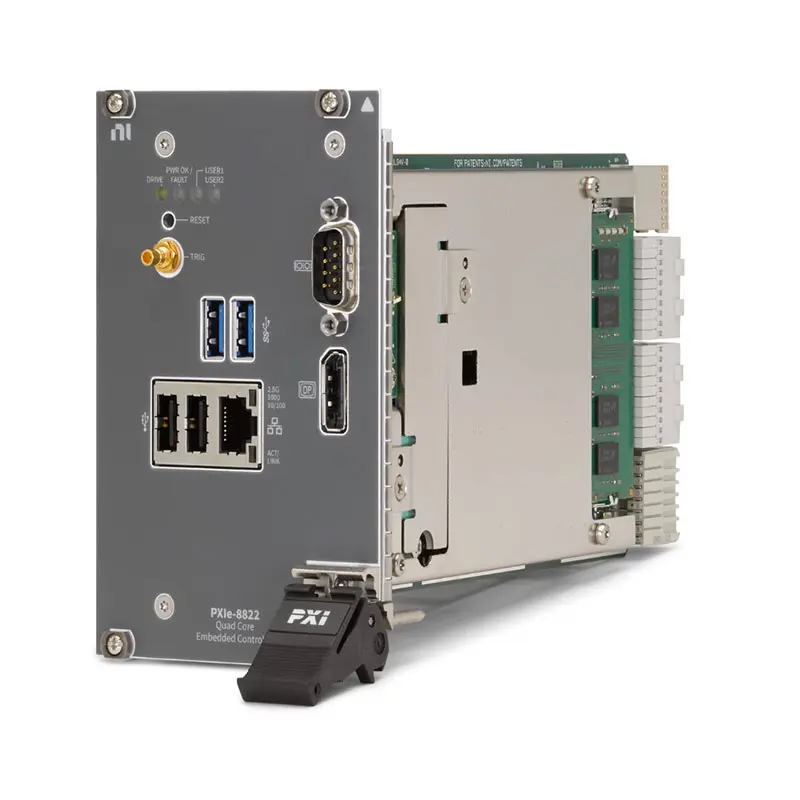
The controller provides up to 4 GB/s maximum controller bandwidth through its PXI Express backplane connection. It also includes one 2.5 Gigabit Ethernet port, two USB 2.0 ports, two USB 3.2 Gen 1 ports, one DisplayPort 1.4 connection, an RS-232 serial port and a front-panel SMB trigger connector.
Available configurations support Windows 11 IoT Enterprise LTSC, Windows 10 IoT Enterprise LTSC, NI Linux Real-Time or operation without a preinstalled operating system. This flexibility allows the PXIe-8822 to serve both conventional Windows-based automated test systems and deterministic LabVIEW Real-Time applications.
Key Features of the PXIe-8822
- 2.4 GHz Intel Core i3-11100HE processor
- Four physical processor cores
- 8 MB Intel Smart Cache
- 8 GB standard DDR4-3200 memory
- 16 GB maximum supported memory
- 512 GB or larger M.2 NVMe solid-state drive
- Up to 4 GB/s maximum controller bandwidth
- One 10/100/1000/2500BASE-T Ethernet port
- IEEE 1588-capable Ethernet interface
- One DisplayPort 1.4 video output
- Two USB 2.0 Type-A ports
- Two USB 3.2 Gen 1 Type-A ports
- One DB-9 RS-232 serial port
- One SMB PXI trigger input/output connection
- Optional TPM 2.0 depending on configuration
- Windows 11, Windows 10, NI Linux Real-Time and no-OS options
- Four-slot-wide 3U PXI Express controller
- 0°C to 55°C operating-temperature range
PXIe-8822 Technical Specifications
| Product Model | PXIe-8822 |
|---|---|
| Product Type | PXI Express embedded controller |
| Processor | Intel Core i3-11100HE |
| Processor Base Frequency | 2.4 GHz |
| Number of Processor Cores | 4 |
| Processor Cache | 8 MB Intel Smart Cache |
| Standard Memory | 8 GB |
| Maximum Memory | 16 GB |
| Memory Type | Single-channel DDR4-3200, non-ECC SODIMM |
| Internal Storage | 512 GB or larger M.2 NVMe SSD |
| Storage Removable | No |
| Maximum Controller Bandwidth | 4 GB/s |
| PCI Express Link Speed | 2.5 GT/s |
| PXI Express Four-Link Configuration | x4, x4, x4, x4 |
| PXI Express Two-Link Configuration | x8, x8 |
| Ethernet Ports | 1 |
| Ethernet Interface | 10/100/1000/2500BASE-T Intel I225 |
| Ethernet Connector | RJ45 |
| Ethernet Timing Support | IEEE 1588 |
| Wake-on-LAN | Supported |
| USB 2.0 Ports | 2 × Type-A |
| USB 3.2 Gen 1 Ports | 2 × Type-A |
| Video Output | 1 × DisplayPort 1.4 |
| Graphics | Integrated Intel HD Graphics |
| Serial Interface | 1 × RS-232 |
| Serial Connector | 9-pin D-Sub |
| PXI Trigger Connection | 1 × front-panel SMB input/output |
| GPIB Interface | Not included |
| Thunderbolt Interface | Not included |
| Trusted Platform Module | Optional TPM 2.0, configuration dependent |
| Supported NI Operating Systems | Windows 11 IoT, Windows 10 IoT or NI Linux Real-Time, depending on part number |
| Module Width | Four-slot-wide 3U PXI Express module |
| Slot Requirement | One system slot plus three controller expansion slots |
| PXI Express Compatibility | PXI Express Specification 1.0 compatible |
| Typical Weight | 728 g |
| Operating Temperature | 0°C to 55°C |
| Operating Humidity | 10% to 90%, noncondensing |
| Storage Temperature | −40°C to 71°C |
| Storage Humidity | 5% to 95%, noncondensing |
| Maximum Operating Altitude | 4,600 m at 25°C with chassis fans set to High |
| Operational Shock | 30 g peak, half-sine, 11 ms pulse |
| Operational Random Vibration | 5 Hz to 500 Hz, 0.3 grms |
| Nonoperational Random Vibration | 5 Hz to 500 Hz, 2.4 grms |
PXIe-8822 Part Number and Accessories
| Part Number | Operating System | TPM | Description |
|---|---|---|---|
| 788815-01 | Windows 11 IoT Enterprise LTSC 24H2, 64-bit | Yes | PXIe-8822 quad-core embedded controller with Windows 11 and TPM |
| 787881-01 | Windows 10 IoT Enterprise LTSC 21H2, 64-bit | Yes | PXIe-8822 quad-core embedded controller with Windows 10 and TPM |
| 787881-33 | LabVIEW Real-Time with NI Linux Real-Time | No | PXIe-8822 real-time controller for deterministic test and control |
| 787881-00 | No operating system | Yes | PXIe-8822 controller supplied without a preinstalled operating system |
| Included Item or Software | Part Number | Description |
|---|---|---|
| DisplayPort-to-VGA Cable | Included | 7-inch display adapter cable supplied with the controller |
| Operating-System Recovery Media | Included with OS configurations | Recovery media for restoring the installed operating system |
| LabVIEW Professional | 784584-35 | Graphical development environment for automated test and measurement |
| LabVIEW+ Suite | 788509-35 | Integrated software suite including LabVIEW, TestStand, DIAdem, FlexLogger and InstrumentStudio |
| InstrumentStudio Professional | 789987-35 | Interactive instrument configuration, measurement and sequence-development software |
The controller, a 7-inch DisplayPort-to-VGA adapter cable, recovery media for the installed operating system and safety documentation are supplied with applicable configurations.
Always order by the complete part number rather than the PXIe-8822 model name alone. The selected part number determines whether the controller includes Windows 11, Windows 10, NI Linux Real-Time or no operating system and whether TPM 2.0 is installed.
Intel Core i3-11100HE Processor
The PXIe-8822 uses an Intel Core i3-11100HE processor with four physical cores, a base clock frequency of 2.4 GHz and 8 MB of Smart Cache.
This processor provides sufficient performance for many automated test applications, including instrument configuration, test sequencing, data logging, report generation and moderate signal processing.
Applications involving intensive parallel analysis, large RF data sets or advanced image processing may benefit from a higher-performance controller such as the PXIe-8842 or PXIe-8862.
Four-Core Processing Architecture
Four processor cores allow the operating system and test software to execute multiple tasks concurrently. One core can handle instrument communication while other cores perform data analysis, user-interface updates and result storage.
Multithreaded test software can take better advantage of the processor than a single sequential loop. However, the final throughput also depends on driver efficiency, memory use, storage performance and communication with the installed PXI instruments.
DDR4-3200 System Memory
The controller includes 8 GB of single-channel DDR4-3200 non-ECC memory as standard. The supported maximum capacity is 16 GB.
Eight gigabytes is suitable for many conventional LabVIEW, TestStand and InstrumentStudio applications. An upgrade to 16 GB may be useful when the system loads large waveform files, runs several applications simultaneously or performs memory-intensive analysis.
Use only compatible memory modules that meet the controller’s electrical, mechanical and thermal requirements. Unsupported SODIMMs may cause boot failures or intermittent system instability.
512 GB NVMe Solid-State Storage
The PXIe-8822 contains a 512 GB or larger M.2 NVMe solid-state drive. NVMe storage provides faster startup, application loading and data access than conventional rotating hard drives.
The absence of moving storage components also helps the controller withstand shock and vibration in industrial and mobile test installations.
The internal drive is not front-removable. Systems requiring frequent physical exchange of storage media should evaluate an external storage solution or a controller specifically offering a removable drive.
4 GB/s Controller Bandwidth
The PXIe-8822 supports up to 4 GB/s of data transfer between the controller and a compatible PXI Express chassis backplane.
The controller supports four-link operation using four x4 links or two-link operation using two x8 links. Actual bandwidth depends on the chassis backplane architecture, installed modules and the number of devices transferring data simultaneously.
For sustained acquisition, calculate the combined data rate from all digitizers, FPGA modules and RF instruments. The storage drive and analysis software must also keep pace with the backplane traffic.
2.5 Gigabit Ethernet Connectivity
The front panel includes one Intel I225 Ethernet interface supporting 10 Mbps, 100 Mbps, 1 Gbps and 2.5 Gbps connections through an RJ45 connector.
The Ethernet port can connect the controller to a corporate network, test database, network-attached storage system, remote workstation or industrial device.
Actual 2.5 Gigabit performance requires compatible network switches, cabling and endpoint hardware. A link will operate at a lower negotiated speed if another component does not support 2.5GBASE-T.
IEEE 1588 Timing Support
The Ethernet controller supports IEEE 1588 timing functions. IEEE 1588 can help coordinate time across compatible networked equipment by distributing a common network time reference.
This feature can be useful when measurement events from several network-connected systems must share related timestamps.
Synchronization performance depends on the network architecture, switches, software and clock configuration. IEEE 1588 support does not replace dedicated PXI backplane timing when the application requires tighter hardware synchronization.
DisplayPort 1.4 Video Output
One DisplayPort 1.4 connection allows the controller to operate with a compatible monitor. Integrated Intel graphics support the local Windows or Linux desktop without requiring a separate graphics module.
A short DisplayPort-to-VGA adapter cable is supplied for compatibility with supported legacy displays. For the best digital image quality, connect directly to a DisplayPort monitor when possible.
If a monitor is not required during normal operation, the controller can be configured and accessed remotely after the operating system and network settings are prepared.
USB 2.0 and USB 3.2 Connectivity
The controller provides two USB 2.0 Type-A ports and two USB 3.2 Gen 1 Type-A ports. These interfaces support keyboards, mice, recovery media, external storage and compatible USB instruments.
Use the USB 3.2 ports for devices requiring higher data rates. USB 2.0 ports are appropriate for keyboards, mice, license dongles and other lower-bandwidth peripherals.
Power consumed by attached USB devices must be included in the complete chassis power budget. Externally powered hubs may be appropriate when several USB devices are required.
RS-232 Serial Interface
A 9-pin D-Sub RS-232 port provides communication with compatible serial instruments, programmable power devices, environmental equipment and industrial controllers.
Serial settings such as baud rate, parity, stop bits and flow control must match the connected device. Use an appropriate straight-through or null-modem cable according to the interface requirements.
Front-Panel PXI Trigger Connector
The front-panel SMB connector can route a PXI trigger signal to or from the chassis backplane trigger bus. This provides a convenient method for connecting an external trigger source or destination.
Trigger routing can coordinate the PXI system with external instruments, fixtures or automation equipment. Confirm voltage levels, routing direction and termination before making the connection.
Optional TPM 2.0 Security
Selected PXIe-8822 configurations include a Trusted Platform Module. TPM 2.0 can securely store cryptographic information used by operating-system security features.
The Windows 10, Windows 11 and no-OS part numbers listed above include TPM, while the NI Linux Real-Time version is specified without TPM.
Customers with cybersecurity, BitLocker or corporate IT requirements should verify the installed TPM version and regional configuration before ordering.
Windows 11 IoT Configuration
Part number 788815-01 includes Windows 11 IoT Enterprise LTSC 24H2, 64-bit and TPM. This is the preferred Windows configuration for new applications requiring a current long-term servicing operating system.
Before migrating an existing test station, verify that all PXI modules, instrument drivers and application dependencies support the selected Windows version.
Windows 10 IoT Configuration
Part number 787881-01 includes Windows 10 IoT Enterprise LTSC 21H2, 64-bit and TPM. This configuration may be useful for existing test applications standardized on Windows 10.
Software lifecycle and driver support should be evaluated when deploying new long-term systems. Compatibility with older application code does not necessarily mean it is the best platform for a new installation.
NI Linux Real-Time Configuration
Part number 787881-33 includes LabVIEW Real-Time based on NI Linux Real-Time. This configuration is intended for deterministic test, monitoring and control applications.
A real-time controller can execute time-critical loops independently of a Windows user interface. A separate development computer can deploy applications to the controller over Ethernet.
Before selecting this configuration, verify that every required PXI module, driver and software library supports NI Linux Real-Time.
No-Operating-System Configuration
Part number 787881-00 is supplied without a preinstalled operating system and includes TPM. It allows qualified system integrators to install and manage an approved operating environment.
The selected operating system must have compatible chipset, network, graphics and PXI platform drivers. Recovery and validation become the responsibility of the system integrator.
Four-Slot Controller Format
The PXIe-8822 occupies the system-controller slot and three adjacent expansion slots. It therefore requires four physical chassis positions.
This width provides space for the processor, cooling system, storage and front-panel connections, but it reduces the number of positions available for peripheral instruments.
When planning a chassis, subtract the controller expansion positions from the usable slot count and account for any additional double-width or triple-width peripheral modules.
Chassis Compatibility
The controller is compatible with PXI Express chassis that provide a supported system-controller slot and adequate space for its three expansion positions.
The chassis must also provide sufficient power, cooling and backplane link support. Although the controller operates in different compatible chassis, its actual backplane performance cannot exceed the chassis architecture.
Before purchasing, confirm controller support in the selected chassis and ensure the chassis firmware and PXI platform software are current.
Software and Driver Integration
The PXIe-8822 can run LabVIEW, TestStand, InstrumentStudio and applicable NI instrument drivers under supported Windows configurations.
The NI Linux Real-Time version supports compatible real-time development and deployment workflows. Software support varies by module, driver version and operating system.
A complete software compatibility review should cover the controller OS, PXI Platform Services, instrument drivers, development environment and application source code.
PXIe-8822 Applications
- Automated production testing
- Functional electronic testing
- High-channel-count data acquisition
- Industrial monitoring and control
- Hardware-in-the-loop validation
- Automotive ECU testing
- Aerospace and defense test systems
- Semiconductor characterization
- RF and wireless-device testing
- Laboratory instrument automation
- Environmental and reliability testing
- Portable PXI measurement systems
Automated Production Test
The PXIe-8822 can execute test sequences, configure PXI instruments, acquire measurements and store pass/fail results within a self-contained PXI system.
Its quad-core processor is suitable for production stations requiring moderate processing performance, dependable local storage and standard industrial communication interfaces.
Data Acquisition Systems
The controller can operate with multifunction DAQ, temperature, strain, vibration, digitizer and digital I/O modules. Measurement results can be processed locally or transferred to network storage through the 2.5 Gigabit Ethernet connection.
High-throughput configurations should be evaluated against the 4 GB/s controller bandwidth, chassis topology, memory capacity and SSD write performance.
Industrial Monitoring and Control
Ethernet, RS-232, USB and PXI interfaces allow the controller to coordinate modular instrumentation with external industrial equipment.
The NI Linux Real-Time configuration is appropriate when a control application requires deterministic loop execution and independent operation without a conventional Windows desktop.
Hardware-in-the-Loop Testing
The controller can run compatible real-time applications for ECU and control-system validation. FPGA, CAN, LIN, FlexRay, fault-insertion and analog I/O modules can be combined inside the PXI chassis.
Verify processor load and loop timing carefully for complex simulation models. More computationally intensive HIL systems may require a higher-performance controller.
Laboratory Automation
The PXIe-8822 can coordinate oscilloscopes, digital multimeters, signal generators, switches and programmable power instruments from one software environment.
Its display, network and USB interfaces allow it to operate as a local laboratory computer or as a remotely managed headless controller.
Portable Measurement Systems
Installing the computer directly in the PXI chassis eliminates the separate host adapter and interface cable required by a remote-control architecture.
This creates a compact system that can be transported as one integrated measurement platform, subject to the chassis size, environmental rating and safe handling requirements.
PXIe-8822 Installation Workflow
Step 1: Verify the Complete Part Number
Confirm whether the controller includes Windows 11, Windows 10, NI Linux Real-Time or no operating system. Also verify whether TPM 2.0 is required.
Step 2: Confirm Chassis Compatibility
Make sure the PXI Express chassis provides one system-controller slot and three unobstructed expansion positions. Review chassis power, cooling and controller-support documentation.
Check Available Peripheral Slots
The four-slot controller width reduces the number of available peripheral positions. Prepare a slot map before installing PXI instruments.
Check Backplane Bandwidth
Confirm that the chassis supports the required link configuration. The complete system cannot exceed either the controller’s 4 GB/s maximum or the bandwidth available from the chassis.
Step 3: Back Up Required Software and Licenses
Before replacing an existing controller, save application files, instrument configurations, calibration information, license details and test-result data.
Step 4: Power Off and Ground the Chassis
Shut down the operating system and disconnect chassis power according to the manufacturer’s instructions. Follow antistatic handling procedures.
Step 5: Install the PXIe-8822
Align the controller with the system-slot card guides. Slide it into the chassis, engage the injector/ejector handle and seat the backplane connectors completely.
Tighten the retaining screws evenly so the front panel remains aligned with the chassis.
Step 6: Connect the Display and Input Devices
Connect a DisplayPort monitor or the supplied VGA adapter. Attach a keyboard and mouse to the appropriate USB ports for initial configuration.
Step 7: Connect Ethernet
Connect the RJ45 Ethernet port to the required network. Use suitable cabling and a 2.5G-capable network path if the application requires the maximum Ethernet rate.
Step 8: Power On the Chassis
Turn on the chassis and observe the controller LEDs. Enter the BIOS when necessary to review boot order, date, time, TPM and hardware configuration.
Step 9: Complete the Operating-System Setup
Complete the Windows first-boot process or configure the NI Linux Real-Time target from the development computer. For no-OS controllers, install the approved operating system and required platform drivers.
Step 10: Install PXI Platform Services and Drivers
Install NI PXI Platform Services and the drivers required by each peripheral module. Use driver versions supported by the selected operating system and development environment.
Step 11: Verify Hardware in NI MAX
Open NI Measurement & Automation Explorer and confirm that the chassis, controller and peripheral modules appear correctly.
Step 12: Run System Validation
Perform module self-tests, network tests, trigger-routing checks and representative data transfers. Verify stability before connecting a valuable DUT or placing the system into production.
PXIe-8822 Troubleshooting
The PXIe-8822 Does Not Boot
Check chassis power, controller seating and front-panel status indicators. Disconnect nonessential USB devices and PXI modules to eliminate peripheral conflicts.
Review the boot order and storage detection in the BIOS. If the SSD is not detected, do not repeatedly reinstall the operating system before checking the hardware configuration.
No Image Appears on the Monitor
Confirm that the monitor is connected to the DisplayPort output and set to the correct input. Inspect the DisplayPort-to-VGA adapter if one is used.
Test with a direct DisplayPort connection when possible, because adapter compatibility can affect legacy VGA displays.
The Controller Is Not Visible on the Network
Check the Ethernet cable, switch port and RJ45 link indicators. Confirm whether the controller uses DHCP or a static IP address.
If 2.5 Gigabit operation is expected, verify that the switch, cabling and endpoint all support 2.5GBASE-T. Otherwise, the connection may negotiate at 1 Gbps or a lower speed.
A PXI Module Is Not Detected
Power down the chassis and reseat the affected module. Confirm slot compatibility and install the correct instrument driver.
Open NI MAX and rescan the system. If the problem follows the module to another compatible slot, investigate the module or driver rather than the controller.
Backplane Throughput Is Lower Than Expected
Review the chassis topology, controller link configuration and combined data rate of active modules. The 4 GB/s rating is the controller maximum rather than a guaranteed rate for every application.
CPU usage, SSD write speed, memory pressure and real-time processing can also reduce sustained acquisition throughput.
The Internal SSD Is Nearly Full
Archive old test results, temporary files and waveform data to approved network or external storage. Maintain enough free capacity for operating-system updates, paging and application logs.
Configure automatic data retention so unattended tests do not stop because the system drive becomes full.
A USB Device Is Not Recognized
Move the device between USB ports and verify its driver. Use a USB 3.2 port for high-speed storage and acquisition devices.
If several bus-powered devices are attached, test with an externally powered hub and include peripheral power in the system budget.
RS-232 Communication Does Not Work
Verify baud rate, parity, stop bits and flow-control settings. Confirm whether the connected device requires a straight-through or null-modem cable.
Use a terminal application to test basic communication before troubleshooting the full automation program.
Windows Does Not Start Correctly
Use the supplied recovery media only after backing up important data. Confirm that the recovery image corresponds to the controller part number and licensed operating system.
Reinstall PXI Platform Services and instrument drivers in a compatible order after completing recovery.
A LabVIEW Real-Time Target Is Not Discovered
Confirm that the host computer and controller are on compatible network subnets. Check firewall settings, Ethernet cabling and NI MAX remote-system discovery.
Verify that the controller is the NI Linux Real-Time part number and that the host software version supports the target.
The Controller Becomes Too Hot
Check chassis airflow, fan operation, filler panels and ambient temperature. The PXIe-8822 must remain within its 0°C to 55°C operating range even if the chassis itself supports a higher temperature.
Remove dust and airflow obstructions using an approved maintenance procedure. Do not operate the controller with blocked cooling vents.
Trigger Routing Does Not Work
Confirm whether the SMB connector is configured as an input or output and verify the selected PXI trigger line.
Check voltage compatibility, cable impedance and software routing. Ensure that another module is not driving the same trigger line in conflict.
PXIe-8822 Comparison
| Feature | PXIe-8822 | PXIe-8842 | PXIe-8862 |
|---|---|---|---|
| Processor | Intel Core i3-11100HE | Intel Core i5-11500HE | Intel Core i7-11850HE |
| Processor Cores | 4 | 6 | 8 |
| Smart Cache | 8 MB | 12 MB | 24 MB |
| Standard Memory | 8 GB | 16 GB | 16 GB |
| Maximum Memory | 16 GB | 32 GB | 32 GB |
| Storage | 512 GB or larger M.2 NVMe SSD | 512 GB or larger M.2 NVMe SSD | 512 GB or larger M.2 NVMe SSD; selected removable-drive versions available |
| Ethernet Ports | 1 × 2.5G | 2 × 2.5G | 2 × 2.5G |
| DisplayPort Outputs | 1 | 1 | 2 |
| Thunderbolt 4 | No | 1 port | 2 ports |
| Optional GPIB | No | Yes, selected versions | Yes, selected versions |
| Best Suited For | General automated test and moderate processing workloads | Mid-range multithreaded test and analysis | High-performance acquisition, analysis and RF testing |
PXIe-8822 vs PXIe-8842
The PXIe-8822 uses a quad-core Intel Core i3 processor, while the PXIe-8842 uses a six-core Intel Core i5 processor with more cache and memory capacity.
The PXIe-8842 also provides two Ethernet ports and Thunderbolt 4 connectivity. Choose it when an application requires additional parallel processing, networking flexibility or high-speed external expansion.
The PXIe-8822 is a more economical choice for standard instrument control, test sequencing and moderate data analysis.
PXIe-8822 vs PXIe-8862
The PXIe-8862 uses an eight-core Intel Core i7 processor with 24 MB of Smart Cache. It supports additional Ethernet, video and Thunderbolt interfaces and is designed for more demanding processing workloads.
Select the PXIe-8862 for RF analysis, high-speed digitizer systems, complex simulations or extensive parallel testing. Select the PXIe-8822 when the application does not require the processing and interface capacity of the higher-end controller.
PXIe-8822 vs Remote PXI Control
The PXIe-8822 installs directly in the PXI Express chassis and creates a self-contained computing platform. A remote-control system uses an external computer, host adapter, PXI interface module and cable.
An embedded controller reduces external hardware and simplifies system transport. Remote control provides greater freedom to select and upgrade the host computer.
Selecting the Correct PXI Controller
Choose the PXIe-8822 when the system needs a current quad-core embedded controller, NVMe storage, 2.5 Gigabit Ethernet and up to 4 GB/s backplane bandwidth.
Select a higher-performance controller when test execution includes CPU-intensive simulations, advanced RF analysis, large multichannel data sets or extensive parallel processing.
The operating-system part number, chassis compatibility and driver support should be confirmed before comparing price alone.
Why Choose the PXIe-8822?
- Provides an integrated computer for PXI Express systems
- Uses a modern quad-core Intel Core i3 processor
- Includes fast M.2 NVMe solid-state storage
- Supports up to 4 GB/s controller bandwidth
- Provides 2.5 Gigabit Ethernet connectivity
- Supports Windows and NI Linux Real-Time configurations
- Includes standard display, USB and serial interfaces
- Provides direct PXI trigger-bus access through an SMB connector
- Supports TPM 2.0 in selected configurations
- Operates from 0°C to 55°C
PXIe-8822 Frequently Asked Questions
What is the PXIe-8822?
The PXIe-8822 is a four-slot PXI Express embedded controller for automated test, data acquisition, industrial control and laboratory measurement systems.
Which processor does the PXIe-8822 use?
It uses a 2.4 GHz Intel Core i3-11100HE processor with four cores and 8 MB of Smart Cache.
How much memory does it include?
The controller includes 8 GB of DDR4-3200 memory as standard and supports a maximum capacity of 16 GB.
What type of storage is installed?
It includes a 512 GB or larger M.2 NVMe solid-state drive. The internal drive is not front-removable.
What is the maximum controller bandwidth?
The PXIe-8822 supports up to 4 GB/s between the controller and a compatible PXI Express chassis backplane.
Does it support 2.5 Gigabit Ethernet?
Yes. Its RJ45 interface supports 10 Mbps, 100 Mbps, 1 Gbps and 2.5 Gbps Ethernet speeds.
How many Ethernet ports are included?
The PXIe-8822 provides one Ethernet port. Customers requiring two integrated Ethernet interfaces should compare it with the PXIe-8842 or PXIe-8862.
Does the PXIe-8822 include GPIB?
No. The controller does not include an integrated GPIB port. A separate compatible PXI or USB GPIB interface is required.
Does it include Thunderbolt?
No. The PXIe-8822 does not provide Thunderbolt connectivity.
Which operating systems are available?
NI offers configurations with Windows 11 IoT Enterprise LTSC, Windows 10 IoT Enterprise LTSC, NI Linux Real-Time or no preinstalled operating system.
Which PXIe-8822 part number includes Windows 11?
Part number 788815-01 includes Windows 11 IoT Enterprise LTSC 24H2, 64-bit and TPM.
Which part number includes Windows 10?
Part number 787881-01 includes Windows 10 IoT Enterprise LTSC 21H2, 64-bit and TPM.
Which part number supports LabVIEW Real-Time?
Part number 787881-33 includes LabVIEW Real-Time based on NI Linux Real-Time and is specified without TPM.
Is a no-OS version available?
Yes. Part number 787881-00 is supplied without a preinstalled operating system and includes TPM.
How many chassis slots does the controller occupy?
It occupies four physical positions: the system-controller slot and three adjacent controller expansion slots.
Can it be operated without a monitor?
Yes. After network and operating-system configuration, the controller can be managed remotely for headless test operation.
Is the PXIe-8822 suitable for real-time control?
Yes. Select the NI Linux Real-Time part number and verify that all required PXI modules and drivers support the real-time operating system.
Recommended Related Products
- PXIe-8842 Six-Core PXI Embedded Controller
- PXIe-8862 Eight-Core PXI Embedded Controller
- PXIe-8881 High-Performance PXI Embedded Controller
- PXIe-1095 18-Slot PXI Express Chassis
- PXIe-1092 10-Slot PXI Express Chassis
- PXIe-1088 9-Slot PXI Express Chassis
- PXI-GPIB Instrument Control Interface
- View More NI PXI Controllers
- View More NI PXI Express Chassis
Request a Quote for the PXIe-8822
Contact us for current availability, lead time and project pricing for the NI PXIe-8822 Quad-Core PXI Express Embedded Controller. Please provide the required operating system, TPM requirement, memory capacity and destination country so that we can confirm the correct part number and configuration.















