






PXIe-8133 1.73 GHz Quad-Core PXI Express Embedded Controller
Земля NI PXIe-8133 is a high-performance PXI Express embedded controller designed for automated test, high-speed data acquisition, RF measurement, hardware-in-the-loop validation and laboratory automation. It combines a quad-core Intel Core i7-820QM processor with dual-channel DDR3 memory and direct access to the PXI Express backplane.
The processor operates at a base frequency of 1.73 GHz and can reach as much as 3.06 GHz in single-core Turbo mode. This combination supports parallel test execution, measurement processing, instrument communication and operator-interface tasks within a self-contained PXI Express system.
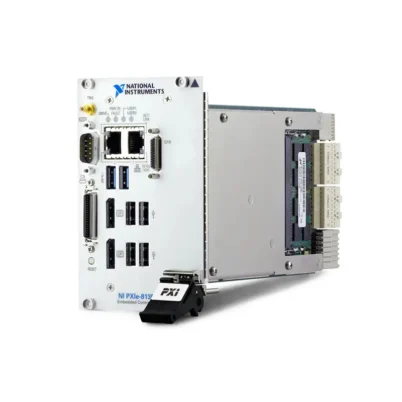
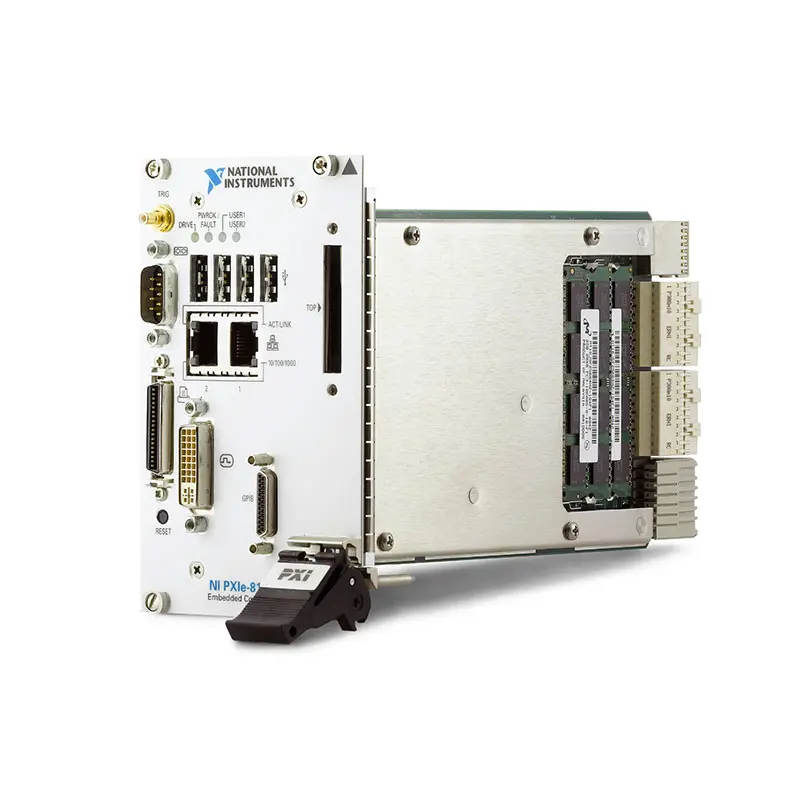
The PXIe-8133 provides two Gigabit Ethernet ports, four USB 2.0 ports, DVI-I video, integrated GPIB, RS-232, an IEEE 1284 parallel port, an ExpressCard/34 slot and a front-panel SMB trigger connector. These interfaces make it particularly useful for test systems combining modern PXI Express modules with traditional external instruments and legacy fixtures.
Key Features of the PXIe-8133
- Intel Core i7-820QM quad-core processor
- 1.73 GHz base processor frequency
- Up to 3.06 GHz single-core Turbo frequency
- Four physical processor cores
- 2 GB standard dual-channel DDR3 memory
- Up to 8 GB DDR3-1333 RAM
- 120 GB or larger internal SATA storage
- 80 GB minimum storage on documented RT and extended-temperature configurations
- Up to 4 GB/s PXI Express system bandwidth
- Four x4 or two x4 PXI Express link configurations
- Two 10/100/1000BASE-T Ethernet ports
- Four Hi-Speed USB 2.0 ports
- DVI-I video output
- ATI Radeon E2400 embedded graphics controller
- Integrated IEEE 488.2 GPIB controller
- One RS-232 serial port
- One IEEE 1284 parallel port
- ExpressCard/34 expansion slot
- Front-panel SMB trigger connector
- PXI Express trigger-bus input and output
- Windows and LabVIEW Real-Time configurations
- Four-slot 3U PXI Express form factor
PXIe-8133 Technical Specifications
| Product Model | PXIe-8133 |
|---|---|
| Product Type | High-performance PXI Express embedded controller |
| Процессор | Intel Core i7-820QM |
| Processor Cores | 4 |
| Processor Threads | Up to 8 with Intel Hyper-Threading Technology |
| Base Processor Frequency | 1.73 GHz |
| Maximum Turbo Frequency | 3.06 GHz in single-core Turbo mode |
| Memory Type | PC3-10600 DDR3-1333 SO-DIMM |
| Memory Architecture | Dual-channel |
| Standard Memory | 2 GB |
| Maximum Memory | 8 GB |
| Standard Storage | 120 GB or larger internal SATA drive |
| LabVIEW Real-Time Storage | 80 GB minimum SATA drive on documented RT configurations |
| Extended-Temperature Storage | 80 GB minimum on documented 24/7 configurations |
| Пропускная способность системы | Up to 4 GB/s, depending on chassis topology |
| Representative Peer-to-Peer Throughput | Approximately 1.6 GB/s in NI-documented test conditions |
| PXI Express Four-Link Configuration | x4, x4, x4, x4 |
| PXI Express Two-Link Configuration | x4, x4 |
| Ethernet | 2 × 10/100/1000BASE-T RJ45 ports |
| USB | 4 × Hi-Speed USB 2.0 ports |
| Video Output | 1 × DVI-I connector |
| Graphics Controller | ATI Radeon E2400 embedded GPU |
| GPIB Interface | Integrated IEEE 488.2 controller |
| GPIB Connector | 25-pin Micro-D |
| Serial Interface | 1 × 16550-compatible RS-232 DB9 port |
| Parallel Interface | 1 × IEEE 1284 Type C connector |
| Peripheral Expansion | 1 × ExpressCard/34 slot |
| Front-Panel Trigger | SMB connector for routing PXI Express triggers to or from the backplane |
| PXI Trigger Support | PXI Express trigger-bus input and output |
| Original Operating Systems | Windows 7 Professional or Windows XP Professional SP3 for Embedded Systems, depending on configuration |
| Real-Time Option | LabVIEW Real-Time configuration available |
| PXI Express Compatibility | PXI Express Specification 1.0 |
| Form Factor | Four-wide 3U PXI Express module |
| Slot Requirement | One system-controller slot plus three adjacent expansion slots |
| Typical Weight | 1.30 kg (2.87 lb) |
| Standard Operating Temperature | 5°C to 50°C |
| Extended Operating Temperature | 0°C to 55°C on applicable extended-temperature configurations |
| Operating Humidity | 10% to 90%, noncondensing |
| Standard Storage Temperature | -40°C to 65°C |
| Extended Storage Temperature | -40°C to 71°C on applicable extended-temperature configurations |
| Maximum Altitude | 2,000 m at 25°C ambient temperature |
| Operating Shock | 30 g peak, half-sine, 11 ms pulse |
| Operating Random Vibration | 5 Hz to 500 Hz, 0.3 grms with a solid-state drive |
| Nonoperating Random Vibration | 5 Hz to 500 Hz, 2.4 grms |
Specifications such as storage capacity, operating system and temperature range depend on the exact PXIe-8133 ordering configuration. Buyers should verify the complete NI part number and hardware label rather than relying only on the controller model.
Intel Core i7 Quad-Core Processing
The PXIe-8133 uses an Intel Core i7-820QM processor with four physical cores. Its 1.73 GHz base frequency provides sustained multicore performance, while Intel Turbo technology can increase one active core to as much as 3.06 GHz when workload and thermal conditions allow.
The processor also supports Intel Hyper-Threading Technology, allowing the operating system to address additional logical processors. Performance improvement depends on whether the application, operating system and instrument drivers can divide their work efficiently across several threads.
For automated test systems, multiple cores help separate measurement processing, instrument communication, user-interface activity, data logging and report generation. This can improve system responsiveness compared with a single-core or basic dual-core controller.
Dual-Channel DDR3 Memory
The PXIe-8133 includes 2 GB of PC3-10600 DDR3-1333 memory as standard and supports up to 8 GB. Two SO-DIMM sockets allow matched modules to operate in dual-channel mode.
Using matched modules of the same capacity and speed provides the best memory bandwidth. The controller can operate with mismatched modules, but performance may be lower than with a matched pair.
An 8 GB configuration is beneficial when the controller runs several instrument drivers, parallel TestStand sequences, large LabVIEW applications or memory-intensive analysis procedures.
PXI Express System Bandwidth
The controller supports four x4 PXI Express links or two x4 links, depending on the chassis backplane. NI positioned the PXIe-8133 as providing up to 4 GB/s of system bandwidth.
Actual throughput depends on the chassis architecture, module location, number of simultaneous transfers, DMA implementation and software workload. An NI-documented peer-to-peer example measured approximately 1.6 GB/s under its specific test conditions.
Applications should be sized using sustained measured throughput rather than theoretical link capacity alone. High-speed digitizers and RF instruments can produce data rates that also depend on controller memory, processing and drive performance.
Internal SATA Storage
Standard PXIe-8133 configurations provide a 120 GB or larger internal SATA drive. LabVIEW Real-Time and documented extended-temperature 24/7 configurations use a drive with at least 80 GB capacity.
The internal drive stores the operating system, NI software, test applications and measurement results. USB storage and network drives can be used for transferring data or maintaining external backups.
For systems exposed to vibration or repeated transport, a qualified solid-state drive may offer better mechanical durability than a rotating hard drive. Any replacement drive should be validated for compatibility, temperature and sustained write performance.
Dual Gigabit Ethernet Interfaces
The controller provides two independent 10/100/1000BASE-T Ethernet interfaces. Port 1 uses an Intel 82577 network controller and supports Wake-on-LAN. Port 2 uses an Intel 82574 controller and does not support Wake-on-LAN.
Two Ethernet ports allow separation of control and enterprise networks. For example, one port can communicate with networked instruments or the DUT while the second port connects to a database, server or remote engineering workstation.
The Ethernet interfaces support automatic crossover, reducing the need for a dedicated crossover cable when making compatible direct connections.
DVI-I Video Output
The PXIe-8133 provides a DVI-I output driven by an ATI Radeon E2400 embedded graphics controller. DVI-I supports digital video and can also support analog VGA through a compatible adapter.
A local monitor is useful during installation, development and troubleshooting. Once configured, the controller can also be managed remotely over Ethernet when the operating system and security policy permit.
Integrated GPIB Controller
An integrated IEEE 488.2 GPIB controller allows the PXIe-8133 to communicate directly with compatible laboratory instruments. This can eliminate the need for a separate PXI GPIB card or external USB-to-GPIB interface.
GPIB remains common in systems containing legacy power supplies, spectrum analyzers, oscilloscopes, digital multimeters and signal generators. The applicable NI-488.2 driver must be installed and compatible with the controller’s operating system.
RS-232 and Parallel Connectivity
The controller includes a 16550-compatible RS-232 serial port for communicating with industrial devices, fixture controllers and traditional laboratory instruments.
An IEEE 1284 parallel interface is also provided. It uses a compact Type C connector, so conventional DB25 Type A devices require a suitable adapter cable.
ExpressCard/34 Expansion
The ExpressCard/34 slot supports compatible peripheral expansion devices. Depending on the selected card, it can add storage, communication or other specialized computer interfaces.
ExpressCard compatibility, operating-system support, power requirements and driver availability should be confirmed before installation. The slot should not be assumed to support every consumer ExpressCard device.
PXI Trigger Routing
A front-panel SMB connector can route a software-controlled trigger signal to or from the PXI Express backplane trigger bus. This allows external test equipment to initiate an acquisition or receive a synchronized event from the PXI system.
Trigger direction and route configuration must be established through the appropriate NI software. The connector is intended for synchronization rather than general-purpose signal acquisition.
PXIe-8133 Part Number and Accessories
| Item | Part Number or Configuration | Описание |
|---|---|---|
| PXIe-8133 with Windows XP | 781478-01 | Base controller configuration originally supplied with Windows XP |
| PXIe-8133 with Windows 7 | 781478-04 | Base controller configuration originally supplied with Windows 7 |
| PXIe-8133 LabVIEW Real-Time | Configuration dependent | Controller configured for deterministic LabVIEW Real-Time applications |
| 2 GB DDR3-1333 SO-DIMM | 781403-2048 | NI-qualified PC3-10600 memory module |
| 4 GB DDR3-1333 SO-DIMM | 781404-4096 | NI-qualified PC3-10600 memory module |
| Parallel-Port Adapter Cable | 777169-01 | Type C to Type A adapter for conventional 25-pin parallel equipment |
| USB Keyboard and Mouse Splitter | 778713-01 | Adapter for compatible PS/2 keyboard and mouse arrangements |
| External USB CD/DVD-ROM Drive | 778492-01 | External optical drive for software installation and operating-system recovery |
Additional ordering numbers may identify differences in storage, software, operating system, temperature rating or regional configuration. Before purchasing a replacement, confirm the full number printed on the controller label.
Memory Upgrade Configuration
| Total Memory | Suggested Module Arrangement | Memory Operation |
|---|---|---|
| 2 GB | Original configuration or one compatible 2 GB module | Configuration dependent |
| 4 GB | 2 × matched 2 GB modules | Dual-channel |
| 8 GB | 2 × matched 4 GB modules | Dual-channel maximum capacity |
When only one module is installed, the lower SO-DIMM socket must be populated first. Power down the chassis and remove the PXIe-8133 before installing or replacing memory.
Identifying the Correct Operating-System Version
The PXIe-8133 was available with Windows XP, Windows 7 and LabVIEW Real-Time. A replacement controller with the correct hardware but a different operating-system image may not run the original application without additional installation and configuration.
Record the original operating-system edition, bit architecture, NI driver versions and software licenses. For a validated production system, maintaining a verified disk image can significantly reduce recovery time.
Accessory Selection
The parallel-port adapter is required when connecting conventional 25-pin parallel equipment. A DVI-to-VGA adapter may also be required for analog monitors, while GPIB instruments require a compatible Micro-D GPIB cable or adapter.
Before ordering accessories, verify connector gender, cable length, shielding, supported communication standard and compatibility with the installed operating system.
PXIe-8133 Applications
- Automated production test equipment
- Высокоскоростной сбор данных
- RF and wireless device testing
- Симуляция с аппаратным входом
- Automotive ECU validation
- Испытания в аэрокосмической и оборонной промышленности
- Semiconductor characterization
- Electronic device verification
- Parallel TestStand sequence execution
- LabVIEW Real-Time control
- Мониторинг состояния оборудования
- Environmental and reliability testing
- Legacy GPIB instrument control
- Research and laboratory automation
Automated Production Testing
The PXIe-8133 can serve as the central computer in a production test station. It can configure PXI instruments, control external equipment, execute test sequences and transfer results to a manufacturing database.
Its four processor cores support parallel operations such as instrument communication, data analysis, operator-interface updates and report generation. This is useful when several DUT measurements must be performed within a limited test time.
High-Speed Data Acquisition
When paired with PXI Express digitizers or multifunction DAQ devices, the PXIe-8133 can control multichannel acquisitions and process measurement data locally.
The required system bandwidth should be calculated from channel count, sample rate and sample width. Drive performance and processing workload must also be considered when continuously recording data.
RF and Wireless Test Systems
The controller can coordinate PXI vector signal analyzers, signal generators, RF switches and timing modules. Its multicore architecture is useful for waveform management, demodulation, measurement analysis and test-sequence control.
Very wideband or current-generation RF instruments may require more sustained data throughput than the PXIe-8133 can provide. Verify controller and chassis performance using the exact instrument configuration.
Hardware-in-the-Loop Testing
A LabVIEW Real-Time PXIe-8133 can execute deterministic control and simulation tasks in hardware-in-the-loop systems. It may be combined with analog I/O, digital I/O, FPGA, CAN, FlexRay and fault-insertion modules.
Multiple processor cores allow control loops, simulation models and communication tasks to be divided across the CPU. Deterministic performance depends on application architecture, BIOS settings and the execution rate of each task.
Automotive Controller Validation
The PXIe-8133 can control a validation system for automotive ECUs, sensors and actuators. Test software can coordinate vehicle-network interfaces, programmable supplies, measurement instruments and fault-insertion modules.
Dual Ethernet ports allow a dedicated DUT or test network to remain separate from the company network used for database access and remote support.
GPIB-Based Laboratory Automation
The integrated GPIB interface makes the PXIe-8133 suitable for laboratories that need to combine PXI Express modules with existing benchtop instruments. Test software can control both groups from the same embedded computer.
This architecture can extend the useful life of established instruments while adding synchronized PXI acquisition, switching or RF capabilities.
Research and Development
A self-contained PXI Express controller simplifies experimental setups by placing computing, instrument control and measurement hardware in one chassis. Engineers can connect a local display or operate the system remotely over Ethernet.
The ExpressCard slot, USB ports and legacy interfaces provide additional flexibility for specialized peripherals used in research applications.
Recommended System Integration
The PXIe-8133 can be installed in a compatible chassis such as the PXIe-1082 PXI Express chassis или PXIe-1085 high-bandwidth chassis. Four adjacent controller slots must be available.
A complete measurement system may combine the controller with a PXIe-6365 multifunction DAQ module, PXIe-4080 digital multimeter and application-specific switching, timing or RF modules.
PXIe-8133 Installation Workflow
Step 1: Confirm Chassis Compatibility
Verify that the chassis accepts a four-wide 3U PXI Express embedded controller. One system-controller slot and three adjacent expansion slots must be available.
Step 2: Record the Existing Configuration
For replacement installations, document the original part number, operating system, memory, storage capacity, BIOS settings, NI software versions and network configuration.
Step 3: Create a System Backup
Back up test applications, configuration files, calibration records, databases and license information. Create a verified disk image when possible.
Step 4: Ground and Power Down the Chassis
Keep the chassis power cord connected for protective grounding, but switch the chassis off. Use appropriate electrostatic-discharge precautions before handling the controller.
Step 5: Insert the PXIe-8133
Place the injector/ejector handle in its downward position. Align the controller with the card guides and slide it into the system-controller location until the handle engages the injector rail.
Step 6: Seat and Secure the Controller
Raise the handle to engage the backplane connectors, then tighten the four front-panel retaining screws. Correct installation supports mechanical stability, grounding and cooling.
Step 7: Connect the Required Peripherals
Connect a DVI display, USB keyboard and mouse, Ethernet cables and any required GPIB, RS-232, parallel or trigger cables.
Step 8: Start the System
Power on the monitor and chassis. Confirm that the Power OK indicator remains illuminated and that the drive indicator shows activity during startup.
Step 9: Check BIOS Configuration
Verify that the processor, memory and SATA drive are detected. Confirm the boot order, PXI Express settings and any custom configuration used by the test application.
Step 10: Verify PXI Hardware
Use NI Measurement & Automation Explorer or the applicable system-management software to confirm that the chassis and installed instruments are recognized.
Step 11: Verify Drivers and Software
Confirm compatibility between the operating system, NI PXI Platform Services, NI-488.2, NI-VISA, instrument drivers and application-development environment.
Step 12: Validate the Test System
Run representative trigger, acquisition, communication and data-transfer operations. Confirm that timing, throughput and thermal performance satisfy the application requirements.
Operating-System Migration
Windows XP and Windows 7 are legacy operating systems. If the PXIe-8133 remains connected to a network, apply the organization’s security and lifecycle policies.
Moving the application to a different operating system can affect PXI Platform Services, instrument drivers, LabVIEW runtimes, TestStand deployment files and third-party components. Validate the complete system before upgrading.
Chassis Cooling
The controller requires adequate forced-air cooling. Keep chassis intake and exhaust openings clear, clean the air filters and install filler panels in unused slots.
The standard controller must remain within a 5°C to 50°C ambient range. Operation from 0°C to 55°C applies only to a verified extended-temperature configuration.
PXIe-8133 Troubleshooting
The PXIe-8133 Does Not Boot
Confirm that the chassis is connected to a working power source and that its fuses or circuit breakers are intact. Verify that the controller is completely seated and inspect the front-panel indicators.
Disconnect nonessential peripherals and remove other PXI modules if necessary. Test the controller in another compatible chassis or use a known-good controller to isolate a chassis problem.
No Video Is Displayed
Check the DVI cable, monitor input and any DVI-to-VGA adapter. Test with a known-good display. If Windows has selected an unsupported resolution, start in Safe Mode and choose conservative display settings.
The SATA Drive Is Not Detected
Enter BIOS Setup and confirm that the SATA controller and drive appear correctly. Run the available disk diagnostic. Back up recoverable information before using the operating-system recovery process.
The Controller Reports a Memory Error
Run the BIOS memory diagnostic, then power down the chassis and reseat the SO-DIMMs. Confirm that the lower socket is populated first and that installed modules meet the required DDR3 specification.
PXI Express Modules Are Missing
Power off and reseat the controller and affected instruments. Install the correct PXI Platform Services and device-driver versions. Confirm that the chassis link topology supports the modules’ slot locations.
Ethernet Port 1 Remains Active After Shutdown
This can be normal because Port 1 supports Wake-on-LAN and may remain powered after operating-system shutdown. Disconnect chassis power before removing the controller.
GPIB Instruments Are Not Detected
Verify the GPIB cable, device addresses and driver installation. Confirm that the integrated GPIB controller is visible in NI MAX and that no two instruments use the same primary address.
USB Devices Disconnect Intermittently
Use short, shielded cables and check the device’s power consumption. Remove unnecessary hubs or use an externally powered hub when connecting high-current peripherals.
System Throughput Is Lower Than Expected
Check the chassis topology, module slot positions, DMA transfer settings, CPU load and drive performance. The advertised system bandwidth does not guarantee that every module can sustain the maximum rate simultaneously.
The Application Uses Too Much Memory
Review application memory allocation and close unnecessary processes. Upgrade to two matched 4 GB SO-DIMMs when the original 2 GB configuration is insufficient.
The Controller Runs Too Hot
Inspect chassis fans, filters, filler panels and surrounding clearance. Confirm that the ambient temperature remains within the controller’s specified range.
The Real-Time Application Has Excessive Jitter
Review processor power-management options, Hyper-Threading settings, loop priorities and processor-core assignments. Test the application using the complete real-time model and hardware configuration.
Operating-System Recovery Did Not Restore the Application
The base recovery process may not reinstall every driver, license and custom test application. Restore the validated disk image or reinstall the required components in the documented order.
PXIe-8133 Comparison
| Модель | General Configuration | Best Suited For |
|---|---|---|
| PXIe-8133 | 1.73 GHz quad-core Core i7, up to 8 GB DDR3 | High-performance legacy PXI Express test systems requiring native GPIB |
| PXIe-8820 | 2.20 GHz dual-core Celeron, up to 8 GB DDR3 | Cost-sensitive instrument control and moderate test workloads |
| PXIe-8135 | 2.3 GHz quad-core Core i7, up to 16 GB DDR3 | Greater CPU performance, memory and PXI Express bandwidth |
| PXIe-8840 | Later-generation quad-core embedded controller | Modernized systems requiring improved processing and platform support |
| PXIe-8880 | Eight-core Xeon-class PXI Express controller | Compute-intensive RF, semiconductor and high-channel-count validation |
PXIe-8133 vs PXIe-8820
The PXIe-8133 provides four processor cores, dual Ethernet, integrated GPIB and higher PXI Express bandwidth. It is more appropriate for parallel processing and data-intensive measurement systems.
The PXIe-8820 occupies two chassis slots instead of four and can be sufficient for basic sequencing, instrument control and moderate acquisition tasks.
PXIe-8133 vs PXIe-8135
The PXIe-8135 uses a newer 2.3 GHz Intel Core i7 processor, supports as much as 16 GB RAM and provides higher-bandwidth PXI Express links. It also adds USB 3.0 and dual DisplayPort outputs.
The PXIe-8133 remains useful when maintaining an established system built around its DVI-I output, operating-system image, driver set and validated application environment.
PXIe-8133 vs PXIe-8840
The PXIe-8840 provides a newer processing platform and is generally a better choice for modernized applications requiring additional CPU performance or newer operating-system support.
The PXIe-8133 may be preferable as a direct maintenance replacement when the system relies on native GPIB, the parallel port or a qualified Windows XP, Windows 7 or LabVIEW Real-Time image.
PXIe-8133 vs Remote PXI Control
The PXIe-8133 installs inside the chassis and creates a self-contained PXI Express system. Remote control uses an external workstation connected through a compatible MXI-Express interface.
Embedded control reduces cabling and provides a compact test station. Remote control offers more flexibility when the application requires a replaceable desktop workstation or server-class computer.
Selecting the Right Controller
Choose the PXIe-8133 when maintaining a compatible legacy system or when the application needs quad-core processing, dual Ethernet, native GPIB and established PXI Express connectivity.
Select the PXIe-8135 when additional processing power, USB 3.0, more RAM or higher system bandwidth is required. Consider a newer controller when current operating-system support and long-term platform availability are priorities.
Recommended Related Products
- PXIe-8820 Dual-Core PXI Express Embedded Controller
- PXIe-8135 Quad-Core PXI Express Embedded Controller
- PXIe-8840 Quad-Core PXI Express Embedded Controller
- PXIe-8880 High-Performance PXI Express Controller
- PXIe-1082 PXI Express Chassis
- PXIe-1085 High-Bandwidth PXI Express Chassis
- View More NI PXI Embedded Controllers
Why Choose the PXIe-8133?
- Provides quad-core Intel Core i7 processing
- Supports up to 8 GB of dual-channel DDR3 memory
- Offers high-bandwidth PXI Express connectivity
- Includes two independent Gigabit Ethernet ports
- Provides integrated IEEE 488.2 GPIB control
- Includes RS-232 and parallel interfaces
- Supports DVI digital and compatible analog displays
- Provides an ExpressCard/34 expansion slot
- Supports PXI backplane trigger routing
- Works with Windows and LabVIEW Real-Time configurations
- Is well suited to maintaining established automated test systems
Frequently Asked Questions
What is the PXIe-8133?
The PXIe-8133 is a four-slot PXI Express embedded controller used to operate instruments in automated test, data-acquisition, RF and control systems.
Which processor does the PXIe-8133 use?
It uses an Intel Core i7-820QM quad-core processor with a 1.73 GHz base frequency and a maximum single-core Turbo frequency of 3.06 GHz.
Does the PXIe-8133 support Hyper-Threading?
Yes. Its processor supports Intel Hyper-Threading, allowing the operating system to use as many as eight logical processing threads.
How much memory does the PXIe-8133 support?
The controller includes 2 GB of DDR3-1333 RAM as standard and supports up to 8 GB using two compatible 4 GB SO-DIMM modules.
What is the PXIe-8133 system bandwidth?
NI positioned the PXIe-8133 with up to 4 GB/s of PXI Express system bandwidth. Actual throughput depends on the chassis, installed modules and application architecture.
How many Ethernet ports does it provide?
The controller provides two 10/100/1000BASE-T Gigabit Ethernet ports. Port 1 supports Wake-on-LAN.
Does the PXIe-8133 have USB 3.0?
No. The PXIe-8133 provides four USB 2.0 ports. The later PXIe-8135 adds two USB 3.0 interfaces.
Does it include GPIB?
Yes. The controller includes an integrated IEEE 488.2 GPIB controller with a 25-pin Micro-D connector.
Which video connector does it use?
The PXIe-8133 uses a DVI-I video connector driven by an ATI Radeon E2400 embedded graphics controller.
Can it connect to a VGA monitor?
Yes. Because the DVI-I connector supports analog video signals, a compatible DVI-to-VGA adapter can be used.
Which operating systems were available?
Documented configurations include Windows XP Professional SP3 for Embedded Systems, Windows 7 Professional and LabVIEW Real-Time.
How many slots does the controller occupy?
It occupies four chassis slots: the system-controller slot and three adjacent controller-expansion slots.
Can the PXIe-8133 be used for hardware-in-the-loop testing?
Yes. A compatible LabVIEW Real-Time configuration can run deterministic control and HIL applications with suitable PXI I/O hardware.
Can its RAM be upgraded?
Yes. The controller supports two qualified DDR3 SO-DIMM modules and a maximum total capacity of 8 GB.
What should be verified before purchasing a used PXIe-8133?
Check the complete part number, operating system, memory capacity, drive health, included accessories, chassis compatibility and functional test condition.
Request a Quote for the PXIe-8133
Contact us for current availability, lead time and project pricing for the NI PXIe-8133 1.73 GHz Quad-Core PXI Express Embedded Controller. We can also help identify the correct operating-system configuration, memory option, GPIB accessories and compatible PXI Express chassis for your test system.















