






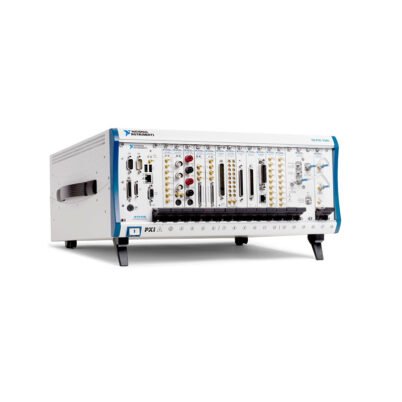

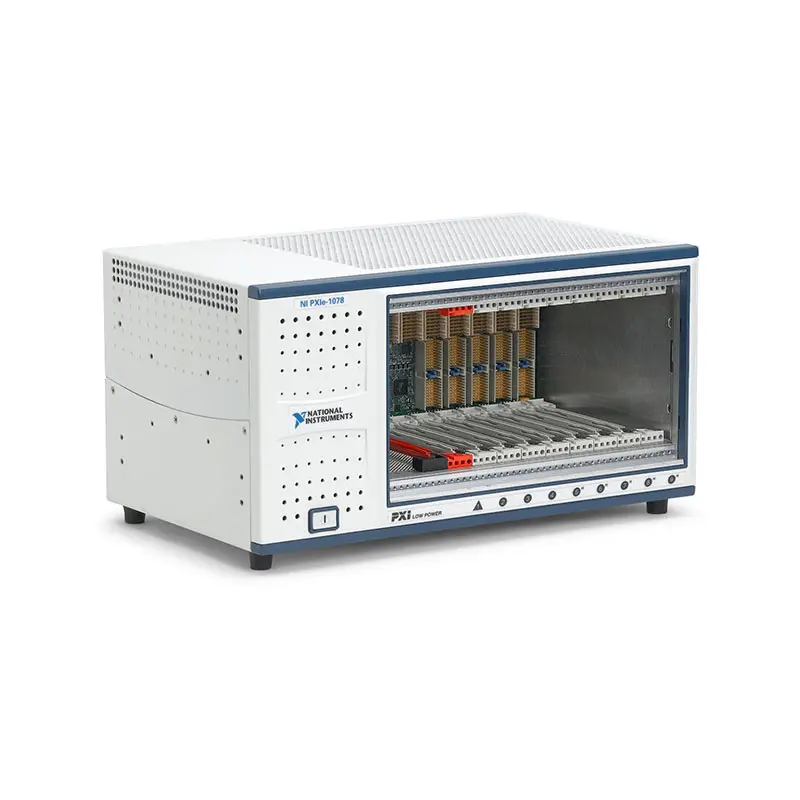
PXIe-1078 9-Slot PXI Express Chassis
Земля NI PXIe-1078 is a nine-slot PXI Express chassis designed for automated test, data acquisition, electronic validation and laboratory measurement systems. It provides one system controller slot and eight peripheral positions in a compact chassis that is narrower than a full-size 18-slot PXI platform.
The peripheral architecture includes five PXI hybrid slots and three PXI Express slots. The hybrid positions accept PXI Express instruments and compatible conventional PXI or CompactPCI modules, allowing existing PXI hardware to operate alongside newer PCI Express-based instruments.
With up to 1.75 GB/s aggregate system bandwidth, 300 W of usable DC power and 38.25 W of cooling capacity per peripheral slot, the PXIe-1078 supports multifunction data acquisition, switching, digital multimeter systems, industrial communications, moderate-speed digitizers and other modular test instruments.
Key Features of the PXIe-1078
- Nine-slot PXI Express chassis
- One PXI Express system controller slot
- Eight peripheral module positions
- Five PXI hybrid peripheral slots
- Three PXI Express peripheral slots
- Up to 1.75 GB/s aggregate system bandwidth
- Supports embedded and remote-control architectures
- Compatible with PXI Express modules
- Compatible with hybrid-ready PXI and CompactPCI modules
- 300 W maximum usable DC output power
- 140 W maximum system-controller dissipation
- 38.25 W cooling capacity per peripheral slot
- Two 150 CFM module-cooling fans
- Automatic and High fan-speed modes
- PXI_CLK10 reference-clock distribution
- PXIe_CLK100 and PXIe_SYNC100 distribution
- 100–240 VAC nominal input range
- 0°C to 50°C operating-temperature range
- Compact benchtop and rack-mountable enclosure
Nine-Slot PXI Express Architecture
The PXIe-1078 has nine functional slots. One position is assigned to the PXI Express system controller, while the other eight positions are available for measurement, switching, communication and control modules.
The system controller position includes three adjacent expansion positions to accommodate compatible multi-slot embedded controllers and remote-control interfaces. These controller expansion positions are part of the controller area and are not counted as peripheral instrument slots.
The eight available peripheral positions allow engineers to build a complete test system containing several complementary instruments without moving to a full-width 18-slot chassis.
Five PXI Hybrid Slots
Five peripheral positions use PXI hybrid connectors. These slots accept PXI Express modules as well as compatible conventional PXI or CompactPCI instruments.
Hybrid slots are useful when an existing test system includes valuable PXI measurement hardware that must be retained during a chassis upgrade. Engineers can combine older switch, data acquisition or communication modules with newer PXI Express instruments.
Not every conventional PXI module is compatible with a hybrid slot. Some early modules use rear connectors that cannot be inserted into a PXI hybrid backplane. Always inspect the module connector and verify hybrid compatibility before installation.
Three PXI Express Peripheral Slots
The remaining three peripheral positions are intended for PXI Express modules. These slots provide PCI Express-based communication between the instruments and system controller.
Typical devices installed in these positions include multifunction DAQ modules, digitizers, digital instruments, serial interfaces and FPGA-based measurement hardware.
Conventional PXI modules should be reserved for compatible hybrid positions. A PXI Express slot does not provide the PCI bus connections required by a conventional PXI instrument.
1.75 GB/s System Bandwidth
The PXIe-1078 provides up to 1.75 GB/s of aggregate system bandwidth. This supports many common automated test workloads, including multichannel data acquisition, switching, digital multimeter scanning, industrial communication and moderate-speed waveform acquisition.
The bandwidth is shared across the chassis architecture. When multiple instruments transfer data simultaneously, their combined sustained throughput must remain within the aggregate system limit.
Applications using several high-speed digitizers, RF instruments or FPGA modules for continuous data streaming should calculate the required data rate carefully. A higher-bandwidth chassis may be more appropriate when total traffic can exceed 1.75 GB/s.
Embedded and Remote Controller Options
A compatible PXI Express embedded controller can be installed directly in the system slot to create a self-contained automated test platform. The controller supplies the processor, memory, storage, network interfaces and operating system.
The system slot can alternatively accommodate a compatible remote-control module. This configuration connects the chassis to an external desktop computer, workstation or laptop through the appropriate host adapter and cable.
Controller selection should consider processor performance, physical width, power consumption, software support, host-interface bandwidth and long-term service requirements.
PXIe-1078 Technical Specifications
| Product Model | PXIe-1078 |
|---|---|
| Part Number | 781622-01 |
| Product Type | PXI Express chassis |
| Total Functional Slots | 9 |
| System Controller Slots | 1 system slot with 3 system expansion positions |
| Peripheral Slots | 8 |
| PXI Hybrid Peripheral Slots | 5 |
| PXI Express Peripheral Slots | 3 |
| Maximum System Bandwidth | Up to 1.75 GB/s |
| Dedicated System Timing Slot | No |
| Maximum Usable DC Power | 300 W |
| Maximum Controller Dissipation | 140 W |
| Maximum Peripheral-Slot Dissipation | 38.25 W per slot |
| Module Cooling | 2 × 150 CFM forced-air fans |
| Fan-Speed Modes | Auto and High |
| Slot Airflow Direction | Bottom of module to top of module |
| Nominal AC Input | 100–240 VAC |
| Operating Voltage Range | 90–264 VAC |
| Input Current Rating | 7–3.5 A |
| Input Frequency | 50/60 Hz |
| Operating Frequency Range | 47–63 Hz |
| Typical Power-Supply Efficiency | 70% |
| PXI_CLK10 Accuracy | ±25 ppm maximum |
| PXI_CLK10 Slot-to-Slot Skew | 500 ps maximum |
| PXI_CLK10 Maximum Jitter | 5 ps RMS phase jitter from 10 Hz to 1 MHz |
| PXIe_CLK100 Slot-to-Slot Skew | 100 ps maximum |
| PXIe_CLK100 Accuracy | ±25 ppm maximum |
| Operating Temperature | 0°C to 50°C |
| Operating Humidity | 20% to 90%, noncondensing |
| Storage Temperature | -40°C to 71°C |
| Storage Humidity | 10% to 95%, noncondensing |
| Maximum Operating Altitude | 2,000 m at 25°C ambient temperature |
| Measurement Category | Category II |
| Pollution Degree | 2 |
| Operational Shock | 30 g peak, half-sine, 11 ms pulse |
| Operating Random Vibration | 5–500 Hz, 0.3 grms |
| Nonoperating Random Vibration | 5–500 Hz, 2.4 grms |
| Auto-Fan Sound Pressure | 49.9 dBA at up to approximately 30°C ambient |
| High-Fan Sound Pressure | 65.4 dBA |
| Dimensions | 177 × 355.6 × 214.2 mm |
| Dimensions in Inches | 6.97 × 14.00 × 8.43 in. |
| Weight | 7.55 kg |
| Intended Environment | Indoor use only |
300 W Usable DC Power
The PXIe-1078 provides a maximum of 300 W of usable DC output power for the system controller and installed peripheral modules.
Between 40°C and 50°C ambient temperature, the maximum usable power derates linearly from 300 W to 288 W. Power planning should therefore use the actual operating temperature rather than only the room-temperature rating.
The +3.3 V and +5 V rails have a combined maximum power limit of 125 W. This combined capacity derates linearly to 100 W between 40°C and 50°C.
| DC Rail | Максимальный ток |
|---|---|
| +3.3 V | 28.5 A |
| +5 V | 26.5 A |
| +12 V | 22 A |
| -12 V | 0.75 A |
| +5 V Auxiliary | 1.5 A |
The available +12 V current derates linearly to 16.5 A between 40°C and 50°C. A system can remain below 300 W total while exceeding the capacity of an individual rail, so every voltage rail must be evaluated separately.
System Controller Power Capacity
The system controller position supports up to 140 W of power dissipation. Total current supplied to the system slot should not exceed 45 A.
This supports a range of embedded controllers and remote-control modules, but high-performance embedded controllers can consume a significant portion of the chassis’s total 300 W power capacity.
When selecting a controller, calculate the remaining power available to the eight peripheral positions and consider the temperature-related derating requirements.
38.25 W Peripheral-Slot Cooling
Each peripheral position can cool a module dissipating up to 38.25 W. This rating supports many PXI Express DAQ modules, switches, digital instruments, communication interfaces and moderate-power digitizers.
The 38.25 W rating applies to each individual slot. A module requiring greater cooling should not be installed even when the chassis has unused total power capacity.
Filler panels should be installed over all unused positions to direct airflow through populated slots and protect the backplane.
Dual 150 CFM Cooling Fans
The PXIe-1078 uses two 150 CFM fans to provide positive-pressure forced-air cooling. Air enters through the bottom of the chassis, travels from the bottom to the top of each module and exits through the right side, rear and top.
The power supply uses a separate integrated fan. Its cooling air enters through the front and left side of the chassis and exhausts through the rear.
Do not place the chassis on a soft surface that can block the bottom intake. Rack shelves, cables and adjacent instruments must not obstruct the airflow path.
Auto and High Fan Modes
The fan selector provides automatic and maximum-speed settings. Auto mode adjusts fan operation based on internal thermal conditions and is suitable for many laboratory configurations.
High mode provides maximum continuous airflow and should be considered for high-power systems, warm environments and installations where additional thermal margin is necessary.
The specified sound-pressure level is 49.9 dBA in Auto mode at ambient temperatures up to approximately 30°C and 65.4 dBA in High mode.
PXI_CLK10 Timing Performance
The chassis distributes the standard 10 MHz PXI reference clock to compatible peripheral modules. The clock has maximum accuracy of ±25 ppm over the specified operating-temperature range.
PXI_CLK10 has a maximum slot-to-slot skew of 500 ps, maximum phase jitter of 5 ps RMS and a duty factor between 45% and 55%.
Compatible modules can use this reference to coordinate measurements and signal generation without requiring a separate external reference cable for each instrument.
PXIe_CLK100 and PXIe_SYNC100
PXI Express modules can use the 100 MHz PXIe_CLK100 reference clock and PXIe_SYNC100 synchronization signal distributed through the backplane.
The maximum slot-to-slot skew is 100 ps and frequency accuracy is ±25 ppm. Specified phase jitter is 3 ps RMS from 10 Hz to 12 kHz and 2 ps RMS from 12 kHz to 20 MHz.
The PXIe-1078 does not include a dedicated system timing slot. Applications requiring disciplined clocking, GPS, IRIG or advanced multi-chassis synchronization may need a separate compatible timing module.
Environmental and Mechanical Performance
The chassis operates from 0°C to 50°C and supports relative humidity between 20% and 90% without condensation. Its maximum operating altitude is 2,000 m at 25°C ambient temperature.
The 30 g operational shock and specified random-vibration ratings support use in laboratory and industrial environments when the chassis is installed correctly.
The PXIe-1078 is intended for indoor use. It should not be exposed directly to rain, conductive contamination, corrosive environments or uncontrolled condensation.
PXIe-1078 Part Number and Accessories
| Item | Part Number or Model | Описание |
|---|---|---|
| PXIe-1078 | 781622-01 | Nine-slot PXI Express chassis with five hybrid and three PXIe peripheral slots |
| Embedded Controller | Model dependent | Installs in the system slot to create a self-contained PXI system |
| Remote-Control Module | Interface dependent | Connects the PXIe-1078 to an external computer |
| Remote-Control Cable | Interface and length dependent | Connects the chassis-side interface to the host adapter |
| Rack-Mount Kit | Configuration dependent | Mounts the chassis in a compatible equipment rack |
| Slot Filler Panels | Configuration dependent | Covers unused slots and maintains correct cooling airflow |
| Replacement Fan Assembly | Hardware-revision dependent | Service replacement for the chassis module-cooling fans |
| AC Power Cord | Region dependent | Grounded power cord selected for the destination country |
PXIe-1078 Part Number
The standard ordering part number commonly associated with the PXIe-1078 is 781622-01.
Confirm the model and part number on the chassis label when replacing equipment in an established test system. Included power cords, rack accessories and controller hardware can vary by order.
Selecting an Embedded Controller
An embedded controller installs in the system slot and provides the processor, memory, storage, operating system and network connectivity for the complete test platform.
The controller must fit within the available system expansion area and remain below the 140 W controller-dissipation limit. Its power consumption must also be included in the total 300 W chassis calculation.
Before ordering, verify operating-system support, driver compatibility, memory, storage, processor performance and the controller’s physical width.
Selecting a Remote-Control Interface
A remote-control interface connects the PXIe-1078 to an external desktop computer, industrial computer, workstation or supported laptop.
The system requires a compatible chassis-side controller, host-side interface and cable. The selected connection must provide sufficient bandwidth for all installed modules.
Host adapters and cables from different MXI or Thunderbolt generations should not be combined unless their compatibility has been confirmed.
Rack-Mounting Accessories
The chassis contains mounting points for compatible rack hardware. Depending on the selected kit, the chassis can be positioned with its module fronts or rear connections facing the front of the equipment cabinet.
Rack installation must preserve access to the bottom intake and the side, top and rear exhaust areas. Avoid installing solid panels directly against ventilation openings.
Filler Panels and EMC Protection
Install filler panels over every unused peripheral position. In addition to improving airflow, properly secured panels help maintain electromagnetic shielding and protect the backplane from dust or accidental contact.
Use shielded signal cabling where required for electromagnetic compatibility and secure all module front-panel screws.
Inspection of Used PXIe-1078 Chassis
When purchasing a used or refurbished PXIe-1078, inspect the backplane connectors, module guides, system slot, cooling fans, AC inlet and front power switch.
Confirm that both main fans operate correctly and that the chassis recognizes test modules in every peripheral position. Check for contamination, corrosion, damaged alignment keys or bent backplane contacts.
Ask whether the controller, remote interface, power cord, rack kit and filler panels are included, because these components may be sold separately.
PXIe-1078 Applications
- Automated production testing
- Electronic functional testing
- Design verification and validation
- Multichannel data acquisition
- Digital multimeter and switching systems
- Moderate-speed waveform acquisition
- Hardware-in-the-loop testing
- Automotive controller validation
- Испытания в аэрокосмической и оборонной промышленности
- Industrial communication testing
- FPGA-based measurement and control
- Sensor measurement and signal conditioning
- Laboratory automation
- University and research laboratories
- Mixed PXI and PXI Express systems
Automated Production Testing
The PXIe-1078 provides enough peripheral positions to consolidate multiple production-test functions in one chassis. A system can include switching, programmable stimulus, digital multimeter measurements, data acquisition and communication interfaces.
Automated software can configure each instrument, execute test sequences, record results and determine whether the DUT meets its production limits.
Electronic Design Validation
Design-verification systems often require several types of stimulus and measurement hardware. The eight peripheral positions allow engineers to combine digitizers, waveform generators, power instruments, switches and digital I/O.
The modular architecture allows individual instruments to be replaced or upgraded as product requirements change.
Multichannel Data Acquisition
The chassis can host several compatible DAQ modules for measuring voltage, current, temperature, strain, pressure, vibration and digital signals.
Its 1.75 GB/s system bandwidth is suitable for many multichannel systems. High-speed applications should calculate total sustained throughput, particularly when several devices transfer data simultaneously.
Digital Multimeter and Switching Systems
A PXI digital multimeter combined with one or more multiplexers can automatically measure multiple DUT test points. Additional slots can hold relay modules, programmable sources or communication interfaces.
Switching and scanning applications commonly require several peripheral positions but generate moderate backplane traffic, making them a practical use for the PXIe-1078.
Waveform Acquisition
Compatible digitizers can capture transient signals, communications waveforms and electronic device responses. Other slots can accommodate triggering, signal generation and routing hardware.
Before selecting a digitizer, verify its sustained data rate, cooling requirement and power-rail demand.
Hardware-in-the-Loop Testing
The chassis can integrate analog I/O, digital I/O, vehicle communication interfaces, fault insertion switches and FPGA modules for compact HIL applications.
The hybrid-slot architecture is particularly useful when an established HIL system contains conventional PXI cards that must remain in service.
Industrial Controller Validation
Test systems can use the PXIe-1078 to simulate sensor signals, monitor controller outputs, communicate through industrial buses and insert controlled electrical conditions.
The external fixture should provide suitable isolation, transient suppression, current limiting and protection for the connected DUT.
Research and Educational Laboratories
The PXIe-1078 provides more expansion capacity than a compact four- or five-slot chassis while remaining smaller than an 18-slot platform.
Laboratories can use one chassis for multiple experiments involving data acquisition, instrumentation, control, communication and signal processing.
PXIe-1078 Installation Workflow
Step 1: Plan the Module Configuration
List the controller and every planned peripheral module. Record each device’s slot type, physical width, power demand, cooling requirement and expected data-transfer rate.
Step 2: Identify the Hybrid and PXIe Slots
Reserve the five hybrid positions for compatible conventional PXI modules or PXI Express instruments. Install PXI Express-only modules in any appropriate hybrid or PXIe position.
Do not install conventional PXI modules in the three PXI Express-only peripheral slots.
Step 3: Calculate the Total Power
Add the power required by the controller and all peripheral modules. Confirm that the configuration remains below 300 W at the intended ambient temperature.
Step 4: Check Individual Power Rails
Calculate the demand on the +3.3 V, +5 V, +12 V, -12 V and auxiliary rails. Check the combined +3.3 V and +5 V limit and the temperature-dependent +12 V derating.
Step 5: Calculate Bandwidth Requirements
Estimate the sustained throughput of all modules that will transfer data simultaneously. Confirm that the total remains within the 1.75 GB/s aggregate chassis limit.
Step 6: Prepare the Installation Area
Place the chassis on a firm surface or install it using compatible rack hardware. Ensure that the bottom intake and the right-side, rear and top exhaust areas remain unobstructed.
Step 7: Disconnect AC Power
Switch off the chassis and unplug the AC cable before installing or removing any controller, remote interface or peripheral module.
Step 8: Install the Controller
Insert the embedded controller or remote-control interface into the system position and required expansion positions. Fully engage the backplane connectors and tighten the retaining screws.
Step 9: Install Peripheral Modules
Insert every instrument into a compatible slot, close the injector/ejector handle and secure its front panel. Never force a module into an incompatible connector.
Step 10: Install Filler Panels
Cover all unused peripheral positions to maintain proper airflow and electromagnetic shielding.
Step 11: Select the Fan Mode
Use Auto mode for ordinary laboratory configurations or High mode when maximum cooling is required. High mode is recommended for high-power modules and elevated ambient temperatures.
Step 12: Connect External Interfaces
For remote operation, connect the compatible host adapter, chassis controller and cable. Connect instrument signal cables according to the applicable module pinouts.
Step 13: Install Software and Drivers
Install the required NI platform services and hardware drivers. Depending on the installed instruments, these may include NI-DAQmx, NI-SCOPE, NI-SWITCH, NI-DCPower or NI-VISA.
Step 14: Verify the System in NI MAX
Open NI Measurement & Automation Explorer and confirm that the chassis controller and all peripheral modules are detected correctly.
Run available self-tests before connecting valuable devices under test.
PXIe-1078 Troubleshooting
The PXIe-1078 Does Not Power On
Confirm that the AC outlet is active, the power cable is connected and the front power switch is enabled. Verify that the input voltage and frequency are within specification.
If the chassis still does not start, remove the peripheral modules and test it with only the controller installed.
The Embedded Controller Does Not Start
Power down the chassis and verify that the controller is fully seated in the system slot. Check its memory, storage and expansion-width requirements.
Confirm that controller dissipation remains below 140 W and that the complete configuration remains within the chassis power limits.
The Remote-Control Connection Is Not Detected
Check the compatibility of the host adapter, cable and chassis-side controller. Reseat the interfaces only after powering down the complete system.
Follow the required startup sequence and verify that the appropriate NI system software is installed.
A Peripheral Module Is Missing in NI MAX
Confirm that the module is installed in a compatible hybrid or PXIe slot and that the backplane connector is fully engaged.
Check the instrument driver and operating-system support. Move the device to another compatible position to determine whether the issue follows the module or remains with the slot.
A Conventional PXI Module Does Not Fit
The module may not have a hybrid-compatible rear connector, or it may have been placed in a PXI Express-only slot.
Do not force the device into the chassis. Check the module documentation and use one of the five hybrid positions if supported.
The Chassis Reports Excessive Temperature
Inspect the bottom air intake and the side, rear and top exhaust openings. Remove any obstruction and install filler panels over unused slots.
Select High fan mode and verify that no peripheral module requires more than 38.25 W of cooling.
The Fans Are Unusually Loud
Check whether the fan selector is set to High. In Auto mode, fan speed can increase when the internal temperature or module power load rises.
Improve rack ventilation and prevent the chassis from drawing warm exhaust air from adjacent equipment.
The Chassis Shuts Down Under Load
Recalculate the total system power and current drawn from every voltage rail. Pay particular attention to the combined +3.3 V and +5 V capacity.
Remove high-power modules and reinstall them one at a time to identify the combination causing the overload.
The System Becomes Unstable at High Temperature
The total usable power, combined +3.3 V and +5 V capacity, and available +12 V current derate between 40°C and 50°C.
Calculate the power budget using the actual ambient temperature and reduce the module load if necessary.
Data Throughput Is Lower Than Expected
The chassis provides up to 1.75 GB/s aggregate system bandwidth. Performance can also be limited by the controller, remote interface, storage device, driver configuration or application software.
Measure each high-throughput instrument independently before testing the full simultaneous configuration.
Measurements Are Not Synchronized
Verify the trigger routing and PXI_CLK10, PXIe_CLK100 or PXIe_SYNC100 settings of every module.
Advanced external reference-clock or multi-chassis applications may require a compatible timing module.
PXIe-1078 Comparison
| Модель | Slot Configuration | Пропускная способность системы | Cooling per Slot | Best Suited For |
|---|---|---|---|---|
| PXIe-1078 | 1 system, 5 hybrid and 3 PXIe peripheral slots | Up to 1.75 GB/s | 38.25 W | Cost-effective medium-size mixed PXI systems |
| PXIe-1071 | 1 system and 3 hybrid peripheral slots | Up to 3 GB/s | 38.25 W | Compact systems requiring three instruments |
| PXIe-1073 | 3 hybrid and 2 PXIe peripheral slots | Up to 250 MB/s | 38.25 W | Compact systems with integrated MXI control |
| PXIe-1082 | Eight peripheral positions | Higher-bandwidth architecture | 38 W class | Higher-performance eight-slot systems |
| PXIe-1088 | 1 system and 8 hybrid peripheral slots | Up to 8 GB/s | Up to 58 W | Higher-power and higher-bandwidth systems |
| PXIe-1092 | Nine-slot high-performance architecture | Up to 24 GB/s | Up to 82 W | Modern high-bandwidth, high-power instruments |
PXIe-1078 vs PXIe-1071
The PXIe-1071 provides three peripheral slots and up to 3 GB/s system bandwidth. It is more compact and can provide greater bandwidth to a smaller number of instruments.
The PXIe-1078 provides eight peripheral positions and 300 W of usable power, making it more suitable when module count is more important than maximum backplane throughput.
PXIe-1078 vs PXIe-1073
The PXIe-1073 provides five peripheral positions and an integrated MXI-Express controller. It is designed specifically for operation from an external desktop computer.
The PXIe-1078 provides eight peripheral slots, higher aggregate bandwidth and a standard system controller position. It supports either an embedded controller or a separately selected remote-control interface.
PXIe-1078 vs PXIe-1082
Both chassis provide eight peripheral positions and support mixed modular test configurations. The PXIe-1082 is intended for applications that require greater data throughput and a more advanced backplane.
The PXIe-1078 is suitable for cost-sensitive systems dominated by switching, communication, digital multimeter measurements and moderate-speed data acquisition.
PXIe-1078 vs PXIe-1088
The PXIe-1088 provides greater system bandwidth and up to 58 W of cooling capacity per slot. It is a better choice for high-speed and higher-power PXI Express instruments.
The PXIe-1078 provides 38.25 W per slot and 1.75 GB/s aggregate bandwidth. It remains practical for many established automated test systems and conventional PXI module configurations.
PXIe-1078 vs PXIe-1092
The PXIe-1092 is a modern high-performance chassis with substantially greater backplane bandwidth and cooling capacity. It is designed for high-speed digitizers, RF instruments and power-intensive modules.
The PXIe-1078 is a more economical platform when the installed instruments do not require the PXIe-1092’s 24 GB/s bandwidth or 82 W slot cooling.
Recommended Related Products
- PXIe-1071 4-Slot PXI Express Chassis
- PXIe-1073 Integrated MXI-Express Chassis
- PXIe-1082 PXI Express Chassis
- PXIe-1088 9-Slot PXI Express Chassis
- PXIe-1092 High-Performance PXI Express Chassis
- Встроенный контроллер PXIe-8822
- PXIe-8862 High-Performance Embedded Controller
- PXIe-8381 Remote-Control Module
- View More NI PXI and PXI Express Chassis
Selecting the Right PXI Express Chassis
Choose the PXIe-1078 when the system requires eight peripheral instruments, five hybrid slots, moderate system bandwidth and support for either embedded or remote control.
Select the PXIe-1071 when only three peripheral positions are required and higher compact-system bandwidth is preferred. Choose the PXIe-1088 or PXIe-1092 for newer high-bandwidth or high-power instruments.
Selection should consider peripheral-slot count, hybrid compatibility, controller width, total power, voltage-rail demand, cooling, sustained bandwidth, timing requirements and future expansion.
Why Choose the PXIe-1078?
- Provides eight peripheral instrument positions
- Includes five hybrid-compatible slots
- Includes three PXI Express peripheral slots
- Supports conventional PXI and PXI Express modules
- Provides up to 1.75 GB/s aggregate system bandwidth
- Supports embedded and remote-control configurations
- Provides up to 300 W of usable DC power
- Supports controllers dissipating up to 140 W
- Provides 38.25 W cooling capacity per peripheral slot
- Uses two 150 CFM cooling fans
- Distributes standard PXI and PXI Express timing clocks
- Fits medium-size benchtop and rack-mounted systems
PXIe-1078 Frequently Asked Questions
What is the PXIe-1078?
The PXIe-1078 is a nine-slot PXI Express chassis designed for modular automated test, data acquisition and electronic validation systems.
What is the PXIe-1078 part number?
The standard ordering part number is 781622-01.
How many peripheral slots does the PXIe-1078 provide?
It provides eight peripheral slots in addition to one system controller position.
Are all eight peripheral slots hybrid slots?
No. The correct configuration is five PXI hybrid slots and three PXI Express slots.
Why is the PXIe-1078 called a nine-slot chassis?
The total includes one system controller position and eight peripheral instrument positions.
What is the maximum system bandwidth?
The PXIe-1078 provides up to 1.75 GB/s aggregate system bandwidth.
Can it accept conventional PXI modules?
Yes. Compatible conventional PXI modules can be installed in the five hybrid positions. They cannot be installed in PXI Express-only slots.
Can the PXIe-1078 use an embedded controller?
Yes. A compatible PXI Express embedded controller can be installed in the system position.
Can it connect to an external computer?
Yes. Install a compatible remote-control interface and use the corresponding host adapter and cable.
How much usable power does the chassis provide?
The maximum usable DC output power is 300 W. This capacity derates to 288 W between 40°C and 50°C.
What is the cooling capacity per peripheral slot?
The specified cooling capacity is 38.25 W for each peripheral position.
Does the PXIe-1078 have a dedicated timing slot?
No. It distributes PXI_CLK10, PXIe_CLK100 and PXIe_SYNC100 but does not provide a dedicated system timing slot.
What is the operating-temperature range?
The chassis operates from 0°C to 50°C, subject to its temperature-dependent power derating limits.
Can the PXIe-1078 operate from 400 Hz power?
The official PXIe-1078 specification lists an operating frequency range of 47–63 Hz. A 400 Hz input is not specified for this model.
Is the PXIe-1078 suitable for high-speed digitizers?
It can support compatible digitizers when their power, cooling and throughput requirements remain within the chassis limits. Several continuously streaming instruments may require a higher-bandwidth chassis.
What software is used to configure the PXIe-1078?
NI Measurement & Automation Explorer can identify and configure the controller and installed instruments. Each peripheral module requires its applicable NI driver.
Should unused slots have filler panels?
Yes. Filler panels help maintain cooling airflow, electromagnetic shielding and physical protection for the backplane.
Request a Quote for the PXIe-1078
Contact us for current availability, lead time and project pricing for the NI PXIe-1078 9-Slot PXI Express Chassis. We can also help select compatible embedded controllers, remote-control interfaces, rack accessories, filler panels and PXI measurement modules for your automated test system.















