






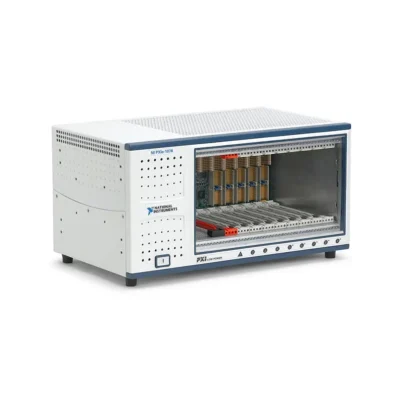

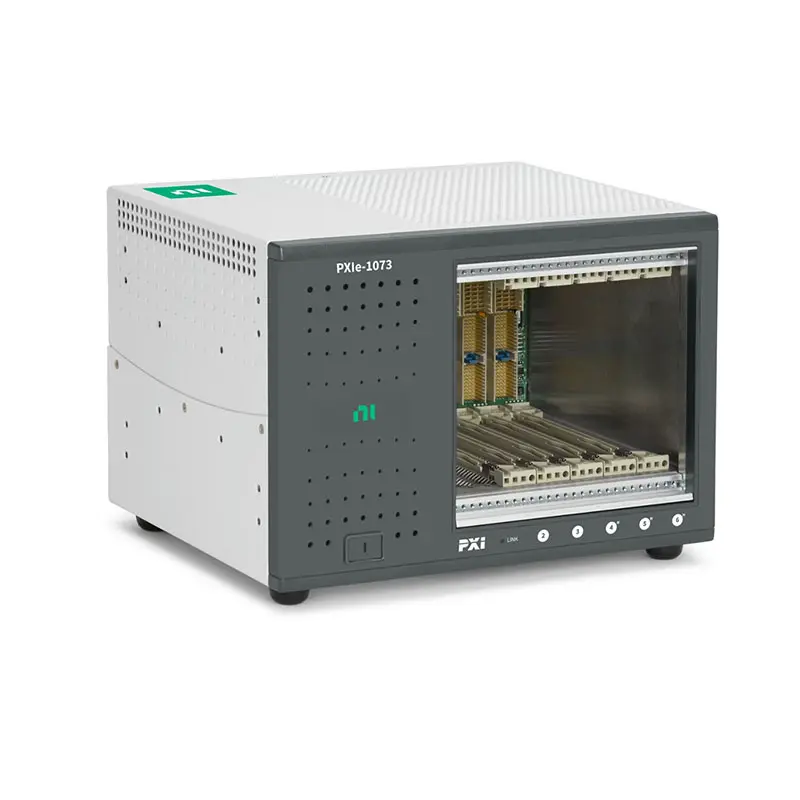
PXIe-1073 5-Slot PXI Express Chassis
Земля NI PXIe-1073 is a compact five-slot PXI Express chassis designed for automated test, data acquisition, electronic validation and laboratory measurement systems. It provides three PXI hybrid slots and two PXI Express peripheral slots, allowing engineers to install a combination of compatible PXI and PXI Express instruments.
Unlike a conventional PXI Express chassis that requires an embedded controller or separate remote-control module, the PXIe-1073 incorporates an интегрированный контроллер MXI-Express. A compatible PCI Express host interface and MXI-Express cable connect the chassis directly to an external desktop computer.
The chassis provides up to 250 MB/s system bandwidth, 38.25 W of cooling capacity per peripheral slot and standard PXI synchronization clocks. Its compact enclosure is suitable for benchtop systems, educational laboratories, portable test stations and space-constrained automated test equipment.
Key Features of the PXIe-1073
- Five-slot PXI Express chassis
- Three PXI hybrid peripheral slots
- Two PXI Express peripheral slots
- Integrated MXI-Express remote controller
- Up to 250 MB/s system bandwidth
- 38.25 W cooling capacity per slot
- 126 CFM forced-air cooling fan
- Automatic and High fan-speed settings
- PXI_CLK10 reference-clock distribution
- PXIe_CLK100 and PXIe_SYNC100 distribution
- 100–240 VAC nominal input range
- Universal 50/60 Hz AC operation
- Compact benchtop and rack-mountable enclosure
- 30 g operational shock rating
- Compatible with PXI Express and hybrid-compatible PXI modules
- Suitable for Windows-based external computer control
Compact Five-Slot Architecture
The PXIe-1073 provides five user-accessible peripheral positions in a compact enclosure. Its slot architecture consists of three hybrid slots and two PXI Express slots.
This configuration provides more expansion capacity than a two-slot chassis while requiring substantially less bench or rack space than an eight-slot or 18-slot system. It is particularly useful when an application needs several complementary instruments but does not require a large chassis.
A typical configuration might include a multifunction DAQ device, digital multimeter, switch module, serial communication interface and digitizer. The exact module combination depends on slot compatibility, power demand, cooling requirements and total data-transfer rate.
Integrated MXI-Express Remote Control
The PXIe-1073 includes an integrated MXI-Express controller that links the chassis backplane to a compatible external computer. This architecture eliminates the need to purchase and occupy chassis space with a separate embedded controller.
The external computer requires a compatible host-side PCI Express interface and MXI-Express cable. Once the hardware and required NI software are installed, supported PXI instruments appear to the host operating system as locally connected devices.
This approach allows users to choose a desktop computer based on processor performance, memory, storage, graphics capability and available expansion slots. It can also simplify computer replacement because the PXI measurement modules remain installed in the external chassis.
Three PXI Hybrid Slots
Three peripheral positions use PXI hybrid connectors. These slots accept PXI Express modules and compatible conventional PXI or CompactPCI instruments.
Hybrid slots help organizations combine existing PXI hardware with newer PXI Express modules. This is valuable when upgrading an established measurement system without replacing every legacy instrument.
Not every older PXI module is physically compatible with a hybrid slot. Modules with traditional J2 connectors may require a hybrid-compatible version, connector modification or a different chassis. Always verify the module documentation before installation.
Two PXI Express Slots
The remaining two peripheral positions are intended for PXI Express modules. They support PCI Express-based communication between the installed instruments and the external host computer.
These positions are suitable for multifunction DAQ modules, digitizers, communication interfaces, FPGA instruments and other devices that use the PXI Express bus.
The chassis does not convert a conventional PXI module into a PXI Express device. Conventional modules should be installed only in one of the three compatible hybrid positions.
250 MB/s System Bandwidth
The PXIe-1073 supports system bandwidth up to 250 MB/s. This is sufficient for many common automated measurements, including moderate-speed data acquisition, digital multimeter scanning, serial communication, switching and functional testing.
The available bandwidth is shared by installed instruments communicating with the external computer. Engineers should calculate the combined sustained throughput when several modules acquire or generate data simultaneously.
Applications using high-speed digitizers, RF instruments or FPGA modules with continuous streaming requirements may benefit from a newer chassis with greater PCI Express bandwidth.
PXIe-1073 Technical Specifications
| Product Model | PXIe-1073 |
|---|---|
| Common Part Numbers | 781163-01, 781161-01 and 781161-02 |
| Product Type | Compact PXI Express chassis with integrated MXI-Express control |
| Peripheral Slot Count | 5 |
| Hybrid Peripheral Slots | 3 |
| PXI Express Peripheral Slots | 2 |
| Maximum System Bandwidth | 250 MB/s |
| Host-Control Architecture | Integrated MXI-Express remote controller |
| Per-Slot Cooling Capacity | 38.25 W |
| Cooling Fan | 126 CFM forced-air fan |
| Fan Settings | Auto and High |
| Slot Airflow Direction | Bottom of module to top of module |
| Nominal AC Input | 100–240 VAC |
| Operating AC Range | 90–264 VAC |
| Input Current Rating | 4–2 A |
| Input Frequency | 50/60 Hz |
| Operating Frequency Range | 47–63 Hz |
| Power-Supply Efficiency | Greater than 70% at full load and normal input voltage |
| PXI_CLK10 Accuracy | ±25 ppm maximum |
| PXI_CLK10 Slot-to-Slot Skew | 250 ps maximum |
| PXI_CLK10 Maximum Jitter | 5 ps RMS phase jitter from 10 Hz to 1 MHz |
| PXIe_CLK100 Slot-to-Slot Skew | 100 ps maximum |
| PXIe_CLK100 Accuracy | ±25 ppm maximum |
| Operating Temperature | 0°C to 50°C |
| Operating Humidity | 20% to 80%, noncondensing |
| Storage Temperature | -40°C to 71°C |
| Storage Humidity | 10% to 95%, noncondensing |
| Maximum Operating Altitude | 2,000 m at 25°C ambient temperature |
| Operational Shock | 30 g peak, half-sine, 11 ms pulse |
| Operating Random Vibration | 5–500 Hz, 0.3 grms |
| Nonoperating Random Vibration | 5–500 Hz, 2.4 grms |
| Auto-Fan Sound Pressure | 43.3 dBA at up to approximately 25°C ambient |
| High-Fan Sound Pressure | 58.3 dBA |
| Dimensions | 177 × 257.1 × 212.8 mm |
| Dimensions in Inches | 6.97 × 10.12 × 8.38 in. |
| Weight | 5.0 kg |
| Intended Environment | Indoor use only |
DC Power-Rail Capacity
| DC Rail | Максимальный ток |
|---|---|
| +3.3 V | 15 A |
| +5 V | 7.5 A |
| +12 V | 15 A |
| -12 V | 0.75 A |
| +5 V Auxiliary | 1.0 A |
System power must be checked on a rail-by-rail basis. A configuration can remain within the combined power capability while exceeding the current available from one voltage rail.
Review the power requirements of each installed module and include sufficient margin for startup conditions, temperature and future expansion.
Overcurrent and Overvoltage Protection
All PXIe-1073 DC outputs include short-circuit protection. The principal +3.3 V, +5 V and +12 V rails also include overvoltage protection.
Protection circuitry helps prevent damage during abnormal electrical conditions, but it should not replace proper installation, module-power calculations, airflow management or scheduled maintenance.
If the chassis shuts down repeatedly, disconnect AC power and remove peripheral modules before attempting further operation. Reinstall the modules individually to identify a possible overloaded or defective device.
38.25 W Slot Cooling Capacity
Each peripheral position supports a cooling capacity of 38.25 W. This rating allows the chassis to accommodate many data acquisition, switching, digital I/O, serial communication and moderate-power instrumentation modules.
The cooling rating does not mean every configuration automatically operates safely. Air intake openings, exhaust paths, ambient temperature, adjacent equipment and filler-panel installation all affect thermal performance.
Check the cooling requirement listed in the documentation for every installed module. Do not install a device that requires more airflow or heat-removal capacity than the chassis can provide.
126 CFM Forced-Air Cooling
The PXIe-1073 uses positive-pressure forced-air circulation generated by a 126 CFM fan. Air enters through the bottom of the chassis, moves from the bottom to the top of each module and exits along the rear, right side and top of the enclosure.
The power supply has a separate integrated fan, with air entering through the front-side area and exhausting through the rear.
Cables, papers, rack panels and adjacent equipment must not obstruct these ventilation paths. Filler panels should be installed over unused slots to maintain the designed airflow pattern.
Auto and High Fan Settings
The fan-speed selector provides Auto and High modes. Auto mode balances cooling performance and acoustic noise by adjusting fan operation according to internal conditions.
High mode provides maximum airflow and should be considered for high-power module configurations, elevated ambient temperatures or installations where additional thermal margin is required.
The specified sound-pressure level is 43.3 dBA in Auto mode at ambient temperatures up to approximately 25°C and 58.3 dBA in High mode.
PXI_CLK10 Reference Clock
The chassis distributes the standard 10 MHz PXI system reference clock across compatible peripheral positions. The clock has a maximum accuracy of ±25 ppm over the specified operating-temperature range.
Maximum slot-to-slot skew is 250 ps, and maximum phase jitter is 5 ps RMS over the specified 10 Hz to 1 MHz measurement range.
Supported PXI instruments can use this backplane clock to coordinate acquisition, generation and triggering without individual external reference-clock cables.
PXIe_CLK100 and PXIe_SYNC100
PXI Express modules can use the 100 MHz PXIe_CLK100 reference and PXIe_SYNC100 synchronization signal distributed through the backplane.
The 100 MHz clock has a maximum slot-to-slot skew of 100 ps and maximum accuracy of ±25 ppm. This provides a common timing foundation for synchronized modular measurements.
Applications requiring GPS, IRIG, IEEE 1588, disciplined oscillators or precise synchronization between multiple chassis may require a separate compatible timing and synchronization module.
Compact Mechanical Design
The PXIe-1073 measures approximately 177 mm high, 257.1 mm wide and 212.8 mm deep. Its 5.0 kg weight and relatively narrow enclosure make it suitable for benchtop and transportable systems.
The chassis includes mounting points for an optional rack-mount kit. The mounting hardware can be configured so that either the front or rear of the chassis faces the front of the instrument cabinet.
PXIe-1073 Part Number and Accessories
| Item | Part Number or Model | Описание |
|---|---|---|
| PXIe-1073 | 781163-01 | Common ordering number for the five-slot PXI Express chassis |
| PXIe-1073 System Option | 781161-01 | PXIe-1073 ordering configuration; included components should be verified |
| PXIe-1073 System Option | 781161-02 | PXIe-1073 ordering configuration; cable or host-interface bundle may differ |
| PXI-1031 Rack-Mount Kit | 778948-01 | Rack-mount hardware compatible with the PXIe-1073 chassis |
| Desktop Host Interface | Configuration dependent | PCI Express interface installed in the external computer |
| MXI-Express Cable | Length dependent | Connects the computer interface to the integrated chassis controller |
| Slot Filler Panels | Configuration dependent | Covers unused peripheral slots and maintains proper airflow |
| Replacement Fan | Revision dependent | Service replacement for the chassis cooling fan |
| AC Power Cord | Region dependent | Grounded power cord selected for the destination country |
The chassis has been offered under multiple ordering numbers and system bundles. Before purchasing, verify whether the quotation includes only the PXIe-1073 chassis or also includes the host-side PCI Express interface, MXI-Express cable, power cord and rack-mounting hardware.
Host-Side PCI Express Interface
The integrated chassis controller must be connected to a compatible interface installed in the external computer. The computer must have the correct expansion slot and operating-system support for the selected host adapter.
A desktop host interface is not the same as an embedded PXI controller. It remains inside the external computer and establishes the PCI Express connection to the chassis through the MXI cable.
MXI-Express Cable Selection
Select a cable that matches the connector type and interface generation of both the PXIe-1073 and host adapter. Cable length should be sufficient for the intended system arrangement without creating unnecessary strain or sharp bends.
Physical connector similarity does not guarantee compatibility. Do not combine MXI interfaces and cables from different generations without confirming support in the applicable documentation.
Rack-Mount Kit
The PXI-1031 rack-mount kit, part number 778948-01, can be used to install the PXIe-1073 in a compatible equipment cabinet.
The chassis includes symmetrical mounting holes that permit front-facing or rear-facing installation. Select the orientation according to required access to module connectors, the MXI connection, AC power and cooling vents.
Filler Panels
Install filler panels in every unused peripheral position. In addition to protecting the backplane, filler panels direct cooling air through installed modules and reduce recirculation through empty openings.
Operating the chassis with uncovered slots can change the internal pressure and reduce airflow through adjacent instruments.
Checking Used PXIe-1073 Systems
When purchasing a used or refurbished chassis, confirm the condition of the MXI connector, backplane connectors, cooling fan, AC inlet and power switch.
Ask whether the host adapter and MXI cable are included. A chassis offered without these components cannot be connected directly to a computer until compatible interface hardware is obtained.
Also verify the hardware revision, serial number and exact part number because different product bundles may contain different cables or accessories.
PXIe-1073 Applications
- Compact automated test systems
- Multifunction data acquisition
- Electronic device validation
- Production functional testing
- Educational and university laboratories
- Portable engineering test stations
- Digital multimeter and switch systems
- Sensor measurement and signal conditioning
- Serial and industrial communication testing
- Moderate-speed waveform acquisition
- Laboratory automation
- Research and prototype development
- Mixed PXI and PXI Express systems
- Space-constrained equipment racks
Compact Automated Test Equipment
The PXIe-1073 is well suited for automated systems that need several modular instruments but have limited bench or rack space. Its five peripheral positions can consolidate stimulus, measurement, switching and communication functions.
Test software running on the external computer can configure the modules, execute test sequences, analyze results and store production data.
Multifunction Data Acquisition
A PXI Express multifunction DAQ module can provide analog input, analog output, digital I/O and counters within a single peripheral position. Additional slots can be used for switching, signal conditioning or communication interfaces.
The chassis’s 250 MB/s bandwidth is suitable for many moderate-speed acquisition systems. Calculate the required throughput when using multiple devices or continuous high-rate sampling.
Electronic Device Validation
Design engineers can use the PXIe-1073 to integrate a digital multimeter, switch module, waveform source and data acquisition device into a compact validation platform.
Software-defined configurations allow the same chassis to support multiple projects without replacing an entire rack of standalone instruments.
Production Functional Testing
In a production environment, the chassis can connect to an external industrial computer that runs TestStand, LabVIEW or another supported automation environment.
The integrated remote-control architecture keeps the computer separate from the measurement hardware, which can simplify maintenance and allow the chassis to be positioned close to the test fixture.
Educational Laboratories
The compact chassis format is useful for teaching laboratories that need a modular platform for instrumentation, data acquisition and control exercises.
Students can work with real PXI timing, triggering and modular instrumentation concepts while using a standard external computer for programming and analysis.
Sensor Measurement Systems
Compatible modules can measure voltage, current, temperature, strain, pressure, vibration and other sensor signals. Hybrid slots allow supported conventional PXI signal-conditioning hardware to be reused alongside newer PXI Express acquisition modules.
Signal accuracy depends on the complete measurement chain, including sensors, excitation, cabling, grounding, shielding, conditioning and calibration.
Switching and Digital Multimeter Systems
A digital multimeter combined with a multiplexer or general-purpose relay module can measure multiple DUT test points automatically.
These applications typically require many routing operations but relatively modest backplane bandwidth, making the PXIe-1073 appropriate for compact scanning systems.
Industrial Communication Testing
The chassis can accommodate compatible serial, CAN, LIN, Ethernet or other industrial communication interfaces. These modules can be combined with analog and digital I/O to create controller and device-validation systems.
Verify driver and operating-system support when deploying older communication modules with a newer external computer.
Portable Engineering Systems
At 5.0 kg and approximately 257 mm wide, the PXIe-1073 is easier to transport than a full-width 18-slot chassis. It can be integrated into a portable case for field diagnostics, demonstrations or temporary laboratory setups.
A portable implementation must protect the module fronts, MXI connector and ventilation openings during transport.
PXIe-1073 Installation Workflow
Step 1: Confirm the Complete System Configuration
Identify the external computer, compatible host interface, MXI-Express cable and every PXI module to be installed. Confirm operating-system and driver compatibility before assembling the system.
Step 2: Check Slot Compatibility
Reserve the three hybrid positions for compatible conventional PXI modules or PXI Express modules. Install PXI Express-only instruments in either hybrid or PXI Express peripheral positions as permitted by their documentation.
Never force a conventional PXI module into an incompatible PXI Express slot.
Step 3: Calculate Power Requirements
Add the current required by all installed modules on the +3.3 V, +5 V, +12 V, -12 V and auxiliary rails. Compare each total with the applicable chassis limit.
Include power margin for startup behavior and future additions.
Step 4: Calculate Data Throughput
Estimate the total sustained data rate of modules that will operate simultaneously. Confirm that the required traffic remains within the chassis’s 250 MB/s system bandwidth.
Step 5: Prepare the Computer
Power off and unplug the computer before installing the compatible host-side PCI Express interface. Use an expansion slot supported by the interface and computer motherboard.
Secure the interface card and close the computer enclosure before reconnecting power.
Step 6: Install PXI Modules
Disconnect AC power from the PXIe-1073. Insert each module into the appropriate peripheral slot, fully engage the injector/ejector handle and tighten the retaining screws.
Cover unused positions with filler panels.
Step 7: Connect the MXI-Express Cable
Connect the chassis to the host interface using the compatible MXI-Express cable. Tighten any connector-retention hardware and avoid placing mechanical strain on the cable.
Step 8: Configure Cooling
Confirm that the bottom intake and the rear, side and top exhaust areas are unobstructed. Select Auto mode for ordinary operation or High mode when maximum cooling is required.
Step 9: Connect AC Power
Use a grounded power cord appropriate for the local AC supply. The operating voltage must remain between 90 and 264 VAC, with a frequency between 47 and 63 Hz.
Step 10: Follow the Correct Power Sequence
Follow the startup sequence specified for the host interface and chassis. PCI Express enumeration can be affected when the external computer and chassis are started in the wrong order.
As a general practice, establish the MXI connection securely before powering the complete system.
Step 11: Install NI Software and Drivers
Install the software required for the host interface and each peripheral module. Depending on the instruments, this may include NI-DAQmx, NI-SWITCH, NI-VISA, NI-SCOPE or other product-specific drivers.
Step 12: Verify the System in NI MAX
Open NI Measurement & Automation Explorer and confirm that the PXI system and every installed module are detected correctly.
Run available self-tests and review device assignments before connecting the system to a valuable DUT.
PXIe-1073 Troubleshooting
The PXIe-1073 Does Not Power On
Confirm that the AC cable is fully connected, the outlet is operating and the front-panel power switch is enabled. Verify that the supply voltage and frequency fall within the specified ranges.
If the chassis still does not start, disconnect the peripheral modules and retest. A defective module or excessive power demand may prevent normal startup.
The Chassis Is Not Detected by the Computer
Check the host-side interface, MXI cable and integrated chassis connector. Power down the complete system before reseating the cable or PCI Express interface.
Confirm that the required NI system software is installed and that the host interface appears correctly in the computer’s device manager.
PXIe-1073 Appears as Unidentified in NI MAX
An unidentified chassis can indicate missing or incompatible NI system software, incorrect MXI enumeration or an unsupported operating-system configuration.
Update or repair the applicable NI platform services, restart the computer and chassis using the recommended sequence, and then refresh the hardware configuration in NI MAX.
An Installed Module Is Not Detected
Verify that the module is fully seated and installed in a compatible slot. Check whether its instrument driver supports the computer’s operating system.
If other modules are recognized, move the affected device to another compatible position to help distinguish a slot problem from a module problem.
A Conventional PXI Module Does Not Fit
The module may use a connector that is not compatible with a PXI hybrid slot. Do not remove connector keys or force the module into the backplane.
Check whether a hybrid-compatible version or approved connector modification is available.
The System Disconnects During Operation
Inspect the MXI cable and connectors for looseness, damage or excessive bending. Check whether movement, vibration or cable strain is interrupting the PCI Express link.
Also review computer power settings. Sleep, hibernation and PCI Express power-saving features can interfere with some remote-control configurations.
Data Transfer Is Slower Than Expected
The chassis supports up to 250 MB/s system bandwidth. Performance can also be limited by the host computer, PCI Express interface, storage device, application architecture or simultaneous operation of multiple instruments.
Measure each module’s data rate separately before testing the complete configuration.
The Chassis Becomes Too Hot
Check the bottom air intake and the rear, right-side and top exhaust openings. Install filler panels in unused slots and move cables away from ventilation areas.
Select High fan mode and verify that no installed module requires more than 38.25 W of slot cooling.
The Fan Is Unusually Loud
Confirm whether the chassis is set to High mode. In Auto mode, fan speed can increase when the internal temperature rises.
Clean the surrounding ventilation area and ensure that the chassis is not drawing warm exhaust air from another instrument.
The Chassis Shuts Down Under Load
Calculate the current demand on each DC rail. The total configuration may exceed the capacity of one rail even when the overall system appears to have adequate power.
Remove high-power modules and reinstall them individually to identify the combination causing the overload.
Measurements Are Not Synchronized
Check the reference-clock and trigger settings of each module. Confirm that the instruments support the selected PXI_CLK10, PXIe_CLK100 or PXIe_SYNC100 resources.
For specialized synchronization requirements, install an appropriate timing module in a compatible peripheral position.
PXIe-1073 Comparison
| Модель | Slot Configuration | Host-Control Method | Пропускная способность системы | Best Suited For |
|---|---|---|---|---|
| PXIe-1073 | 3 hybrid and 2 PXIe peripheral slots | Integrated MXI-Express control | Up to 250 MB/s | Compact systems controlled by an external computer |
| PXIe-1071 | Compact four-slot architecture | Embedded or separately selected remote controller | Configuration dependent | Small self-contained PXI Express systems |
| PXIe-1078 | Nine-slot architecture | Embedded or remote controller | Higher than PXIe-1073 | Systems requiring additional slots and throughput |
| PXIe-1090 | Two-slot compact architecture | Thunderbolt-based external control | High-speed external connection | Highly compact and portable PXI Express systems |
| PXIe-1083 | Five-slot compact architecture | Thunderbolt 3 external control | Higher-performance modern interface | Newer laptop and workstation-controlled systems |
| PXIe-1082 | Eight peripheral slots | Embedded or remote controller | Higher-bandwidth architecture | Larger automated test systems |
PXIe-1073 vs PXIe-1071
The PXIe-1073 provides five peripheral slots and an integrated MXI-Express remote-control interface. It is intended to connect directly to an external computer through compatible MXI hardware.
The PXIe-1071 uses a conventional system-controller architecture and is appropriate when the application requires an embedded controller or a separately selected remote-control module.
Choose the PXIe-1073 when an external computer and integrated MXI connection match the required system design. Choose the PXIe-1071 when controller flexibility or a self-contained embedded system is more important.
PXIe-1073 vs PXIe-1078
The PXIe-1078 provides more peripheral positions and greater expansion capability. It is better suited to systems containing a larger number of measurement, switching and communication modules.
The PXIe-1073 has a smaller footprint and integrated remote control, making it attractive for compact benchtop systems that need no more than five peripheral instruments.
PXIe-1073 vs PXIe-1083
Both products provide compact five-slot PXI Express platforms intended for use with external computers. The major distinction is their host-interface generation.
The PXIe-1073 uses an earlier MXI-Express architecture with up to 250 MB/s system bandwidth. The PXIe-1083 uses Thunderbolt 3 and provides substantially greater host-connection bandwidth.
The PXIe-1073 remains useful for maintaining established MXI-based systems. The PXIe-1083 is generally more appropriate for new compact systems requiring modern computers and higher data throughput.
PXIe-1073 vs PXIe-1090
The PXIe-1090 provides a smaller two-slot architecture, while the PXIe-1073 provides five peripheral positions. The PXIe-1090 is useful when portability and minimum size are the main requirements.
Select the PXIe-1073 when the application requires a broader combination of instruments or needs hybrid slots for compatible conventional PXI hardware.
When to Upgrade from the PXIe-1073
An upgrade may be appropriate when the application requires more than five modules, sustained throughput beyond 250 MB/s, a newer host interface or support for instruments with higher cooling requirements.
Before replacing the chassis, check the connector compatibility of conventional PXI modules. A new PXI Express chassis should provide enough hybrid positions for any legacy modules that must remain in service.
Recommended Related Products
- PXIe-1071 Compact PXI Express Chassis
- PXIe-1078 9-Slot PXI Express Chassis
- PXIe-1082 8-Slot PXI Express Chassis
- PXIe-1083 Thunderbolt 3 PXI Express Chassis
- PXIe-1090 Compact PXI Express Chassis
- PXIe-8381 PXI Express Remote-Control Module
- PXI-8360 MXI-Express Interface Module
- View More NI PXI and PXI Express Chassis
Selecting the Right Compact PXI Chassis
Choose the PXIe-1073 when the application requires five peripheral slots, three hybrid positions, integrated MXI-Express control and moderate data bandwidth.
Select the PXIe-1083 when a modern Thunderbolt connection and greater throughput are required. Choose the PXIe-1078 or PXIe-1082 when the system needs additional module positions.
Selection should consider slot type, controller architecture, host-computer compatibility, operating-system support, bandwidth, power-rail demand, cooling and future expansion.
Why Choose the PXIe-1073?
- Provides five peripheral slots in a compact chassis
- Includes three hybrid-compatible positions
- Includes two dedicated PXI Express peripheral positions
- Integrates the MXI-Express chassis controller
- Connects to an external desktop computer
- Supports up to 250 MB/s system bandwidth
- Provides 38.25 W cooling capacity per slot
- Supports automatic and High fan modes
- Distributes standard PXI and PXI Express clocks
- Operates from universal 100–240 VAC power
- Supports benchtop, portable and rack-mounted installations
- Helps preserve compatible conventional PXI instruments
PXIe-1073 Frequently Asked Questions
What is the PXIe-1073?
The PXIe-1073 is a compact five-slot PXI Express chassis with three hybrid slots, two PXI Express slots and an integrated MXI-Express remote controller.
How many slots does the PXIe-1073 provide?
It provides five user-accessible peripheral slots: three PXI hybrid slots and two PXI Express slots.
Does the PXIe-1073 accept an embedded controller?
The PXIe-1073 is designed around an integrated MXI-Express remote-control architecture. It connects to an external computer instead of using a conventional user-installed embedded controller.
What is the maximum system bandwidth?
The maximum specified system bandwidth is 250 MB/s.
Can the PXIe-1073 accept conventional PXI modules?
Yes. Its three hybrid positions accept compatible conventional PXI or CompactPCI modules. Older modules should be checked for hybrid-connector compatibility.
What is the cooling capacity per slot?
The specified cooling capacity is 38.25 W per peripheral slot.
What computer hardware is required?
The external computer requires a compatible host-side PCI Express interface, an appropriate MXI-Express cable and supported NI software.
Is the host adapter included with the chassis?
It depends on the ordering number and original bundle. Confirm whether the host interface and MXI cable are included before purchasing.
What are the PXIe-1073 part numbers?
Common ordering numbers associated with the PXIe-1073 include 781163-01, 781161-01 and 781161-02. Bundle contents should be verified for each number.
What AC power does the chassis require?
It accepts a nominal input of 100–240 VAC at 50/60 Hz. The specified operating range is 90–264 VAC and 47–63 Hz.
Does the PXIe-1073 support 400 Hz power?
No 400 Hz input is specified. Use an AC source within the documented 47–63 Hz operating range.
Can the PXIe-1073 be rack mounted?
Yes. The compatible PXI-1031 rack-mount kit, part number 778948-01, supports installation in an equipment cabinet.
Why is the PXIe-1073 not detected in NI MAX?
Common causes include an incompatible host interface, loose MXI cable, incorrect startup sequence, missing NI system software or a host PCI Express enumeration problem.
Is the PXIe-1073 suitable for high-speed digitizers?
It can support compatible digitizers when their power, cooling and data-transfer requirements remain within the chassis limits. Continuous high-rate streaming may require a higher-bandwidth chassis.
Can the PXIe-1073 synchronize multiple modules?
Yes. It distributes PXI_CLK10, PXIe_CLK100 and PXIe_SYNC100 backplane signals. Specialized external or multi-chassis synchronization may require an additional timing module.
Is the PXIe-1073 still useful for an existing test system?
Yes. It is particularly useful for maintaining compact systems already designed around its integrated MXI interface, five-slot layout and compatible PXI instrumentation.
Request a Quote for the PXIe-1073
Contact us for current availability, lead time and project pricing for the NI PXIe-1073 5-Slot PXI Express Chassis. We can also help identify compatible MXI-Express host interfaces, cables, rack-mounting accessories, replacement fans and PXI measurement modules for your automated test system.















