






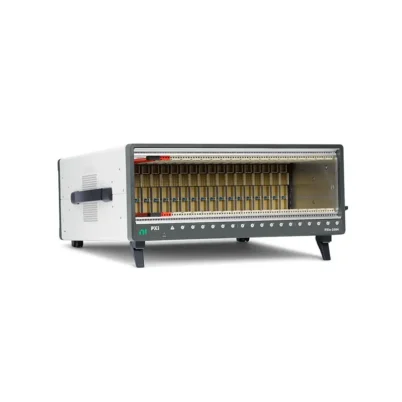
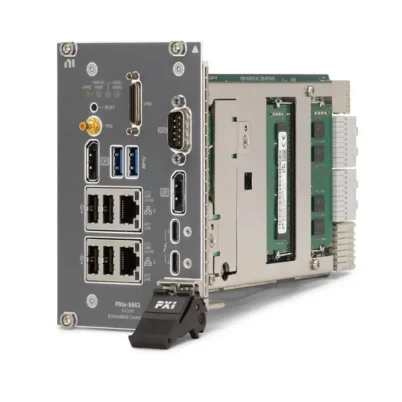
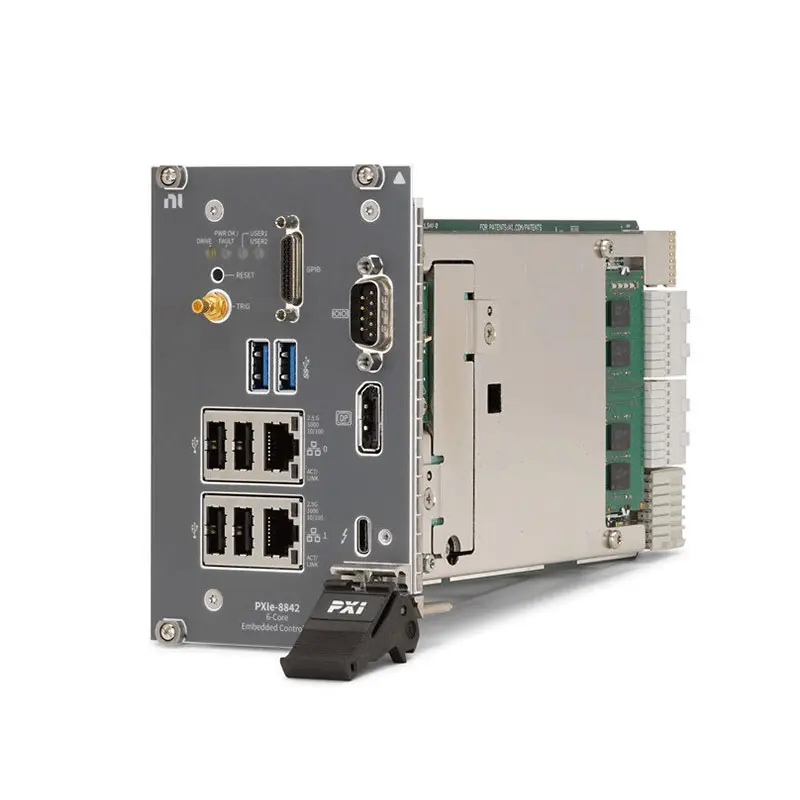
PXIe-8842 2.6 GHz 6-Core PXI Express Embedded Controller
Земля NI PXIe-8842 is a high-performance embedded controller designed for PXI Express automated test, measurement and control systems. It combines a 2.6 GHz six-core Intel Core i5-11500HE processor, dual-channel DDR4 memory, NVMe solid-state storage and a maximum controller bandwidth of 8 GB/s.
The controller is well suited for multifunction data acquisition, production testing, validation laboratories and applications requiring moderate data streaming. Because the computing system is installed directly in the PXI Express chassis, the PXIe-8842 creates a compact, self-contained platform without requiring an external desktop computer or remote-control interface.
Available interfaces include two 2.5 Gigabit Ethernet ports, Thunderbolt 4, DisplayPort 1.4, USB 3.2 Gen 1, USB 2.0, RS-232 serial and an SMB trigger connector. Separate ordering configurations are available with or without a GPIB port and with Windows, NI Linux Real-Time or no preinstalled operating system.
Key Features of the PXIe-8842
- 2.6 GHz Intel Core i5-11500HE processor
- Six processor cores for parallel test execution
- 12 MB Intel Smart Cache
- 16 GB standard dual-channel DDR4-3200 memory
- 32 GB maximum supported memory
- 512 GB or greater M.2 NVMe solid-state drive
- 8 GB/s maximum PXI Express controller bandwidth
- 5.0 GT/s PCI Express link speed
- Two 10/100/1000/2500BASE-T Ethernet ports
- IEEE 1588-capable Intel I225 Ethernet interfaces
- One Thunderbolt 4 USB Type-C port
- Two USB 3.2 Gen 1 Type-A ports
- Four USB 2.0 Type-A ports
- One DisplayPort 1.4 video output
- One DB-9 RS-232 serial port
- Optional mini-GPIB interface
- SMB connector for PXI trigger-bus routing
- Windows 10, Windows 11 and NI Linux Real-Time configurations
- Optional TPM 2.0 hardware security
- 0°C to 55°C operating-temperature range
Six-Core Intel Core i5 Processing
The PXIe-8842 uses an Intel Core i5-11500HE processor with six physical cores and 12 MB of Smart Cache. Its multicore architecture allows test applications to divide instrument control, data acquisition, result processing, logging and user-interface tasks across multiple processor cores.
This processing capability is valuable in automated systems that operate several PXI instruments simultaneously. For example, one test sequence can acquire waveforms while another software process analyzes earlier records, stores results or communicates with factory systems.
Intel Turbo Boost can temporarily operate processor cores above the base frequency when workload and thermal conditions permit. In deterministic real-time applications, engineers should evaluate the effect of Turbo Boost and processor power-management settings on execution jitter before changing the default BIOS configuration.
16 GB Dual-Channel DDR4 Memory
The standard PXIe-8842 memory configuration consists of two 8 GB DDR4-3200 non-ECC SODIMMs, providing a total of 16 GB in dual-channel mode. The controller supports as much as 32 GB using two compatible 16 GB modules.
Dual-channel memory provides greater memory bandwidth than a comparable single-channel configuration. This can benefit test applications that perform waveform processing, data conversion, database operations or simultaneous control of multiple instruments.
Memory capacity should be selected according to the operating system, application framework, number of instruments, waveform size and expected data-processing workload. Use compatible memory configurations and follow the controller service instructions when replacing or upgrading SODIMMs.
NVMe Solid-State Storage
The controller includes a 512 GB or greater M.2 NVMe solid-state drive. NVMe storage provides fast startup, application loading and test-data access while eliminating the moving components associated with mechanical hard drives.
The drive is internally installed and is not a front-removable storage device. NI identifies a compatible 512 GB, 80 mm M.2 NVMe SSD under part number 788897-01 for supported controller service applications.
Storage requirements should account for the operating system, instrument drivers, development software, recovery files and accumulated test data. High-volume waveform or production data should be archived regularly to network or external storage instead of allowing the system drive to become full.
8 GB/s PXI Express Bandwidth
The PXIe-8842 provides up to 8 GB/s maximum controller-to-backplane bandwidth. This capability supports multifunction DAQ and test applications that require moderate streaming between the embedded controller and installed PXI Express instruments.
The controller supports a four-link configuration of x4, x4, x4 and x4, or a two-link configuration of x8 and x8, depending on the chassis backplane architecture. Its PCI Express link speed is 5.0 GT/s.
Actual data throughput depends on the chassis, slot configuration, installed modules, driver architecture, memory transfers, storage activity and test software. The maximum controller bandwidth does not guarantee that every peripheral module or storage operation can sustain the same rate.
Dual 2.5 Gigabit Ethernet
Two Intel I225 Ethernet interfaces provide 10 Mbps, 100 Mbps, 1 Gbps and 2.5 Gbps network operation through standard RJ45 connectors. The two independent ports can be assigned to separate instrument, enterprise, DUT or control networks.
Dual Ethernet connections are useful when production traffic must be separated from instrument communication. One interface can communicate with networked devices under test while the second transfers results to a server or connects the controller to a facility network.
The Ethernet interfaces support Wake-on-LAN and IEEE 1588 functionality. IEEE 1588 can assist with time coordination in compatible network architectures, although the timing accuracy of the complete system depends on the network equipment, software and synchronization design.
Thunderbolt 4 Connectivity
The PXIe-8842 provides one Thunderbolt 4 port through a USB Type-C connector. The interface supports compatible Thunderbolt, USB, PCI Express and DisplayPort functions.
Thunderbolt 4 expands the controller’s connectivity for supported displays, storage devices and other peripherals. Compatibility should be verified for the specific device, cable, operating system and driver combination before deployment.
Power delivered to external equipment through the Thunderbolt port must be included in the total chassis power calculation. The presence of a USB Type-C connector alone does not guarantee compatibility with every Type-C accessory or alternate operating mode.
USB Peripheral Connections
The controller provides two USB 3.2 Gen 1 Type-A ports for SuperSpeed peripherals and four USB 2.0 Type-A ports for keyboards, mice, license devices and other lower-bandwidth accessories.
USB 3.2 Gen 1 ports are backward compatible with USB 2.0 equipment. High-throughput devices such as external drives should normally be connected to the faster ports, leaving the USB 2.0 interfaces available for human-interface and configuration devices.
External USB loads consume chassis power and may affect the system power budget. For permanent installations, secure cables and avoid connecting bus-powered devices that exceed the supported port or chassis capacity.
DisplayPort 1.4 Video Output
One DisplayPort 1.4 connector provides video output through the processor’s integrated Intel graphics. A monitor can be used for controller setup, BIOS configuration, software development and local operation of the test system.
NI includes a 7-inch DisplayPort-to-VGA adapter cable with the controller. When a modern digital monitor is available, a direct DisplayPort connection can avoid the analog conversion required by VGA.
RS-232 and Optional GPIB Interfaces
A DB-9 RS-232 port supports communication with serial instruments, programmable devices, legacy test fixtures and industrial equipment. Application software can access compatible serial devices through the appropriate operating-system and NI-VISA resources.
Selected PXIe-8842 versions also include a 25-pin Micro-D mini-GPIB interface supporting IEEE 488.2 instrument communication. No-GPIB versions are available for systems that do not require legacy parallel instrument control.
The GPIB configuration must be selected when ordering because the port is not present on no-GPIB variants. A compatible mini-GPIB cable or adapter is required when connecting conventional GPIB instruments.
PXI Trigger Bus Connection
The front-panel SMB connector can route PXI trigger signals to or from the chassis backplane trigger bus. This provides a convenient way to coordinate external equipment with PXI instruments and system events.
Trigger direction, line assignment and electrical compatibility must be configured for the application. The trigger connector is intended for synchronization and control signals rather than general-purpose analog measurements.
Operating System Options
The PXIe-8842 is available with Windows 11 IoT Enterprise LTSC, Windows 10 IoT Enterprise LTSC, NI Linux Real-Time or no operating system. The correct version depends on software compatibility, deterministic execution requirements, security policy and expected lifecycle.
Windows Configurations
Windows configurations are appropriate for systems using desktop applications, LabVIEW, TestStand, InstrumentStudio and third-party Windows software. Confirm that all required PXI instrument drivers support the selected Windows version before ordering.
NI Linux Real-Time Configurations
NI Linux Real-Time configurations are intended for deterministic test, control and hardware-in-the-loop applications. Real-time compatibility must be checked for every installed module, driver and software component.
No-OS Configuration
The no-operating-system version allows a qualified system integrator to apply an independently managed software image. Operating-system installation, activation, driver support and recovery planning become the responsibility of the system owner.
TPM 2.0 Security Options
Selected Windows and no-OS variants include a Trusted Platform Module 2.0. TPM hardware can support operating-system security functions such as device identity, secure key storage and drive-encryption workflows.
The NI Linux Real-Time ordering configurations listed for this controller do not include TPM. Security features depend on the selected operating system, BIOS settings and organization-level configuration; the presence of TPM hardware does not enable every security feature automatically.
PXIe-8842 Technical Specifications
| Product Model | PXIe-8842 |
|---|---|
| Product Type | PXI Express embedded controller |
| Процессор | Intel Core i5-11500HE |
| Base Processor Frequency | 2.6 GHz |
| Processor Cores | 6 |
| Processor Cache | 12 MB Smart Cache |
| Standard Memory | 16 GB total, 2 × 8 GB |
| Maximum Memory | 32 GB total, 2 × 16 GB |
| Memory Type | Dual-channel DDR4-3200 non-ECC SODIMM |
| Хранение | 512 GB or greater M.2 NVMe SSD |
| Removable Drive | No |
| Maximum Controller Bandwidth | 8 GB/s |
| PCI Express Link Speed | 5.0 GT/s |
| Four-Link Configuration | x4, x4, x4, x4 |
| Two-Link Configuration | x8, x8 |
| Ethernet | 2 × 10/100/1000/2500BASE-T RJ45 ports |
| Ethernet Controllers | Intel I225 with Wake-on-LAN and IEEE 1588 support |
| Thunderbolt | 1 × Thunderbolt 4 USB Type-C port |
| USB 3.2 Gen 1 | 2 × Type-A ports |
| USB 2.0 | 4 × Type-A ports |
| Video Output | 1 × DisplayPort 1.4 |
| Serial Interface | 1 × DB-9 RS-232 port |
| GPIB Interface | Optional 25-pin Micro-D mini-GPIB port, IEEE 488.2 |
| Trigger Interface | 1 × SMB PXI trigger-bus input/output |
| Operating System Options | Windows 11 IoT, Windows 10 IoT, NI Linux Real-Time or no OS |
| Security Hardware | Optional TPM 2.0, configuration dependent |
| Module Size | Four-wide 3U PXI Express module |
| Slot Requirement | One system slot plus three controller expansion slots |
| Typical Weight | 753 g |
| Operating Temperature | 0°C to 55°C |
| Operating Humidity | 10% to 90%, noncondensing |
| Storage Temperature | -40°C to 71°C |
| Storage Humidity | 5% to 95%, noncondensing |
| Maximum Altitude | 4,600 m at 25°C with chassis fans set to high |
| Operating Shock | 30 g peak, half-sine, 11 ms pulse |
| Operating Random Vibration | 5 Hz to 500 Hz, 0.3 grms |
| Nonoperating Random Vibration | 5 Hz to 500 Hz, 2.4 grms |
| Совместимость с PXI | PXI Express Specification 1.0 |
PXIe-8842 Electrical Requirements
| Power Rail | Typical Current | Максимальный ток |
|---|---|---|
| +3.3 V | 1.2 A | 2.6 A |
| +5 V | 0.9 A | 3.0 A |
| +12 V | 5.1 A | 7.1 A |
| +5 V auxiliary | 0.4 A | 0.7 A |
The controller’s electrical specifications do not include attached USB or Thunderbolt devices. Add the requirements of all externally powered peripherals and installed PXI modules when calculating chassis power capacity.
PXIe-8842 Part Number and Accessories
| Part Number | Операционная система | GPIB | TPM |
|---|---|---|---|
| 788816-01 | Windows 11 IoT LTSC 24H2 64-bit | Да | Да |
| 790658-01 | Windows 11 IoT LTSC 24H2 64-bit | No | Да |
| 787882-01 | Windows 10 IoT LTSC 21H2 64-bit | Да | Да |
| 790657-01 | Windows 10 IoT LTSC 21H2 64-bit | No | Да |
| 787882-33 | NI Linux Real-Time | Да | No |
| 790657-33 | NI Linux Real-Time | No | No |
| 787882-00 | No operating system | Да | Да |
PXIe-8842 ordering numbers are configuration-specific. Confirm the operating system, GPIB requirement, TPM requirement and regional availability before ordering. Do not assume that one part number represents every PXIe-8842 configuration.
Included Items
- PXIe-8842 embedded controller in the selected configuration
- 7-inch DisplayPort-to-VGA adapter cable
- Recovery media when an operating system is installed
- Safety, environmental and regulatory documentation
Recommended Supporting Hardware and Software
- Compatible PXI Express chassis with one system slot and three controller expansion slots
- DisplayPort monitor, keyboard and mouse for local configuration
- Mini-GPIB cable for versions equipped with the GPIB connector
- Shielded Cat 5e or better Ethernet cables for 2.5GbE networking
- Compatible Thunderbolt 4 cable and peripherals
- NI part number 788897-01, 512 GB M.2 NVMe SSD, for qualified replacement applications
- LabVIEW for test, measurement and control development
- TestStand for automated test sequencing and result management
- InstrumentStudio for supported instrument configuration and interactive measurements
- Drivers required by each PXI Express instrument installed in the chassis
Selecting the Correct PXIe-8842 Configuration
Select a Windows version when the system requires conventional desktop applications, Windows-only drivers or broad compatibility with third-party software. Select NI Linux Real-Time when deterministic execution and supported real-time drivers are central requirements.
Choose a GPIB-equipped version when the system must control IEEE 488 instruments. A no-GPIB model can be selected when all instruments use PXI, USB, Ethernet, serial or other interfaces. For security-managed Windows installations, confirm that the selected part number includes TPM 2.0.
PXIe-8842 Applications
Automated Test Equipment
The PXIe-8842 can serve as the central computer in automated test equipment containing digitizers, digital multimeters, waveform generators, programmable power instruments, switch modules and data-acquisition hardware.
Its six processor cores help separate instrument control, test sequencing, analysis and reporting workloads. The integrated architecture also reduces the number of external computers and interface cables required in a rack-mounted system.
Multifunction Data Acquisition
The controller supports PXI Express multifunction DAQ systems that acquire analog, digital and counter signals. Its 8 GB/s backplane interface provides room for moderate streaming workloads across compatible modules.
Required throughput should be calculated from the number of channels, sample rates, sample width, number of modules and acquisition duration. Processing and storage performance must also be considered when data is streamed continuously.
Production Functional Testing
Production systems can use the PXIe-8842 to execute test sequences, configure instruments, analyze results and communicate with factory databases. Dual Ethernet ports can separate DUT communication from enterprise or manufacturing-network traffic.
The controller can be combined with TestStand for sequence execution and result handling, while LabVIEW or supported text-based software provides instrument control and custom measurements.
Design Validation and Verification
Validation laboratories can use the PXIe-8842 for automated characterization of electronic assemblies and subsystems. Multiple instruments can be synchronized, configured and read from a single embedded computing platform.
Its front-panel trigger connector, Ethernet ports and legacy interfaces help integrate PXI hardware with external laboratory equipment and custom fixtures.
Hardware-in-the-Loop and Real-Time Control
An NI Linux Real-Time version can be used for supported deterministic test and control applications. Typical examples include controller validation, closed-loop simulation and synchronized fault-response testing.
Real-time suitability depends on the complete system. Confirm module-driver support, loop rates, CPU utilization, interrupt behavior and timing architecture before selecting the controller for a critical HIL application.
RF and Wireless Test Systems
The PXIe-8842 can control compatible PXI RF signal generators, analyzers, transceivers and switches. Its multicore processor can coordinate measurement stages and perform moderate signal-processing workloads.
High-bandwidth RF applications may require more processor performance, memory or backplane bandwidth than the PXIe-8842 provides. Calculate the expected waveform rate and analysis workload before choosing between the PXIe-8842 and a higher-performance controller.
Laboratory Automation
The optional GPIB port, RS-232 interface, USB connections and Ethernet ports make the controller useful for laboratories that combine modern PXI instruments with existing standalone equipment.
Software-defined communication can replace manual setup and allow repeatable measurements across multiple instruments, environmental chambers, power supplies and devices under test.
PXIe-8842 Installation Workflow
Step 1: Verify the Ordered Configuration
Check the controller part number against the required operating system, GPIB port and TPM configuration. Confirm that the selected operating system supports the planned applications and instrument drivers.
Step 2: Confirm Chassis Compatibility
Use a compatible PXI Express chassis with an available system-controller slot and three adjacent controller expansion slots. The PXIe-8842 is a four-wide module and cannot be installed where the required adjacent space is occupied.
Step 3: Review Cooling and Power Capacity
Confirm that the chassis can supply the controller and all installed modules. Include USB and Thunderbolt peripherals in the power calculation. Maintain clear airflow and use the required chassis fan setting for the ambient temperature and altitude.
Step 4: Apply ESD Protection
Keep the controller in its antistatic packaging until installation. Ground yourself with an approved wrist strap or touch a grounded chassis surface before handling the module. Do not touch exposed connector pins.
Step 5: Power Off the Chassis
Connect the chassis power cord to establish protective grounding, but keep the chassis powered off during installation. Follow the chassis-specific instructions because power-switch and inhibit behavior can vary between models.
Step 6: Install the Controller
Lower the injector/ejector handle, align the controller with the system-slot guides and insert it without forcing the connectors. Seat the module using the handle and secure the four front-panel retaining screws.
Step 7: Connect Basic Peripherals
Connect a DisplayPort monitor, keyboard and mouse when local setup is required. Attach Ethernet, serial, GPIB, USB, Thunderbolt and trigger cables only after verifying their pinout and compatibility.
Step 8: Start the Controller
Power on the chassis and allow the controller to complete its startup sequence. Enter the BIOS only when boot order, power-restoration behavior, security or other platform settings must be changed.
Step 9: Install Software and Drivers
Install or verify the operating system, NI Platform Services and drivers for every installed PXI module. For real-time systems, use software versions supported by the selected NI Linux Real-Time release.
Step 10: Verify the Complete PXI System
Confirm that the controller, chassis and peripheral modules are detected correctly. Test the Ethernet, serial, GPIB and trigger interfaces required by the application before deploying the final test sequence.
Step 11: Create a Recovery Plan
Record BIOS settings, application versions, driver revisions, network configuration and license information. Retain the supplied recovery media and create a validated backup before the controller enters production service.
PXIe-8842 Troubleshooting
The PXIe-8842 Does Not Power On
Recommended Checks
Verify chassis input power, power-switch position and inhibit settings. Confirm that the controller is fully seated in the system slot and that its front-panel screws are secured. Remove unsupported external USB or Thunderbolt loads when diagnosing a possible power-capacity problem.
The Controller Is Not Detected Correctly
Recommended Checks
Power off the chassis and reseat the controller using proper ESD precautions. Confirm that it is installed in the designated system-controller slot rather than a peripheral slot. Review chassis compatibility and inspect the backplane connectors for contamination or damage.
PXI Peripheral Modules Are Missing
Recommended Checks
Verify that the required drivers are installed and compatible with the operating system. Check module seating and chassis slot compatibility. If a link fails after startup in an older chassis using Gen 1 or Gen 2 PCI Express switches, power-cycle the complete system as described in the NI controller documentation.
The System Does Not Boot from the NVMe Drive
Recommended Checks
Review the BIOS boot order and confirm that the M.2 NVMe SSD is detected. Remove unnecessary bootable USB storage and inspect the drive only after powering down and removing the controller according to the service procedure.
Ethernet Operates Below 2.5 Gbps
Recommended Checks
Confirm that the network adapter, switch port and cable all support 2.5GbE. Check link negotiation, operating-system drivers and switch configuration. Actual file-transfer speed can be lower than the nominal Ethernet link rate because of protocol, storage and processing overhead.
The Thunderbolt Device Is Not Recognized
Recommended Checks
Use a certified cable and confirm that the peripheral, operating system and installed driver support the required Thunderbolt mode. Check device power requirements and test the peripheral without intermediate adapters or docks.
A GPIB Instrument Cannot Be Found
Recommended Checks
First confirm that the ordered controller actually includes the mini-GPIB port. Inspect the cable and instrument address, install the required NI-488.2 software and verify that no two devices on the bus use the same primary address.
The Controller Runs Too Hot
Recommended Checks
Check chassis airflow, fan mode, ambient temperature and adjacent module loading. Clean or replace chassis air filters according to the chassis maintenance schedule. The PXIe-8842 operating temperature must not exceed 55°C even if the chassis has a higher published temperature limit.
Real-Time Execution Shows Excessive Jitter
Recommended Checks
Measure CPU usage and review task priorities, network traffic and background processes. Evaluate Turbo Boost, C-state and power-management settings carefully. Higher peak processor frequency can increase timing variation in some real-time workloads.
The Controller Does Not Restart After a Power Failure
Recommended Checks
Review the BIOS Restore After Power Loss setting. The default is Stay Off; select Turn On only when automatic restart is required and permitted by the test-system safety design.
The System Drive Is Nearly Full
Recommended Checks
Archive test results and large waveforms to approved network or external storage. Remove obsolete installer files only after confirming they are no longer required. Maintain a validated recovery image before replacing or reformatting the NVMe drive.
PXIe-8842 Comparison
| Модель | Processor Class | Key Positioning | Best Suited For |
|---|---|---|---|
| PXIe-8822 | Intel Core i3, four cores | Entry-level controller in the same generation | General instrument control and lighter automated tests |
| PXIe-8842 | Intel Core i5, six cores | 16 GB standard memory and 8 GB/s controller bandwidth | Multifunction DAQ and moderate-streaming test systems |
| PXIe-8862 | Intel Core i7, eight cores | More processing, memory and peripheral capability | Heavier analysis and more demanding automated tests |
| PXIe-8840 | Earlier-generation Intel Core i5 | Established controller for existing systems | Maintaining compatible legacy PXI Express installations |
| PXIe-8880 | High-performance Intel Xeon class | Greater compute capability for demanding workloads | Processor-intensive RF, analysis and test applications |
PXIe-8842 vs PXIe-8822
The PXIe-8842 provides a six-core Intel Core i5 processor, while the PXIe-8822 uses a four-core Intel Core i3 processor. The PXIe-8842 also provides dual-channel memory, dual Ethernet, Thunderbolt 4 and higher PCI Express link performance.
Select the PXIe-8822 for lighter instrument-control applications where acquisition and analysis demands are limited. Choose the PXIe-8842 when additional processor cores, networking and backplane throughput provide useful system margin.
PXIe-8842 vs PXIe-8862
The PXIe-8862 is the higher-performance member of the same controller family. It uses an eight-core Intel Core i7 processor, supports more memory and provides additional high-performance connectivity.
The PXIe-8842 offers a balanced configuration for multifunction DAQ and moderate streaming. The PXIe-8862 is better suited when the application performs heavier parallel analysis, handles larger datasets or requires more expansion capacity.
PXIe-8842 vs PXIe-8840
The PXIe-8840 is an earlier embedded-controller generation commonly found in established PXI systems. The PXIe-8842 provides a newer six-core processor platform, 2.5GbE networking, Thunderbolt 4 and current operating-system configurations.
When replacing an existing PXIe-8840, verify chassis compatibility, software versions, operating-system requirements, connector differences and application licensing before migration.
Embedded Controller vs Remote PXI Control
An embedded controller such as the PXIe-8842 creates a self-contained chassis with no separate host computer. A remote-control architecture connects the PXI chassis to an external workstation using an interface such as MXI-Express or Thunderbolt.
Embedded control simplifies cabling and makes the system easier to deploy as one integrated unit. Remote control may be preferable when the application requires a specialized workstation, centralized computing or easier independent computer upgrades.
Recommended Related Products
- PXIe-8822 PXI Express Embedded Controller
- PXIe-8862 High-Performance PXI Express Controller
- PXIe-8840 PXI Express Embedded Controller
- PXIe-8880 PXI Express Embedded Controller
- PXIe-8881 PXI Express Embedded Controller
- PXIe-1095 PXI Express Chassis
- PXIe-1092 PXI Express Chassis
- View More NI PXI Controllers
Why Choose the PXIe-8842?
- Balanced six-core processing for automated test applications
- Up to 8 GB/s controller-to-backplane bandwidth
- 16 GB standard dual-channel DDR4 memory
- Fast M.2 NVMe solid-state storage
- Two 2.5 Gigabit Ethernet connections
- Thunderbolt 4 and multiple USB interfaces
- Optional integrated GPIB for legacy instruments
- Windows and NI Linux Real-Time ordering options
- Front-panel PXI trigger-bus access
- Self-contained PXI Express system architecture
Frequently Asked Questions
What is the PXIe-8842?
The PXIe-8842 is a four-wide PXI Express embedded controller that provides the processing, storage, networking and peripheral interfaces required to operate a compatible PXI Express chassis.
Which processor does the PXIe-8842 use?
It uses a 2.6 GHz Intel Core i5-11500HE processor with six cores and 12 MB of Smart Cache.
What is the maximum controller bandwidth?
The maximum controller-to-backplane bandwidth is 8 GB/s. Actual application throughput depends on the chassis, installed modules, software and data-transfer architecture.
How much memory is installed?
The standard configuration has 16 GB of dual-channel DDR4-3200 memory using two 8 GB SODIMMs.
Can the PXIe-8842 memory be upgraded?
Yes. It supports up to 32 GB using two compatible 16 GB DDR4-3200 non-ECC SODIMMs.
What storage does the controller use?
The controller uses a 512 GB or greater M.2 NVMe solid-state drive. The drive is internally installed rather than front removable.
How many Ethernet ports are provided?
Two RJ45 Ethernet ports are provided. Each supports 10 Mbps, 100 Mbps, 1 Gbps and 2.5 Gbps operation.
Does the PXIe-8842 support Thunderbolt 4?
Yes. It provides one Thunderbolt 4 port through a USB Type-C connector.
Does every PXIe-8842 include GPIB?
No. NI offers both GPIB-equipped and no-GPIB configurations. Verify the exact part number before purchasing.
Which operating systems are available?
Ordering options include Windows 11 IoT Enterprise LTSC, Windows 10 IoT Enterprise LTSC, NI Linux Real-Time and a no-OS configuration.
Does the controller include TPM 2.0?
TPM availability depends on the ordering configuration. Listed Windows and no-OS configurations include TPM, while the NI Linux Real-Time configurations are specified without TPM.
Can the PXIe-8842 run LabVIEW Real-Time?
Yes. Dedicated NI Linux Real-Time configurations are available. Confirm that all required PXI modules and drivers support the intended real-time software release.
How many chassis slots does it occupy?
The four-wide controller requires the PXI Express system slot and three adjacent controller expansion slots.
What is the operating-temperature range?
The specified operating-temperature range is 0°C to 55°C. Chassis airflow and fan settings must keep the controller within this range.
Can it control conventional serial instruments?
Yes. The front panel includes one DB-9 RS-232 serial port. Appropriate communication settings and software drivers are still required.
Can it synchronize with external equipment?
Yes. The SMB trigger connector can route PXI trigger signals between the chassis backplane and compatible external equipment.
Is the PXIe-8842 suitable for high-rate data streaming?
NI positions it for multifunction DAQ and moderate-streaming applications. Very demanding RF, vision or multi-digitizer systems should be evaluated using their complete data-rate and processing requirements.
Does the controller require an external computer?
No. It is an embedded controller installed directly in the PXI Express chassis. A display, keyboard and mouse may be connected for local use, or the operating system can be administered remotely.
What is included with the PXIe-8842?
NI lists the controller, a 7-inch DisplayPort-to-VGA adapter cable, recovery media for the installed operating system and safety, environmental and regulatory documentation as included items.
How do I select the correct PXIe-8842 part number?
Identify the required operating system first, then determine whether the system needs GPIB and TPM. Match those requirements to the complete configuration table before requesting a quote.
Request a Quote for the PXIe-8842
Contact us for current availability, lead time and project pricing for the NI PXIe-8842 2.6 GHz Six-Core PXI Express Embedded Controller. Please specify the required operating system, GPIB configuration and TPM requirement when requesting a quotation.
We can also help identify compatible PXI Express chassis, memory, NVMe storage, cables and related embedded controllers for your automated test, data-acquisition or real-time control system.















