






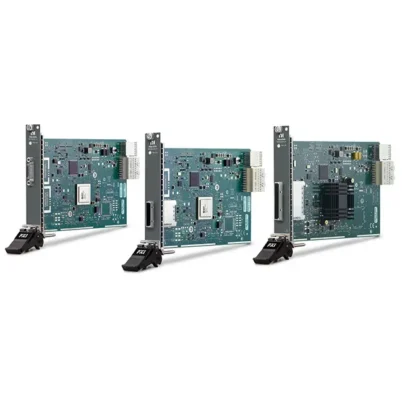
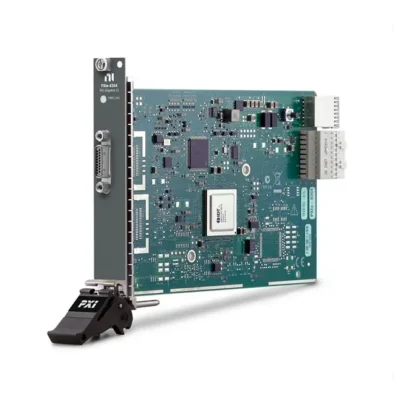
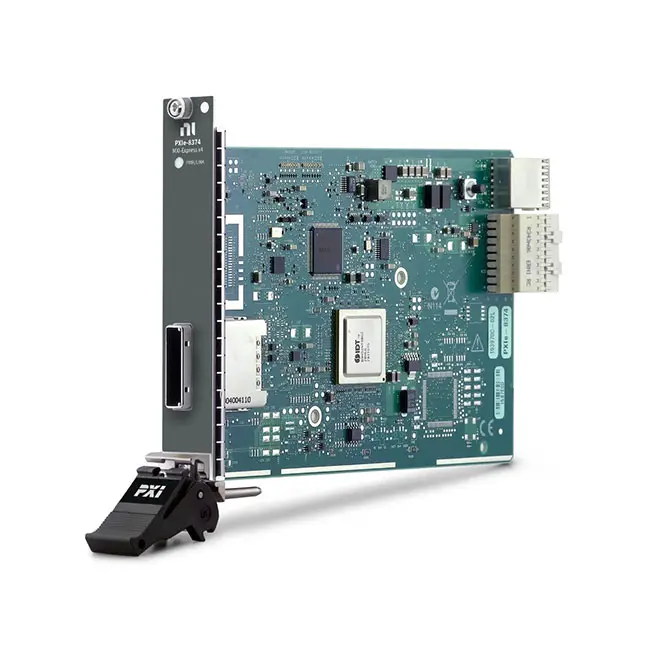
PXIe-8374 x4 MXI-Express Daisy-Chain Remote Control Module
Земля PXIe-8374 is an x4 MXI-Express PXI bus extension module designed for building multichassis PXI and PXI Express systems. Its dual-port daisy-chain architecture allows as many as eight PXI chassis to operate from the same system controller.
The controller can be an embedded PXI controller or an external computer connected through a compatible remote-control interface. The PXIe-8374 provides up to 1 GB/s theoretical MXI bandwidth and uses copper MXI-Express cables between chassis.
Key Features of the PXIe-8374
- x4 MXI-Express bus extension interface
- Dual-port daisy-chain architecture
- Up to 1 GB/s theoretical MXI bandwidth
- Supports copper MXI-Express cables
- Connects as many as eight PXI chassis to one controller
- Compatible with embedded PXI controllers
- Compatible with supported PC remote-control systems
- Transparent PCI Express bus extension
- Allows instruments in several chassis to operate as one system
- Single-slot 3U PXI Express module
- Software-transparent operation for supported PXI instruments
- PXI Platform Services support
- Suitable for large automated test systems
PXIe-8374 Technical Specifications
| Product Model | PXIe-8374 |
|---|---|
| Part Number | 781820-04 |
| Product Type | PXI Express bus extension and remote control module |
| MXI Communication Level | MXI-Express x4 |
| MXI Bandwidth | 1 GB/s theoretical maximum |
| Connection Architecture | Daisy-chain copper interface |
| MXI Ports | Two, for upstream and downstream chassis connections |
| Supported Cable Type | Copper MXI-Express cable |
| Maximum Chassis Count | Up to eight PXI chassis in a supported daisy-chain system |
| Bus Connection | PXI Express |
| Module Format | 3U, single-slot PXI Express module |
| Поддержка программного обеспечения | PXI Platform Services |
| Supported Platform | PXI and PXI Express systems |
PXIe-8374 Part Number and MXI Cable
| Item | Part Number | Описание |
|---|---|---|
| PXIe-8374 | 781820-04 | x4 copper MXI-Express daisy-chain PXI bus extension module |
| MXI-Express Cable | 779500-03 | 3 m copper MXI-Express cable for compatible system connections |
A complete remote-control or multichassis system normally requires additional hardware beyond the PXIe-8374. The first chassis must contain an embedded controller or a compatible remote-control interface connected to the host computer.
Each connection between chassis requires a compatible MXI-Express cable. Verify the required cable quantity, length, connector type and remote-control hardware before ordering.
What Is the PXIe-8374?
The PXIe-8374 extends the PCI Express communication path from one PXI chassis to another. Modules installed in the downstream chassis can then be detected and controlled by the same computer that operates the first chassis.
Unlike Ethernet communication, MXI-Express extends the computer’s PCI Express bus. Supported PXI instruments appear to the operating system and instrument drivers as locally connected devices rather than independent network instruments.
This transparent architecture allows existing PXI application software to control instruments across several chassis without developing a separate Ethernet communication layer.
MXI-Express x4 Architecture
The PXIe-8374 uses an x4 MXI-Express communication link. The x4 designation indicates that four PCI Express lanes are used to transfer data through the supported MXI connection.
The module provides a theoretical maximum MXI bandwidth of 1 GB/s. Actual application throughput may be lower because bandwidth is affected by protocol overhead, controller performance, chassis architecture, connected instruments and simultaneous traffic from other devices.
When several high-speed instruments share the same upstream MXI link, calculate their combined sustained data rate instead of evaluating each instrument separately.
Daisy-Chain Chassis Connectivity
The PXIe-8374 provides two MXI interfaces that allow one chassis to connect to the previous chassis and another chassis downstream. This creates a linear daisy-chain configuration.
In a typical system, the controller connects to the first chassis. A PXIe-8374 then extends the bus to the second chassis, and additional PXIe-8374 modules continue the connection to other chassis.
The PXIe-8374 supports system configurations containing as many as eight PXI chassis connected to the same embedded controller or remote computer.
Typical Daisy-Chain Architecture
| System Component | Function |
|---|---|
| Embedded Controller or Host PC | Runs the operating system, instrument drivers and test application |
| Primary PXI Chassis | Contains the controller or compatible remote-control connection |
| PXIe-8374 | Extends the PCI Express bus to the next PXI chassis |
| MXI-Express Cable | Carries the PCI Express communication link between chassis |
| Downstream PXI Chassis | Provides additional slots for PXI and PXI Express instruments |
Connecting Up to Eight PXI Chassis
Up to eight chassis can be connected in a supported PXIe-8374 daisy-chain system. This capability is useful when one chassis does not provide enough slots for all required instruments, switches and interface modules.
Although several chassis can be connected, all traffic traveling toward the controller shares the relevant upstream MXI links. High-channel-count digitizers, RF instruments and data acquisition modules may require careful bandwidth planning.
Longer chains can also increase system initialization time and make cabling or power problems more difficult to locate. Label every chassis, MXI port and cable during installation.
Embedded Controller Integration
An embedded PXI controller can operate the primary chassis and communicate with downstream chassis through PXIe-8374 modules. This creates a self-contained multichassis test system without requiring a separate desktop computer.
The embedded controller must provide sufficient processor performance, memory and system bandwidth for all connected instruments. Confirm the controller operating system and driver compatibility before assembling the system.
External PC Remote Control
The first PXI chassis can also be connected to an external desktop, workstation or rack-mounted computer through a compatible MXI-Express remote-control interface. PXIe-8374 modules can then extend the system to additional chassis.
A complete PC-controlled system requires compatible host-side hardware, chassis-side remote-control hardware and the appropriate MXI cables. The PXIe-8374 alone does not provide the host computer interface.
Transparent PCI Express Bus Extension
MXI-Express extends PCI Express communication across a cable while preserving the enumeration model used by locally installed hardware. PXI modules in downstream chassis are detected as part of the computer’s PCI Express hierarchy.
This transparent operation means that instrument drivers such as NI-DAQmx, NI-SCOPE, NI-RFSA, NI-RFSG and NI-SWITCH can communicate with supported modules without requiring the user to send instrument commands through a separate network protocol.
The exact driver requirements depend on the instruments installed in the PXI chassis.
1 GB/s Theoretical Bandwidth
The PXIe-8374 provides a theoretical maximum MXI bandwidth of 1 GB/s. This is the maximum capability of the link architecture and is not a guaranteed sustained application data rate.
Actual throughput depends on factors including:
- PXI controller processor and memory performance
- Chassis PCI Express backplane architecture
- Number of connected chassis
- Number and type of installed instruments
- Measurement record size
- Software buffer configuration
- Simultaneous data transfers
- Storage-device write performance
Benchmark the complete system with representative instrument data before deploying an application that depends on continuous high-speed streaming.
Copper MXI-Express Cabling
The PXIe-8374 uses copper MXI-Express cables. Copper provides a direct and practical connection for chassis installed within the supported cable distance.
Use only compatible MXI-Express cables. A cable with a similar connector may support a different MXI generation, lane width or application and should not be substituted without confirming compatibility.
Protect the cable from sharp bends, excessive pulling and mechanical stress. Secure the connector hardware so vibration or accidental movement does not interrupt the PCI Express link.
Power-On Sequence
The host computer enumerates the connected PXI hardware during startup. In many MXI systems, downstream chassis should be powered and ready before the host controller begins its boot process.
If a chassis is powered on after the computer has completed PCI Express enumeration, the modules in that chassis may not appear until the complete system is restarted.
Follow the recommended power-on and power-off sequence in the applicable controller, chassis and PXIe-8374 documentation.
Multichassis Timing and Synchronization
The PXIe-8374 extends the PCI Express control and data path, but it should not automatically be treated as a precision timing or clock-distribution connection.
Applications requiring synchronized sampling, common reference clocks or deterministic triggering across several chassis may need dedicated PXI timing modules, trigger cables or clock-distribution hardware.
Evaluate data connectivity and instrument synchronization as separate system-design requirements.
PXI Platform Services
The PXIe-8374 is supported through PXI Platform Services. This software provides the system-level support required for compatible PXI chassis, controllers and remote-control devices.
Install a version compatible with the controller operating system and the other PXI hardware in the system. The instrument modules installed in each chassis also require their individual device drivers.
NI Measurement & Automation Explorer
After the complete MXI system starts, NI Measurement & Automation Explorer can display the connected PXI chassis and installed modules. Downstream chassis should appear under the same system controller.
Use NI MAX to verify chassis identification, slot assignments and instrument detection before running the test application. Missing chassis usually indicate a power, cable, slot, driver or enumeration problem.
Typical PXIe-8374 Applications
- Multichassis PXI test systems
- Automated production testing
- Валидация полупроводников
- High-channel-count data acquisition
- РФ и беспроводное тестирование
- Aerospace and defense validation
- Automotive hardware-in-the-loop testing
- Электронное проектирование верификация
- Large switching systems
- Laboratory automation
- Distributed instrumentation racks
- Research and scientific measurement
- System expansion for additional PXI slots
High-Channel-Count Data Acquisition
Large data acquisition systems may require more analog input, digital I/O and sensor measurement modules than one chassis can contain. The PXIe-8374 allows additional chassis to be added under the same controller.
When many modules acquire data simultaneously, compare the combined data rate with the bandwidth available through each MXI connection and the storage capability of the controller.
Системы тестирования полупроводников
Semiconductor characterization and production systems frequently combine source measure units, digital instruments, switches and waveform devices. A daisy-chain MXI system provides additional slots while maintaining centralized software control.
Test throughput depends on more than MXI bandwidth. Instrument configuration time, device handling, switching, measurement processing and result storage should also be evaluated.
RF and Wireless Test Systems
RF systems can require several vector signal transceivers, local oscillator modules and high-speed processing devices. The PXIe-8374 can expand the available chassis capacity for these instruments.
RF instruments can produce high data rates, so the 1 GB/s shared MXI bandwidth must be evaluated carefully. Newer and higher-bandwidth MXI architectures may be more appropriate for applications requiring continuous multigigabyte-per-second streaming.
Automotive HIL Testing
Hardware-in-the-loop systems may contain analog I/O, digital I/O, CAN, LIN, FlexRay, automotive Ethernet, fault insertion and switching modules. Multiple chassis can provide the slot capacity needed for a large controller test system.
The PXIe-8374 provides the control and data connection between chassis. Dedicated timing and real-time control resources may still be required for deterministic HIL operation.
PXIe-8374 Installation
Install the PXIe-8374 in a compatible PXI Express peripheral slot. Power off all connected chassis and the system controller before inserting the module or connecting MXI cables.
Connect the upstream port to the controller-side system or previous chassis. Connect the downstream port to the next chassis in the chain. Confirm port direction and cable seating before applying power.
Provide adequate chassis airflow and avoid placing heavy cable tension on the front-panel connectors.
PXIe-8374 Troubleshooting
The PXIe-8374 is not detected
Confirm that the module is fully installed in a compatible PXI Express slot. Check chassis power, controller communication and PXI Platform Services installation, then restart the complete system.
The downstream chassis is not detected
Verify that the downstream chassis is powered on before the controller boots. Check the MXI cable and confirm that it is connected to the correct upstream and downstream ports.
Only part of the daisy chain appears
Inspect the first chassis that does not appear and the cable connecting it to the previous chassis. A problem at one point in the chain can prevent every chassis located after that point from being enumerated.
The link indicator does not illuminate
Power off the system and reseat the MXI cable at both ends. Inspect the connectors for damage and verify that the cable type is compatible with the PXIe-8374.
The chassis disappears after a cable is moved
Stop the test and shut down the system. Tighten the cable connectors and inspect the cable for mechanical damage. MXI cables should not be connected or disconnected while the system is operating unless the documentation explicitly supports that procedure.
Data throughput is lower than expected
Review the combined traffic from all connected instruments. Check controller performance, storage speed, chassis topology and software buffers. Remember that 1 GB/s is the theoretical maximum MXI link bandwidth.
Modules appear in the wrong slot
Check the chassis identification and slot configuration in NI MAX. Restart the complete system after changing the chassis order or MXI cabling so the PCI Express hierarchy can be enumerated correctly.
The system does not start after adding another chassis
Return to the last working configuration and verify the new chassis, PXIe-8374 module and cable separately. Confirm that the total system remains within the supported maximum chassis count.
The host PC cannot control the first chassis
The PXIe-8374 is primarily a daisy-chain bus extension module. Confirm that the first chassis has the correct chassis-side remote controller and that the computer contains a compatible host interface.
PXIe-8374 Comparison with Related Remote Control Modules
| Модель | Primary Configuration | Best Suited For |
|---|---|---|
| PXIe-8374 | x4 copper MXI-Express, 1 GB/s, daisy-chain | Expanding one controller across several PXI chassis |
| PXIe-8370 | x4 copper MXI-Express remote control | Connecting a compatible host to a single PXI Express chassis |
| PXIe-8381 | Higher-bandwidth MXI-Express remote control | Systems requiring greater host-to-chassis throughput |
| PXIe-8394 | Newer-generation high-bandwidth MXI-Express architecture | Data-intensive modern PXI Express systems |
| PXIe-8301 | Thunderbolt remote control | Portable computer and laptop-controlled PXI systems |
PXIe-8374 vs PXIe-8370
The PXIe-8374 is designed for daisy-chain expansion and provides connections for extending the system to another chassis. The PXIe-8370 is commonly used as a chassis-side remote-control interface for a single host-to-chassis connection.
Select the PXIe-8374 when several chassis must be connected in sequence. Select the appropriate single-chassis remote controller when no downstream expansion is required.
PXIe-8374 vs Higher-Bandwidth MXI Modules
The PXIe-8374 provides 1 GB/s theoretical bandwidth through an x4 MXI-Express link. Newer MXI-Express modules may offer higher bandwidth for RF streaming, high-speed digitizers and other data-intensive instruments.
The PXIe-8374 remains useful when compatibility with an existing x4 copper MXI system and multichassis daisy chaining are the primary requirements. Compare the controller, chassis, cable and MXI generation before replacing individual components.
PXIe-8374 vs PXIe-8301
The PXIe-8374 uses a dedicated copper MXI-Express interface and is designed for PXI bus extension and multichassis daisy chaining. The PXIe-8301 uses Thunderbolt connectivity for convenient remote control from compatible computers.
The Thunderbolt option is useful for portable systems, while dedicated MXI hardware is generally preferred for established rack-mounted and multichassis PXI installations.
Recommended Related Products
- PXIe-8370 x4 MXI-Express Remote Control Module
- PXIe-8381 MXI-Express Remote Control Module
- PXIe-8394 High-Bandwidth MXI-Express Module
- PXIe-8398 PXI Express Remote Control Module
- PXIe-8301 Thunderbolt Remote Control Module
- PCIe-8371 MXI-Express Host Interface
- PCIe-8372 MXI-Express Host Interface
- View More NI PXI Controllers and Remote Control Modules
Selecting the Right PXI Remote Control Module
Choose the PXIe-8374 when the system requires x4 copper MXI-Express connectivity and several PXI chassis must be connected through a daisy chain. It is especially appropriate for maintaining or expanding an existing 1 GB/s MXI-Express system.
Before ordering, identify the host-side controller, primary chassis remote controller, downstream chassis count, required cables and total bandwidth. Confirm the MXI generation and connector type for every component.
Select a newer high-bandwidth MXI solution when the combined data rate of the installed instruments exceeds the practical capacity of the PXIe-8374 architecture.
Why Choose the PXIe-8374?
- Connects several PXI chassis to one controller
- Supports as many as eight chassis
- Provides dual-port daisy-chain connectivity
- Uses established copper MXI-Express cabling
- Offers up to 1 GB/s theoretical bandwidth
- Extends the PCI Express bus transparently
- Supports embedded-controller and remote-PC systems
- Allows PXI instrument drivers to operate across several chassis
- Occupies only one PXI Express slot
- Supports large automated test architectures
Frequently Asked Questions
What is the PXIe-8374?
The PXIe-8374 is an x4 copper MXI-Express PXI bus extension module used to connect several PXI chassis to one system controller.
What is the PXIe-8374 part number?
The standard NI part number for the PXIe-8374 is 781820-04.
What is the maximum MXI bandwidth?
The theoretical maximum MXI bandwidth is 1 GB/s. Actual application throughput depends on the complete system configuration.
How many chassis can the PXIe-8374 connect?
A supported daisy-chain system can contain as many as eight PXI chassis connected to the same controller.
Which cable type does it use?
The module uses compatible copper MXI-Express cables.
What is the recommended cable part number?
NI lists the 3 m MXI-Express copper cable, part number 779500-03, as a compatible connection accessory.
Does the PXIe-8374 connect directly to a desktop computer?
Not by itself. A PC-controlled system also requires compatible host-side and primary-chassis remote-control interfaces.
Can it be used with an embedded PXI controller?
Yes. It can extend a system controlled by a compatible embedded controller to additional PXI chassis.
Does it synchronize instruments between chassis?
It provides the PCI Express control and data path. Applications requiring precision clock or trigger synchronization may need additional timing hardware.
Can MXI cables be connected while the system is running?
Normally, the controller and connected chassis should be powered off before MXI cables are connected or disconnected. Follow the applicable NI installation instructions.
Which software supports the PXIe-8374?
The system-level interface is supported through PXI Platform Services. Each installed instrument also requires its applicable device driver.
Is the PXIe-8374 suitable for high-speed digitizer streaming?
It may be suitable when the combined sustained data rate fits within the available MXI bandwidth. Higher-bandwidth MXI hardware should be considered for more demanding streaming applications.
Request a Quote for the PXIe-8374
Contact us for current availability, lead time and project pricing for the PXIe-8374 x4 MXI-Express Daisy-Chain Remote Control Module. We can also help identify compatible MXI cables, host interfaces, PXI Express chassis and higher-bandwidth remote-control alternatives for your multichassis system.















