







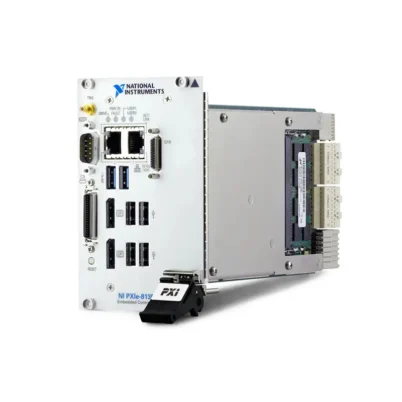
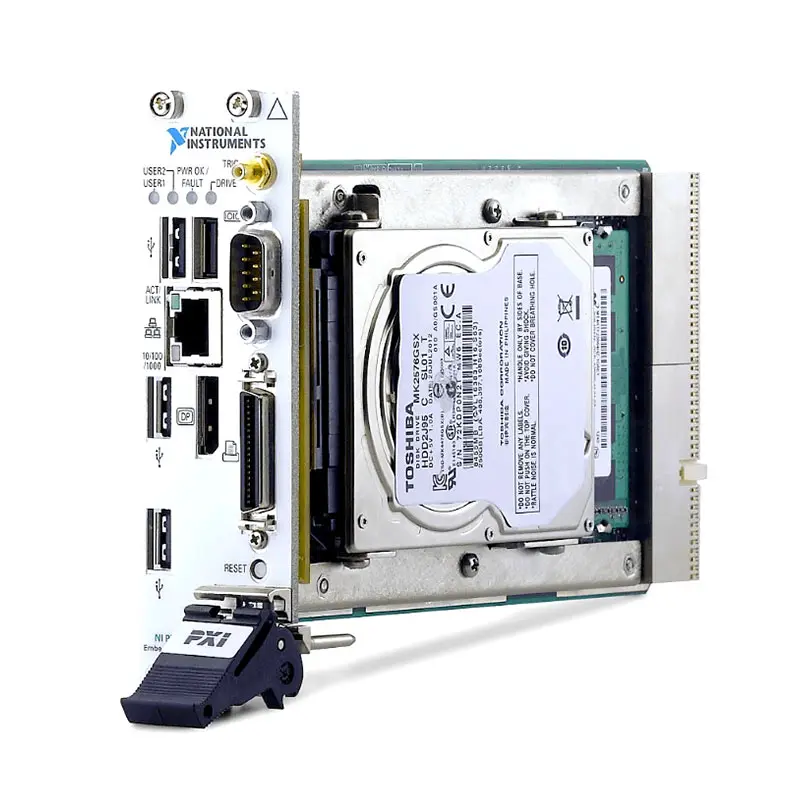
PXIe-8820 2.20 GHz Dual-Core PXI Express Embedded Controller
Земля NI PXIe-8820 is a two-slot PXI Express embedded controller designed for cost-sensitive automated test, measurement, monitoring and control systems. It integrates an Intel Celeron 1020E dual-core processor, DDR3 memory, internal SATA storage and commonly required computer interfaces into a compact controller installed directly in a PXI Express chassis.
Because the controller resides inside the instrumentation chassis, it eliminates the external host interface and cable required by a remotely controlled PXI system. This creates a self-contained platform with direct access to PXI Express instruments, trigger resources and the chassis backplane.
The PXIe-8820 is especially suitable for systems that require dependable embedded operation but do not need the processing performance of a higher-end quad-core or multicore PXI controller. Typical uses include production testing, laboratory automation, data acquisition, hardware-in-the-loop testing, machine monitoring and portable measurement systems.
Key Features of the PXIe-8820
- Intel Celeron 1020E dual-core processor
- 2.20 GHz processor clock frequency
- 2 MB on-die cache
- 2 GB standard single-channel DDR3 memory
- Supports as much as 8 GB of RAM
- 250 GB minimum SATA drive on documented Windows configurations
- 80 GB minimum SATA drive on documented LabVIEW Real-Time configurations
- One 10/100/1000BASE-T Gigabit Ethernet interface
- Four Hi-Speed USB 2.0 ports
- One DisplayPort video output
- One RS-232 serial port
- One IEEE 1284 parallel port
- Front-panel SMB trigger connection
- PXI trigger-bus input and output support
- Two-slot 3U PXI Express form factor
- Windows and LabVIEW Real-Time configurations were offered
PXIe-8820 Technical Specifications
| Product Model | PXIe-8820 |
|---|---|
| Product Type | PXI Express embedded controller |
| Процессор | Intel Celeron 1020E |
| Частота процессора | 2.20 GHz |
| Processor Cores | 2 |
| On-Die Cache | 2 MB |
| Memory Type | Single-channel PC3-10600 DDR3 SO-DIMM |
| Standard Memory | 2 GB |
| Maximum Memory | 8 GB |
| Windows-Configuration Storage | 250 GB minimum internal SATA drive |
| LabVIEW Real-Time Storage | 80 GB minimum internal SATA drive on documented RT configurations |
| Ethernet | 1 × 10/100/1000BASE-T RJ45 port |
| USB | 4 × Hi-Speed USB 2.0 ports |
| Video Output | 1 × DisplayPort |
| Serial Interface | 1 × RS-232 DB9 port |
| Parallel Interface | 1 × IEEE 1284 Type C parallel port |
| Front-Panel Trigger | SMB connector for routing PXI triggers to or from the backplane |
| Four-Link Configuration | x1, x1, x1, x1 |
| Two-Link Configuration | x1, x1 |
| PXI Express Compatibility | PXI Express Specification 1.0 |
| Form Factor | Two-slot 3U PXI Express module |
| Slot Requirement | One system-controller slot and one adjacent controller-expansion slot |
| Typical Weight | 0.85 kg (1.87 lb) |
| Operating Temperature | 5°C to 50°C |
| Operating Humidity | 10% to 90%, noncondensing |
| Storage Temperature | -40°C to 65°C |
| Maximum Altitude | 2,000 m at 25°C ambient temperature |
| Operating Shock | 30 g peak, half-sine, 11 ms pulse |
| Operating Random Vibration | 5 Hz to 500 Hz, 0.3 grms with a solid-state drive |
Storage capacity, operating system, memory and included accessories can vary by ordering configuration. Buyers replacing a controller in an existing system should verify the complete NI assembly number rather than relying only on the PXIe-8820 model name.
2.20 GHz Dual-Core Processing
The PXIe-8820 uses an Intel Celeron 1020E processor with two physical cores operating at 2.20 GHz. This processor provides an economical computing platform for instrument control, sequential test execution, data logging and moderate real-time workloads.
Two cores allow the operating system and test software to distribute work more effectively than on a single-core controller. For example, one core can handle user-interface and communication activity while another processes measurements or executes a test sequence.
The PXIe-8820 is not intended to replace modern high-performance multicore controllers in CPU-intensive applications. Advanced RF processing, high-channel-count streaming, large simulation models and computationally demanding analysis may benefit from a newer controller with additional cores, memory and bandwidth.
DDR3 Memory Architecture
The controller includes 2 GB of single-channel PC3-10600 DDR3 RAM as standard and supports as much as 8 GB. Increasing the installed memory can improve operation when running larger LabVIEW applications, TestStand sequences, multiple instrument drivers or data-processing tasks.
NI documented qualified 2 GB, 4 GB and 8 GB SO-DIMM options for the controller. A replacement module should meet the mechanical, electrical and thermal requirements of the PXIe-8820. Compatibility should be confirmed before installing third-party memory.
Internal SATA Data Storage
The PXIe-8820 includes an internal 2.5-inch SATA drive. Documented Windows configurations provided a drive of at least 250 GB, while LabVIEW Real-Time configurations provided at least 80 GB. The exact drive capacity and media type can differ between ordering options or previously upgraded units.
USB storage devices can be used for transferring test programs, collecting results or performing recovery procedures. For applications exposed to vibration, an appropriate solid-state drive can provide better mechanical resilience than a rotating hard disk.
PXI Express Backplane Connectivity
The PXIe-8820 communicates directly with instruments through the PXI Express backplane. It supports a four-link configuration of x1, x1, x1 and x1 or a two-link configuration of x1 and x1, depending on the chassis backplane architecture.
Direct backplane communication provides a compact and integrated alternative to controlling the chassis from an external computer. Actual data throughput depends on the chassis topology, installed modules, driver design and application workload.
Front-Panel Computer Interfaces
The controller provides four USB 2.0 ports for keyboards, mice, removable storage and other compatible peripherals. Its DisplayPort output supports connection to a digital monitor, while a suitable active or passive adapter may be needed for VGA or another display standard.
A Gigabit Ethernet interface supports network communication, file transfer, remote access and distributed test-system integration. The controller also includes legacy RS-232 and IEEE 1284 parallel interfaces, which can be valuable when maintaining older laboratory instruments, fixtures or production equipment.
PXI Trigger Connectivity
A front-panel SMB trigger connector can route a software-controlled trigger to or from the PXI backplane trigger bus. This connection is useful when an external device must initiate an acquisition or receive a timing event from the PXI system.
The trigger connector is intended for synchronization and event routing rather than general-purpose analog or digital measurement. Trigger direction and routing must be configured correctly in the applicable software.
PXIe-8820 Part Number and Accessories
| Item | Part Number or Configuration | Описание |
|---|---|---|
| PXIe-8820 Windows Configuration | Configuration dependent | Controller supplied with a Microsoft Windows operating-system image |
| PXIe-8820 LabVIEW Real-Time Configuration | Configuration dependent | Controller configured for deterministic LabVIEW Real-Time operation |
| 2 GB Replacement RAM | 782911-2048 | NI-qualified DDR3 SO-DIMM documented for the PXIe-8820 |
| 4 GB Memory Upgrade | 782911-4096 | NI-qualified DDR3 SO-DIMM memory upgrade |
| 8 GB Memory Upgrade | 781736-8192 | Maximum-capacity NI-qualified DDR3 SO-DIMM option |
| DisplayPort-to-VGA Adapter | 782271-01 | Adapter for connecting a compatible VGA monitor |
| Parallel-Port Adapter Cable | 777169-01 | Type C to Type A adapter for conventional 25-pin parallel-port equipment |
| USB CD/DVD-ROM Drive | 778492-01 | External drive for software installation and operating-system recovery |
| USB Cable Ferrite | 711849-01 | Snap-on ferrite specified for maintaining documented EMC performance |
PXIe-8820 ordering numbers can distinguish operating system, storage, software and regional configurations. When requesting a replacement, provide the complete assembly or part number printed on the original controller label.
Selecting the Correct Replacement Controller
A controller with the same model name may not have the same operating system, disk image, memory capacity or software licenses as the original unit. Before ordering, record the existing controller’s complete part number, installed RAM, drive type and operating-system edition.
For a legacy production system, confirm that the replacement supports the required NI drivers and application versions. Newer operating systems or driver releases are not automatically compatible with software developed for the original Windows 7 or LabVIEW Real-Time environment.
Display and Peripheral Accessories
A DisplayPort monitor can connect directly to the controller. A DisplayPort-to-VGA adapter is required when the system uses a conventional VGA display. USB ports support commonly used keyboards and mice, eliminating the need for a dedicated PS/2 connector.
The Type C parallel connector differs from the DB25 connector found on many legacy peripherals. A compatible adapter cable is therefore necessary when connecting conventional IEEE 1284 equipment.
PXIe-8820 Applications
- Automated production testing
- Laboratory instrument automation
- Functional and end-of-line testing
- PXI data-acquisition systems
- Hardware-in-the-loop validation
- Machine monitoring and control
- Environmental and reliability testing
- Electronic device characterization
- Portable and rack-mounted test systems
- Legacy PXI Express system maintenance
- LabVIEW Real-Time applications
- TestStand sequence execution
Automated Production Testing
The PXIe-8820 can run automated functional tests, communicate with production fixtures and coordinate measurement modules installed in the chassis. Its integrated architecture reduces the number of external computer connections required at a test station.
A typical system may combine the controller with digital multimeters, multifunction DAQ modules, switch modules and programmable power instruments. Test software can configure each instrument, collect results and record pass-or-fail information in a production database.
Data Acquisition and Monitoring
When combined with compatible PXI or PXI Express DAQ instruments, the PXIe-8820 can control multichannel voltage, current, temperature, strain and digital measurements. The onboard Ethernet interface allows results to be transferred to another computer or central server.
The controller is appropriate for moderate acquisition workloads. Sustained high-speed streaming should be evaluated against backplane bandwidth, processor load, drive performance and the combined throughput of all installed instruments.
Hardware-in-the-Loop Testing
A LabVIEW Real-Time configuration can execute deterministic test tasks for controller validation and hardware-in-the-loop systems. PXI trigger resources can coordinate the controller with DAQ, CAN, serial, fault-insertion and waveform-generation hardware.
Real-time performance depends on the complete application. Large simulation models or demanding sub-millisecond control loops may require a higher-performance controller or FPGA-based processing.
Legacy Test-System Support
The RS-232 and parallel ports make the PXIe-8820 useful in systems containing older instruments or fixtures. Retaining these native interfaces may reduce the changes required when replacing an existing industrial computer or older PXI controller.
Legacy compatibility should be verified at the software level as well as the electrical level. Confirm driver versions, operating-system support, serial settings, parallel-port mode and application dependencies before changing controllers.
Laboratory Automation
The controller can operate a self-contained laboratory test station without a separate desktop computer. Engineers can connect a monitor, keyboard and mouse directly or access the system remotely over Ethernet.
This configuration works well for repetitive measurement procedures, component characterization, long-duration data logging and research setups that require several synchronized PXI instruments.
Recommended System Integration
The PXIe-8820 can be installed in a compatible chassis such as the PXIe-1082 PXI Express chassis. The chassis must provide the correct system-controller and adjacent expansion-slot arrangement required by the two-slot controller.
It can also coordinate measurement hardware such as a PXIe-6365 multifunction DAQ module or switching and instrument modules selected for the application. Review the complete range of NI PXI and PXI Express modules when designing a complete test system.
PXIe-8820 Installation Workflow
Step 1: Verify the Chassis
Confirm that the chassis supports a two-slot 3U PXI Express embedded controller. One system-controller slot and the adjacent controller-expansion slot must be available.
Step 2: Record the Existing Configuration
For replacement projects, document the original controller’s complete part number, memory capacity, storage device, BIOS settings, operating system, NI drivers and application versions before removing it.
Step 3: Back Up Important Data
Create a verified backup of test programs, configuration files, calibration information, databases and license data. An operating-system recovery operation can erase the controller’s drive.
Step 4: Power Down and Ground the Chassis
Connect the chassis power cord so the enclosure remains grounded, but keep chassis power switched off while installing the controller. Follow standard electrostatic-discharge precautions.
Step 5: Install the Controller
Keep the injector/ejector handle in its downward position while aligning the controller with the upper and lower card guides. Slide the module into the chassis and raise the handle to seat the backplane connectors.
Step 6: Secure the Front Panel
Tighten the four bracket-retaining screws. Proper mechanical installation improves connector engagement, grounding and cooling performance.
Step 7: Connect Required Peripherals
Connect the DisplayPort monitor, USB keyboard, mouse, Ethernet cable and any required serial, parallel or trigger cables. Install the specified ferrite when needed to maintain documented USB EMC performance.
Step 8: Start the System
Power on the display and chassis, then verify that the Power OK indicator remains illuminated and the drive indicator shows activity during startup.
Step 9: Confirm BIOS Settings
Enter BIOS Setup when necessary to check the installed memory, system date, SATA configuration and boot order. Preserve known-good settings when replacing a controller in a validated test station.
Step 10: Verify NI Hardware and Software
Confirm that the chassis and installed modules are recognized by NI Measurement & Automation Explorer or the applicable system-management software. Run a representative test sequence before returning the system to service.
Software and Operating-System Considerations
Original PXIe-8820 configurations were documented with Windows 7 Professional or LabVIEW Real-Time. These historical software environments may no longer receive ordinary support or security updates, so their use should follow the organization’s lifecycle and network-security policies.
Do not assume that a newer operating system supports every legacy PXI module or application. Verify the controller, chassis, device drivers, development environment and deployed application as one complete compatibility chain.
Cooling and Slot Management
The PXIe-8820 must receive adequate airflow from the chassis. Keep unused chassis locations covered with filler panels and avoid obstructing intake or exhaust vents. The controller’s specified 50°C maximum ambient temperature must not be exceeded, even if the chassis has a wider operating range.
PXIe-8820 Troubleshooting
The PXIe-8820 Does Not Boot
Confirm that the chassis is connected to a working power source and that its fuses or circuit protection are intact. Check that the controller is firmly seated and observe the Power OK and drive LEDs during startup.
Remove nonessential peripherals and PXI modules, then attempt to boot again. If possible, test the controller in another compatible chassis or install a known-good controller in the original chassis to isolate the fault.
No Video Appears on the Monitor
Check the DisplayPort cable, adapter and monitor input selection. Test with a known-good monitor and verify that the selected resolution is supported. If Windows starts with an invalid video setting, boot into Safe Mode and select a conservative resolution and refresh rate.
The Controller Cannot Find the Boot Drive
Enter BIOS Setup and confirm that the internal SATA drive is detected and included in the boot order. Run the built-in drive diagnostic when available. Back up recoverable data before attempting operating-system restoration.
A Memory Error Occurs
Run the BIOS memory diagnostic and verify that the installed SO-DIMM is supported and correctly seated. Power down and remove the controller before handling its memory. Replace a failed module with a compatible DDR3 SO-DIMM.
PXI Modules Are Not Detected
Power off the system and reseat the affected modules. Confirm chassis compatibility and install the correct NI device drivers. If multiple modules are missing, inspect the controller-to-backplane connection and chassis configuration.
Ethernet Communication Is Unavailable
Inspect the RJ45 cable and link indicators, then verify network-adapter settings, IP configuration, firewall rules and driver installation. The interface supports automatic crossover, so a special crossover cable is normally unnecessary.
USB Devices Disconnect Intermittently
Check the peripheral’s power requirements and test it with a shorter, shielded cable. Remove unpowered hubs and unnecessary devices. High-current peripherals should use a properly powered USB hub when appropriate.
The System Runs Too Slowly
Review CPU usage, available RAM, disk health and background processes. Increasing memory can help applications that exceed the standard 2 GB configuration. High-rate analysis or streaming workloads may require a faster PXI Express controller.
The BIOS Configuration Is Corrupted
Load the BIOS defaults from Setup or clear CMOS using the procedure documented in the PXIe-8820 manual. Record custom boot, serial and chassis settings before resetting the configuration whenever possible.
The Controller Overheats or Shuts Down
Inspect chassis fans, air filters, filler panels and surrounding clearance. Confirm that ambient temperature remains within 5°C to 50°C and that cables do not obstruct the chassis airflow.
PXIe-8820 Comparison
| Модель | General Positioning | Best Suited For |
|---|---|---|
| PXIe-8820 | 2.20 GHz dual-core Celeron, up to 8 GB DDR3 | Economical legacy PXI Express automation and moderate processing |
| PXIe-8821 | Newer-generation dual-core embedded controller | Applications requiring more processor performance while retaining a compact controller |
| PXIe-8840 | Higher-performance quad-core PXI Express controller | Multithreaded test software, analysis and higher-throughput systems |
| PXIe-8842 | Modern high-performance embedded controller | New systems requiring current interfaces, greater memory and substantially higher CPU performance |
| PXIe-8861 | Performance-oriented multicore controller | Compute-intensive validation, RF, data streaming and advanced automation |
PXIe-8820 vs PXIe-8821
The PXIe-8820 is based on a 2.20 GHz Intel Celeron processor, while the PXIe-8821 represents a later controller generation with improved processing and peripheral capabilities. The PXIe-8820 remains useful for maintaining validated systems whose performance requirements are modest.
Choose between them by checking operating-system support, driver compatibility, required interfaces and application performance. A newer controller may require software-image or driver changes even when it physically fits the chassis.
PXIe-8820 vs PXIe-8840
The PXIe-8840 is better suited to multithreaded software, signal processing and higher-volume data movement. The PXIe-8820 consumes fewer project resources when the workload primarily involves instrument configuration, test sequencing and moderate data collection.
For an existing PXIe-8820 deployment, upgrading to a PXIe-8840 should be treated as a system migration rather than a simple part substitution. Validate the operating system, software licenses, drivers and external interfaces.
Embedded Controller vs Remote PXI Control
The PXIe-8820 creates a self-contained PXI system with the computer installed in the chassis. A remote-control solution connects the chassis to an external workstation through an interface such as MXI-Express.
An embedded controller minimizes cabling and is convenient for portable or rack-mounted stations. Remote control provides greater flexibility in choosing and upgrading the host computer. The appropriate architecture depends on physical layout, processing needs and maintenance strategy.
Selecting the Right PXI Controller
Choose the PXIe-8820 when maintaining a compatible legacy system or building an economical test station with moderate processing requirements. It is particularly useful when native RS-232, parallel-port and USB 2.0 connectivity are needed.
Select a newer controller when the application requires more cores, substantially more memory, faster storage, modern USB interfaces or support for a current operating system. Confirm the chassis power, cooling and slot requirements before changing controller families.
Recommended Related Products
- PXIe-8821 PXI Express Embedded Controller
- PXIe-8840 Quad-Core PXI Express Embedded Controller
- PXIe-8842 High-Performance PXI Express Controller
- PXIe-8861 PXI Express Embedded Controller
- PXIe-1082 PXI Express Chassis
- PXIe-1085 PXI Express Chassis
- View More NI PXI Embedded Controllers
Why Choose the PXIe-8820?
- Provides a self-contained controller for PXI Express systems
- Offers economical dual-core processing for automated test
- Supports memory expansion from 2 GB to 8 GB
- Includes internal SATA storage
- Provides Gigabit Ethernet and four USB ports
- Includes DisplayPort, RS-232 and parallel connectivity
- Supports PXI backplane trigger routing
- Works well for maintaining validated legacy systems
- Was available for Windows and LabVIEW Real-Time applications
Frequently Asked Questions
What is the PXIe-8820?
The PXIe-8820 is a two-slot PXI Express embedded controller used to operate instruments installed in a compatible PXI Express chassis.
Which processor does the PXIe-8820 use?
It uses an Intel Celeron 1020E dual-core processor operating at 2.20 GHz with 2 MB of on-die cache.
How much memory does the PXIe-8820 support?
The controller includes 2 GB of single-channel DDR3 RAM as standard and supports as much as 8 GB.
What storage does the controller provide?
Documented Windows configurations include a minimum 250 GB SATA drive. Documented LabVIEW Real-Time configurations include a minimum 80 GB SATA drive. Actual installed capacity should be verified on used or upgraded units.
Does the PXIe-8820 support Gigabit Ethernet?
Yes. It provides one RJ45 10/100/1000BASE-T Ethernet port.
How many USB ports are available?
The PXIe-8820 provides four front-panel Hi-Speed USB 2.0 ports.
Does the controller have a serial port?
Yes. It includes one DB9 RS-232 serial interface based on a 16550-compatible controller.
Does the PXIe-8820 have a parallel port?
Yes. It has an IEEE 1284 Type C parallel connector. An adapter is needed for equipment that uses a conventional DB25 Type A connector.
Can the PXIe-8820 run LabVIEW Real-Time?
Yes. LabVIEW Real-Time configurations of the PXIe-8820 were offered. Verify that the controller configuration and installed software match the required real-time application.
How many chassis slots does it occupy?
It occupies two slots: the PXI Express system-controller slot and one adjacent controller-expansion slot.
What is the operating-temperature range?
The specified ambient operating-temperature range is 5°C to 50°C with appropriate chassis cooling.
Can the PXIe-8820 boot from USB?
Yes. Its documented boot options include compatible USB mass-storage devices, USB optical drives, the internal SATA drive and a PXE network server.
Is the PXIe-8820 suitable for new high-performance systems?
It is best suited to moderate workloads and legacy-system maintenance. New compute-intensive applications generally benefit from a more recent multicore PXI Express controller.
What should be checked before ordering a replacement?
Verify the complete part number, operating system, storage capacity, installed memory, chassis compatibility, driver versions and application-software requirements.
Request a Quote for the PXIe-8820
Contact us for current availability, lead time and project pricing for the NI PXIe-8820 2.20 GHz Dual-Core PXI Express Embedded Controller. We can also help identify compatible PXI Express chassis, memory, display adapters and replacement controllers for your automated test system.















