






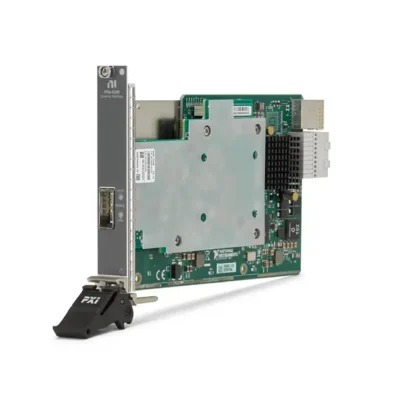
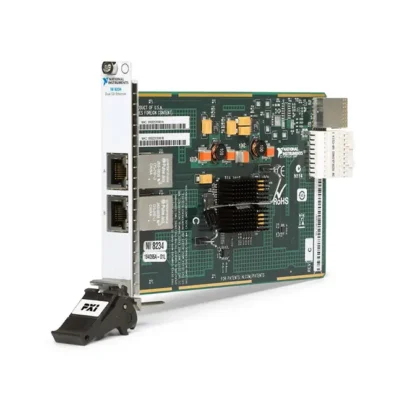
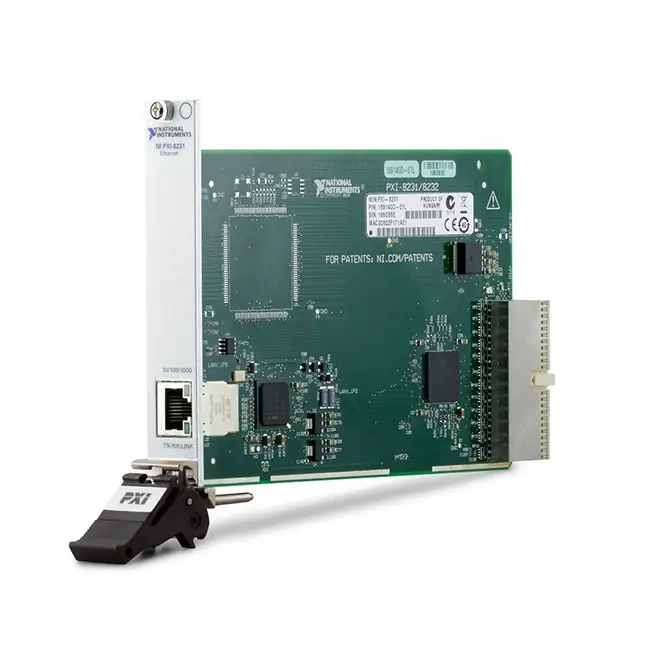
PXI-8231 1-Port Gigabit PXI Ethernet Interface Module
Земля PXI-8231 is a one-port Gigabit Ethernet interface module that adds an independent Ethernet connection to a PXI system. It supports 10BASE-T, 100BASE-TX and 1000BASE-T networks through a standard RJ45 copper interface.
Engineers can use the PXI-8231 to connect a PXI controller to Ethernet instruments, industrial networks, distributed data-acquisition systems, GigE Vision cameras and other network devices. In compatible NI real-time systems, the interface can also support EtherCAT master applications when used with the required NI software and controller configuration.
The PXI-8231 installs in a conventional PXI or compatible hybrid slot. It functions as a standard network adapter rather than a PXI measurement instrument or MXI remote-control interface.
Key Features of the PXI-8231
- One Gigabit Ethernet port
- 10/100/1000BASE-T network support
- Up to 1000 Mbit/s negotiated link speed
- Standard RJ45 copper Ethernet connector
- Intel 82541PI Gigabit Ethernet controller
- Compatible with conventional PXI systems
- Automatic Ethernet speed negotiation
- Backward compatibility with 10BASE-T and 100BASE-TX networks
- Suitable for Ethernet instrument communication
- Supports additional or isolated PXI network connections
- Can be used for GigE Vision camera connectivity
- Can support EtherCAT on qualified NI real-time systems
- Uses standard operating-system network configuration
- Compact one-slot 3U PXI form factor
PXI-8231 Technical Specifications
| Product Model | PXI-8231 |
|---|---|
| Part Number | 781752-01 |
| Product Type | PXI Gigabit Ethernet interface module |
| Number of Ethernet Ports | 1 |
| Supported Ethernet Standards | 10BASE-T, 100BASE-TX and 1000BASE-T |
| Maximum Negotiated Link Speed | 1000 Mbit/s |
| Network Connector | RJ45 |
| Network Medium | Copper twisted-pair Ethernet |
| Ethernet Controller | Intel 82541PI Gigabit Ethernet controller |
| PXI Interface | PCI-based conventional PXI |
| Module Format | 3U, one-slot PXI module |
| Typical Cable | Category 5e or better four-pair Ethernet cable |
| Конфигурация | Operating-system network adapter settings |
| Типичные применения | Instrument networking, EtherCAT, GigE Vision and distributed testing |
The 1000 Mbit/s value is the negotiated Ethernet link rate. Actual application throughput depends on the PXI controller, system bus, operating system, protocol overhead, storage performance, connected device and network configuration.
PXI-8231 Part Number and Accessories
| Item | Part Number or Type | Описание |
|---|---|---|
| PXI-8231 | 781752-01 | Single-port Gigabit Ethernet interface module for PXI systems |
| Gigabit Ethernet Cable | Category 5e or better | Four-pair RJ45 cable for 10/100/1000BASE-T connections |
| PXI Шасси | Application dependent | Compatible chassis with a conventional PXI or suitable hybrid slot |
| PXI Контроллер | Application dependent | Embedded or remote-controlled PXI computer that supports the selected operating system |
Older PXI-8231 units or documentation may show a different legacy ordering number. Verify the complete model, assembly number and hardware revision printed on the module before purchasing a replacement.
Single-Port Gigabit Ethernet Architecture
The PXI-8231 provides one independent Ethernet interface through its front-panel RJ45 connector. The controller installed in or connected to the PXI chassis recognizes the module as an additional network adapter.
This architecture allows the interface to be assigned its own IP address, subnet, gateway and network role. It can operate separately from the Ethernet port built into the PXI controller.
For example, the controller’s primary port can remain connected to a corporate or supervisory network while the PXI-8231 provides a dedicated connection to instruments, cameras or industrial devices.
10/100/1000BASE-T Connectivity
The PXI-8231 supports 10 Mbit/s, 100 Mbit/s and 1000 Mbit/s copper Ethernet connections. Automatic negotiation allows the interface and connected network device to select a mutually supported link speed.
Backward compatibility enables the module to communicate with older 10BASE-T and 100BASE-TX equipment as well as Gigabit Ethernet devices. Actual operation depends on the connected device, cable and network-switch configuration.
Use a properly terminated four-pair Category 5e or better cable for reliable Gigabit Ethernet operation. Damaged connectors, split pairs and cables containing only two connected pairs can prevent the link from operating at 1000 Mbit/s.
Additional Ethernet Port for PXI Controllers
Many PXI embedded controllers include one or more integrated Ethernet ports. The PXI-8231 adds another independently configurable connection when the built-in ports are already in use or when the application requires network separation.
A separate adapter can help isolate high-volume measurement traffic from general control communication. It can also create a dedicated subnet for test instruments so that device discovery and data transfer do not depend on the facility network.
Ethernet Instrument Connectivity
The PXI-8231 can connect the PXI controller to oscilloscopes, power supplies, signal generators, analyzers and other instruments equipped with Ethernet interfaces.
Instrument communication can use TCP/IP, UDP, a vendor-specific protocol or a supported instrument-control standard. The required driver and application software depend on the connected instrument rather than the PXI-8231 itself.
When communicating with an Ethernet instrument directly, configure compatible static IP addresses or provide an appropriate DHCP server. The controller and instrument must share a valid IP network unless a router is intentionally included.
EtherCAT Applications
On qualified NI real-time PXI controllers, the PXI-8231 can be used as an EtherCAT master interface with a compatible version of NI-Industrial Communications for EtherCAT.
EtherCAT suitability depends on the controller, real-time operating system, interface driver and NI software version. Confirm the complete compatibility combination before specifying the module for a new deterministic control system.
The EtherCAT network should normally be kept separate from standard office Ethernet traffic. Connect the PXI-8231 directly to the EtherCAT device chain or to network equipment specifically supported by the system design.
GigE Vision Camera Connectivity
The Gigabit Ethernet port can provide a dedicated connection for GigE Vision cameras used in automated inspection, machine vision and research applications.
A dedicated interface helps keep image traffic separate from controller communication and other test-system network activity. Camera performance still depends on packet size, acquisition rate, image format, host processing capability and vision software.
When supported by the complete system, jumbo frames may reduce protocol overhead during large image transfers. The camera, network adapter, switches and operating system must all be configured consistently.
Distributed Data-Acquisition Systems
The PXI-8231 can connect a PXI controller to distributed acquisition hardware, intelligent sensors, industrial computers and remote data-storage systems.
This capability is useful when the measurement hardware and monitored equipment are installed in different physical locations. Ethernet provides a standardized network connection without requiring every device to occupy the PXI chassis.
Dedicated Test-System Network
A common PXI-8231 application is creating a private network for the test cell. Instruments and devices under test can use fixed addresses on this network while the PXI controller communicates with the wider facility through another interface.
Separating the networks can simplify device addressing, reduce broadcast traffic and limit interference from unrelated network activity. It does not automatically provide security isolation; firewall rules and system-access policies must still be configured appropriately.
Standard Network Adapter Operation
The PXI-8231 operates as a network adapter rather than a traditional NI measurement module. Under Windows, it is normally verified and configured through Device Manager and the operating system’s network settings.
It is not generally listed as a measurement device under the NI MAX Devices and Interfaces section. This behavior does not necessarily indicate a detection problem.
On a supported NI real-time system, the additional Ethernet interface can appear in the controller’s Network Settings section in NI MAX. Additional ports may initially be disabled and require network configuration before use.
Intel Ethernet Controller and Driver
The PXI-8231 uses an Intel 82541PI Gigabit Ethernet controller. Legacy Phar Lap real-time installations require the applicable Intel 8254x Ethernet driver.
NI Linux Real-Time systems use Ethernet support supplied through the operating-system kernel and NI PXI Platform Services, subject to the applicable hardware and software compatibility requirements.
Because the PXI-8231 is a legacy product, do not assume that every current operating system includes validated support. Check the NI hardware and operating-system compatibility information for the intended controller and software release.
Legacy Windows Software Support
The original PXI-8231 documentation describes installation for historical Windows releases such as Windows 2000, Windows XP and Windows Vista using Intel Ethernet drivers supplied with the product.
Those references describe the software environment available when the module was released. They should not be interpreted as confirmation that the PXI-8231 is officially supported by every newer version of Windows.
For an existing system, preserve a verified driver package and record the controller, operating-system and BIOS configuration before performing an upgrade.
PXI Chassis Compatibility
The PXI-8231 is a conventional PCI-based PXI module. Install it in a compatible conventional PXI slot or a hybrid slot that accepts legacy PXI peripheral modules.
It is not a native PXI Express peripheral. A PXI Express-only slot without conventional PXI signaling cannot operate the PXI-8231.
Before ordering, inspect the chassis slot map and confirm that a suitable slot is available. Also check controller support, cooling capacity, driver availability and front-panel cable clearance.
PXI-8231 Applications
- Adding an Ethernet port to a PXI controller
- Connecting Ethernet test instruments
- Creating an isolated instrument network
- EtherCAT master communication on supported NI real-time systems
- GigE Vision camera acquisition
- Распределенный сбор данных
- Industrial equipment communication
- Network-based device-under-test control
- Transferring test results to a server
- Production test-system networking
- Laboratory automation
- Research and validation systems
Production Test-System Networking
In a production system, the PXI-8231 can provide a dedicated connection between the test controller and network-enabled fixtures, barcode systems, instruments or devices under test.
Test results can also be transferred to a database or manufacturing server over Ethernet. When result storage is critical, the application should include error handling and local buffering in case the network becomes unavailable.
PXI-8231 Installation Workflow
Step 1: Confirm Slot Compatibility
Verify that the chassis provides a conventional PXI or compatible hybrid slot. Power down the chassis before installing or removing the module.
Step 2: Install the Module
Insert the PXI-8231 into the selected slot, secure the injector/ejector handle and tighten the front-panel mounting screws according to the chassis instructions.
Step 3: Install or Verify the Driver
Start the PXI controller and confirm that the operating system recognizes the Intel Ethernet controller. Install the correct driver when it is not already available.
Step 4: Connect the Ethernet Cable
Connect a Category 5e or better RJ45 cable between the PXI-8231 and the network switch, instrument, camera or industrial device.
Step 5: Configure Network Settings
Configure DHCP or a static IP address according to the network design. Verify the subnet mask, gateway and DNS settings where applicable.
Step 6: Test Communication
Confirm the link state and negotiated speed, then test communication with the connected device using the appropriate diagnostic or application software.
PXI-8231 Troubleshooting
The PXI-8231 Does Not Appear Under Devices and Interfaces
The PXI-8231 is a network adapter and may not appear as a conventional measurement instrument under NI MAX Devices and Interfaces. Under Windows, check the Network Adapters section of Device Manager.
On a supported real-time controller, select the controller under Remote Systems and inspect its Network Settings page.
The Network Adapter Is Missing
Confirm that the module is installed in a compatible PXI or hybrid slot. Check whether the Intel Ethernet driver required by the selected operating system is installed.
For legacy Phar Lap systems, verify the availability of the Intel 8254x driver. For NI Linux Real-Time, confirm the applicable NI PXI Platform Services and operating-system compatibility.
The Ethernet Link Does Not Start
Inspect the RJ45 connectors and cable. Verify that the connected instrument or network switch is powered and that its Ethernet port is enabled.
Try a known-good four-pair Category 5e or better cable. If a manually forced speed or duplex setting is being used, return both ends to automatic negotiation or configure them consistently.
The Connection Operates at Only 100 Mbit/s
Confirm that the remote device supports Gigabit Ethernet and that the cable contains four correctly terminated pairs. A damaged conductor or two-pair cable can cause the connection to fall back to 100 Mbit/s.
Also inspect managed-switch settings and confirm that neither endpoint is configured to limit the link speed.
The Adapter Has an IP Address but Cannot Reach the Device
Verify that the PXI controller and target device use compatible IP addresses and subnet masks. Check for duplicate addresses, incorrect gateways, firewall restrictions and unintended VLAN configuration.
If the PXI controller has several Ethernet adapters, confirm that the operating system is routing traffic through the intended interface.
Gigabit Throughput Is Lower Than Expected
The 1000 Mbit/s rating represents the Ethernet link speed rather than guaranteed application throughput. Protocol overhead, packet size, PXI bus traffic, processor load, storage speed and application architecture can reduce the measured transfer rate.
Check link negotiation, driver settings, CPU utilization and network errors. For high-volume transfers, also evaluate packet size, buffer configuration and the performance of the connected device.
The EtherCAT Interface Is Not Available
Confirm that the selected NI real-time controller, operating system and NI-Industrial Communications for EtherCAT version support the PXI-8231. Standard Windows network operation alone does not configure the interface as an NI EtherCAT master.
A Real-Time Controller Shows the Port as Disabled
Additional Ethernet ports can initially appear disabled in NI MAX. Select the real-time controller, open Network Settings and configure the additional adapter according to the required network role.
PXI-8231 Comparison
| Модель | Interface | Primary Application |
|---|---|---|
| PXI-8231 | One 10/100/1000BASE-T RJ45 port | General PXI Ethernet networking and supported real-time communication |
| PXIe-8234 | PXI Express Gigabit Ethernet interface | Gigabit Ethernet connectivity in a native PXI Express system |
| PXIe-8280 | 50 Gigabit Ethernet with RDMA capability | Very-high-throughput data streaming between compatible systems |
| PXIe-8285 | Dual-port 25 Gigabit Ethernet with RDMA capability | High-bandwidth peer-to-peer and data-streaming applications |
| PXIe-8521 | Automotive Ethernet interface | Automotive Ethernet communication and testing |
| PXIe-8374 | MXI-Express remote-control interface | Connecting a host computer to a PXI Express chassis |
PXI-8231 vs PXIe-8280
The PXI-8231 provides a standard 1 Gigabit copper Ethernet connection for networking instruments and external devices. The PXIe-8280 is a substantially higher-performance interface intended for 50 Gigabit Ethernet and RDMA data transfer.
Select the PXI-8231 for legacy PXI systems requiring ordinary TCP/IP networking or compatible EtherCAT operation. Select the PXIe-8280 when the application requires modern PXI Express infrastructure and extremely high data-streaming bandwidth.
PXI-8231 vs PXIe-8285
The PXI-8231 has one 10/100/1000BASE-T RJ45 port, while the PXIe-8285 provides two 25 Gigabit Ethernet ports with RDMA capability.
The two modules address different system requirements. The PXI-8231 is a conventional network adapter for legacy PXI platforms; the PXIe-8285 is designed for high-throughput PXI Express data movement.
PXI-8231 vs MXI-Express Interface
The PXI-8231 adds a network connection to the computer controlling the PXI system. It does not allow an external computer to enumerate and control the PXI backplane as though the chassis were directly attached.
A module such as the PXIe-8374 или PXIe-8383 is used for MXI-Express remote control. Choose the product according to whether the application needs Ethernet networking or PCI Express extension.
Selecting the Right PXI Ethernet Interface
Choose the PXI-8231 when an existing conventional PXI system requires one additional 10/100/1000BASE-T Ethernet port and the controller, operating system and required driver have been verified as compatible.
For a new PXI Express system, consider a native PXI Express Ethernet interface. Applications involving multi-gigabit streaming or RDMA require a higher-performance interface rather than the PXI-8231.
Automotive Ethernet applications should use an interface designed for the applicable automotive physical layer and protocol instead of a general-purpose network adapter.
Recommended Related Products
- PXIe-8234 Gigabit Ethernet Interface Module
- PXIe-8280 50 Gigabit Ethernet Interface Module
- PXIe-8285 Dual-Port 25 Gigabit Ethernet Interface Module
- PXIe-8521 Automotive Ethernet Interface Module
- PXIe-8374 PXI Express Remote Control Module
- PXIe-8383 PXI Express Remote Control Module
- View More NI PXI and PXI Express Modules
Why Choose the PXI-8231?
- Adds an independent Ethernet port to a PXI system
- Supports 10, 100 and 1000 Mbit/s Ethernet networks
- Uses a standard RJ45 copper connection
- Supports Ethernet-based instruments and external devices
- Can separate instrument traffic from the controller’s primary network
- Can connect GigE Vision cameras and distributed equipment
- Supports EtherCAT on qualified NI real-time configurations
- Fits conventional PXI and suitable hybrid slots
- Operates as a familiar system network adapter
Frequently Asked Questions
What is the PXI-8231?
The PXI-8231 is a single-port Gigabit Ethernet interface module that adds a 10/100/1000BASE-T RJ45 network connection to a compatible PXI system.
What is the maximum network speed?
The maximum negotiated Ethernet link speed is 1000 Mbit/s. Actual data throughput is lower and depends on the complete system and network configuration.
How many Ethernet ports does the PXI-8231 provide?
The module provides one front-panel RJ45 Ethernet port.
Can the PXI-8231 connect to a 100 Mbit/s device?
Yes. It is backward compatible with 100BASE-TX and 10BASE-T network devices.
Can the PXI-8231 be used for EtherCAT?
Yes, in qualified NI real-time PXI configurations using a compatible version of NI-Industrial Communications for EtherCAT. Verify the controller, operating system and software combination before ordering.
Does the PXI-8231 appear under NI MAX Devices and Interfaces?
Under Windows, it normally appears as a network adapter in Device Manager rather than as a conventional measurement instrument under NI MAX Devices and Interfaces. On supported real-time controllers, it can appear under the controller’s Network Settings.
Which Ethernet controller does it use?
The PXI-8231 uses an Intel 82541PI Gigabit Ethernet controller.
Is the PXI-8231 a PXI Express module?
No. It is a conventional PCI-based PXI module. It requires a compatible PXI or hybrid slot.
Can it remotely control a PXI chassis?
No. It provides Ethernet connectivity to the PXI controller. Remote chassis control through PCI Express requires a compatible MXI-Express interface.
Which cable should be used?
Use a properly terminated four-pair Category 5e or better RJ45 Ethernet cable for Gigabit Ethernet operation.
What is the PXI-8231 part number?
The listed NI part number for the PXI-8231 is 781752-01. Always verify the number printed on older units when sourcing a direct replacement.
Request a Quote for the PXI-8231
Contact us for current availability, condition, lead time and pricing for the PXI-8231 1-Port Gigabit PXI Ethernet Interface Module. We can also help identify compatible PXI chassis, controllers, Ethernet cables and alternative PXI Express network interfaces for your test system.















