






Product Introduction
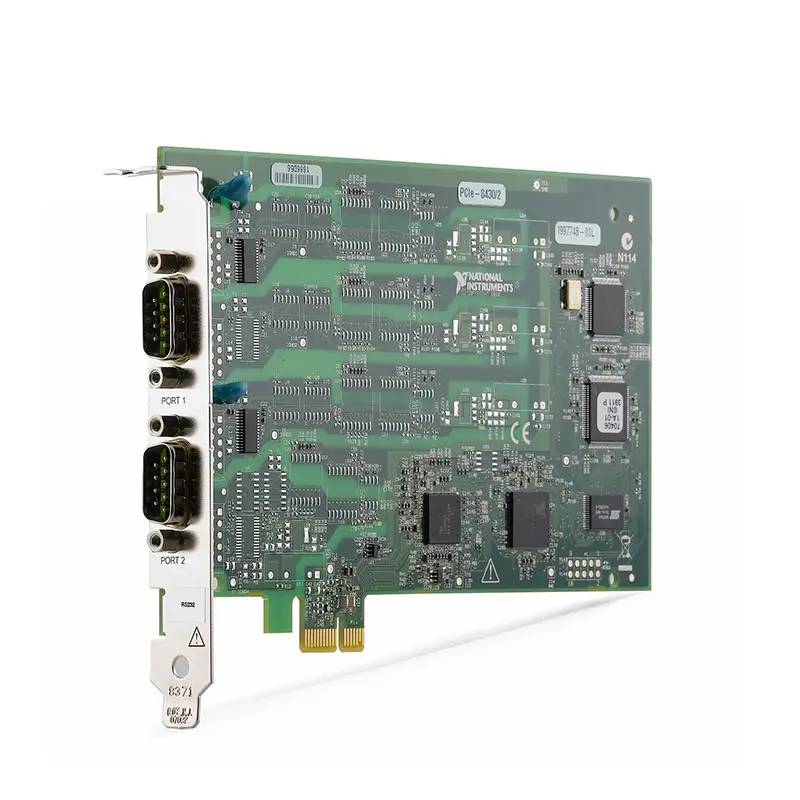
Земля NI PCIe-8430/2 является 2-port PCI Express RS-232 serial interface device designed for instrument control, industrial communication, automated test, laboratory systems, embedded device communication, and integration of legacy RS-232 equipment.
Installed in a compatible PCI Express slot, the PCIe-8430/2 adds two independent RS-232 serial ports to a desktop, workstation, rackmount, or industrial computer.
The device is particularly useful in test and measurement systems that need reliable communication with instruments, controllers, sensors, barcode readers, programmable equipment, and other devices using conventional RS-232 serial interfaces.
Product Overview
Земля National Instruments PCIe-8430/2 is designed for applications requiring multiple hardware serial interfaces directly integrated into a PCI Express host computer.
A typical communication architecture is:
Host Computer → PCI Express → PCIe-8430/2 → RS-232 → Instrument / Controller / DUT
With two serial ports, one computer can communicate with multiple RS-232 devices within the same automated test or industrial control system.
Key Features
Two RS-232 Serial Ports
The PCIe-8430/2 provides two RS-232 serial communication ports.
The two-port configuration is suitable for systems requiring simultaneous communication with multiple serial devices without installing several separate interface cards.
RS-232 Communication
The PCIe-8430/2 uses the widely adopted RS-232 serial communication standard.
RS-232 remains common in:
- Test and measurement instruments
- Industrial controllers
- Laboratory equipment
- Embedded systems
- Barcode readers
- Motion controllers
- Programmable power equipment
- Legacy automation systems
PCI Express Host Interface
The PCIe-8430/2 installs into a compatible PCI Express expansion slot.
This allows modern computers with PCI Express expansion capability to communicate with equipment that still relies on RS-232.
A typical configuration is:
Industrial PC → PCIe-8430/2 → RS-232 Cable → External Equipment
Independent Serial Communication
Each serial port can communicate with an independent RS-232 device.
Например:
Port 1 → Instrument A
Port 2 → Instrument B
This architecture is useful for automated test systems where several instruments or DUT interfaces must be controlled from one host computer.
Hardware-Based Serial Interface
The PCIe-8430/2 provides dedicated serial communication hardware rather than relying on a simple external USB-to-serial conversion architecture.
An internal PCI Express interface can be advantageous in fixed industrial, laboratory, and rackmount systems where the serial interfaces are intended to remain permanently installed.
Suitable for Instrument Control
RS-232 has historically been widely used for remote instrument communication.
The PCIe-8430/2 can therefore be integrated with compatible:
- Power supplies
- Electronic loads
- Мультиметры
- Temperature controllers
- Motion controllers
- Environmental chambers
- Laboratory instruments
- Industrial controllers
Legacy Equipment Integration
Many industrial and laboratory devices remain operational for many years and continue to use RS-232 even when the host computer has been upgraded.
The PCIe-8430/2 provides a practical way to retain these devices while migrating the host system to a computer with PCI Express expansion slots.
Technical Specifications
| Параметр | Спецификация |
|---|---|
| Product Type | Serial Interface Device |
| Модель | PCIe-8430/2 |
| Manufacturer | Национальные инструменты |
| Host Interface | PCI Express |
| Serial Protocol | РС-232 |
| Number of Serial Ports | 2 |
| Communication Type | Asynchronous Serial Communication |
| Independent Port Operation | Supported |
| Primary Function | RS-232 Serial Communication and Instrument Control |
| Типичные применения | Automated Test, Instrument Control, Industrial Communication and Legacy Serial Equipment Integration |
How Does the PCIe-8430/2 Work?
The PCIe-8430/2 acts as an interface between application software running on the host computer and external RS-232 devices.
For transmitted data:
Application → Serial Driver → PCIe-8430/2 → RS-232 → External Device
For received data:
External Device → RS-232 → PCIe-8430/2 → Serial Driver → Application
This bidirectional communication allows software to send commands, configure devices, request measurements, receive responses, and automate serial equipment.
What Is RS-232?
РС-232 is a serial communication standard widely used for point-to-point communication between computers, instruments, controllers, and embedded devices.
A typical RS-232 communication link is:
Computer ↔ RS-232 Interface ↔ External Device
Although newer interfaces such as USB and Ethernet are widely used today, RS-232 remains common in industrial and laboratory equipment because of its simplicity and large installed base.
Two-Port Serial Architecture
The PCIe-8430/2 provides two independent serial interfaces from a single PCI Express card.
A typical automated system might use:
Port 1 → Programmable Power Supply
Port 2 → Environmental Chamber
The host application can communicate with both devices as part of the same automated test sequence.
RS-232 Instrument Control
Instrument control is one of the primary applications for the PCIe-8430/2.
A typical command-response sequence is:
- Open the required serial port.
- Configure baud rate and serial parameters.
- Send a command to the instrument.
- Wait for the instrument response.
- Read returned serial data.
- Parse the measurement or status information.
- Continue the automated test sequence.
- Close the serial session when complete.
Automated Test Applications
The PCIe-8430/2 can integrate RS-232 equipment into automated test systems.
A complete test system may include:
- RS-232 instruments
- DAQ hardware
- Oscilloscopes or digitizers
- Programmable power supplies
- Switch systems
- Цифровой ввод-вывод
- DUT fixtures
The host software can coordinate serial communication with measurement and stimulus hardware to create a complete automated test sequence.
Industrial Communication
Industrial equipment frequently uses RS-232 for configuration, diagnostics, status reporting, or control.
The PCIe-8430/2 can provide communication with compatible:
- Industrial controllers
- Motor controllers
- Barcode scanners
- Measurement devices
- Process equipment
- Embedded controllers
- Machine-control equipment
Laboratory Automation
The PCIe-8430/2 can be used in laboratory automation systems where multiple RS-232 instruments need to be controlled from one computer.
A typical architecture is:
Test Software → PCIe-8430/2 → Laboratory Instruments → Measurement / Control Process
Serial Communication Parameters
Successful RS-232 communication requires the host interface and connected device to use compatible serial settings.
Important parameters include:
- Baud rate
- Data bits
- Parity
- Stop bits
- Flow control
- Termination character
- Read timeout
If these parameters do not match the connected device, communication may fail even when the cable and hardware are functioning correctly.
Baud Rate
The baud rate determines the serial communication speed.
Common RS-232 baud rates include:
- 9,600 baud
- 19,200 baud
- 38,400 baud
- 57,600 baud
- 115,200 baud
The selected baud rate must be supported by both the PCIe-8430/2 configuration and the connected RS-232 device.
Hardware Flow Control
RS-232 systems can use hardware flow-control signals to coordinate data transmission between devices.
Depending on the connected equipment and application, communication may use:
- RTS
- CTS
- DTR
- DSR
The required handshake configuration should be matched to the external equipment.
Software Flow Control
Some serial applications use software flow control rather than hardware handshake lines.
Common software flow-control methods include XON/XOFF.
The selected flow-control method must match the configuration of the connected device.
RS-232 Cable Selection
Correct cable wiring is essential for reliable RS-232 communication.
Before selecting a cable, verify:
- Connector type
- Male or female connector
- Pinout
- Straight-through or null-modem wiring
- Required handshake lines
- Cable length
- Connected device configuration
A cable with physically compatible connectors may still fail if its internal pinout does not match the required RS-232 configuration.
Straight-Through vs Null-Modem Cable
One of the most common RS-232 integration problems is selecting the wrong cable wiring.
| Cable Type | Типичное использование |
|---|---|
| Straight-Through | Used when the connected devices have complementary DTE/DCE interfaces. |
| Null Modem | Crosses required transmit and receive signals when connecting compatible devices with similar interface roles. |
Always verify the external device manual before selecting the cable.
PCIe-8430/2 vs PCIe-8430/4
The PCIe-8430 family includes configurations with different numbers of RS-232 ports.
| Функция | PCIe-8430/2 | PCIe-8430/4 |
|---|---|---|
| Serial Standard | РС-232 | РС-232 |
| Host Interface | PCI Express | PCI Express |
| Serial Ports | 2 | 4 |
| Наилучшее использование | Low to Medium Port Count | Higher Port Count |
The appropriate model should be selected primarily according to the number of independent RS-232 ports required by the system.
PCIe-8430/2 vs PCIe-8430/8
For systems requiring more serial interfaces, higher-port-count versions of the PCIe-8430 family may reduce the number of PCI Express cards required.
When selecting between models, compare:
- Required serial port count
- Available PCI Express slots
- Connector configuration
- Cable requirements
- System expansion requirements
PCIe-8430/2 vs PCIe-8432/2
The PCIe-8430/2 and PCIe-8432/2 are both PCI Express serial interface devices, but they are designed for different serial electrical standards.
| Функция | PCIe-8430/2 | PCIe-8432/2 |
|---|---|---|
| Serial Interface | РС-232 | RS-232 / RS-485 Family Dependent |
| Ports | 2 | 2 |
| Host Interface | PCI Express | PCI Express |
| Primary Selection Factor | Required Serial Electrical Standard | Required Serial Electrical Standard |
Always confirm the exact electrical interface required by the connected equipment rather than selecting a serial board based only on the number of ports.
RS-232 vs RS-485
| Функция | РС-232 | RS-485 |
|---|---|---|
| Typical Architecture | Point-to-Point | Multi-Point Capable |
| Signaling | Single-Ended | Differential |
| Long-Distance Communication | More Limited | Better |
| Noise Immunity | Moderate | Higher |
| Typical Application | Instrument Control | Industrial Networks |
The PCIe-8430/2 should be selected specifically when the external equipment requires RS-232.
PCIe-8430/2 vs USB-to-RS-232 Adapter
| Функция | PCIe-8430/2 | Typical USB Serial Adapter |
|---|---|---|
| Host Connection | Internal PCI Express | External USB |
| Serial Ports | 2 | Model Dependent |
| Permanent Installation | Well Suited | External Connection |
| Industrial / Rackmount Integration | Strong | Device Dependent |
| Portable Use | Ограниченный | Better |
USB adapters can be convenient for temporary connections, while PCI Express serial cards are often preferred for permanently integrated automated test and industrial systems.
Instrument Control Software
The PCIe-8430/2 can be accessed through compatible NI serial communication software and standard serial programming interfaces.
Applications can be developed to:
- Open serial ports
- Configure communication parameters
- Transmit ASCII commands
- Transmit binary data
- Receive instrument responses
- Implement communication timeouts
- Log serial data
- Automate instrument sequences
NI-VISA Integration
In many instrument-control applications, the PCIe-8430/2 can be used with NI-VISA to communicate with serial instruments.
A typical VISA communication sequence is:
VISA Open → Configure Serial Port → VISA Write → VISA Read → VISA Close
This architecture can simplify integration with LabVIEW and other compatible development environments.
LabVIEW Integration
The PCIe-8430/2 can be integrated into compatible ЛабВью applications for automated serial communication.
Typical LabVIEW applications include:
- Instrument control
- Automated test sequencing
- Serial data logging
- Device configuration
- Production test
- Laboratory automation
- Industrial equipment monitoring
Legacy System Replacement
The PCIe-8430/2 can be useful when upgrading older computer-based test systems while retaining existing RS-232 equipment.
Before replacing an existing serial interface, verify:
- RS-232 electrical interface
- Required number of ports
- Connector type
- Connector gender
- Pinout
- Straight-through or null-modem cable requirement
- Baud rate
- Flow-control requirements
- Available PCI Express slot
- Operating system compatibility
- Driver compatibility
- NI-VISA compatibility
- Existing application software
Troubleshooting Serial Communication
If an external RS-232 device does not communicate correctly with the PCIe-8430/2, check the complete communication path.
- Verify that the PCIe-8430/2 is detected by the host computer.
- Verify that the correct serial port is selected.
- Check the RS-232 cable and connector.
- Verify straight-through or null-modem wiring.
- Confirm baud rate.
- Confirm data bits.
- Confirm parity.
- Confirm stop bits.
- Verify hardware or software flow control.
- Check the termination character and communication protocol.
- Verify that the external device is powered and configured correctly.
How to Choose a Serial Interface Device
Before selecting the PCIe-8430/2, determine:
- Required serial standard
- Required number of ports
- RS-232 baud rate
- Connector requirements
- Cable pinout
- Flow-control requirements
- Communication distance
- Available PCI Express slot
- Operating system compatibility
- Software and driver requirements
- Future port expansion requirements
Industries
- Automated Test
- Промышленная автоматизация
- Electronic Manufacturing
- Laboratory Automation
- Research and Development
- Production Test
- Equipment Manufacturing
- Embedded Systems
- Industrial Measurement
- Системная интеграция
Applications
Instrument Control
The PCIe-8430/2 allows a host computer to send commands and receive measurement or status information from compatible RS-232 instruments.
Automated Test
Two independent serial ports can control multiple pieces of RS-232 equipment as part of an automated DUT test sequence.
Industrial Communication
The PCIe-8430/2 can communicate with compatible industrial controllers, sensors, scanners, and machine-control equipment using RS-232.
Laboratory Automation
Laboratory instruments with serial interfaces can be integrated into automated measurement and experimental systems.
Production Test
Production test stations can use the PCIe-8430/2 to communicate with serial DUTs, fixtures, controllers, and supporting test equipment.
Legacy Equipment Integration
The PCI Express interface allows computers with modern expansion slots to retain communication with existing RS-232 equipment.
Recommended Related Products
| PCIe-8430/2 | 2-port PCI Express RS-232 serial interface for instrument control and automated test. |
| PCIe-8430/4 | Higher-port-count PCI Express RS-232 interface for systems requiring additional serial connections. |
| PCIe-8430/8 | Multiport PCI Express RS-232 interface for larger serial communication systems. |
| PCIe-8430/16 | High-density PCI Express serial interface for applications requiring many RS-232 ports. |
| PCIe-8432/2 | Related two-port serial interface for applications requiring a different serial electrical standard. |
Why Choose PCIe-8430/2?
- Two RS-232 serial ports
- PCI Express host interface
- Independent serial communication
- Suitable for instrument control
- Suitable for automated test
- Suitable for industrial communication
- Suitable for laboratory automation
- Suitable for production test
- NI-VISA integration
- LabVIEW compatibility
- Useful for legacy RS-232 equipment
- Permanent internal computer installation
Frequently Asked Questions
What is the NI PCIe-8430/2?
The NI PCIe-8430/2 is a two-port PCI Express serial interface device designed to add RS-232 communication capability to compatible computers.
How many serial ports does PCIe-8430/2 have?
The PCIe-8430/2 provides two independent serial ports.
What serial standard does PCIe-8430/2 support?
The PCIe-8430/2 is designed for RS-232 serial communication.
Is PCIe-8430/2 a PCI or PCI Express card?
The PCIe-8430/2 uses a PCI Express host interface. It should not be confused with older conventional PCI serial interface cards.
Can PCIe-8430/2 control test instruments?
Yes. Instrument control is one of the primary applications for RS-232 interfaces. The connected instrument must provide a compatible RS-232 interface and communication protocol.
Can PCIe-8430/2 communicate with two devices simultaneously?
Yes. The two serial ports can be configured independently and used to communicate with two compatible RS-232 devices.
Can PCIe-8430/2 be used with LabVIEW?
Yes. The PCIe-8430/2 can be integrated into compatible LabVIEW applications for serial instrument control, automated testing, data logging, and equipment communication.
Can PCIe-8430/2 be used with NI-VISA?
Yes. NI-VISA can be used in compatible software environments to configure and communicate with serial instruments through the PCIe-8430/2.
Does PCIe-8430/2 support RS-485?
The PCIe-8430/2 is intended for RS-232 communication. If the external equipment requires RS-485 or RS-422, select an interface specifically designed for that electrical standard.
What is the difference between PCIe-8430/2 and PCIe-8430/4?
Both belong to the same RS-232 serial interface family. The primary difference is port count: the PCIe-8430/2 provides two serial ports, while the PCIe-8430/4 provides four.
Can PCIe-8430/2 replace a USB-to-RS-232 adapter?
Potentially. The PCIe-8430/2 provides an internal PCI Express serial interface and can be more appropriate for permanently installed automated test or industrial systems. Connector, software, and communication compatibility should be verified before replacement.
Why does my PCIe-8430/2 communicate with some devices but not others?
Check the baud rate, data bits, parity, stop bits, flow control, connector pinout, straight-through or null-modem cable configuration, termination character, and the command protocol required by the external device.
What cable should I use with PCIe-8430/2?
The required cable depends on the external device connector and pinout. Verify connector gender, DTE/DCE configuration, straight-through or null-modem wiring, handshake signals, and cable length before selecting the cable.
Is PCIe-8430/2 suitable for legacy equipment?
Yes. It is particularly useful when a newer PCI Express computer must communicate with existing instruments or industrial devices that continue to use RS-232.
What should I check before purchasing PCIe-8430/2?
Verify that the external equipment uses RS-232, determine the required number of ports, check connector and cable pinout, baud rate and flow-control requirements, confirm an available PCI Express slot, and verify operating system, driver, NI-VISA, LabVIEW, and existing application compatibility.
Заключение
Земля NI PCIe-8430/2 2-Port RS-232 Serial Interface Device provides two independent RS-232 ports through a PCI Express host interface. It is well suited for instrument control, automated test, industrial communication, production test, laboratory automation, embedded device communication, and integration of legacy serial equipment into modern computer-based systems.















